Choose the right Power BI licensing approach for users and guests
Discover practical strategies for reducing Power BI licensing costs. Align user roles, Fabric capacity, and guest access to avoid paying for unused licenses.
- Match Free, Pro, PPU and Fabric capacity to what people actually do, from creating reports to consuming them.
- Compare internal sharing, guest access and embedding to find a suitable way to serve each audience.
- Use a phased review of licences, capacity and usage to spot waste and keep spending aligned with demand.
- Before downgrading or removing access, assess the reports, workloads and sharing needs that could be affected.
- When licensing decisions connect to wider data-platform changes, Fabric migration and modernization can help align the environment with future needs.
The cheapest Power BI setup isn’t necessarily the one with the fewest licences. For organisations in Luxembourg, reducing Power BI licensing costs starts with matching each person’s licence to how they create, publish or view reports, then reclaiming assignments that aren’t being used. A review of Power BI activity over the previous 90 days can help identify inactive accounts.
It’s easy to assume that every employee who needs a report needs the same licence. In practice, the right approach depends on user roles, external access, sharing requirements and the capacity your workloads need. Microsoft 365 E5 holders already have Power BI Pro included, while larger audiences may make capacity-based options worth comparing.
This guide explains how to assess the options for reducing Power BI licensing costs, including guest access, embedding, volume discounts and ongoing governance. You’ll learn which options suit different user groups, what to review before changing assignments and how to meet reporting needs without paying for access people don’t use.
Why Does Power BI Licensing Cost Optimization Matter in 2026?
In 2026, the right Power BI licence depends on who creates reports, who consumes them and what capacity workloads require. Compare per-user access with shared capacity before assigning licences across your Luxembourg organisation.
Free, Pro, PPU, and Fabric Capacity Licenses
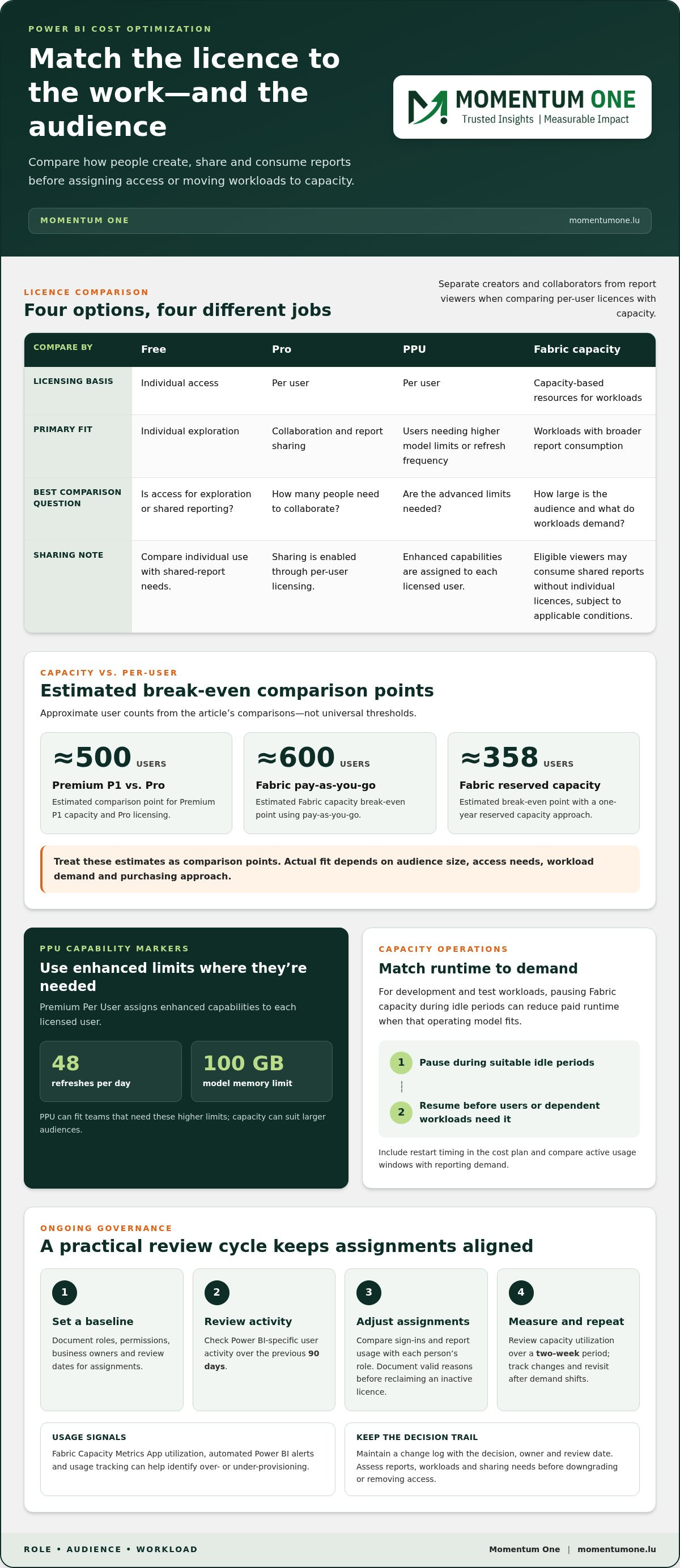
Power BI Free supports individual exploration, while Pro enables collaboration and sharing through per-user licensing. Premium Per User (PPU) offers higher model limits and refresh frequency for users who need those capabilities. Fabric capacity allocates resources to workloads rather than charging for every viewer. Because the options differ in sharing, capacity and access, match each licence to the user’s role.
Capacity Versus Per-User Break-Even Analysis
Compare total per-user licence needs with the monthly cost of dedicated capacity. The research estimates a break-even point of approximately 500 users for Premium P1 versus Pro licensing, using the stated comparison. Fabric capacity estimates differ by purchasing approach: pay-as-you-go breaks even at approximately 600 users, while one-year reserved capacity reaches approximately 358. Treat these as comparison points, not universal thresholds.
F-SKU Pricing and Free Viewer Eligibility
Fabric F-SKU pricing is capacity-based, so monthly spend depends on the selected SKU and your requirements. Capacity licensing can allow viewers to consume shared reports without individual per-user licences when the applicable eligibility conditions are met. Count creators and viewers separately before comparing options.
Premium Per User Versus Premium Capacity
PPU assigns enhanced capabilities to each licensed user, including up to 48 refreshes per day and a 100 GB model memory limit. Premium capacity instead dedicates resources to sharing and performance without per-user licences for viewers. PPU fits teams that need its higher limits; capacity can suit larger audiences. Compare workload requirements, audience size and access needs, not licence labels alone.
| Option | Licensing basis | Best comparison criterion |
|---|---|---|
| Free | Individual access | Exploration versus shared reporting |
| Pro | Per user | Number of collaborators |
| PPU | Per user | Advanced limits and refresh needs |
| Fabric capacity | Capacity-based | Audience size and workload demand |
For development and test workloads, pause Fabric capacity during idle periods if that operating model suits your needs. This can reduce paid runtime, but capacity must be resumed before dependent workloads or users need it. Compare active usage windows with reporting demand, and include restart timing in your cost plan.
Assign per-user licences to defined creator and collaborator groups, then compare capacity options if broad report consumption drives the licence count.
Phased cost optimization and ongoing governance
Licence savings last when organizations review usage, capacity and access together through a governance process. A phased approach helps preserve report sharing while controlling recurring assignments and Microsoft Fabric consumption.
License Administration and Governance
License administration sets clear rules for assigning, approving and reviewing Power BI access. Document user roles, such as report creators, publishers and viewer groups, then map each role to the permissions it needs. A new employee who only views shared reports, for instance, may not need the same assignment as someone who publishes content. Record the business owner and review date for each assignment.
Cost Monitoring and Governance
Cost monitoring links licence assignments to actual usage and capacity demand. Use the Fabric Capacity Metrics App to observe utilization over a two-week period and assess whether capacity is over- or under-provisioned. Pair this with automated Power BI alerts and usage tracking to spot changes in activity. Larger organizations can review trends by department, workspace and workload before adjusting capacity.
Maintenance, Governance, and Training Costs
Licensing is only one part of operating Power BI. Maintenance includes reviewing workspaces, permissions, refresh needs and report ownership; governance defines how sharing and publishing should work. Training helps users follow those standards and use existing reports effectively. For example, show report authors how to publish approved content, then teach viewer groups how to find and use it instead of creating duplicate reports.
Identifying Unused or Overlicensed Pro Accounts
Review Power BI-specific user activity over the previous 90 days when auditing assignments. Compare sign-in and report usage with each person’s role, then flag accounts with no activity or access that exceeds their work needs. An inactive user may still have a valid business requirement, so document the reason before reclaiming a licence. Usage analysis also reveals features or access some employees may not need.
Use a phased cycle: establish a baseline, review activity, adjust assignments, then measure the effect. Keep a change log noting the decision, owner and review date. This helps explain why a viewer retains access or an assignment changes, while preventing one-time savings from becoming unmanaged drift. Repeat the review after significant changes to teams, reporting needs or capacity use.
For teams that need support aligning permissions, usage reviews and capacity oversight, a Power BI governance discussion can help define practical next steps.
Ways to reduce Power BI licensing costs
Effective savings come from changing assignments and workloads, not simply choosing the lowest licence. Start with a role-based inventory, then test each adjustment against reporting access, refresh requirements and capacity demand. Deliberate optimization is estimated to reduce spending by 25-45% without losing meaningful capability.
Separate creators from consumers before reviewing licences. Creators and publishers are roughly 10-20% of Power BI users, while standard viewers are usually 70-80%. Identify who builds or publishes reports, who only views them, and which reports need external sharing. This role map shows where per-user licences may be concentrated unnecessarily.
Review subscription terms alongside licence assignments. Annual Power BI subscriptions are estimated to offer a 10-15% discount compared with monthly pricing. However, Enterprise Agreement volume discount tiers were eliminated on November 1, 2025, so don’t assume larger seat counts automatically unlock those former tiers. Compare available purchasing terms against actual user demand.
- Check whether Microsoft 365 E5 holders already have Power BI Pro included, avoiding a separate Pro assignment for the same user.
- Review Pro and Premium Per User assignments against each person’s publishing, sharing and model requirements.
- Group report consumers around shared capacity when audience size and workload demand make that comparison worthwhile.
- Use a documented approval and review process before adding licences for new teams or projects.
Reduce capacity pressure by improving how data is prepared and refreshed. For transformation-heavy workloads, dataflows are estimated to reduce capacity compute by 30-50%. For large datasets with millions of rows, incremental refresh is estimated to reduce refresh CPU consumption by 80-95%. These changes target resource use directly, rather than removing access people still need.
Restructure duplicate reports and datasets so teams can reuse governed models instead of maintaining separate copies. Efficient data models can consume fewer premium resources, and fewer redundant refreshes can reduce avoidable workload. For example, consolidate department reports around a shared semantic model, then align refresh schedules with actual business needs.
Measure each change before applying it broadly. Compare licence assignments, capacity usage and report activity before and after a pilot, then keep adjustments that preserve required access. This creates a repeatable way to reduce Power BI licensing costs: remove duplication, right-size assignments and optimize the workloads behind them.
How can an organization identify unused or overlicensed Power BI Pro accounts?
Start with a Power BI-specific activity review covering the previous 90 days. Compare assigned Pro accounts with report views, publishing activity and workspace contributions. The aim is to find assignments that no longer match a person’s work, not to remove access based on a single quiet period. Typical enterprise deployments are estimated to have 15-30% of Pro licences unused or underutilized, making a structured review worthwhile.
Build an inventory that connects each account to its role and reporting needs. For each user, record the licence type, department, manager, workspace access and recent Power BI activity. Note whether the person creates or publishes reports, collaborates on shared content, or mainly consumes reports. This helps distinguish potential licence waste from access that supports a recurring business task.
- Export current Power BI Pro assignments and compare them with user activity for the previous 90 days.
- Group accounts by observed role, such as creator, publisher, collaborator or viewer.
- Flag accounts with no recorded activity, plus accounts whose assignments exceed their documented tasks.
- Ask the relevant manager to validate the business need and identify any upcoming reporting work.
- Record the decision, owner and review date before changing an assignment.
Look beyond sign-ins. A user may open reports through shared links or contribute to a workspace without publishing frequently. Review activity across relevant reports and workspaces, then compare it with the account’s assigned permissions. For example, a viewer who never creates content may still need licensed access because of the organization’s sharing setup. Usage alone does not show whether access is unnecessary.
Classify findings into clear actions: retain the assignment, change access, or schedule a follow-up review. A dormant account with no current reporting responsibility may be a candidate for licence removal. A low-activity creator supporting a monthly close or seasonal process may still need Pro. Document the reason for each decision so the next audit can distinguish planned usage from forgotten licences.
Apply changes in a controlled sequence. Notify the account owner, confirm any reports or workspaces they manage, then remove or adjust access only after ownership is addressed. Track the resulting assignment count and monitor report access for disruption. Repeat the same 90-day review on a consistent governance schedule, and compare results across departments to spot recurring patterns.
This process makes licence auditing an evidence-based control. It helps organizations identify inactive or overlicensed accounts while preserving the Power BI access needed for publishing, collaboration and report consumption.
What are the risks and limitations of downgrading or removing Power BI licenses?
A licence change can affect report creation, refreshes and sharing, not just an account’s monthly assignment. Before downgrading a Power BI Pro or Premium Per User (PPU) account, map the person’s responsibilities to the capabilities their reports use. The consequences can differ for a viewer, report creator and workspace publisher.
Removing Pro may disrupt collaboration if a user publishes reports or shares them with colleagues. Power BI Free does not support secure sharing, so switching a Pro user to Free can interrupt that workflow. Check who consumes the reports and how they access them. A report that opens for its creator may no longer reach its intended audience after the change.
Downgrading from PPU to Pro can affect reports that depend on PPU capabilities. Review model size, refresh frequency and workloads that rely on those higher limits. For example, a dataset refreshed repeatedly during the working day may need a different schedule after its owner changes licence. Test the affected report and refresh process before changing assignments across a team.
Capacity-based access has its own conditions. Free viewers can consume content only when the applicable capacity and access arrangement allows it. A capacity change or reassignment may therefore affect more than one user. Map workspaces, reports, external guests and embedded use before changing capacity or its access model.
Use a controlled change process to reduce avoidable disruption:
- Identify the account’s reports, semantic models, workspaces and refresh responsibilities.
- List internal viewers, external guests and any embedded consumption tied to the content.
- Compare the current licence with the proposed licence against required sharing and workload capabilities.
- Test the change with a limited group and confirm report access, publishing and refresh behaviour.
- Record an owner and rollback step before applying the change more widely.
Removing a licence without transferring ownership can leave reports or models without a clear maintainer. Assign another responsible person before changing the original owner’s access. Confirm that scheduled refreshes and workspace permissions still have an accountable owner. This matters especially for reports supporting recurring processes, such as a monthly finance review.
Don’t treat low activity as proof that access is unnecessary. A user may support a periodic task or an upcoming reporting cycle. Use the activity review alongside role and dependency checks, then communicate the change and its expected impact. For a structured review of licence changes and access dependencies, discuss your Power BI licensing approach.
Momentum One: Fabric Migration & Modernization
Momentum One connects licensing decisions with the data platform behind your Power BI reports. Turn to Fabric Migration & Modernization when your environment needs to move to or adapt to Microsoft Fabric, or when capacity and workloads need a broader review.
Data Modeling & DAX Optimization can help refine models that consume more resources than necessary. Data Warehouse & Lakehouse Design supports decisions about structuring data for analytics, while Training Solutions helps teams use reporting tools and shared models effectively. Together, these services can align platform design, report performance and user needs with your licensing approach.
Contact Momentum One to discuss the next step for your Power BI environment.
Build a licensing model that can evolve
Make licensing part of your data-platform decisions rather than an isolated procurement task. As teams, reporting needs and workloads change, keep ownership clear and revisit how access supports the way people work. This gives your organization a practical basis for reducing Power BI licensing costs while maintaining the capabilities its teams rely on.
Momentum One can connect your licensing review to the wider environment. Power BI Consulting & Governance supports clearer access and oversight, while Fabric Migration & Modernization addresses platform changes. Data Modeling & DAX Optimization can help refine the models behind reporting workloads, bringing licence choices and technical design into the same conversation.
Choose a next step that fits your priorities, whether that’s reviewing governance, preparing for Fabric or improving model efficiency. Discuss your Power BI licensing approach with Momentum One and move forward with a clearer plan for your environment.
Frequently Asked Questions
How Should Enterprises Budget for Power BI?
Budget by user role, sharing needs and workload, then compare monthly and annual licensing scenarios. Separate report creators from people who only consume reports, and include any Fabric capacity alongside user licences. Account for existing entitlements, such as Power BI Pro included for Microsoft 365 E5 holders. An annual subscription may offer a 10–15% discount compared with monthly pricing, so include both terms in the forecast.
What Factors Affect Total Power BI Cost?
Total spend depends on licence type, the number of users assigned to each type, and whether workloads use capacity. Report creation, secure sharing, model limits and refresh requirements all influence which option fits. External guests and embedded report access also affect the design. For example, a team serving customers through an application should assess embedded access separately from employee licences, then account for capacity and workload requirements.
What are the Power BI licensing options and what features does each include?
Power BI Free supports individual use but cannot be used for secure sharing. Pro is licensed per user and supports collaboration and sharing. Premium Per User (PPU) provides higher model and refresh limits for users who need them. Fabric capacity assigns resources to workloads, with viewer access depending on capacity eligibility. Microsoft 365 E5 includes Power BI Pro for the E5 licence holder, which can affect assignment decisions.
When do Power BI users need Pro licenses to share or collaborate on reports?
Users generally need Pro to publish, share or collaborate on Power BI content when it isn’t hosted on capacity that allows free viewers. Under that setup, a Pro licence may also be needed to consume shared reports. Before distributing a workspace report, check both the publisher’s licence and the audience’s access route. Content hosted on eligible capacity can change viewer licensing needs, but not the creator’s requirements.
What steps can admins take to reduce Power BI license costs without disrupting users?
Reduce assignments only after mapping account owners to the reports, workspaces and refresh processes they support. Compare usage with role requirements, identify content dependencies, and test proposed changes with a limited group. Keep a rollback plan and tell affected users what access may change. These controls make reducing Power BI licensing costs a managed change, not a blanket licence removal, while preserving access for essential reporting tasks.
How can Power BI licensing costs be estimated for a small or large team?
Count users by licence need, then apply Microsoft’s current euro pricing for the relevant purchasing terms. Add capacity requirements separately, especially where a large viewer audience may qualify for capacity-based access. For a small team, model each creator and collaborator individually. For a larger organisation, compare that per-user scenario with capacity options, including workload demand, external access and existing Microsoft 365 E5 entitlements.
Are there Microsoft 365 plans that include Power BI Pro, and what are their current prices in Luxembourg?
Microsoft 365 E5 includes Power BI Pro at no additional cost to the E5 license holder.