Cloud Data Warehouse Benefits for Security and Scale
Explore the benefits of moving to a cloud data warehouse, including flexible scale, integration, security controls, compliance, backup and recovery planning.
- Cloud data warehousing can combine flexible computing capacity with scalable storage, but performance depends on how workloads and data models are designed.
- Security relies on deliberate controls, including restricted access, encryption, and audit logging; data location also matters when considering GDPR.
- Connecting warehouse data with business systems can support more joined-up analysis, while integration planning helps manage differences in sources and formats.
- Backup and recovery capabilities can strengthen resilience, but they need to be planned alongside access controls and disaster recovery requirements.
- Migration may mean moving an existing warehouse as-is or reworking its data model; the right approach depends on your goals, workloads, and current architecture.
Moving a data warehouse to the cloud doesn’t automatically make it safer or cheaper. The benefits of moving to a cloud data warehouse can include flexible capacity, easier integration across data sources, and built-in options for backup and recovery. Security still depends on how access, encryption, data location and other controls are configured.
If your current system is difficult to scale or relies on disconnected tools and processes, it makes sense to weigh a change carefully. A cloud data warehouse stores and processes data on cloud infrastructure, while an on-premises warehouse runs on equipment managed at your organisation’s premises. The right approach depends on your workloads, data and operational needs.
This article explains how cloud data warehousing works and compares its practical effects on security, compliance, integration, scalability, backup and disaster recovery. It also explains where migration planning and data modelling matter, helping you weigh potential benefits against the responsibilities and trade-offs.
Cloud security, compliance, backup and disaster recovery
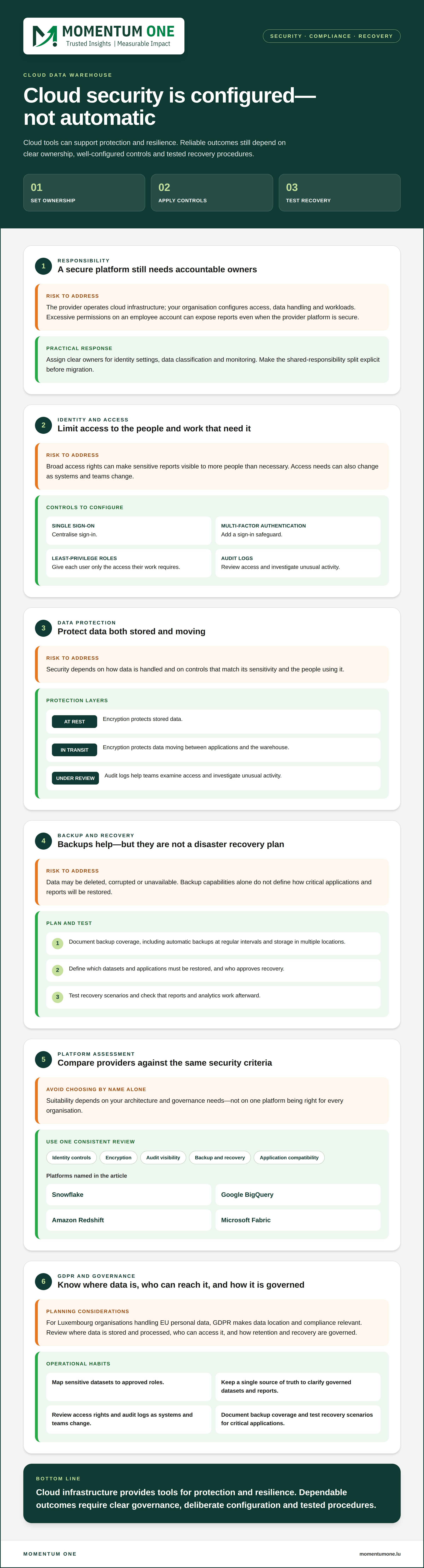
Cloud security follows a shared-responsibility model. The provider operates the cloud infrastructure, while your organisation configures access, data handling and workloads. A secure provider platform, for example, cannot prevent an employee account with excessive permissions from exposing reports. Assigning clear owners for identity settings, data classification and monitoring makes that division of responsibility practical.
Cloud data warehouses can monitor cloud data 24/7, use encryption, and restrict viewing through access rights for authorised people. Apply single sign-on and multi-factor authentication, then assign least-privilege roles so each user receives only the access their work requires. Encryption at rest protects stored data; encryption in transit protects data moving between applications and the warehouse. Audit logs help teams review access and investigate unusual activity.
Backups and recovery help maintain continuity when data is deleted, corrupted or unavailable. Cloud data warehouses can create automatic backups at regular intervals and store data in multiple locations. These capabilities can support faster recovery, but they do not replace a disaster recovery plan. Define which datasets and applications must be restored, who approves recovery and how teams will test that reports and analytics work afterward.
Compare Snowflake, Google BigQuery, Amazon Redshift and Microsoft Fabric against the same security criteria: identity controls, encryption, audit visibility, backup and recovery options, and compatibility with existing applications. Suitability depends on your architecture and governance needs, not on one platform being the right fit for every organisation.
For Luxembourg organisations handling EU personal data, the General Data Protection Regulation (GDPR) makes data location and compliance relevant planning considerations. Review where data is stored and processed, who can access it, and how retention and recovery are governed. A single source of truth for enterprise data can also help clarify which datasets and reports are governed. Security controls need to match the sensitivity of the data and the people using it.
Turn these considerations into an operating plan before migration. Map sensitive datasets to approved roles, document backup coverage and test recovery scenarios for critical applications. Review audit logs and access rights as systems and teams change. Cloud infrastructure provides tools for protection and resilience, but dependable outcomes require clear governance and tested procedures too.
What Is Cloud Data Warehousing?
A cloud data warehouse stores structured data on cloud infrastructure and runs analytical queries against it. Unlike a local server room, its computing resources run on provider-managed servers. Data pipelines load records from operational systems into tables prepared for analysis. Teams can then use SQL queries to combine sales, finance or service data and create reports without querying each source separately.
Performance depends on how the warehouse reads data and allocates query work. A query that scans a large transaction table may take longer than one that narrows its search. For example, a report filtering sales by date can benefit when the table layout helps the engine find relevant records. Table design, queries and data pipelines all affect processing speed.
Partitioning divides a table into segments based on a selected column, such as transaction date. When a query filters on that column, the warehouse can read the relevant partitions instead of scanning the entire table, reducing query reads. Partitioning helps less when reports rarely filter by the chosen field, so designers should match the layout to actual query patterns.
Clustering organises related values in the data, supporting queries that filter on the corresponding columns. For example, clustering a customer table by region can help the warehouse locate records for reports that filter by region. Partitioning and clustering work best when they reflect frequent filters. Applying either without considering query patterns can add complexity without reducing the reads that matter.
Cloud warehouses can process parts of a query in parallel across computing resources. A query aggregating sales across regions, for instance, can divide the work among data segments and then combine the results. This can help demanding analytics finish faster than sequential processing. But parallel execution cannot fix every bottleneck: inefficient joins, repeated transformations or poorly prepared source data can still slow reports.
Performance tuning starts with the workload, not a promise of speed. A migration team can inspect representative queries, identify slow joins and filters, and compare results before and after changes. Benchmarking should reflect realistic data volumes and concurrent applications. This helps pinpoint whether delays come from query logic, table organisation, pipeline refreshes or available computing resources, so improvements can be targeted.
For Luxembourg organisations evaluating a new architecture, the practical advantage is control over how data is structured for analytics, not speed by itself. A clear model connects source fields to business measures, so reports use consistent definitions. If your warehouse design needs to support specific query patterns and reporting needs, discuss your data architecture with a specialist.
Data integration across sources and formats
A cloud data warehouse can bring information from CRM, ERP, marketing, finance and business intelligence tools into a shared analytical environment. One report, Optimizing Business Analytics by Transforming Data in the Cloud, states that companies use data from over 400 distinct sources for analytics and business intelligence. Integration helps connect those sources so teams can analyse related activity together, rather than interpreting each system in isolation.
Each source can structure information differently. A CRM may record customer names and sales stages, while an ERP stores orders and invoices. Marketing platforms may export campaign events as files, while operational applications provide tables or streams. Before combining the data, pipelines map fields, standardise formats such as dates and currencies, and resolve duplicate or inconsistent records. This preparation gives reports a consistent basis for analysis.
Cloud warehouses commonly support extract, load and transform (ELT) workflows. A pipeline extracts data from a source, loads it into the warehouse, then transforms it there for reporting. For example, ERP sales orders and marketing campaign responses can be loaded separately, then matched using shared customer or transaction fields. This approach keeps source data available while creating analysis-ready views.
Integration also depends on how often data needs to refresh. A daily finance report may use scheduled loads, while a sales dashboard might need more frequent updates. The right design balances the value of current data against pipeline complexity, source limits and warehouse workload. Monitoring failed loads and recording each source’s last refresh helps analysts distinguish a genuine business change from a delayed update. Automated data pipelines can make data movement and transformation across connected systems repeatable.
How do cloud data warehouses support data sharing and collaboration? Teams can work from centrally managed datasets and use role-based access to share relevant tables or views with approved users. Finance and marketing, for example, can analyse shared customer measures while maintaining separate reports for their responsibilities. Clear definitions and ownership reduce conflicting interpretations, while access controls support data security.
Integration planning should account for changes in source systems. If an application renames a field or changes a file format, downstream transformations and reports may need updating. A well-managed pipeline records dependencies, surfaces load failures and supports recovery from interrupted processing. Teams can then trace which source feeds a report and identify affected data before decisions rely on incomplete results.
Combining sources creates value when the warehouse preserves meaning, not simply when it collects more data. Matching customer identifiers, documenting business definitions and validating totals between source systems and warehouse outputs all help protect report accuracy. In data-intensive sectors such as healthcare, providers like One Health Connect apply these principles to unify cloud-based radiology and clinical systems. With these foundations, analysts can connect operational activity to business outcomes and draw insights from information previously held in separate applications.
Elastic capacity and workload scalability
Cloud warehouses can scale computing resources up during busy periods and reduce them afterward. This elasticity helps match processing capacity to changing workloads rather than keeping hardware sized for peak demand. A finance team running month-end reports, for example, may need more computing power during closing than during ordinary operations. The warehouse can adjust compute resources without the organisation buying and installing additional servers.
Storage and computing can also scale separately. A company may retain growing volumes of historical data while increasing compute only when analytics demand rises. This provides flexibility: storage capacity can meet retention needs, while processing resources respond to active workloads. It also means that storing more data does not automatically require computing resources to expand at the same rate.
Elasticity is useful when demand changes quickly, but scalability also depends on workload design. A cloud warehouse can accommodate a tenfold increase in data next quarter without a procurement cycle or migration weekend. That capacity does not remove the need to prepare ingestion pipelines, queries and data models for growth. If a new application requires heavier transformations, those workloads still need suitable compute and scheduling.
Refresh frequency can affect demand as much as data volume. Increasing a data pipeline’s refresh frequency from hourly to every five minutes results in twelve times as many runs. Each run consumes processing capacity, so a more current dashboard can create substantially more workload. Align refresh schedules with the decisions reports support instead of refreshing every dataset at the same rate.
Separating workloads can also help manage competing demands. Scheduled reporting and interactive analysis, for example, may need different compute settings or execution windows. Workload-aware rules can direct resources by task, automatically suspend compute when it is idle and use budget alerts to flag spending. These controls help align capacity with actual activity instead of letting unused software resources run without oversight.
Elastic capacity can support business continuity during a disaster or unexpected demand that disrupts normal operations. However, scaling resources alone does not restore data or applications: recovery planning remains a separate requirement. For a growth forecast, migration teams can model expected data volume, pipeline frequency and report concurrency, then test the warehouse against those workloads. This grounds capacity decisions in realistic needs rather than simply selecting the largest available configuration.
The practical advantage is adaptable infrastructure, not unlimited capacity without trade-offs. Data growth, query complexity, refresh schedules and concurrent users all affect the resources a warehouse needs. By separating storage from compute and matching compute to workload patterns, organisations can scale deliberately as analytics requirements evolve.
Cloud versus on-premises data warehousing
Traditional on-premises data warehouses remain an option for organisations. They give organisations direct control over hardware, infrastructure and maintenance, but expanding capacity can involve purchasing equipment, preparing premises and connecting new systems. Cloud platforms shift much of that infrastructure management to a provider. Configuring a cloud warehouse can take hours, compared with weeks for older data warehouses.
The difference is especially clear when demand varies. An on-premises system sized for nightly batch processing may leave disks, CPU and memory idle for 20 hours per day. Cloud services can adjust computing resources to workload needs, while storage and compute can be managed separately. That flexibility can suit organisations whose reporting demand changes, though resource use still needs active monitoring.
Migration also changes operational responsibilities. The cloud provider manages its infrastructure, but your organisation remains responsible for data access, workload configuration and governance. Many organisations rely on managed IT specialists like Telx Computers to assist with infrastructure security, system maintenance, and day-to-day operational support. A move can expose outdated models, undocumented processes or unused data. Before migrating, define objectives, inventory data and processes, and exclude information with no current or future use.
What are the risks and disadvantages of migrating to a cloud data warehouse? Poorly planned migration can disrupt applications and reports, carry forward inefficient data models or create workloads that are difficult to manage. Cloud use also requires clear spending controls and well-defined security responsibilities. The risks depend on your existing architecture, data quality, integration needs and migration approach.
A lift-and-shift approach moves existing data to the cloud unchanged, which can minimise migration time and risk. However, it may not address a warehouse shaped by years of workarounds. Re-engineering the data model in that situation can support new data types and improve performance. A phased migration that starts with high-value use cases lets teams test the new platform before expanding.
After each migration phase, test applications and query tools, then benchmark warehouse performance against representative workloads. This shows whether reports still return expected results and helps uncover issues before wider adoption. A detailed on-premises warehouse migration plan can connect those checks to objectives, dependencies and cutover decisions.
The clearest takeaway is that cloud is not automatically better for every workload. On-premises infrastructure may remain suitable when direct control and established operations fit the organisation’s needs. Cloud platforms can offer faster configuration and adaptable resources, but migration quality depends on data preparation, testing and governance. Discuss your warehouse migration to assess the architecture and transition approach that fit your requirements.
Momentum One: Data Warehouse & Lakehouse Design
Momentum One’s Data Warehouse & Lakehouse Design shapes an architecture around your data, workloads and reporting needs. If you’re planning a move from on-premises infrastructure, Microsoft Fabric Migration & Modernization can support the transition. Data Modeling & DAX Optimization can address model structure and analytical performance as the platform evolves.
The right next step depends on your priorities: designing a new warehouse, planning a migration or creating clearer data models for reliable reporting. Corporate training can also help teams build confidence using their data environment. Momentum One’s services connect architecture decisions with the practical needs of the people who use reports and analytics.
To discuss your data warehouse plans, contact Momentum One.
Turn the Architecture Decision Into a Clear Plan
The benefits of moving to a cloud data warehouse matter most when they support specific business priorities. Before committing to a migration, define what success should look like for your teams, such as more reliable reporting, better access to shared data or a platform that adapts to changing workloads. Those priorities can guide decisions about architecture, sequencing and governance.
It also helps to identify who will own the data environment after the transition. Clear responsibilities for data models, access and reporting keep the platform aligned with how people work. Momentum One’s Power BI Consulting, Governance & Performance can support organisations in shaping governance and reporting practices around their data environment.
A considered plan gives your migration a practical direction without treating cloud adoption as an end in itself. If you’re ready to discuss the right next step for your warehouse, contact Momentum One to discuss your data warehouse. A clear starting point can help you move forward with confidence.
Frequently Asked Questions
What are the main benefits of moving to a cloud data warehouse?
The benefits of moving to a cloud data warehouse include a more adaptable foundation for analytics and changing business needs. A cloud warehouse can help teams bring information together, adjust resources as workloads shift and reduce reliance on equipment managed on premises. Its value depends on your organisation’s priorities. A business preparing to expand reporting across departments, for example, may benefit from designing shared data structures and clear ownership before migration.
How do cloud data warehouses reduce infrastructure and maintenance costs?
Cloud data warehouses can reduce the need to purchase, house and refresh dedicated warehouse hardware. The provider manages the underlying cloud infrastructure, while your organisation focuses on its data environment and workloads. This does not eliminate operating expenses: storage, compute usage, data movement, licensing and ongoing administration can still affect total spend. A useful comparison includes current infrastructure commitments and the resources the cloud workload will consume.
How do cloud data warehouses scale storage and compute on demand?
Cloud platforms can scale storage and processing resources separately, so retaining more data does not automatically require the same increase in compute. For example, an organisation can keep historical records available while assigning more processing capacity to reporting during a busy period. The design should account for workload timing, refresh needs and concurrent users. Monitoring usage helps teams align capacity with activity instead of leaving resources running unnecessarily.
How do cloud data warehouses improve query performance and analytics?
Cloud platforms can provide computing resources to process analytical queries across large datasets, but architecture and query design still matter. Assess performance by identifying slow reports, reviewing their joins and filters, and testing representative workloads. For example, test a dashboard used by several departments with realistic concurrent activity. This helps distinguish a capacity issue from a data model or query problem before teams tune the wrong part.
How do cloud data warehouses improve reliability, backup, and disaster recovery?
Cloud platforms can support reliability through backup and recovery capabilities, but organisations need defined recovery expectations. Establish a recovery point objective, which describes how much recent data the business can afford to lose, and a recovery time objective, which defines how quickly a service should return. Connect those targets to retention settings and business priorities. A recovery exercise can reveal whether critical datasets and dependent reporting services return in the required order.
How do cloud data warehouse costs compare with on-premises data warehouses?
There is no single cost comparison that fits every organisation. On-premises costs can include hardware, facilities, energy and staff time; cloud costs depend on resource consumption, storage, data movement and ongoing platform management. Compare both options across the expected workload lifecycle, including periods of high and low demand. For a fair assessment, include migration work and existing infrastructure commitments, not just visible monthly cloud usage.
How do professionals plan and carry out a cloud data warehouse migration, and what should clients prepare?
Migration typically starts by defining objectives, mapping dependencies and assessing which data and processes should move or be redesigned. Your team can contribute relevant source-system access, data definitions, application dependencies, representative queries and reporting priorities. The migration team then selects an approach, moves data in planned phases and validates results against agreed criteria. Clear business owners for key reports help resolve questions about definitions and acceptance during testing.