How to Build and Validate Automated Fabric Data Pipelines
Build reliable Fabric data pipeline automation with smart data movement, quality checks, Git workflows, and tests that catch issues early, before production.
- Choose copy activities, mirroring, or OneLake shortcuts based on how data needs to move and whether it should be copied or accessed in place.
- Build quality gates that validate incoming files and transformed data, then run tests in a development or stage workspace before production.
- Use modular pipeline activities, suitable schedules or event triggers, and Git integration to make workflows easier to manage and deploy.
- Plan migrations around artifact dependencies and workspace references, and validate promoted pipelines before relying on them in production.
- Use run monitoring, retry policies, logs, and alerts to spot failures, understand their causes, and respond without rerunning more of the workflow than necessary.
A schedule alone won’t make a Fabric pipeline dependable. Effective Fabric data pipeline automation combines the right data movement approach with modular activities, quality checks, and deployment tests before production. Run pipelines on a schedule or in response to an event, then validate the incoming files and the data they produce.
It’s easy to focus on moving data from one place to another. The harder part is ensuring each step runs in the right order, catches problems early, and remains maintainable as your Fabric environment changes.
This guide explains how to build and schedule pipelines, choose between copy activities, mirroring, and OneLake shortcuts, and add validation that checks more than whether a run succeeded. You’ll also learn how to connect workspaces with Git, test changes before deployment, and plan a Fabric migration around reliable pipeline behaviour. The goal is a practical workflow that makes data movement clear and helps surface issues before they reach production.
Choosing between copy jobs, copy activities, mirroring, and OneLake shortcuts
- Choose a data movement pattern based on whether the destination needs its own copy of the data. Use a copy activity when a pipeline must move files or rows as part of a larger workflow. A copy job suits a defined transfer task that runs independently. Mirroring keeps a supported source represented in Fabric, while a OneLake shortcut provides access to data without copying it elsewhere.
For example, use a shortcut when a Lakehouse needs to reference existing OneLake data. Choose copying when a destination table needs a separate, prepared result. Treat mirroring as a replication option, not a replacement for transformation rules.
- Match the item to the work after movement. Dataflows Gen2 use Power Query to connect, clean, and transform data before storing it in OneLake. They can write clean data as Delta tables. Pipelines orchestrate those steps alongside notebooks, warehouses, and Power BI dataset refreshes.
A pipeline can copy delimited text files from a Lakehouse Files folder into a Lakehouse table. For a CSV example, map
datetoDateandtotaltoSalesValue, then write toSalesTable. Specify the source folder and destination table explicitly. - Test parameters and activity properties before deployment. Set a development value for each path, table name, or date range, then run the pipeline with representative inputs. Confirm that the activity uses the intended source, destination, format, and column mapping. Test both valid input and an invalid value, so a failed run shows which setting needs attention.
Keep each activity focused on one operation. Order dependent activities so the next step starts only after its predecessor succeeds. This makes it easier to retry a specific step instead of repeating the entire workflow.
- Set triggers to match when data becomes usable. Fabric pipelines can run manually, on a schedule, or after an event such as a new OneLake file. Activator can start a pipeline after a configured OneLake
FileCreatedevent. Use a schedule for predictable batches and an event trigger when a file arrival should prompt immediate processing.Before copying, add a Validation activity to check the source folder. It can confirm that at least one file is present or verify a minimum byte size. These checks catch empty arrivals before downstream transformations begin.
- Include capacity-unit pricing in design reviews without assuming that one movement method always costs less. Compare measured capacity consumption across realistic run frequency, data volume, and concurrent activity patterns. Record these measurements alongside refresh requirements before choosing a deployment approach. Capacity demand depends on workload behaviour, so a low-frequency file copy and a frequent transformation workflow require different evaluations.
For Luxembourg teams planning pipeline and Dataflow work, the pipeline and dataflow automation service connects movement choices with operational requirements. Document the selected format, trigger, validation rule, and failure path together.
Stage testing and quality gates
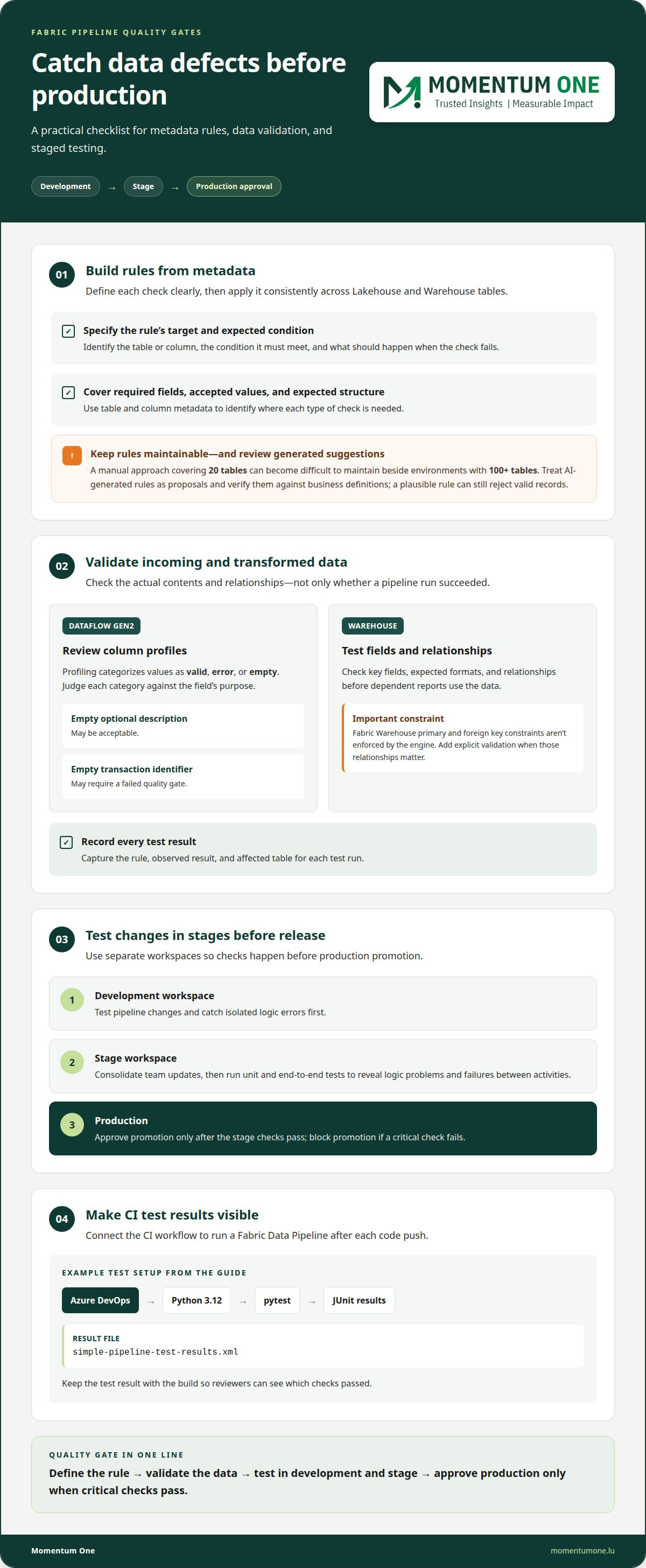
Use separate development, stage, and production workspaces to catch data defects before release. Make each gate test a specific rule, record the result, and block promotion if a critical check fails.
-
Apply Metadata-Driven Quality Checks
Build quality rules from table and column metadata, then apply them consistently across Lakehouse and Warehouse tables. Define each rule’s target, expected condition, and failure response so reviewers can see what it protects. A manual approach covering 20 tables can become difficult to maintain beside environments with 100+ tables.
Use metadata to identify tables that need checks for required fields, accepted values, or expected structure. AI-generated rules can help draft candidates from descriptions and schemas, but treat each suggestion as a proposal. Validate its meaning against business definitions before adding it to a stage workspace: a plausible rule can still reject valid records.
-
Validate Data Quality
Run checks on both incoming data and transformed outputs. In Dataflow Gen2, column profiling categorizes values as valid, error, or empty. Review those categories against the field’s purpose: an empty optional description may be acceptable, while an empty transaction identifier may require a failed quality gate.
For a Warehouse table, test key fields, expected formats, and relationships before dependent reports use the data. Fabric Warehouse primary and foreign key constraints aren’t enforced by the engine, so add explicit validation where those relationships matter. Record the rule, observed result, and affected table for each test run.
- Separate development checks from release approval. Test pipeline changes in a development workspace first, then consolidate team updates in a stage workspace. Run unit and end-to-end tests there before approving production. This sequence can reveal both isolated logic errors and failures that appear only when pipeline activities work together.
Connect the CI workflow to run a Fabric Data Pipeline after each code push. In an Azure DevOps example, Python 3.12 runs tests with pytest and writes JUnit output to
simple-pipeline-test-results.xml. Keep that result with the build so reviewers can see which checks passed. - Make tests fail for meaningful reasons. For example, an assertion expecting a directory named
SampleDatashould fail if the expected name changes toSampleData2. That failure shows the release gate catches a broken assumption instead of merely confirming that a pipeline started.Use visual test results to trace errors back to the table, rule, or activity involved. If quality gates need to align across a Lakehouse and Warehouse, discuss a data quality approach grounded in your model and reporting needs.
Building and scheduling Fabric data pipelines
Build workflows as clear sequences, then connect each run to the right environment. Store schedule definitions with pipeline changes to keep deployments manageable.
-
Build Pipeline Workflows
Arrange each Fabric pipeline around a defined outcome, such as loading data before refreshing a Power BI semantic model. Add Dataflows Gen2 for transformation, notebooks for processing, and warehouse activities where the workflow requires them. Keep activities modular, so a failed step can be retried without rerunning every completed operation.
Set dependencies so each activity starts only after its required predecessor succeeds. For example, load a Lakehouse table before running its quality check, then refresh Power BI only after validation passes. This sequence makes the data quality gate visible and prevents downstream steps from consuming incomplete outputs.
-
Set Monitoring and Logging
Review each pipeline run’s status and activity outcomes in the Fabric workspace. Use the activity sequence to find where a workflow stopped, then compare the failed step’s inputs with its configured source, destination, and transformation. Keep enough operational context to distinguish a source issue from a downstream processing failure.
For example, if a Dataflow Gen2 activity completes but a warehouse load fails, focus investigation on the load rather than repeating successful preparation. Record the run outcome and relevant activity so the next deployment can address the actual failure point.
-
Configure Retries and Alerts
Set retry policies on activities that can recover from temporary failures. Configure the retry count and waiting time to suit the operation, rather than applying identical settings across every workflow. A temporary source interruption may justify another attempt; a persistent schema mismatch needs correction, not repeated retries.
Use Fabric Activator for notifications tied to critical dataset changes. It can send Teams and email notifications when critical datasets are modified. Keep notifications distinct from retry behaviour: retries attempt the activity again, while an alert informs people about a relevant event.
- Choose a schedule that matches when data is ready and reports need updating. Fabric pipelines can run daily, weekly, or hourly. Use a daily schedule for a completed overnight batch, or an hourly schedule when new data and dependent workflows need more frequent processing.
Review each schedule in its target environment before production deployment. A development schedule may help with testing, but production should reflect the business workflow and data readiness. Avoid overlapping runs when a later execution depends on the previous run completing successfully.
- Version pipeline definitions with Git to keep workflow changes reviewable. Fabric workspace Git integration supports Azure DevOps and GitHub. Connected pipeline schedules are added to the repository in a
.schedulesfile within the pipeline definition, so schedule changes can travel with the related item.Make Git changes part of deployment: review the pipeline definition and its schedule together, then promote the tested version. This keeps the workflow and its timing aligned across environments instead of relying on separate manual schedule edits after deployment.
Fabric migration and pipeline validation
Move pipeline artifacts through controlled workspaces, then validate dependencies and references before production. Fabric deployment pipelines provide a promotion path, but each migrated workflow still needs testing.
- Inventory the source factory’s pipeline dependencies before rebuilding or promoting them. Record each pipeline’s linked Dataflows, Lakehouses, Warehouses, notebooks, and downstream reports. This dependency map helps identify which foundational items to deploy first. For example, deploy a Lakehouse before a pipeline that writes to it, then validate the pipeline’s destination and outputs in its target workspace.
Include the expected source, destination, parameters, and data checks in the migration record. These details give development and test teams a consistent basis for validating the migrated feature.
- Use Fabric deployment pipelines to move selected artifacts between workspaces. Their default stages are Development, Test, and Production. Deployment options are full, selective, and backward deployment. Choose full deployment for a coordinated release or selective deployment when only specific artifacts have passed validation.
Backward deployment is allowed only when the target stage is empty and has no workspace assigned. Treat this as a deployment constraint, not a routine rollback method. Plan the promotion direction before assigning workspaces to stages.
- Validate references after promotion, especially when a pipeline invokes a dataflow. A promoted pipeline continues to reference the dataflow in the previous workspace. Test that dependency in the target environment, then update or redeploy items so the pipeline uses the dataflow in the intended workspace.
Run the complete workflow in Test, not just the pipeline’s first activity. Confirm that the pipeline reads the expected source, writes to the intended Lakehouse or Warehouse, and passes downstream checks before production promotion.
- Add pipeline tests to Azure DevOps CI/CD with fabric-cicd, Fabric CLI, or PowerShell. Use tests to compare expected item definitions, parameters, and outputs with the migrated version. A CI workflow can deploy a Fabric Data Pipeline to run tests after a code change, helping catch a broken reference before release.
Keep workspace and repository changes aligned. Fabric Git integration supports Azure DevOps and GitHub, while deployment pipelines can promote specified artifacts between source and target workspaces through the REST API.
- Configure validation around artifact dependencies and business outputs, rather than relying only on a successful deployment status. Confirm that upstream items exist, pipeline activities complete, and destination data has the expected structure. If a Warehouse depends on a Lakehouse transformation, deploy and validate the Lakehouse first.
For organizations modernizing a data platform, Fabric migration works best when artifact order, workspace references, and pipeline tests form one release process. This gives each promotion a clear validation trail from development through production.
Which monitoring, logging, retry, and alerting features are available for Fabric pipelines?
- Review each Fabric pipeline run at the activity level. Check which activities succeeded, failed, or were skipped, then trace dependencies to locate the first unsuccessful step. For example, if a notebook fails after a copy activity succeeds, investigate the notebook inputs before rerunning the completed copy. A run’s overall status alone won’t show which operation needs attention.
Record the run outcome, affected item, and failure context in your operational log. Include details that help distinguish source problems from transformation or destination issues, such as the activity name and relevant input parameters. This gives support teams a consistent starting point when the workflow runs again.
- Configure retry policies on activities that can recover from temporary interruptions. Fabric Pipeline activities support policies that specify retry counts and waiting times. Set these values according to the activity’s behaviour: a temporary connection interruption may clear, while an invalid schema usually requires a corrected input or pipeline change.
Keep retry settings visible in the activity configuration and review them during deployment. Too few attempts can leave a recoverable workflow incomplete; repeated attempts on a persistent error can delay diagnosis. Pair retries with a clear failure path so an exhausted activity doesn’t leave downstream data stale without notice.
- Use alerts to make important events actionable. Fabric Activator can send Teams and email notifications when critical datasets are modified. Choose datasets and recipients based on who needs to respond, then describe the affected item in the notification context. A change alert is useful when a modification itself needs attention, even if a pipeline run hasn’t failed.
For metric-based responses, Data Activator can trigger an action when a quality metric crosses a predefined threshold. Connect the metric to a meaningful response, such as investigating a change in completeness. Tie the threshold to a defined quality rule rather than treating every fluctuation as an incident.
- Route event-driven checks through the right component. Fabric Eventstreams can forward events to a webhook for custom compliance and data quality scans. This pattern separates event capture from the external scan, making both easier to diagnose. For example, an incoming data event can prompt a webhook check before teams act on the resulting quality status.
Use OneLake or Azure Blob Storage events when new data should initiate a workflow. Activator can trigger Fabric items, including pipelines and notebooks, in response to file events. Keep event triggers, pipeline retries, and notifications distinct: each handles a different response to incoming data or execution problems.
- Turn these controls into a recovery sequence: inspect the failed activity, assess its inputs, allow configured retries, then notify the appropriate team if the issue persists. Apply that sequence consistently across development and production workspaces. To review monitoring and recovery design for Fabric workflows, discuss your pipeline operations with a specialist.
Momentum One: Fabric Migration & Modernization
Momentum One helps organizations plan and deliver Fabric Migration & Modernization when existing pipelines need a structured transition or modernization. This work can align pipeline design with workspace deployment, data movement, and validation needs, helping teams build a more maintainable Fabric environment.
For a migration involving new Lakehouse or Warehouse structures, Data Warehouse & Lakehouse Design can shape the underlying data architecture. Data Modeling & DAX Optimization supports the reporting layer, while Training Solutions help teams build confidence working with Fabric pipelines and quality controls.
If your next step is assessing a migration, improving pipeline reliability, or preparing your team to manage the resulting workflows, contact Momentum One to discuss your requirements.
Make Your Pipeline Strategy Ready to Evolve
A durable approach to Fabric data pipeline automation should support more than the next deployment. As data sources, reporting needs, and team responsibilities change, clear ownership and consistent design decisions help keep workflows maintainable. For organizations exploring how to advance their operational automation further, consulting firms like Navo help teams deploy GenAI agents and develop synthetic workforces to streamline complex workflows.
Momentum One can support this longer-term direction through Fabric Migration & Modernization, Power BI Consulting & Governance, and Data Modeling & DAX Optimization. These services connect platform changes with the governance and reporting considerations that shape how teams use their data.
Use your next planning discussion to identify which pipeline or platform decision would make the greatest difference to your organisation’s goals. Contact Momentum One to discuss your Fabric plans and consider a practical next step for your data environment.
Frequently Asked Questions
How do you automate pipeline deployment across Fabric environments using CI/CD?
Use a repository-based workflow to test and promote pipeline definitions. A practical pattern gives each developer or feature branch a dedicated development workspace, then merges reviewed changes into the main branch. A push to main can trigger production deployment. To keep Fabric data pipeline automation maintainable, include deployment tests that check expected artifact definitions and dependencies, not just whether the pipeline starts successfully.
What security, permissions, and data governance rules apply to automated Fabric pipelines?
Limit workspace and repository permissions to the people and processes that need them, and document who owns each pipeline and its data. Fabric Git integration requires workspace admin settings for creating Fabric items and syncing workspace items with Git repositories to be enabled. For GitHub integration, use a fine-grained token with read and write permissions for Contents, or a classic token with repo scopes enabled.
What are common Fabric pipeline automation failures and how can they be troubleshot?
Typical causes include a missing source file, invalid activity configuration, an unavailable dependency, or data that fails a quality rule. Start with the first failed activity, inspect its error details, and compare its inputs with the expected source and parameters. For file-driven workflows, confirm that the configured folder received the intended file. Then correct the likely cause and rerun the smallest affected part of the pipeline.
What best practices reduce pipeline runtime, failures, and unnecessary capacity use?
For efficient Fabric data pipeline automation, remove redundant steps, avoid refreshing downstream items before their inputs are ready, and don’t make independent work wait unnecessarily on unrelated tasks. Measure runs with representative data and review which activities use the most time or capacity. Change one part of the workflow at a time, then compare runtime and output quality before applying the change in production.
How do Fabric pipelines compare with Azure Data Factory and other orchestration tools?
Fabric Pipelines share a foundation and concepts with Azure Data Factory, including activities, triggers, data movement, and monitoring. They can orchestrate Dataflows, notebooks, warehouses, and Power BI dataset refreshes; the material does not provide a comparison with other orchestration tools.