How to Embed Power BI Reports for Your Customers
Learn how to embed Power BI reports for customers securely. Our guide covers Fabric F-SKUs, row-level security, and creating a white-labeled analytics portal.
- Understand how to transition from internal reporting to a "Data as a Product" model that increases client value and engagement.
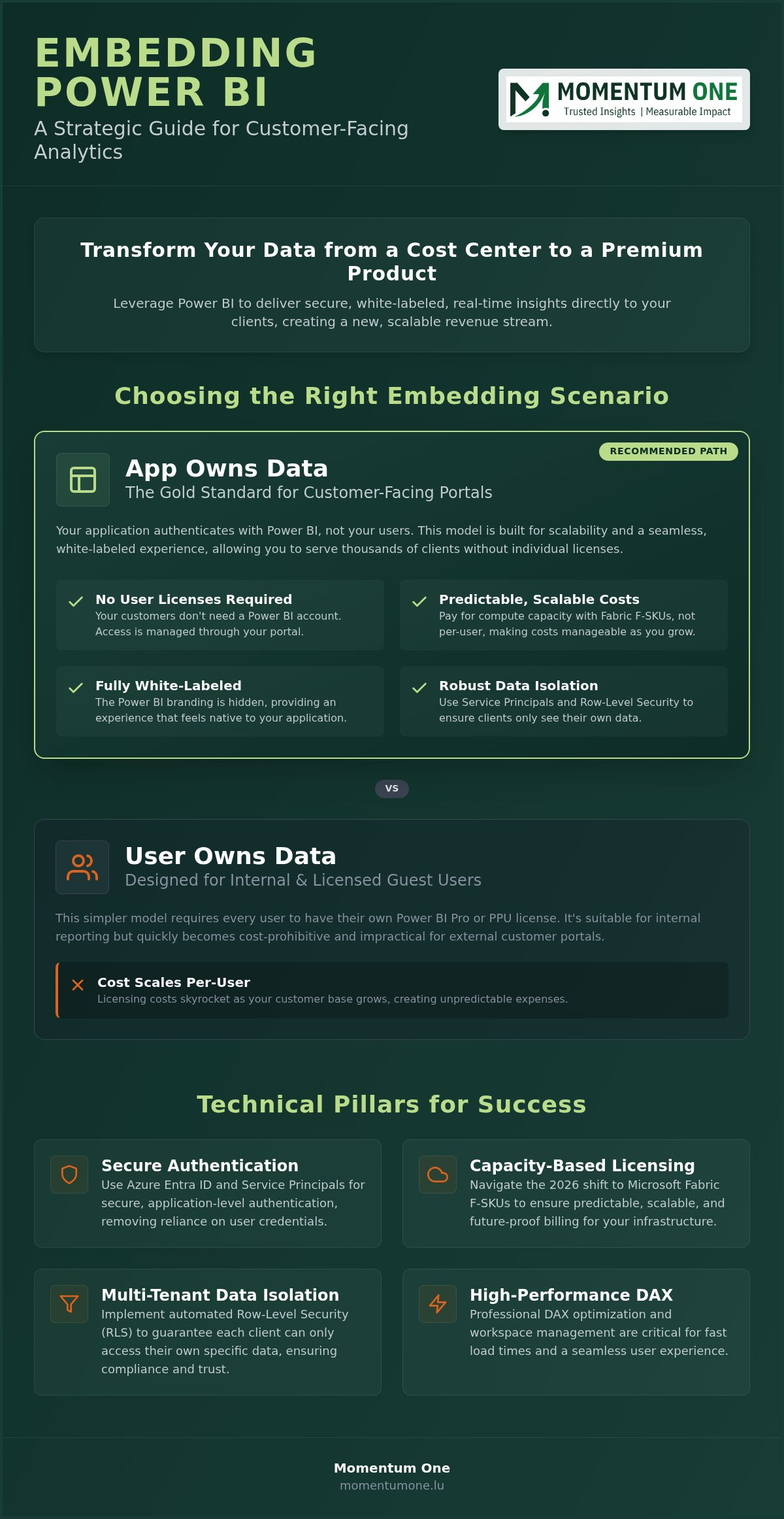
- Learn why the "App Owns Data" scenario is the gold standard when you embed Power BI reports for customers without requiring individual user licenses.
- Navigate the 2026 shift from A-SKUs to Microsoft Fabric F-SKUs to ensure predictable, capacity-based billing for your infrastructure.
- Master the technical setup using Azure Entra ID and Service Principals to maintain robust data isolation and client security.
- Discover how professional DAX optimization and workspace management ensure fast load times and a seamless, white-labeled experience for your users.
What if your data wasn't just a cost center, but the most valuable product you sold to your clients? You already know that providing real-time insights is a competitive necessity, yet the technical complexity of how to embed Power BI reports for customers often feels like a choice between unpredictable Azure costs and security vulnerabilities. It's frustrating to feel stuck between "App Owns Data" and "User Owns Data" scenarios while your clients wait for a seamless, professional experience.
We understand these challenges because we've guided many partners through these exact technical hurdles. In this guide, you'll master the strategic requirements to deliver a white-labeled, secure, and scalable reporting portal. We'll help you move beyond the confusion of licensing and data isolation to create a professional analytics environment that reflects your brand's authority and commitment to excellence.
We'll walk through the latest 2026 pricing structures for Fabric F-SKUs, demonstrate how to automate row-level security for robust multi-tenancy, and provide a clear roadmap for optimizing DAX performance. By the end, you'll have a predictable, high-performance strategy to turn your internal reports into a premium customer-facing service that scales with your growth.
The Strategic Value of Embedding Power BI Reports for External Customers
In 2026, data has transitioned from a backend operational cost to a primary customer-facing asset. Power BI Embedded allows you to provide high-fidelity, interactive analytics directly within your own application or portal. Unlike standard internal reporting, this solution lets you embed Power BI reports for customers without requiring every end-user to hold an individual Power BI Pro or Premium license. You control the experience while Microsoft's robust engine handles the heavy lifting.
Many organizations historically relied on "Publish to Web" or static PDF exports to share insights. These methods are outdated and risky. Public links lack security, and PDFs lack the interactivity that modern clients expect. By choosing a dedicated embedded strategy, you ensure data isolation between clients while offering a branded, seamless experience that looks and feels like part of your own software suite. It's a shift from providing static information to delivering a dynamic service.
- Increased Retention: Clients who rely on your data for daily decisions are less likely to churn.
- Operational Efficiency: Automated dashboards eliminate the endless cycle of manual, ad-hoc report requests.
- Scalable Growth: Capacity-based licensing means your costs don't skyrocket as your user base expands.
Enhancing Customer Experience Through Interactive Data
Embedded Analytics is the integration of BI capabilities within a business application to enhance user workflow. This integration allows your clients to move beyond static snapshots and engage in self-service exploration. When you embed Power BI reports for customers, you aren't just giving them a chart; you're giving them a tool to solve their own business problems in real time. This transparency builds deep trust. Clients can verify performance and trends instantly without waiting for monthly reviews or manual updates.
Monetizing Your Data Assets
Transforming your reporting into a "Data as a Product" model opens new revenue streams. You can implement tiered subscription models where basic analytics are included, while advanced, deep-dive insights are locked behind a premium tier. This approach scales effectively because you pay for capacity rather than user seats. To ensure this transition is both secure and scalable, many firms rely on professional Power BI consulting and governance to set the right foundation. This strategic alignment reduces the burden on your internal data teams. It allows them to focus on innovation while your portal handles client inquiries automatically.
Choosing the Right Embedding Scenario: 'App Owns Data' vs. 'User Owns Data'
Success begins with picking the right architectural path. Microsoft offers two distinct ways to embed Power BI reports for customers, and choosing the wrong one can lead to massive licensing overhead or security gaps. The primary question is simple: does the user have their own Power BI license, or does your application provide the access? This choice dictates everything from your development workflow to your monthly Azure bill.
Scenario A: Embed for Your Customers (App Owns Data)
This scenario is the industry standard for Independent Software Vendors (ISVs) and businesses hosting client portals. In this model, your application "owns" the data. Your customers don't need their own Power BI accounts, licenses, or even an Entra ID identity. Instead, your application authenticates with Power BI using a Service Principal. This acts as a digital identity for the app itself, allowing it to communicate with the Power BI service securely. By using this method, you can embed Power BI reports for customers at scale while paying for dedicated compute capacity through Azure or Fabric. It provides a truly professional experience because the Power BI branding is replaced by your own application's interface.
Scenario B: Embed for Your Organization (User Owns Data)
This path is designed for internal use or specific extranets where your customers are essentially guest users in your own tenant. Every user must have their own Power BI Pro or Premium Per User license to view the content. While this is simpler to set up initially, it's rarely cost-effective for external customer portals. The per-user costs become a barrier to growth. It's best reserved for internal dashboards or small-scale collaboration where everyone already exists within your Microsoft ecosystem and already carries the necessary licensing.
In the "App Owns Data" scenario, your application acts as the ultimate gatekeeper for security. Since users don't log in to Microsoft directly, your backend must programmatically request an "Embed Token" for every individual session. This token defines exactly which reports the user can see and, more importantly, which rows of data they are allowed to access via Row-Level Security. This is why robust workspace and capacity management is essential for long-term success. You aren't just showing a report; you're orchestrating a secure data flow that must remain performant as your user base grows. By acting as the bridge between the data and the user, your application ensures that sensitive information remains isolated and secure.
Navigating Licensing, Capacity, and Luxembourg Compliance
In 2026, the landscape for how you embed Power BI reports for customers is defined by the transition from legacy Azure A-SKUs to Microsoft Fabric F-SKUs. This shift represents a move toward a unified data platform where you pay for compute power rather than individual user seats. For businesses in Luxembourg, this isn't just a technical change; it's a strategic opportunity to align BI costs with actual usage while maintaining the high standards of compliance expected in the national market.
Capacity based billing allows you to scale your environment based on demand. Instead of purchasing hundreds of individual licenses, you buy a dedicated slice of Microsoft's cloud resources. A major advantage of this model is cost flexibility. You can pause your capacity during off-peak hours or weekends if your clients don't require 24/7 access. This granular control ensures your BI infrastructure remains a lean, value-adding asset rather than a runaway operational expense.
Fabric Capacity Planning for Embedded Analytics
Choosing the right entry point is critical for maintaining a professional user experience. An F2 capacity might suffice for small scale pilots, but as your concurrent user load grows, moving toward F64 or higher becomes necessary to ensure seamless performance. Effective workspace and capacity management ensures that your reports load instantly even during peak usage. By monitoring your Capacity Metrics, you can proactively scale up before users notice any lag, ensuring a premium experience for every client.
GDPR and Data Sovereignty in the National Context
For organizations in Luxembourg, particularly in the financial and legal sectors, data residency is a non-negotiable requirement. When you embed Power BI reports for customers, you must ensure that the underlying data remains within compliant regions. This is where Power BI consulting and governance becomes a foundational element of your architecture. We focus on ensuring that multi-tenant environments are logically separated, preventing any risk of data leakage between different entities. This approach satisfies both GDPR requirements and the strict oversight of national regulators, positioning your brand as a steady, reliable partner in a highly regulated field.
Step-by-Step: Implementing Secure Embedded Analytics in Your Portal
Moving from strategy to execution requires a structured approach to ensure your portal remains both secure and performant. When you embed Power BI reports for customers, the implementation follows a logical progression from infrastructure setup to front-end integration. Following these steps helps you avoid common pitfalls like authentication failures or data leaks while building a foundation that scales with your user base.
Step 1: Set up your environment. Ensure your Azure subscription and Power BI tenant are active. You'll need to provision a Fabric capacity to host your embedded content, which provides the necessary compute power for external rendering.
Step 2: Register an application in Microsoft Entra ID. Create a Service Principal and generate a client secret. This identity allows your application to interact with the Power BI REST APIs securely. It acts as the "master" identity that your backend uses to request data on behalf of your customers.
Step 3: Organize your content. Create dedicated workspaces for your reports and assign them to your Fabric capacity. This is a critical step in workspace and capacity management that enables embedding features for users who don't have their own licenses.
Step 4: Implement Row-Level Security (RLS). Define roles within Power BI Desktop to restrict data access. This ensures that Client A never sees Client B's records, even if they're looking at the same report template.
Step 5: Integrate the SDK. Use the Power BI Client SDK to embed the report into your web application. Your backend will generate an embed token, and the SDK will render the report within your portal's UI, providing a smooth, interactive experience.
Mastering Row-Level Security (RLS) for Multi-Tenancy
Dynamic RLS ensures that a single report template can securely serve thousands of unique customers by filtering data at the query level based on the user identity passed from the parent application. By using functions like USERNAME() or CUSTOMDATA(), you can pass the client’s unique ID from your application directly into the DAX query. This approach eliminates the need to maintain hundreds of separate report files. It makes your solution infinitely more scalable and easier to update as your reporting requirements evolve.
White-Labeling and Custom Branding
To provide a truly native experience, you should customize the look and feel of the embedded iframe. You can remove the Power BI logo and customize the loading screen to match your brand's colors. Using custom themes and CSS allows the analytics to blend seamlessly with your application's design language. This attention to detail transforms the reporting from a third-party add-on into a core feature of your product. It ensures that the transition between your app's navigation and the BI content feels natural for the end user.
If you need assistance setting up these technical foundations, our team provides expert Power BI consulting and governance to ensure your implementation is secure and performant from day one.
Scaling Your Customer Analytics with Momentum One
Moving from a successful proof of concept to a production-ready, enterprise-grade portal is a significant leap. While the technical steps to embed Power BI reports for customers are well-documented, orchestrating a solution that stays performant under heavy concurrent load requires a strategic partner. Momentum One acts as your steady hand during this transition. We ensure your architecture isn't just functional today, but remains scalable as your client base expands throughout 2026 and beyond.
A professional portal requires more than just a connection to a dataset. It demands proactive monitoring and a commitment to governance. Our managed Power BI services provide the oversight necessary to maintain security and compliance within the Luxembourg market. We don't just set up the technology; we provide the long-term support needed to monitor capacity usage and prevent cost overruns, allowing your team to focus on core business growth rather than infrastructure maintenance.
DAX Optimization for External Performance
Performance is the most critical element of the user experience. External users typically follow the "3-second rule": if a report takes longer than three seconds to render, their perception of your product's quality drops instantly. This is why we prioritize efficiency in every data model. Our DAX optimization experts specialize in refining complex calculations to reduce the strain on your Fabric capacity. By optimizing these queries, we help you serve more customers on lower-tier F-SKUs, directly improving your bottom line. We use advanced techniques to handle large enterprise datasets, ensuring that even the most data-intensive reports remain snappy and responsive.
Your Partner in Data Modernization
The transition to a modern, Fabric-powered stack is a journey that requires both technical skill and strategic foresight. We guide you through the entire process, from initial roadmap design to a full-scale Fabric migration and modernization. Our approach is collaborative. We offer tailored workshops to align your technical team with BI best practices, ensuring your internal staff feels confident managing the new environment. We believe in a supportive partnership that builds your internal capability while we handle the complex architectural heavy lifting.
Ready to transform your customer portal into a premium analytics product? Contact Momentum One for an architectural review today. Our experts will evaluate your current setup and provide a clear, actionable path to embed Power BI reports for customers with the security and speed your clients expect.
Transforming Data into a Strategic Client Asset
Successful embedding isn't just a technical integration; it's a commitment to providing secure, high-performance insights that drive client loyalty. You've seen how the "App Owns Data" model offers the best balance of cost and security, especially when paired with the right Fabric capacity and robust row-level security. It's the most effective way to embed Power BI reports for customers while maintaining full control over the user experience and your brand's reputation.
As a certified Microsoft Solutions Partner, Momentum One brings years of expertise in high-value technical migrations. We specialize in multi-tenant data isolation and expert DAX performance tuning to ensure your portal remains lightning-fast for every user. Our team acts as a steady hand, guiding you through complex capacity planning and Luxembourg-specific compliance throughout 2026. We're dedicated to your success and ready to help you turn raw data into a premium product.
Scale your customer analytics with Momentum One's expert Power BI consulting. Let's build a reporting environment that grows with your ambition and delivers measurable value to your clients every single day.
Frequently Asked Questions
Do my customers need a Power BI license to view embedded reports?
No, your customers don't need their own Power BI licenses when you use the "App Owns Data" scenario. In this model, your application handles authentication through a Service Principal, and you pay for dedicated capacity rather than individual user seats. This allows you to embed Power BI reports for customers at scale without the administrative burden or cost of managing hundreds of individual Microsoft accounts for your external users.
What is the difference between Azure Power BI Embedded and Power BI Premium?
Azure Power BI Embedded (A-SKUs) is a developer-focused service billed hourly through Azure, which is ideal for software vendors. Power BI Premium (P-SKUs) is billed monthly through Microsoft 365 and includes additional features like the Power BI service portal. By 2026, both are largely superseded by Microsoft Fabric F-SKUs. These provide a unified way to manage compute power for both internal and external reporting while maintaining predictable costs.
How do I ensure one customer cannot see another customer's data?
You ensure data isolation by implementing Row-Level Security (RLS) and using "Effective Identities" in your embed tokens. When your application requests a token from Power BI, it passes a specific user ID or tenant ID. The report then filters the data at the query level so the user only sees their own records. This architecture prevents data leakage and is essential for meeting strict Luxembourg data residency and privacy requirements.
Can I white-label the Power BI reports to look like my own brand?
Yes, you can fully white-label the experience to match your brand's design language. The Power BI Client SDK allows you to hide the default action bar, remove the Power BI logo, and customize loading screens. By applying custom JSON themes to your reports, you ensure that colors, fonts, and chart styles align perfectly with your parent application. This creates a native, seamless feel for your customers during their data exploration.
What are the costs associated with embedding Power BI for customers?
Costs primarily consist of Microsoft Fabric capacity fees, which are based on the compute power (F-SKUs) you provision. You also need at least one Power BI Pro license for the developer account. Unlike per-user licensing, capacity billing allows for predictable monthly spending. You can optimize these costs by pausing your capacity during periods of inactivity or scaling your SKUs based on actual concurrent user demand throughout the month.
Is it possible to embed Power BI reports in a non-Microsoft application?
Yes, you can embed Power BI reports for customers into any web application, regardless of the technology stack. Whether your portal is built on React, Angular, or a custom framework, the Power BI JavaScript SDK provides the necessary hooks to render reports in a secure iframe. The authentication happens on your backend, making it a versatile choice for any modern SaaS platform or custom-built client portal seeking advanced analytics.
How does Microsoft Fabric change the way I embed reports in 2026?
In 2026, Microsoft Fabric has unified the licensing model by introducing F-SKUs as the primary way to purchase compute capacity. This change simplifies the environment by allowing you to use the same capacity for data engineering, warehousing, and embedded analytics. It offers better performance monitoring and more granular scaling options, making it easier to manage the infrastructure required to deliver high-quality, external-facing analytics to your clients without technical friction.
Can customers export data from an embedded Power BI report?
Yes, your customers can export data to Excel or CSV formats if you enable these permissions in the report settings. You have granular control over this feature and can choose to disable it for specific users or reports to maintain data security. Within the embedded environment, you can also allow users to export report pages as PDFs or PowerPoint files, providing them with the flexibility they need for their own presentations.