Microsoft Fabric F8 Pricing: Complete Cost & ROI Guide
Explore Microsoft Fabric F8 Pricing, capacity limits, and ROI. Learn how to leverage 41% reservation discounts and optimize 8 CUs for production workloads.
- Understand how the F8 SKU balances 8 Capacity Units with 16 Spark vCores to power your production-level data pipelines.
- Compare the flexibility of pay-as-you-go against the 41 percent savings of reserved instances to find the optimal Microsoft Fabric F8 Pricing for your 2026 budget.
- Evaluate the performance ceiling of the F8 tier to determine if it can support your concurrent Power BI users and scheduled Data Factory refreshes.
- Learn to leverage "smoothing" and "bursting" features to manage peak compute loads effectively without needing an immediate capacity upgrade.
- Discover why F8 serves as the ideal entry point for pilot migration projects and how to integrate it into your long-term modernization roadmap.
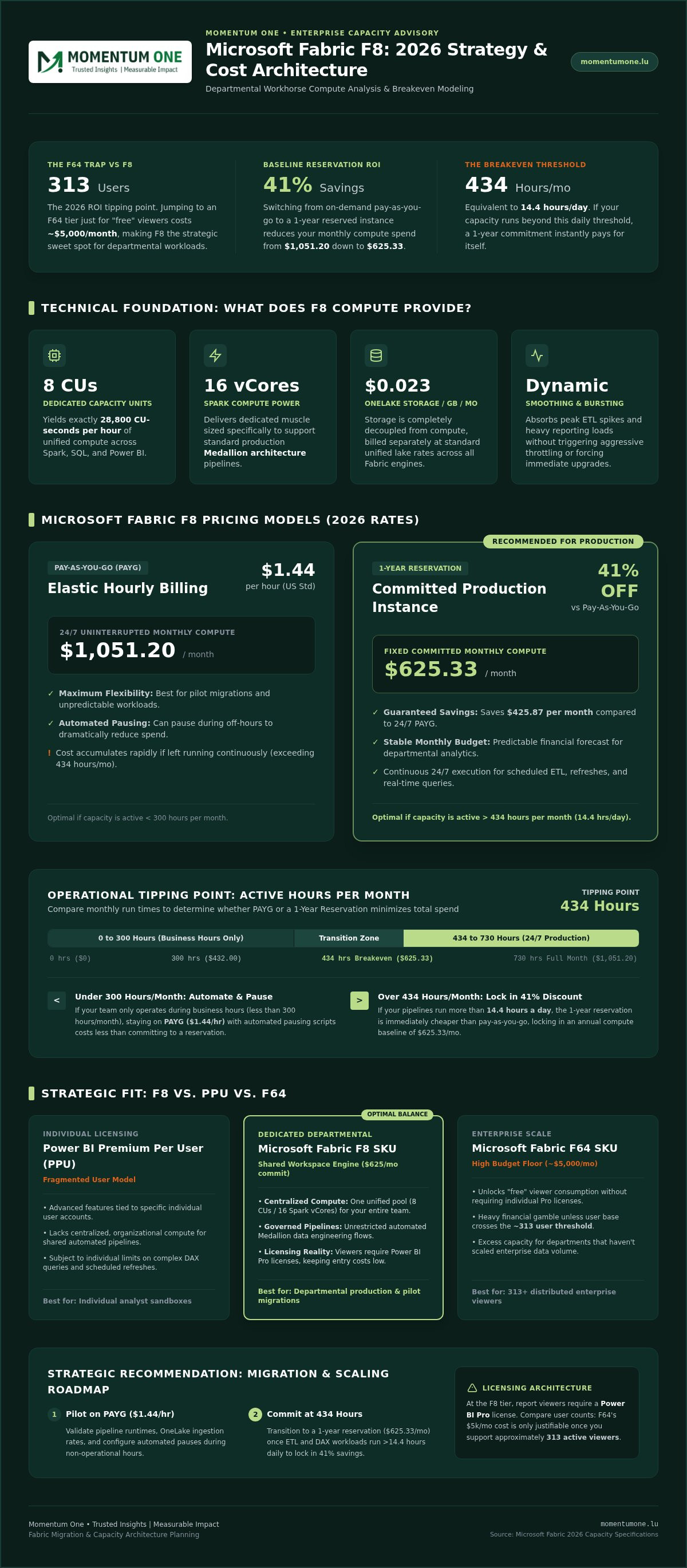
If you're managing a growing data team, you've likely realized that jumping straight to an F64 capacity just to unlock "free" viewers is a $5,000-a-month gamble you might not need to take. In reality, the 2026 ROI threshold for that leap is approximately 313 users, meaning for most departments, the F8 SKU is actually your most strategic production workhorse. We understand that Microsoft Fabric F8 Pricing can feel like a moving target, especially when you're trying to reconcile 8 Capacity Units with 16 Spark vCores while keeping an eye on the OneLake storage meter.
It's common to feel a sense of uncertainty about whether this tier can handle your ETL pipelines without triggering aggressive throttling. You want a clear path to performance that doesn't break the bank. This guide promises to clear the fog by providing a definitive monthly budget estimate and a deep dive into the performance limits of the F8 tier. We'll explore how to leverage 2026 reservation discounts to cut costs by 41 percent, explain the Power BI licensing requirements for smaller capacities, and provide a logical roadmap for scaling your resources as your data footprint expands.
What is Microsoft Fabric F8 Capacity?
The F8 SKU represents a pivotal step for organizations moving beyond basic experimentation. It serves as a mid-entry level compute tier within the Fabric ecosystem, offering a dedicated pool of resources that you control. Unlike shared environments, an F8 capacity ensures your workloads aren't competing with other tenants for basic compute cycles. For many national enterprises, this tier is the first serious consideration when transitioning from development to small-scale production workloads. Understanding Microsoft Fabric F8 Pricing requires a shift in how we think about hardware; we're no longer just counting physical servers, but managing elastic performance.
The Technical Foundation: 8 Capacity Units Explained
Capacity Units (CUs) are the heartbeat of the Fabric platform. While traditional on-premise setups focus on physical cores, Fabric uses CUs to measure processing power across various engines like Spark, SQL, and Power BI. An F8 capacity provides 8 CUs, which equates to 28,800 CU-seconds per hour. For data engineering tasks, this baseline translates to 16 Spark vCores, providing enough muscle for a standard Medallion architecture. This compute power interacts seamlessly with OneLake, the unified storage layer where data is billed separately at approximately $0.023 per GB. The F8 SKU acts as the essential bridge between development testing and production readiness for departmental data projects.
F8 vs. Power BI Premium Per User (PPU)
Choosing between individual licenses and dedicated capacity is a common friction point. Power BI Premium Per User (PPU) offers advanced features to specific individuals, but it doesn't provide the organizational-level compute that a dedicated capacity offers. When you invest in an F8 SKU, you're buying a shared engine for your entire workspace. This shift is crucial for Fabric migration and modernization projects where you need consistent performance for automated pipelines. Analyzing Microsoft Fabric F8 Pricing reveals that while the initial compute cost is a factor, the true value lies in the operational efficiency of a unified environment.
The Microsoft Power BI capacity architecture dictates that at the F8 level, viewers still require a Pro license. However, the advantage of F8 lies in its ability to handle complex DAX queries and scheduled refreshes without the individual limits imposed on PPU users. You should consider the F8 SKU when your team needs a centralized environment for data warehouse design rather than just individual report consumption. It's the right choice when you prioritize governed, automated data flows over fragmented, user-specific licenses.
Microsoft Fabric F8 Pricing Models for 2026
Managing your data budget effectively requires more than just picking a tier; it demands a strategic choice between flexibility and commitment. In 2026, Microsoft Fabric F8 Pricing offers two distinct paths that cater to different operational rhythms. This flexibility aligns with the NIST cloud computing definition of measured service, where resource pooling and rapid elasticity allow you to pay only for what you actually consume. While regional data residency can slightly influence costs, Microsoft has largely standardized these rates across major national markets to ensure predictable global deployments.
The pay-as-you-go (PAYG) model is priced at $1.44 per hour in standard US regions. This approach is ideal for pilot projects or unpredictable workloads where you might pause the capacity during off-hours to save money. If your capacity remains active 24/7, your monthly compute spend will reach $1,051.20. However, most established organizations find that a one-year reservation is far more cost-effective. By committing to a 1-year term, you secure an approximate 41 percent discount, slashing the monthly compute cost to $625.33.
Pay-As-You-Go vs. Reserved Instance ROI
To determine your best path, calculate your monthly breakeven point. At $1.44 per hour, the tipping point between PAYG and a reservation is approximately 434 hours per month. If your team operates the capacity for more than 14.4 hours a day, the reservation pays for itself. For teams that only run workloads during business hours (less than 300 hours a month), staying with PAYG and automating a pause schedule can actually be cheaper than a commitment. You can use the Microsoft Fabric Pricing Calculator to forecast these scenarios based on your specific workload patterns.
Hidden Costs: OneLake Storage and Networking
Compute isn't the only line item on your bill. OneLake storage is decoupled and billed at $0.023 per GB each month, which is roughly $23.55 per terabyte. It's also vital to track networking egress fees when data leaves the Azure ecosystem, as these can accumulate during heavy external reporting. One specific advantage of the F8 tier is the inclusion of 8 TB of free mirroring replica storage, which can significantly offset costs for teams synchronizing external databases. If you're unsure how these variables will impact your specific environment, reaching out for a capacity audit can prevent unexpected overruns before they hit your bottom line.
Performance Analysis: What Can You Run on F8?
Understanding what you can actually run on an F8 capacity is where the technical rubber meets the financial road. While Microsoft Fabric F8 Pricing defines your budget, performance dictates the actual ROI. With 8 Capacity Units (CUs) at your disposal, you're looking at a baseline of 16 Spark vCores. This is generally sufficient to run one small to medium Apache Spark notebook session without hitting autoscale limits. For Power BI, an F8 capacity can comfortably support 50 to 100 casual report users, provided the underlying models are lean. It's vital to remember that at this tier, every viewer still needs a Power BI Pro license; the free viewer distribution benefit only kicks in at the F64 level.
For Data Factory workloads, those 8 CUs are shared across all active pipelines and refreshes. If you have multiple heavy scheduled jobs hitting simultaneously at the start of the business day, you'll likely see queuing. A significant reality check involves Copilot. While Microsoft opened Copilot to all paid tiers in early 2025, using AI features on an F8 SKU consumes units from your shared 8 CU pool. For heavy AI-driven environments, the performance ceiling of F8 might feel restrictive, which is why some teams still view F64 as the production standard for full-scale automation.
Concurrency and Refresh Limits
An F8 SKU can handle several parallel data refreshes, but background operations are smoothed over a rolling 24-hour window. This means a heavy overnight ETL job can borrow compute from the next day, potentially leading to interactive delays during business hours. To avoid this, you can see how Data Modeling and DAX Optimization can make F8 feel like F16 by reducing the compute required for each visual query. Managing these spikes is essential to maintaining a responsive environment for your end users.
F8 for Data Science and Real-Time Analytics
F8 serves as an excellent entry point for small-scale machine learning and KQL databases. It handles real-time event streams well for departmental use cases, but you must watch for specific throttling signals. If your 60-minute smoothed consumption exceeds 100 percent, interactive requests will be rejected entirely. Adopting a FinOps Framework for cloud cost optimization helps you right-size these workloads and identify the exact moment to scale. When you start seeing consistent 20-second latencies on your visuals, it's a clear signal that your data footprint has outgrown the 8 CU ceiling.
Optimizing Your F8 Spend and Capacity
Mastering the nuances of Microsoft Fabric F8 Pricing isn't just about the initial purchase; it's about active management. Fabric's architecture uses "Smoothing" and "Bursting" to help you navigate peak demand. Bursting allows your F8 capacity to temporarily exceed its 8 CU limit for intensive tasks. Smoothing then spreads that heavy consumption over a longer period, preventing immediate system lockout. To keep costs predictable, implement a "Pause and Resume" strategy for your development environments. This is particularly effective for teams using the pay-as-you-go model, as it ensures you aren't paying for idle compute during weekends or overnight. Establishing clear governance is also vital; restricting who can create high-compute items like large Spark clusters prevents a single user from exhausting your entire monthly budget.
Mastering the Capacity Metrics App
The Microsoft Fabric Capacity Metrics App is your primary tool for operational visibility. It's essential to distinguish between "interactive" usage, like a user clicking a Power BI visual, and "background" usage, such as a scheduled Data Factory refresh. Interactive spikes are smoothed over minutes, while background tasks are averaged over a 24-hour window. By analyzing the "Timepoint Detail," you can pinpoint the exact semantic model or notebook causing your highest compute charges. For a deeper look at structuring your environment to avoid these bottlenecks, explore our guidance on Workspace and Capacity Management.
Scaling Strategies: When to Move to F16
Upgrading your capacity should be a calculated decision, not a reactive one. Before moving to an F16 SKU, run through this checklist:
- Are you seeing consistent "Interactive Rejection" errors in your metrics app?
- Have you exhausted all opportunities for DAX and model optimization?
- Is the business impact of delayed background jobs exceeding the cost of the upgrade?
If the answer is yes, the "vertical scaling" process is straightforward. You can upgrade your SKU in the Azure Portal within minutes without migrating any data. However, remember that optimizing your DAX code is often a more sustainable way to stay within the F8 budget. If you're struggling to keep your consumption under control, contact our team for a capacity optimization review to ensure your infrastructure remains efficient.
Strategic Implementation: Starting Your Fabric Journey
Selecting the right entry point for your data modernization is a high-stakes decision. For many national enterprises, the F8 SKU serves as the ideal "Pilot Phase" tier. It provides enough compute to prove value without the massive financial commitment required by higher-level capacities. By integrating F8 into a broader Microsoft Fabric Deployment Roadmap, you create a structured path toward a full-scale data mesh. This approach allows your team to master the environment's nuances, from OneLake storage to Capacity Unit management, before scaling to meet wider organizational demands. It's a low-risk way to validate your architecture in a real-world production setting.
Migration from Synapse or On-Premise
Transitioning from legacy systems requires a steady hand and a clear strategy. If you're moving from Azure Synapse or on-premise SQL Server, mapping your existing workloads to 8 CUs is the first critical step. You can review our Microsoft Fabric vs Azure Synapse guide to understand the specific migration steps and performance differences. A structured governance framework is essential here. It ensures that your migration doesn't just move data, but also optimizes it for the new architecture. We help you define these boundaries, ensuring that your F8 environment remains a stable foundation for growth while preventing the "lift and shift" traps that often lead to bloated compute costs.
Ensuring Long-Term ROI with Momentum One
Long-term success depends on more than just initial setup. Managed services play a vital role in maintaining F8 performance as your data volume grows. At Momentum One, we facilitate this transition by providing the technical expertise and strategic guidance needed to navigate Microsoft Fabric F8 Pricing effectively. Our Fabric Migration & Modernization services are designed to optimize your setup from day one, ensuring your Capacity Units are used efficiently. This proactive approach positions your organization as a leader in data-driven decision-making while keeping your overhead predictable.
Education is the final piece of the ROI puzzle. Without proper skills, even the most optimized capacity can become a source of waste. We offer Corporate Data Fabric Training to empower your internal teams. This training focuses on practical skills like DAX optimization and pipeline automation, which directly impact your monthly bill. By building these capabilities in-house, you ensure that your investment in Fabric continues to deliver value long after the initial migration is complete. If you're ready to design a cost-effective architecture that scales with your business, Contact Momentum One to design your cost-effective Fabric architecture.
Future-Proofing Your Data Strategy with Fabric
The F8 SKU is more than just a budget-friendly entry point; it's a strategic asset for enterprises ready to modernize their data architecture. We've explored how Microsoft Fabric F8 Pricing balances the flexibility of pay-as-you-go with the significant 41 percent savings available through reserved instances. Navigating this tier successfully requires a focus on active capacity monitoring and robust DAX optimization to keep your workloads performing consistently within the 8 CU ceiling.
As a Certified Microsoft Solutions Partner with over eight years of data consulting expertise, Momentum One is here to act as your steady guide. We provide a proven Fabric migration framework that simplifies the transition from legacy systems while maximizing your ROI. Whether you're launching a pilot project or refining an existing departmental setup, our team ensures your infrastructure is as efficient as it is powerful.
Optimize your Fabric costs with Momentum One today and take the next step toward a truly unified data experience. We're excited to help you turn these technical capabilities into lasting business growth.
Frequently Asked Questions
Is Microsoft Fabric F8 enough for a production environment?
F8 is sufficient for production environments that handle departmental workloads or small-scale data pipelines. With 8 Capacity Units providing 16 Spark vCores, it's a reliable choice for national enterprises running pilot projects. While it doesn't match the scale of an F64, it handles end-to-end Medallion architectures effectively. You should monitor your interactive query spikes closely to ensure consistent performance for your end users as your data footprint expands.
Does the F8 SKU include Power BI licenses for all users?
No, the F8 SKU does not include Power BI licenses for report viewers. Because this tier is below the F64 threshold, every individual who interacts with a report must possess a Power BI Pro or Premium Per User license. This is a vital factor in your overall Microsoft Fabric F8 Pricing strategy. For teams with fewer than 300 users, combining an F8 capacity with individual Pro licenses often remains the most cost-effective path.
What is the difference between F8 pricing and Power BI Premium P1?
Power BI Premium P1 was a legacy offering that provided significantly more compute power than an F8 SKU. In the modern Fabric landscape, F8 is an entry-level production tier, whereas P1 was roughly equivalent to an F64 capacity. The primary difference lies in the entry price and the "free" viewer distribution, which F8 lacks. F8 is designed for teams that need dedicated resources for data engineering without the massive overhead of a P1 equivalent.
Can I pause my Microsoft Fabric F8 capacity to save money?
You can pause your F8 capacity to save on compute costs if you're using the Pay-As-You-Go model. This is an excellent way to manage your Microsoft Fabric F8 Pricing during non-business hours. However, if you've committed to a one-year reservation to secure the 41 percent discount, you're billed continuously regardless of whether the capacity is active. Remember that storage costs for data in OneLake continue to accrue even when compute is paused.
Does F8 support Microsoft Fabric Copilot features in 2026?
Yes, Copilot features are fully supported on F8 capacities in 2026. Microsoft removed the F64 minimum requirement in early 2025, making AI tools accessible to smaller tiers. It's important to realize that Copilot operations consume Capacity Units from your shared pool of 8 CUs. If your team uses AI heavily, you'll need to monitor your capacity metrics closely to prevent these background tasks from throttling your interactive Power BI reports.
How much storage is included with the F8 pricing tier?
There is no OneLake storage included in the base compute price for F8. Compute and storage are billed as separate line items to provide better transparency. OneLake storage is standardized at approximately $0.023 per GB per month. However, the F8 tier does include 8 TB of free storage specifically for mirroring replicas. This helps offset costs for organizations synchronizing external databases like Snowflake or Cosmos DB into their Fabric environment.
What happens if my workload exceeds the 8 Capacity Units limit?
When your workload exceeds 8 CUs, Fabric utilizes smoothing and bursting to manage the load. Bursting allows you to temporarily use more than your allocated compute, while smoothing spreads that consumption over time to avoid immediate failure. If your usage remains consistently above the limit, you'll experience throttling. This typically starts with a 20-second delay on interactive queries and can eventually lead to rejected requests if the capacity debt isn't cleared.
Can I upgrade from F4 to F8 without downtime?
You can upgrade from F4 to F8 with virtually no downtime. The process is a simple vertical scale operation performed directly within the Azure Portal. It typically takes just a few minutes to complete, and your existing workspaces, data, and configurations remain entirely intact. This seamless transition makes it easy to start small and scale your compute resources as your organizational needs and user base grow over time.