Power BI Customer Data Isolation: Architecture Best Practices
Learn Power BI customer data isolation best practices. Compare RLS vs. workspace models to build a secure, scalable multi-tenant architecture and avoid data ...
- Understand the distinction between logical and physical separation to implement a reliable Power BI customer data isolation strategy.
- Evaluate the performance and security trade-offs between Row-Level Security and the Workspace-per-customer model for your multi-tenant environment.
- Discover how Microsoft Fabric and OneLake simplify data organization in 2026 using Domains and centralized governance tools.
- Secure your external reporting by configuring Service Principal authentication and following a structured roadmap for embedding.
- Align your isolation architecture with a comprehensive governance framework to ensure scalability and compliance with national data standards.
A single misconfigured filter in your reporting layer isn't just a technical glitch; it's a fundamental breach of trust that can dismantle your reputation in seconds. As you scale your analytics offering, the stakes for Power BI customer data isolation grow exponentially higher. You likely already feel the pressure of managing a complex web of unique workspaces while worrying about the catastrophic fallout of a data leak. It's a common struggle to balance high-performance reporting with the rigid security filters your clients demand.
We're here to help you move past the guesswork and build a foundation that's both secure and sustainable. In this guide, you'll master the architectural patterns and security protocols required to isolate customer data effectively while maintaining the ability to grow. We'll provide a clear framework for choosing between Row-Level Security (RLS) and workspace-level isolation, ensuring your multi-tenant reporting remains compliant with national data protection standards in 2026. You'll walk away with a scalable blueprint that simplifies management and reinforces your position as a reliable data partner.
The Fundamentals of Power BI Customer Data Isolation
Power BI customer data isolation is the practice of ensuring that data belonging to different clients remains strictly separated, whether through logical filters or physical storage boundaries. Multi-tenancy is the architecture where a single application serves multiple customers while keeping data segregated. In a multi-tenant environment, achieving effective Power BI customer data isolation isn't just about hiding rows; it's about establishing a robust framework for multilevel security. This ensures that users only interact with authorized information while the underlying infrastructure remains efficient.
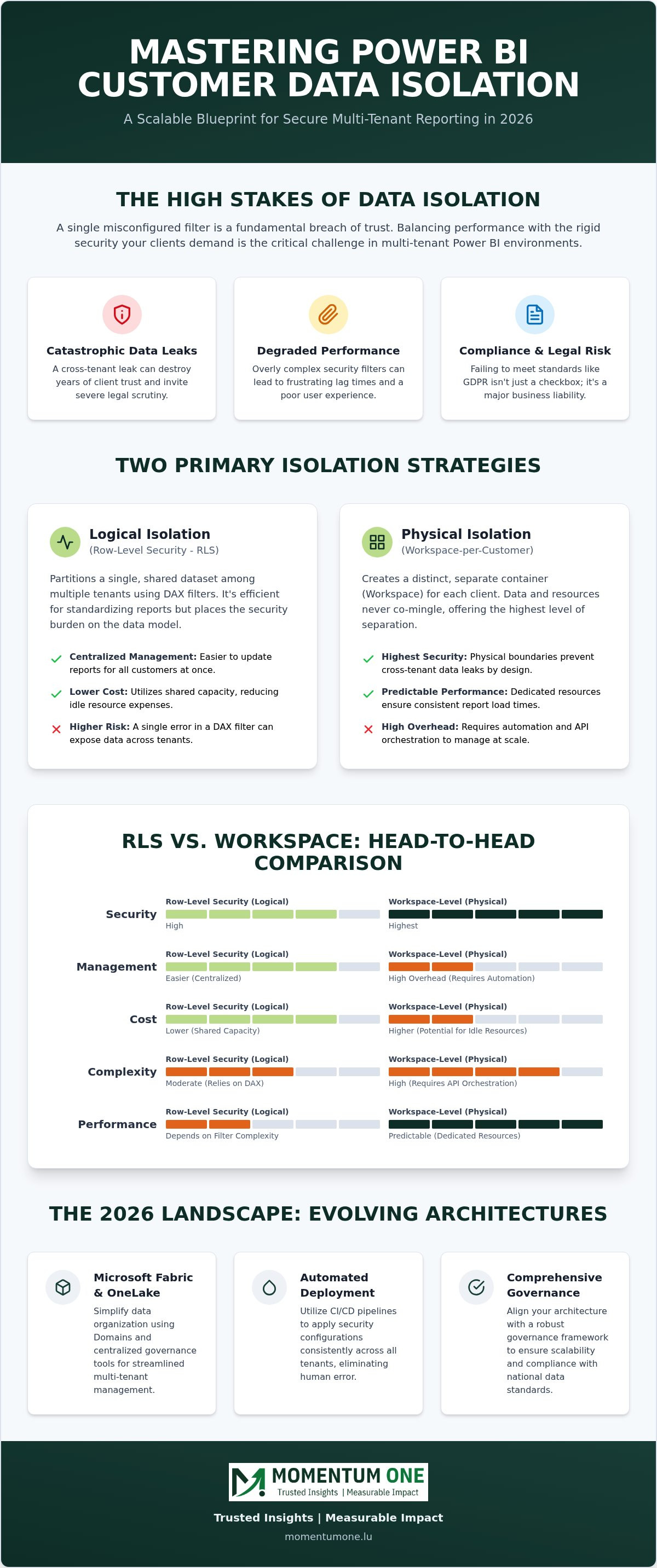
Two primary schools of thought dominate the conversation around isolation. Logical isolation relies on Row-Level Security (RLS) to partition a single, shared dataset among many users. In contrast, physical isolation involves deploying separate Workspaces or dedicated capacities for each individual client. Each path offers distinct advantages for performance and administrative overhead, and your choice will define how your environment scales.
As we move through 2026, the demand for transparency and data integrity has never been higher. Compliance with GDPR isn't just a legal checkbox anymore. It's a competitive advantage that builds client trust by proving you treat their sensitive information with the highest level of care. Without a clear isolation strategy, you risk more than just technical errors; you risk the very foundation of your client relationships.
Why Isolation is the Bedrock of Client Portals
When you build a client portal, you're essentially promising a private viewing room for their business intelligence. A single cross-tenant leak can destroy years of relationship building and invite severe legal scrutiny. Beyond security, your isolation choice impacts the user experience. Overly complex filters can degrade report performance, leading to frustrating lag times for your end users. This is why a structured Power BI governance framework is essential. It provides the oversight needed to monitor filter health and access logs without manual overhead, ensuring your portal remains fast and reliable.
The 2026 Landscape: Security vs. Scalability
In 2026, the landscape has shifted toward automated rigor. For our clients across Luxembourg, national data residency requirements often dictate where data must live and how it's handled. Modern Power BI customer data isolation strategies now lean heavily on automated deployment pipelines. These pipelines ensure that security configurations are applied consistently across every tenant, removing human error from the equation. It's a delicate balance between the ironclad security required by regulators and the operational scalability needed to support hundreds of unique clients. We help you find that balance, ensuring your growth doesn't come at the cost of your security posture.
Row-Level Security (RLS) vs. Workspace-Level Isolation
Choosing the right path for Power BI customer data isolation requires a clear understanding of your long term scalability goals. Most organizations begin with Row-Level Security (RLS) with Power BI, a logical isolation method that uses a single dataset to serve multiple users. It's highly efficient for standardizing report layouts but places a significant load on the engine to filter data in real time. On the other hand, the "Workspace-per-customer" model provides physical separation. This approach creates a distinct container for each client, ensuring that data never co-mingles at the storage or compute level.
The choice between these two models often comes down to a trade-off between administrative ease and absolute security. While RLS is easier to update, workspace isolation offers a safety net against logical errors in DAX filters. Let's look at how these models compare across five key operational pillars.
| Criteria | Row-Level Security (Logical) | Workspace-Level (Physical) |
|---|---|---|
| Security | High (Logical) | Highest (Physical) |
| Management | Centralized; easier updates | High overhead; requires automation |
| Cost | Lower; shared capacity | Higher; potential for idle resources |
| Complexity | Moderate; relies on DAX | High; requires API orchestration |
| Performance | Depends on filter complexity | Predictable; dedicated resources |
When to Choose Row-Level Security
RLS is often the best fit for high-volume scenarios where you serve hundreds of clients with nearly identical data structures. It simplifies the deployment of report updates since you only manage one semantic model. However, as filters become more complex, performance can suffer. This is where DAX optimization experts become essential to ensure your queries remain snappy. Managing dynamic RLS for external users requires a steady hand to map identities correctly across different systems without creating security gaps.
The Case for Workspace-Level Separation
Some clients demand a higher tier of security that logical filters simply can't provide. If you're working with high-sensitivity data that requires dedicated compute resources or unique customer-managed encryption keys, workspace-level isolation is the superior choice. While it introduces more management overhead, you can mitigate this through professional workspace and capacity management. We frequently use Service Principals to automate the creation of these environments, turning a manual bottleneck into a seamless deployment pipeline. If you're unsure which path fits your 2026 growth strategy, our team can provide a tailored architecture review to help you decide.
Advanced Multi-Tenant Architectures in Microsoft Fabric
Microsoft Fabric has fundamentally redefined the landscape of Power BI customer data isolation by introducing a unified data lake known as OneLake. In 2026, we no longer view isolation as just a reporting layer problem. It's an end to end data engineering challenge. Fabric allows us to move beyond simple filters by utilizing "Domains" to categorize data by business unit or client tier, while "Workspaces" remain the primary container for specific tenant assets. This structure provides a logical hierarchy that simplifies governance without compromising the physical security of the data.
One of the most significant shifts in this paradigm is the use of "Shortcuts." These allow us to point to data in a central Lakehouse without creating redundant copies, which reduces storage costs and minimizes the potential attack surface. The Fabric Medallion architecture is a data design pattern that organizes information into Bronze, Silver, and Gold layers, providing a structured framework to ensure client data remains segregated and high quality throughout its lifecycle. By applying security at each stage of the Medallion process, you create a defense in depth strategy that protects sensitive client information from ingestion to visualization.
Leveraging OneLake for Secure Client Access
OneLake security roles augment traditional Power BI filters by providing granular control at the folder and file level. This means you can secure the underlying data before it ever reaches a report. For organizations moving away from legacy setups, our Fabric migration services help modernize old isolation models into this more secure, unified environment. The choice between a Lakehouse or a Warehouse design also plays a role in your security posture. Lakehouses offer file level flexibility, while Warehouses provide the familiar SQL based security that many enterprise clients expect in 2026.
Automating Pipelines for New Customer Onboarding
Scaling a multi tenant solution manually is a recipe for error and security gaps. We lean heavily on pipeline and dataflow automation to spin up new, isolated environments the moment a customer signs on. This ensures that every client receives a perfectly mirrored environment with all security protocols pre configured. Deployment pipelines then maintain this consistency, allowing you to push updates to hundreds of client reports simultaneously without the risk of cross tenant data leakage. It's a methodical approach that turns complex security requirements into a repeatable, automated success story.
Implementation Roadmap: Securing External Access
Building a multi-tenant environment requires a methodical transition from architecture theory to technical execution. Establishing a robust roadmap for Power BI customer data isolation ensures that every new client onboarded in 2026 meets your highest security standards. This process isn't just about the initial setup; it's about creating a repeatable framework that scales as your business grows across Luxembourg. We follow a five step approach to ensure nothing is left to chance.
- Step 1: Choose your isolation model. Evaluate the sensitivity of your data and the volume of clients. High sensitivity often mandates workspace separation, while high volume with standard data structures favors Row-Level Security.
- Step 2: Configure Service Principal authentication. Move away from individual user accounts to a dedicated application identity for all embedding tasks.
- Step 3: Implement security logic. Deploy your DAX based RLS rules or trigger your automated workspace deployment scripts to create the physical boundaries.
- Step 4: Conduct a security audit. Perform a comprehensive Power BI security audit to verify that filters are firing correctly and no data is leaking between tenants.
- Step 5: Monitor and log. Set up continuous monitoring of security logs and performance metrics to catch anomalies before they impact your clients.
Service Principal vs. Master User
In 2026, Service Principals have become the non negotiable industry standard for secure external embedding. Using a "Master User" account creates a fragile dependency on an individual identity, which often leads to authentication failures when passwords expire or MFA requirements change. Service Principals offer a more secure, app only authentication method that doesn't require a Power BI license for the identity itself. This approach simplifies your Power BI customer data isolation strategy by centralizing permissions within Azure, making it easier to manage hundreds of client environments without the risk of account lockouts.
Performance Tuning for Isolated Reports
Isolation filters act as an additional layer of logic that the Power BI engine must calculate for every visual. If your RLS rules are overly complex, you'll see a noticeable dip in DAX query speed. We recommend optimizing DAX for high-performance reports by keeping security tables lean and avoiding expensive many to many relationships within your filtering logic. Fast reports are just as vital as secure ones; a secure report that takes thirty seconds to load will ultimately fail to provide value to your clients. If you're struggling to balance these two priorities, our team can provide a professional governance review to streamline your environment.
Strategic Governance with Momentum One
Technical excellence in Power BI customer data isolation is a significant milestone, but its long term success depends on integration with a wider corporate vision. We act as a steady partner, helping you embed these security patterns into a comprehensive enterprise BI strategy. Our approach ensures that isolation isn't just a technical hurdle you've cleared, but a core component of your value proposition to your own clients. We help you move beyond the "how" of security and focus on the "why" of scalable, trusted analytics.
Momentum One facilitates the design of multi-tenant architectures that are both rigid in their security and flexible in their growth. We understand that as your business expands, the complexity of managing hundreds of unique security filters can become a bottleneck. By positioning isolation within a broader governance framework, we provide the oversight needed to maintain compliance without slowing down your deployment cycles. This proactive stance on data integrity is what separates market leaders from those who merely react to security threats.
Custom Architecture Design for Luxembourgish Enterprises
Every organization in Luxembourg faces a unique set of national regulatory requirements that dictate how data must be handled and stored. We specialize in tailoring isolation models to meet these specific standards, ensuring your architecture is fully compliant in 2026. Many of our clients start with manual report sharing, which quickly becomes unmanageable. We guide you through the transition to automated, branded portals that provide a seamless and secure experience for your end users. This shift doesn't just improve security; it elevates your professional image and builds lasting client trust.
Ongoing Support and Managed Security
Building a secure environment is only the first step. Maintaining that security in a high-growth environment requires constant vigilance and expert oversight. Our managed services provide continuous monitoring of your security filters through dedicated incident and support services. We catch configuration drifts before they become vulnerabilities, ensuring your Power BI customer data isolation remains ironclad. Regular architectural reviews are a standard part of our partnership, allowing us to adjust your strategy as new features emerge in Microsoft Fabric or as your performance needs evolve. We are committed to your journey, providing the reliable expertise you need to scale with confidence.
Securing Your Multi-Tenant Future in 2026
Establishing a bulletproof framework for Power BI customer data isolation is no longer a luxury for growing enterprises; it's a foundational requirement for maintaining client trust. Whether you choose the logical efficiency of Row-Level Security or the physical separation of dedicated workspaces, your architecture must be built to scale without compromising security. As Microsoft Fabric continues to evolve in 2026, leveraging OneLake and automated deployment pipelines will be essential for managing complex multi-tenant environments across Luxembourg.
At Momentum One, we combine our status as a certified Microsoft Solutions Partner with deep expertise in Fabric and Power BI governance to help you navigate these complexities. Our Luxembourg-based technical team is dedicated to building architectures that protect your data while driving performance. We're here to ensure your reporting portals are as secure as they are insightful. Secure your client data with Momentum One’s expert Power BI consulting and build a scalable foundation for your analytics today.
Frequently Asked Questions
What is the most secure way to isolate customer data in Power BI?
Physical separation via the workspace-per-customer model is the most secure approach. This method ensures that data resides in distinct containers, preventing any possibility of cross-tenant leakage at the storage level. While Row-Level Security is robust, physical isolation provides an extra layer of protection against logical filtering errors. It's often the preferred choice for Luxembourgish enterprises handling highly sensitive financial or personal information that requires strict compliance.
Can Customer A ever see Customer B’s data if I use RLS?
No, a correctly implemented Row-Level Security setup prevents users from seeing data outside their assigned roles. RLS applies filters at the database level before any data is sent to the report. However, security depends entirely on the accuracy of your DAX logic and mapping tables. Regular testing is essential to ensure that no overlapping roles or filter directions inadvertently expose sensitive information to the wrong tenant.
How does Workspace-level isolation affect Power BI licensing costs?
Workspace-level isolation generally increases administrative complexity and can impact your overall capacity requirements. Since every customer has a dedicated workspace, you'll likely need a Microsoft Fabric capacity or Power BI Premium to manage these resources efficiently. While the per-user cost for creators remains the same, the overhead of managing hundreds of workspaces often leads organizations to invest in automation to keep operational expenses under control.
Is Microsoft Fabric better than standard Power BI for customer data isolation?
Microsoft Fabric provides a more comprehensive security layer through OneLake and Domains, which simplifies Power BI customer data isolation at scale. It allows you to apply security at the lakehouse level before the data even reaches the reporting engine. This multi-layered approach is often more resilient than relying on Power BI alone. It's an excellent choice for modernizing legacy environments into a more governed and secure ecosystem.
How do I handle Row-Level Security for thousands of external users?
Managing thousands of users requires dynamic Row-Level Security coupled with an automated identity management system. Instead of creating individual roles for every client, you use a single dynamic role that filters data based on the user's login ID or a custom attribute passed through the embed token. This approach keeps your semantic model lean and ensures that your Power BI customer data isolation remains manageable as your user base grows.
What role does a Service Principal play in data isolation?
A Service Principal acts as a secure, non-human identity that handles the authentication between your application and the Power BI service. It eliminates the need for "master user" accounts, which are prone to password expiration and MFA issues. By using a Service Principal, you can automate the generation of embed tokens with specific RLS identities, ensuring that every external user only accesses the data they're authorized to see.
Does data isolation impact report performance?
Yes, the method you choose will influence how quickly your reports load. Row-Level Security adds a computational layer to every query, which can slow down performance if your DAX filters are inefficient or your datasets are massive. Conversely, workspace-level isolation can improve performance by providing dedicated compute resources for each client. We often recommend DAX optimization to ensure that security filters don't create frustrating bottlenecks for your end users.
How often should I audit my Power BI customer data isolation setup?
We recommend conducting a formal security audit at least once a quarter or whenever you push significant updates to your data model. Regular reviews ensure that your security filters still align with your business logic and that no new features have introduced vulnerabilities. Managed services can provide continuous monitoring, giving you peace of mind that your isolation protocols remain ironclad as your environment evolves and your client list expands.