Power BI Implementation Roadmap: Enterprise Guide 2026
Build a successful Power BI implementation roadmap. Learn how to align business outcomes, establish governance, test a pilot, and scale analytics effectively.
- Build a Power BI implementation roadmap around business outcomes, with clear decisions, owners, deliverables, and measures of success.
- Match architecture choices to your data sources, models, refresh needs, and reporting workloads so the foundation can be governed and maintained.
- Use a pilot to test data trust, access, user workflows, and support, not just dashboard design, before deciding how to scale.
- Plan a controlled rollout and review adoption, data quality, report performance, and decision usefulness regularly.
- Bring in focused expertise where it can move the roadmap forward, from governance and modelling to Fabric migration, training, and ongoing support.
A Power BI implementation roadmap should start with business decisions, not a queue of dashboard requests. When priorities differ across teams, building reports first can leave you with fragmented data, inconsistent metrics, and limited trust in the results.
A successful rollout needs more than useful visualisations. It needs clear ownership, a secure and maintainable data foundation, and a plan for helping people use insights in their day-to-day work. The practical challenge is deciding what to establish first, what to test in a pilot, and how to expand without creating unnecessary complexity.
This guide explains how to shape a phased roadmap around business outcomes. You’ll learn how to prioritise use cases, set governance and modelling foundations, launch a focused pilot, and build adoption as your platform grows. It also covers how to assess Microsoft Fabric as part of a wider analytics strategy, so your next steps support current reporting needs as well as future plans.
Why a Power BI implementation roadmap should start with business outcomes
Teams need useful reporting soon, but speed alone is not a reliable measure of progress. A quick dashboard may answer an immediate question. Without dependable data, clear ownership, and agreed definitions, however, it can create another version of the truth. A strong Power BI implementation roadmap balances early value with the foundations needed to keep reporting trusted as more teams come on board.
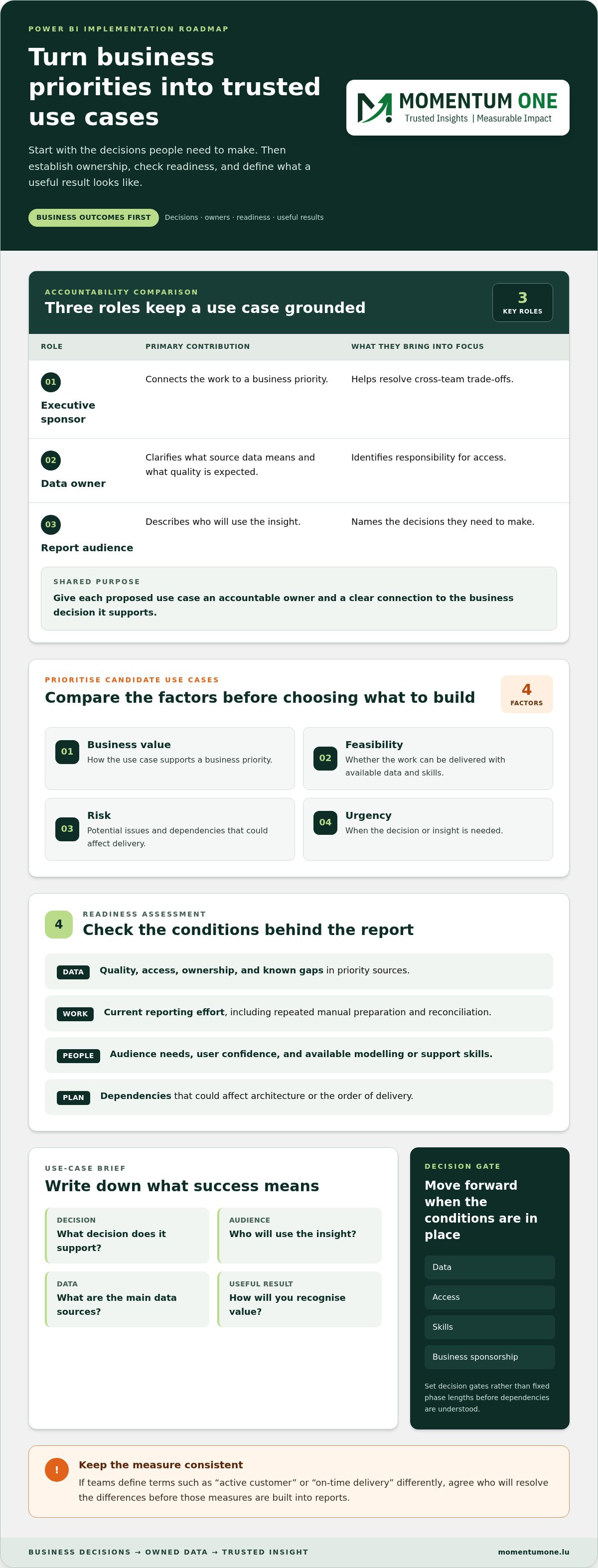
Organise the roadmap around decisions and deliverables, each with an accountable owner and a measurable outcome. Instead of promising fixed phase lengths before dependencies are understood, set decision gates. Move forward when the data, access, skills, and business sponsorship needed for the next stage are in place. This keeps timing responsive to scope and organisational readiness rather than a calendar template.
Translate business priorities into Power BI use cases
Start with decisions, not visual requests. Ask what a team needs to decide, how often it makes that decision, and what information would make the choice clearer. A finance team, for example, may need to explain variances before a review, while an operations team may need to spot where work is delayed. Those use cases call for different data, refresh, and audience requirements.
Rank candidate use cases by business value, feasibility, risk, and urgency. Then identify the people accountable for delivery and use:
- Executive sponsor: connects the work to a business priority and helps resolve cross-team trade-offs.
- Data owner: clarifies what source data means, what quality is expected, and who is responsible for access.
- Report audience: describes who will use the insight and what decisions they need to make.
For each proposed use case, write down the decision it supports, the audience, the main data sources, and how you will recognise a useful result. This keeps a pilot focused on a real workflow instead of producing attractive but disconnected reports. For an overview of the platform and its capabilities, see the Microsoft Power BI Wikipedia entry. Decisions about ownership and standards can also be shaped through a scalable Power BI governance framework.
Assess readiness before committing to a rollout
Before designing a solution, map the current state. Identify source systems, existing reports and spreadsheets, data refresh expectations, platform constraints, and the skills available to build and support analytics. Check whether key terms, such as “active customer” or “on-time delivery,” have shared definitions. If they do not, agree who will resolve differences before those measures are built into reports.
Make readiness visible with a short assessment that covers:
- Data quality, access, ownership, and known gaps in priority sources.
- Current reporting effort, including repeated manual preparation and reconciliation.
- Audience needs, user confidence, and available modelling or support skills.
- Dependencies that could affect architecture or the order of delivery.
Record a baseline for reporting effort and the decisions the organisation wants to improve. Later reviews can compare progress against that starting point instead of relying on report counts or general impressions. If readiness gaps remain, make resolving them a roadmap deliverable with an owner and a clear condition for moving forward. For example, a release might depend on agreeing the definition of a key measure or resolving access to a priority data source.
Design the Power BI foundation: data, governance, and architecture
Once priorities and readiness are clear, decide what the analytics platform needs to support. Define the target architecture at a decision level: which sources feed reporting, where data is prepared, which models should be reused, and how users will access insights. Leave detailed configuration, technical specifications, and tenant procedures for design and implementation. At this stage, the goal is to agree on choices that business and technical teams can validate before committing to a build.
Architecture should fit the work. A report based on a small, regularly updated dataset may have different needs from operational reporting that draws on several systems or a large analytical workload. Consider source reliability, data volumes, refresh frequency, existing warehouses, and the number and type of report users. These factors help determine whether to extend the current architecture or assess Microsoft Fabric as part of the wider platform direction.
Choose a maintainable data and semantic model
Map priority sources to trusted, reusable models instead of allowing each report to recreate its own definitions. If separate teams calculate revenue differently, for example, agree on the measure and its business meaning before publishing it for wider use. Assign owners for source data, quality checks, definitions, and refresh responsibilities. This gives report builders a dependable starting point and helps users interpret results consistently.
Include architecture dependencies in the Power BI implementation roadmap. An existing data warehouse, transformation process, or platform constraint may shape the sequence of work. Microsoft Fabric may also be relevant when data engineering, warehousing, and Power BI need to fit into a broader analytics environment. Record these as options to assess, not assumptions that dictate a platform choice. Compare each option against the use cases, data flows, and operating responsibilities you have identified.
Set governance and security boundaries early
Agree who owns workspaces, who can publish or approve shared content, and how access is granted and reviewed. Establish principles for separating development from approved reporting, limiting access according to user needs, and handling sensitive information carefully. Decide how reports and models move from working content to managed, published assets, including who reviews changes and how retired content is handled.
These are operating-model decisions, not tenant configuration instructions. Define responsibilities and boundaries first, then translate them into technical procedures during implementation. A Power BI governance framework can help structure ownership, access, and content lifecycle planning. Microsoft’s Power BI Adoption Roadmap also connects platform decisions with adoption and organisational practices.
Capture the foundation decisions in a concise architecture brief: priority sources, reusable models, refresh expectations, workspace principles, access responsibilities, and open dependencies. The brief gives business owners and technical teams a shared reference, while detailed design determines how each choice will be implemented. If you’re shaping governance and architecture together, Power BI consulting and governance support can help align those decisions with maintainable analytics.
Deliver Power BI value without a big-bang rollout
A focused pilot and a broad initial deployment can both work, but they address different needs. A pilot limits the initial scope so teams can test assumptions and refine how analytics will be delivered. A broader rollout can make sense when shared foundations, ownership, and support are already established. Choose based on evidence and readiness, not a universal timeline.
Whichever pattern you choose, treat release as a sequence of phase gates. Agree what must be true before expanding: trusted data, appropriate access, usable workflows, clear support ownership, and evidence that the reporting helps with its intended decisions. This prevents unresolved issues from spreading to more users and gives leaders a practical basis for deciding whether to scale, adjust, or pause.
When should an organisation begin with a pilot?
Choose a pilot when teams still need to validate priorities, data readiness, or how people will use reports. Select a representative use case with an accountable sponsor and a reachable audience, rather than an edge case or a showcase designed only to impress. Before release, define success criteria, feedback routes, and a decision point for scaling. Test data trust, access, everyday workflows, and who handles user questions, not just visual quality.
When can a broader rollout make sense?
A wider launch may fit when core models and governance are shared, ownership is clear, and support can handle expected demand. Sequence teams according to business value, dependencies, and operational readiness. Do not release everywhere simply because the platform is available. If data definitions conflict or access and support issues remain unresolved, address them before expanding. A staged rollout can still be broad in ambition while controlling the order of deployment.
Use this comparison to frame the decision. A pilot limits initial exposure while creating an opportunity to learn. A broader rollout may deliver consistency across teams sooner, but it also increases the impact of gaps in shared foundations.
| Rollout pattern | Best fit | Evidence to move forward | Risks to manage |
|---|---|---|---|
| Focused pilot | Priorities, data readiness, or user workflows need validation. | Users can access trusted information, complete key tasks, and provide actionable feedback; ownership and support are understood. | A narrow use case may not reveal every scaling dependency, so document what still needs testing. |
| Broader rollout | Common foundations, accountable owners, and support processes are in place. | Priority teams, dependencies, access needs, and release responsibilities are mapped. | Unresolved data, access, or support issues can affect many teams at once. |
For a pilot, capture baseline measures before release, then review whether users can find and interpret the information they need. Record defects, access barriers, recurring questions, and requests for changes. For a broader release, use the same evidence at each team or workload gate, adapting the sequence as dependencies become clearer. This keeps the Power BI implementation roadmap responsive to what the organisation learns instead of locking it to fixed day ranges.
Turn the Power BI roadmap into a rollout, adoption, and improvement plan
A successful release is the start of an operating rhythm, not the finish line. Turn pilot findings into controlled releases, then review whether people can use the information and whether it supports the decisions the implementation was meant to improve. Assign owners for training, user support, release management, and ongoing improvement so these responsibilities do not disappear after launch.
Sequence rollout with clear readiness gates
Before adding an audience or team, confirm the release is ready for its users and support model. A consistent gate helps teams make deliberate decisions instead of expanding simply because a report is available.
- Validate the release: confirm the model reflects agreed definitions, access controls fit the audience, and key data checks pass.
- Prepare users and support: provide relevant training, explain where to get help, and make release ownership clear.
- Review feedback: capture usability issues, trust concerns, access problems, and change requests from each release.
- Decide what happens next: document whether to proceed, revise, or pause, using agreed acceptance criteria and named owners for follow-up.
Keep the criteria tied to the use case. A report used in a regular review, for example, may need to show that users can find the relevant measures, understand their definitions, and access refreshed information as expected. Give feedback a clear outcome, such as a model change, an access adjustment, or targeted training, rather than leaving it in an unprioritised list.
Track whether implementation is creating lasting value
Usage alone does not show whether analytics is helping. Pair activity indicators, such as repeat use by the intended audience, with business measures linked to the original decision. Add qualitative feedback to understand why people return to a report, work around it, or continue relying on manual analysis. The Power BI adoption strategy guide offers further perspective on connecting adoption efforts with business value.
Compare results with the baseline established before rollout. Review trends in data quality, report performance, support demand, and duplicated content alongside user feedback and decision usefulness. More report views may indicate interest, but persistent confusion about a key measure could signal that definitions or training need attention. A slowdown may point to performance issues, changing needs, or content that no longer serves its audience.
Use these reviews to maintain a focused improvement backlog. Prioritise fixes that affect trust or everyday use, then consider training needs and future use cases. Assign a person to each action and revisit whether it resolved the issue. This closes the loop between release and learning, keeping the Power BI implementation roadmap responsive as needs evolve.
Momentum One’s Power BI consulting, governance, training, and managed services can support different stages of rollout and continuous improvement. Discuss your Power BI rollout and adoption priorities with the team.
Put your Power BI implementation roadmap into action with expert support
Before moving from planning to delivery, leaders should share a clear view of the desired outcomes, organisational readiness, required data and governance foundations, rollout approach, and owners for each stage. These decisions turn reporting requests into a coherent plan while leaving room to adapt as teams learn more about their data and users’ needs.
Specialist support can focus on the gaps in that plan. Some organisations need help connecting priorities to platform decisions; others have a defined direction but need focused expertise in data models, DAX, migration, training, or ongoing operations. The aim is to strengthen the work at the stage where it is needed, not to impose a standard sequence or fixed timetable.
Match support to the implementation stage
Power BI consulting and governance can help clarify priorities, operating responsibilities, and controls. Data modelling and DAX expertise can address model design or report performance needs, while Fabric migration and modernisation can support a wider platform transition. Training can build internal capability, and managed services can provide ongoing support for analytics operations. Momentum One is a certified Microsoft Solutions Partner, with expertise across these areas for roadmap planning and delivery.
Start with the specific decision or constraint that needs attention. A team with inconsistent measures may benefit from modelling expertise; one preparing to move workloads may need migration guidance. If the platform is already in use, training or managed services may better support adoption and continuity. Momentum One tailors its work to your organisation’s priorities, current environment, and internal capabilities, rather than assuming every stage needs the same level of external input.
Agree on a practical next step
Prepare a concise picture of the current state and the decisions ahead. You do not need a finished technical design to have a useful discussion. Bring the information that helps stakeholders focus on priorities and constraints:
- Current reporting challenges, including manual effort or duplicated content.
- Priority use cases and the decisions each should support.
- Known data, access, platform, or skills constraints.
- Decision-makers, data owners, intended users, and prospective support leads.
Use the discussion to identify what is already clear, where assumptions need validation, and which next step would reduce the most uncertainty. That may be a governance decision, a modelling review, a readiness assessment, or a focused discussion about Fabric migration. The right starting point depends on your roadmap and what your teams need to move forward with confidence.
Momentum One can connect those choices to a practical Power BI implementation roadmap, with support tailored to your organisation’s needs. Discuss your Power BI implementation roadmap with the team.
Give your analytics strategy its next clear step
A roadmap becomes useful when it helps people make the next decision with confidence. Treat your Power BI implementation roadmap as a working agreement between business and technical teams: revisit priorities as needs change, make ownership visible, and use what you learn from each release to guide the next investment. You do not need to settle every future detail today. Start with a shared view of what matters now and a practical way to move forward.
Momentum One can work with your team to shape the next step around your priorities, constraints, and internal capabilities. Bring the questions you are working through, whether they concern governance, data models, user readiness, or ongoing operations. A focused discussion can clarify where specialist support would add value and which decisions should come next.
Discuss your Power BI implementation roadmap and take a confident next step toward analytics that can grow with your organisation.
Frequently Asked Questions
When should an organisation begin with a pilot?
Choose a pilot when teams still need to validate priorities, data readiness, or how people will use reports. Select a representative use case with an accountable sponsor and a reachable audience, rather than an edge case or a showcase designed only to impress. Before release, define success criteria, feedback routes, and a decision point for scaling. Test data trust, access, everyday workflows, and who handles user questions, not just visual quality.
When can a broader rollout make sense?
A wider launch may fit when core models and governance are shared, ownership is clear, and support can handle expected demand. Sequence teams according to business value, dependencies, and operational readiness. Do not release everywhere simply because the platform is available. If data definitions conflict or access and support issues remain unresolved, address them before expanding. A staged rollout can still be broad in ambition while controlling the order of deployment. Use this comparison to frame the decision. A pilot limits initial exposure while creating an opportunity to learn. A broader rollout may deliver consistency across teams sooner, but it also increases the impact of gaps in shared foundations. For a pilot, capture baseline measures before release, then review whether users can find and interpret the information they need. Record defects, access barriers, recurring questions, and requests for changes. For a broader release, use the same evidence at each team or workload gate, adapting the sequence as dependencies become clearer. This keeps the Power BI implementation roadmap responsive to what the organisation learns instead of locking it to fixed day ranges. A successful release is the start of an operating rhythm, not the finish line. Turn pilot findings into controlled releases, then review whether people can use the information and whether it supports the decisions the implementation was meant to improve. Assign owners for training, user support, release management, and ongoing improvement so these responsibilities do not disappear after launch.
How long does a Power BI implementation take?
There is no single duration that fits every organisation. The timeline depends on factors such as the number of data sources, data quality, integration dependencies, security reviews, and how many teams need to be involved. A focused deployment using well-understood data may progress differently from one that requires major modelling or platform changes. Plan around completed deliverables and readiness decisions, then adjust as dependencies become clearer.
What should an organisation assess before implementing Power BI?
Assess whether the organisation can provide reliable data, clear business definitions, appropriate access, and people who can make decisions about reporting. Check how existing reports are produced, where numbers are reconciled manually, and which systems hold the information needed for priority analyses. For example, if finance and sales use different definitions of a “closed” deal, agree on the intended meaning before building measures that compare their results.
Can Power BI implementation start with existing Excel reports?
Yes. Existing Excel reports can help identify useful measures, recurring questions, and familiar workflows. Treat them as reference material rather than assuming each spreadsheet should be copied into a dashboard. Check formulas, source data, refresh practices, and whether different files calculate the same measure consistently. A sales workbook might reveal the metrics people rely on while also exposing manual adjustments that need to be understood before those metrics are reused.
Does every Power BI implementation need Microsoft Fabric?
No. Power BI can support reporting without every organisation adopting Microsoft Fabric. Consider Fabric if your roadmap includes broader data engineering or warehousing needs, or if bringing analytics workloads together is a strategic goal. The decision should reflect your existing platform, data sources, operating needs, and future plans. Avoid introducing a wider platform simply because it is available; define the requirement it would address first.
How much does Power BI implementation cost?
Implementation cost depends on the work involved, such as source integration, data warehouse or model design, governance, migration, training, and ongoing support. Separate professional services from software licensing and capacity decisions when preparing a budget, since each depends on different factors. For a more useful estimate, scope the priority use cases, users, data sources, and known constraints, then identify which work is essential for the first release.
Who should own Power BI after implementation?
Ongoing ownership should be shared across business and technical roles, with responsibilities clearly assigned. Business owners maintain the meaning and usefulness of measures; data owners address source definitions and quality; platform or analytics leads coordinate access, publishing, and releases. Name a support contact and a training owner as well. For example, a change to a sales metric should have a business approver and a defined process for updating affected reports.