Power BI Licensing for Portals: Guide for External Sharing
Explore Power BI licensing for customer portal access. Compare user-based and embedded models to share secure, scalable external reports with your clients.
- Map identity, workspace or capacity, permissions, and embedding method to understand how each part affects customer access.
- Compare user-based sharing with app-owns-data embedding and hosted portal options by who authenticates users and manages licensing.
- Assess customer organizations, user numbers, and usage frequency before choosing a Power BI licensing for customer portal model.
- Plan security separately from licensing: use permissions and data design to control which customer information each user can see.
- Assign clear ownership for identity, workspaces, capacity monitoring, and access changes so the portal model remains governed as it evolves.
What if the right Power BI licensing for customer portal access depends less on how many reports you publish and more on who authenticates users and where the analytics capacity runs? That distinction matters when customers need reports inside your portal. An access model designed for employees may not suit an external audience.
Whether every customer needs an individual Power BI license depends on the access architecture. Customers may access content through their own Power BI identities, or your application may manage the experience using a capacity-backed embedding model. Those approaches affect licensing, administration, and how you plan for growth.
This guide explains the main licensing patterns for external portal users and the questions that shape a suitable architecture and capacity plan. It compares user-based access with Power BI Embedded and Microsoft Fabric capacity, and explains why licensing alone doesn’t separate each customer’s data. Consider access, governance, and ongoing management together to set clear expectations for portal analytics.
Power BI licensing for a customer portal: why architecture comes first
Licensing governs whether someone is entitled to view Power BI content; portal architecture determines how that person reaches it. External-user access means customers view analytics through a digital experience your company controls, such as a customer portal. The portal provides the interface, while Power BI identities, permissions, workspaces, or capacity support report access behind the scenes.
User-based Power BI sharing gives access through each viewer’s Power BI identity, while capacity-backed embedded analytics delivers reports through an application experience running against dedicated capacity. That distinction is the starting point for Power BI licensing for customer portal access. A portal is not, by itself, a licensing model or a way to bypass applicable requirements.
Customer viewers aren’t the only people whose access matters. Report creators may need permission to publish; workspace contributors may need to edit semantic models or reports; administrators may manage settings, permissions, or capacity. Their roles can require different permissions and licensing arrangements from those of customers who only view reports. The Microsoft Power BI Wikipedia overview introduces the platform and its components, but a portal decision also needs to account for how those components are configured in your environment.
What does Power BI licensing decide in a customer portal?
Licensing helps determine what a user can do in Power BI, but it doesn’t authenticate that person into your portal or decide which customer records they’re allowed to see. Those responsibilities belong to the portal’s identity and authorization design. Treat them as connected decisions, not interchangeable controls.
Access also depends on where content is hosted and which permissions are assigned. A report’s workspace, the workspace’s capacity, and a person’s role can all affect their ability to view or work with content. A customer who only views a report has different access needs from an internal analyst who publishes or maintains it. The portal’s sign-in process doesn’t remove the need to account for Power BI licensing and permissions.
Capacity is an architectural consideration as well as a licensing one. Planning how reports run and who manages capacity shapes the portal’s operating model. This Power BI and Fabric capacity planning guide explores that planning dimension.
Which portal access pattern are you planning?
Start by identifying who owns the viewer experience and whose identity Power BI uses to authorize access:
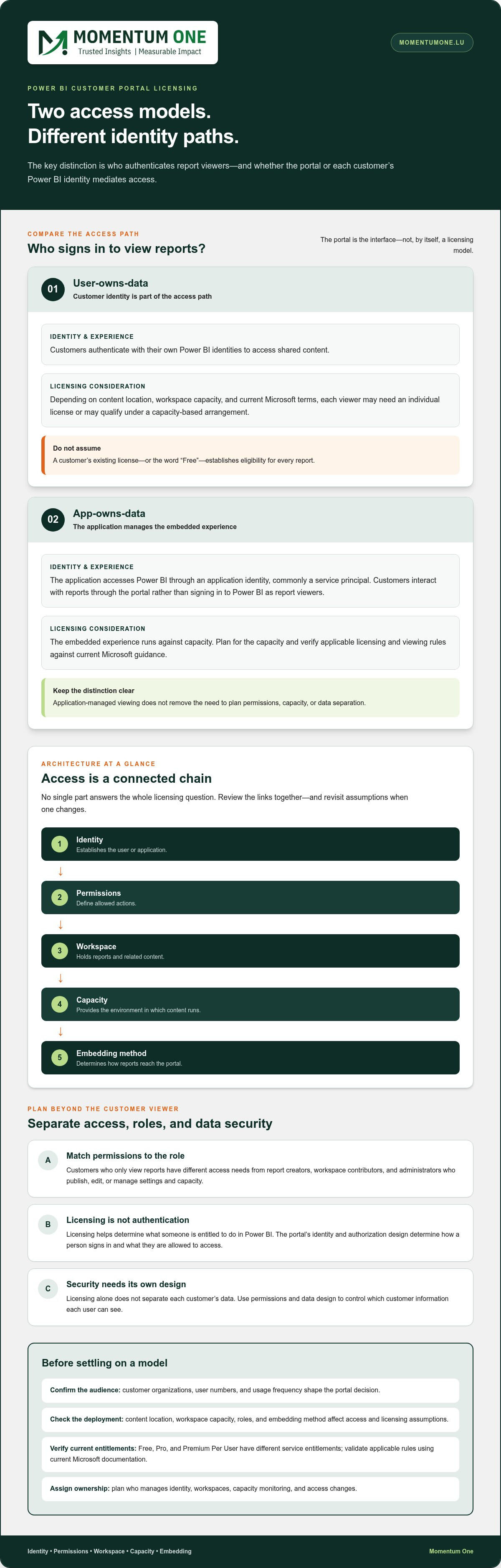
- User-owns-data: Customers authenticate with their own Power BI identities to access shared content. The customer’s identity is part of the access path.
- App-owns-data: The application manages the embedded experience and accesses Power BI through an application identity. Customers interact with reports through the portal rather than signing in to Power BI as report viewers.
These patterns frame the decision, but they don’t settle every licensing or security detail. For a portal where customers see account-specific dashboards while internal staff build and administer reports, design the customer viewing path, staff authoring roles, and data-separation controls separately. Clarifying those responsibilities gives you a sound basis for comparing licensing and assessing capacity.
How Power BI licenses, identities, and capacity interact
A portal’s access model brings several parts together: the viewer’s Power BI license, the workspace and its hosting capacity, the identity used to authenticate, assigned permissions, and the embedding method. None answers the whole licensing question on its own. A customer’s sign-in establishes who they are, while the workspace and capacity affect how content can be accessed and which license rules apply.
Think of the setup as a chain. Identity establishes the user or application; permissions define allowed actions; the workspace holds the content; capacity provides the environment in which it runs; and the embedding pattern determines how reports reach the portal. If any link changes, review the licensing assumptions too. For Power BI licensing for customer portal decisions, use Microsoft’s current documentation to verify entitlements and any capacity-based viewing rules before committing to an architecture.
User-based access and Power BI service licenses
With user-owns-data, viewers authenticate using their Power BI identities. Depending on the content’s location, workspace capacity, and current Microsoft terms, each viewer may need an individual license or may qualify for access under a capacity-based arrangement. Don’t assume that an external customer’s existing license, or the word “Free,” establishes eligibility for every report.
Free, Pro, and Premium Per User (PPU) represent different service entitlements. Pro and PPU support specific capabilities, while viewing rights can also depend on where content is hosted. Microsoft’s Power BI Features by License Type documentation is a useful reference for comparing features. Validate the rules for your portal and deployment against current guidance. Workspace roles determine actions such as viewing, publishing, or editing, but a role doesn’t replace a required license.
Capacity-backed embedding and application identities
With app-owns-data, the application mediates access to embedded reports using an application identity, commonly a service principal, rather than relying on each customer’s Power BI identity as the report viewer. This can suit a branded portal where customers sign in to the company’s experience. Plan application permissions, report access, workload, and the capacity that serves the embedded content.
Embedding changes the access pattern, while Microsoft licensing terms still apply. Capacity is a workload and architecture decision, not a blanket exemption from licensing conditions. Estimate expected usage and report demands, then validate the required capacity and entitlements for the chosen design. A guide to embedding Power BI reports for customers explores the implementation patterns behind this decision.
Microsoft licensing and capacity rules can change, so document the assumptions your design relies on and review them against current documentation during planning and as the portal evolves. Momentum One’s Power BI Embedded and governance consulting can help bring those requirements into the architecture discussion.
Compare customer-portal licensing models without mixing vendor claims
Compare the full access arrangement, not just the license label. A customer’s identity, the location and capacity of Power BI content, the portal experience, and who operates the environment all shape the decision. The same model may fit differently as the audience or report workload changes.
Use this overview to frame the options. Exact entitlements depend on Microsoft’s current terms and the specific deployment. Any hosting or licensing included in a third-party portal plan is specific to that vendor’s offer, not a general Power BI rule.
User-based sharing
Identity: Customers access content using their own Power BI identities. Where reports appear: Power BI service, potentially linked or surfaced through a portal. Licensing responsibility: The organisation must account for applicable user licenses and content-location rules. Operational control: The organisation manages Power BI sharing, permissions, and workspace arrangements.
App-owns-data embedding
Identity: The application mediates access through an application identity. Where reports appear: Embedded in the customer-facing experience. Licensing responsibility: The organisation plans for applicable Power BI licensing and capacity; customer viewer licensing depends on Microsoft’s rules for the implementation. Operational control: The organisation oversees the embedded setup, access design, and capacity.
Hosted third-party portal
Identity: Customers sign in according to the portal provider’s design. Where reports appear: Within that provider’s hosted portal. Licensing responsibility: The vendor may include particular hosting or Embedded costs under its own terms; that inclusion is vendor-specific. Operational control: Responsibilities are divided between the provider and your organisation according to the service arrangement.
When does user-based sharing fit external customers?
User-based access can suit a defined customer group whose members already use organisational Power BI identities and can work with a Power BI sign-in experience. It may be practical when access is limited and managing individual permissions is acceptable operationally. Still, Pro or Premium Per User shouldn’t be assumed to fit every portal. Requirements depend on content location, capacity, and Microsoft’s current licensing terms.
When should you evaluate Power BI Embedded?
Evaluate Embedded when customers need reports inside an application-controlled experience, or when using each customer’s Power BI identity doesn’t fit the intended journey. Consider who owns identity flows and access administration, how the workload will be monitored and capacity planned, and how much control your organisation needs over the experience. Keep Microsoft licensing and capacity obligations distinct from any third-party portal subscription or included services.
The right comparison depends on customer count, how often users access reports, expected report workload, and who should operate the environment. An audience with occasional access may call for a different balance than frequent use across many customer organisations. Model those factors together before choosing. The best fit for Power BI licensing for customer portal access is an architecture decision, not simply a product-tier comparison.
Plan portal licensing around customer access, security, and scale
A useful portal plan starts with the people and data involved, then tests the architecture against expected usage and Microsoft’s current licensing terms. This keeps licensing, security, and capacity connected without treating one as a substitute for another. Work through these six questions before settling on a model:
- Audience: How many customer organizations and individual users need access now? Consider whether use will be occasional or frequent, and how customers may be added over time.
- Identity: Will users sign in with organizational accounts, guest access, or an application-mediated identity? Map each identity type to the access experience you intend to provide.
- Access pattern: Will customers view reports through their own Power BI identities, or through an embedded application experience? Include internal creators and administrators in the access plan.
- Workload: Estimate concurrent use, refresh expectations, report complexity, and patterns such as busy periods. These affect capacity planning, not just the choice of license.
- Governance: Assign ownership for customer onboarding and removal, permissions, data boundaries, workspace access, and monitoring. Define how access changes are reviewed and recorded.
- Licensing validation: Check the proposed identity, content location, capacity, and user roles against Microsoft’s current documentation before committing to the design. Keep the assumptions documented for later review.
Map users, identity, and customer data boundaries
Make an access map that connects each audience to its identity type, reports, datasets, and permitted customer records. For instance, a customer user should see only information authorized for that customer, while an internal analyst may need broader access to prepare or maintain reports. Document where tenant separation or other data boundaries are enforced. The Power BI customer data isolation architecture guide can inform that design discussion.
Row-level security (RLS) can help filter rows for a user, but it doesn’t grant a license or prove that the licensing model complies with Microsoft terms. Likewise, a license doesn’t determine which customer’s data a person should see. Validate authorization and licensing as separate controls that must work together.
Estimate growth and validate capacity assumptions
Look beyond the initial user count. Estimate how many people may use reports at the same time, how often data must refresh, and how report complexity could affect demand. Consider whether usage is steady or concentrated around customer reporting cycles, and account for expected growth in both organizations and viewers. These assumptions help shape a realistic capacity plan.
Before choosing a capacity or licensing arrangement, validate applicable entitlements and thresholds against current Microsoft documentation. Revisit the estimate when audience size, report usage, or architecture changes. The Power BI and Fabric capacity planning guide provides a framework for relating workload assumptions to capacity needs.
Bring identity, data boundaries, workload, and licensing together in one review. Plan your customer-portal licensing and governance approach with Momentum One.
Turn Power BI portal licensing into a governed implementation plan
A sound portal decision becomes operational when requirements, architecture, licensing, and security are captured in one plan. That record helps teams understand why an access pattern was selected and what needs review if the audience or workload changes. It also keeps licensing assumptions visible to the people managing customer identities, Power BI workspaces, and capacity.
Before rollout, document the decisions and assign an owner to each responsibility:
- Requirements: Record customer groups, expected access patterns, and the reports each group needs.
- Architecture: Describe the chosen portal access pattern, identity flow, workspaces, and capacity assumptions.
- Licensing: Note the Microsoft documentation used to validate the approach, along with assumptions that need reassessment if terms change.
- Security: Define data boundaries, permissions, and how access is granted, reviewed, and removed.
- Operations: Assign responsibility for report changes, capacity monitoring, customer access requests, and issue escalation.
What to document before rollout
Keep the record practical: identify who owns identity configuration, workspace access, capacity oversight, and customer onboarding or removal. Specify how report changes are reviewed and how access issues are escalated. Set a review point based on meaningful changes, such as audience growth, new customer groups, different usage patterns, or changes to Microsoft licensing terms. This makes the plan a working governance tool.
Ownership matters because the controls span teams. For example, the portal access owner may manage customer account changes, while the analytics owner reviews workspace roles and report updates. Assign capacity monitoring to an owner who can track workload and raise concerns. For organizations seeking operational support across their broader Microsoft environment, partnering with specialists in Managed IT services Wellington helps ensure access controls and infrastructure remain seamlessly maintained. A Power BI governance framework can help structure how policies, roles, and review processes fit together.
How expert guidance reduces licensing uncertainty
Licensing questions are easier to assess when they’re connected to the real operating model. Momentum One’s Power BI consulting and governance expertise brings Power BI Embedded, identity and access design, capacity planning, and ongoing oversight into the same conversation. The aim is to evaluate the architecture and its assumptions against your requirements, not to promise a particular license outcome.
This joined-up assessment can clarify which decisions belong to the portal design, which depend on Microsoft licensing terms, and which need an ongoing owner. It also gives technical and business stakeholders a shared basis for reviewing customer access and capacity as needs evolve.
To turn your assessment into a governed plan, discuss your Power BI customer portal requirements with Momentum One. A clear view of your audience, identity model, and operating responsibilities creates a stronger starting point for evaluating Power BI licensing for customer portal access.
Build a portal model that can grow with your customers
A customer portal will evolve as services, audiences, and usage patterns change. Make the licensing decision a living part of its operating model, not a one-time approval. Record the assumptions behind your design and define what should trigger a review, such as a new customer group, a change in how users sign in, or a different pattern of report use. This helps the Power BI licensing for customer portal approach keep pace with the experience you’re building.
Momentum One’s Power BI Embedded and governance consulting connects architecture choices with capacity planning and operational responsibilities. A focused review can help your team understand trade-offs, clarify ownership, and plan how the portal should adapt as requirements develop, without assuming one licensing model fits every organization.
Discuss your portal analytics architecture with Momentum One to identify a practical next step for your customer access model. With clear assumptions and the right governance in place, you can move forward with confidence.
Frequently Asked Questions
What does Power BI licensing decide in a customer portal?
Licensing helps determine what a user can do in Power BI, but it doesn’t authenticate that person into your portal or decide which customer records they’re allowed to see. Those responsibilities belong to the portal’s identity and authorization design. Treat them as connected decisions, not interchangeable controls. Access also depends on where content is hosted and which permissions are assigned. A report’s workspace, the workspace’s capacity, and a person’s role can all affect their ability to view or work with content. A customer who only views a report has different access needs from an internal analyst who publishes or maintains it. The portal’s sign-in process doesn’t remove the need to account for Power BI licensing and permissions. Capacity is an architectural consideration as well as a licensing one. Planning how reports run and who manages capacity shapes the portal’s operating model. This Power BI and Fabric capacity planning guide explores that planning dimension.
Which portal access pattern are you planning?
Start by identifying who owns the viewer experience and whose identity Power BI uses to authorize access: These patterns frame the decision, but they don’t settle every licensing or security detail. For a portal where customers see account-specific dashboards while internal staff build and administer reports, design the customer viewing path, staff authoring roles, and data-separation controls separately. Clarifying those responsibilities gives you a sound basis for comparing licensing and assessing capacity. A portal’s access model brings several parts together: the viewer’s Power BI license, the workspace and its hosting capacity, the identity used to authenticate, assigned permissions, and the embedding method. None answers the whole licensing question on its own. A customer’s sign-in establishes who they are, while the workspace and capacity affect how content can be accessed and which license rules apply. Think of the setup as a chain. Identity establishes the user or application; permissions define allowed actions; the workspace holds the content; capacity provides the environment in which it runs; and the embedding pattern determines how reports reach the portal. If any link changes, review the licensing assumptions too. For Power BI licensing for customer portal decisions, use Microsoft’s current documentation to verify entitlements and any capacity-based viewing rules before committing to an architecture.
When does user-based sharing fit external customers?
User-based access can suit a defined customer group whose members already use organisational Power BI identities and can work with a Power BI sign-in experience. It may be practical when access is limited and managing individual permissions is acceptable operationally. Still, Pro or Premium Per User shouldn’t be assumed to fit every portal. Requirements depend on content location, capacity, and Microsoft’s current licensing terms.
When should you evaluate Power BI Embedded?
Evaluate Embedded when customers need reports inside an application-controlled experience, or when using each customer’s Power BI identity doesn’t fit the intended journey. Consider who owns identity flows and access administration, how the workload will be monitored and capacity planned, and how much control your organisation needs over the experience. Keep Microsoft licensing and capacity obligations distinct from any third-party portal subscription or included services. The right comparison depends on customer count, how often users access reports, expected report workload, and who should operate the environment. An audience with occasional access may call for a different balance than frequent use across many customer organisations. Model those factors together before choosing. The best fit for Power BI licensing for customer portal access is an architecture decision, not simply a product-tier comparison. A useful portal plan starts with the people and data involved, then tests the architecture against expected usage and Microsoft’s current licensing terms. This keeps licensing, security, and capacity connected without treating one as a substitute for another. Work through these six questions before settling on a model:
Can external customers view Power BI reports with a free license?
Yes, in some capacity-based scenarios, but not simply because they have a free license. Under the current rules in this guide, external viewers may access shared content without an individual paid license when it’s hosted on qualifying Power BI Premium capacity or Microsoft Fabric F64 capacity or higher. Power BI Premium capacity is no longer sold to new customers, so validate the applicable entitlement and hosting arrangement against current Microsoft documentation. This applies to viewing, not every Power BI task.
Do customers need Microsoft Entra ID accounts to access a Power BI portal?
Not always; it depends on the sign-in pattern. With user-based sharing, customers generally access content through a Microsoft identity, including an Entra ID guest identity where the organisation uses external collaboration. With app-owns-data embedding, customers can authenticate to the portal through its chosen sign-in system, while the application uses its own identity to access Power BI. Keep the portal’s user authentication distinct from the identity Power BI uses behind the scenes.
Does a Microsoft 365 subscription automatically include Power BI Pro?
No, not every Microsoft 365 subscription includes Power BI Pro. Microsoft 365 E5 includes a Pro license, but other plans shouldn’t be assumed to provide it. For example, a customer employee may have access to Microsoft 365 email and collaboration tools without the Power BI entitlement needed for a particular sharing scenario. Check the exact subscription assigned to each relevant user and confirm its current Power BI benefits before relying on it for portal access.
Can Power BI guest users access reports in a customer portal?
Yes, guest users can access shared Power BI content when external collaboration is configured and they have the necessary permissions and applicable licensing. A guest invited into an organisation’s tenant may use their own organisational credentials to sign in, but guest status alone doesn’t grant report access. For example, a partner’s analyst could be invited to view a report, while the organisation still needs to verify the workspace, content, and license conditions for that user.
Does row-level security remove the need for Power BI licenses?
No. Row-level security controls which rows a user can see within a report or semantic model; it doesn’t grant a Power BI entitlement or replace licensing requirements. For example, RLS might filter a shared sales report so a customer sees only their own transactions. You still need to establish that the viewer can access the content under the applicable Microsoft licensing terms. Treat data visibility and license eligibility as separate checks in your access review.
Can one Power BI Embedded capacity serve multiple customer organizations?
Yes, an Embedded capacity can support reports for multiple customer organizations, provided the architecture is designed for the workload and securely separates each customer’s data. Capacity doesn’t automatically create tenant boundaries. The application must pass or enforce the right customer context, and report permissions or data-security design must prevent cross-customer visibility. Model expected concurrent activity and report demand, then monitor performance as use grows to determine whether the capacity remains appropriate.
Do third-party Power BI portal plans include Microsoft licensing?
Some hosted portal providers may include specified Power BI Embedded hosting or capacity in their own plans, but that’s a vendor-specific commercial arrangement, not a universal Microsoft licensing rule. The plan may cover only certain components or uses, while other Power BI users, such as report creators or administrators, may have separate licensing needs. The applicable service terms define what the provider includes, what your organisation supplies, and who manages capacity and access.