Power BI & Microsoft Fabric: 2026 Enterprise Guide
Discover how integrating Power BI with Microsoft Fabric eliminates ETL and data silos. Our 2026 guide covers OneLake, Direct Lake, and cost reduction strateg...
- Understand how OneLake serves as a unified foundation for your data, providing a single source of truth that eliminates traditional silos.
- Discover how Direct Lake mode delivers high performance by reading Parquet files directly, removing the need for time-consuming data refreshes.
- Learn why integrating Power BI with Microsoft Fabric reduces total cost of ownership by consolidating storage and compute into a streamlined SaaS environment.
- Identify a clear roadmap for auditing your existing reporting assets and successfully provisioning Fabric capacity for your organization.
- Explore how expert guidance and managed services can help you monitor capacity and maintain peak performance across your entire analytics stack.
The era of the "extract, transform, load" (ETL) pipeline as we know it is officially over. For years, enterprise teams have battled the friction of data silos and the nagging latency of large dataset refreshes. You've likely spent a significant portion of your budget building complex bridges between storage and compute, only to find your "real-time" dashboards are still lagging behind. It's a common frustration that often leads to governance fragmentation and spiraling maintenance costs.
Integrating Power BI with Microsoft Fabric changes this dynamic by shifting the focus from data movement to data virtualization. This 2026 guide explores how to unify your ecosystem using OneLake and Direct Lake technology to achieve a single source of truth. We'll show you how to eliminate data duplication and reduce overhead while maintaining peak performance. We will walk through the latest F-SKU capacity structures, architectural synergies, and the practical steps for a modernization strategy that turns your data into a proactive asset for your organization.
The Evolution of Analytics: Why Integrate Power BI with Microsoft Fabric?
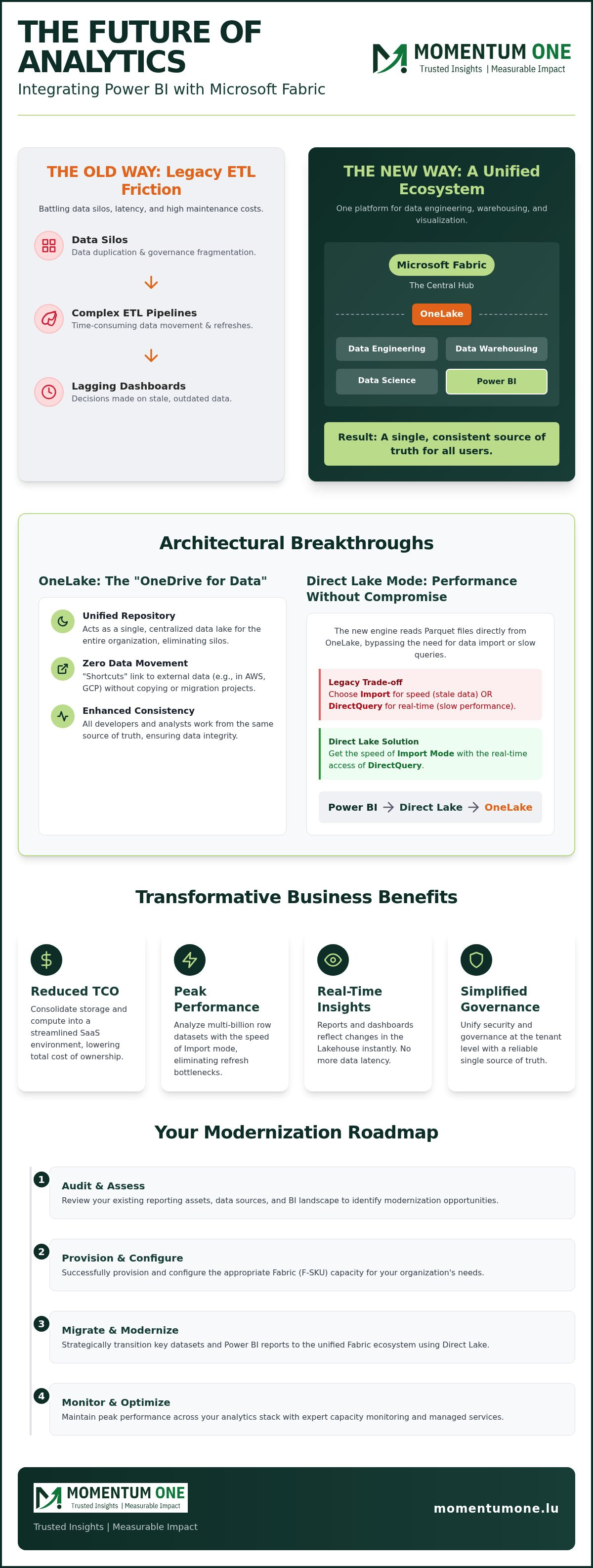
The shift from legacy, fragmented systems to a unified SaaS environment represents a fundamental change in how enterprises handle data. Historically, business intelligence was a separate layer perched atop complex data warehouses. Integrating Power BI with Microsoft Fabric collapses these boundaries, merging data engineering, warehousing, and visualization into one cohesive platform. This transition eliminates the "ETL tax," which is the significant time and resource drain spent moving data between disconnected stages. Instead of waiting hours for pipelines to finish, analysts can access data the moment it enters the system.
Breaking Down Data Silos with OneLake
OneLake serves as the "OneDrive for Data," acting as a centralized repository where all organizational information resides in a single, open format. It removes the need for "copy-paste" data management. Instead of duplicating storage for each department, you can use "Shortcuts" to link data from external clouds like AWS or GCP directly into your Fabric environment. This ensures that Microsoft Power BI reports access the most current data without the latency of traditional data movement. This architecture provides several immediate benefits:
- Reduced storage costs through data deduplication across the tenant.
- Simplified access to cross-cloud data without complex migration projects.
- Enhanced data consistency for all developers using a single source of truth.
For enterprise leaders, this means a clearer path to data consistency. It allows your team to maintain a lean architecture while still supporting diverse data needs across the entire organization. By integrating Power BI with Microsoft Fabric, you ensure that your data foundation is as agile as your business needs.
Power BI's New Role in the Fabric Workspace
In the Fabric ecosystem, Power BI isn't just a standalone tool; it's the primary visualization layer deeply embedded within the workspace. This integration creates a tight synergy between Lakehouses, Warehouses, and Semantic Models. For Luxembourgish firms, this setup provides a reliable single source of truth, ensuring that every stakeholder looks at the same numbers. We often see clients struggle with governance across separate BI tools, but Fabric Migration & Modernization simplifies this by unifying security and governance at the tenant level.
Your team stops managing infrastructure and starts focusing on high-impact insights. This modernization isn't just about new features; it's about building a data culture that is resilient and scalable for the years ahead. Integrating Power BI with Microsoft Fabric allows you to leverage the full power of your data without the friction of legacy architectures.
Direct Lake Mode: The Technical Foundation of Fabric-Power BI Synergy
Direct Lake mode represents the most significant architectural shift in the history of the platform. It's a groundbreaking engine that reads Parquet-formatted files directly from OneLake. This effectively bridges the gap between massive data volumes and lightning-fast reporting. By integrating Power BI with Microsoft Fabric, you bypass the traditional need to "import" data into a separate model. Instead, the VertiPaq engine interacts directly with the Delta Lake storage. This creates a scenario where you get the performance of Import mode without the management burden of scheduled refreshes.
Legacy methods often forced a compromise. You either chose Import mode for speed at the cost of data freshness, or DirectQuery for real-time access at the cost of query performance. Direct Lake removes this binary choice. It provides a secure, high-performance environment similar to the standards required for Power BI for US Government, ensuring that enterprise-grade reliability is built into the foundation of every report. It's the technical glue that makes a unified data ecosystem possible.
How Direct Lake Eliminates the Refresh Bottleneck
The primary advantage of this synergy is real-time visibility. When data changes in your Lakehouse, those updates are immediately available in your reports. You're no longer reliant on the source system's ability to handle heavy SQL queries during a refresh cycle. This is a game-changer for organizations managing multi-billion row datasets. By bypassing the SQL layer, you significantly reduce the load on your underlying infrastructure, allowing for smoother operations across the board. Reports stay fast, and data stays current without manual intervention.
Optimizing DAX Performance in a Fabric Environment
While the engine is faster, the logic still requires precision. DAX optimization experts prioritize Direct Lake because it provides a clean, high-performance canvas for complex calculations. To maximize query speed, it's essential to model your data correctly within the Parquet files. Direct Lake avoids the 'DirectQuery' performance penalty by loading data directly into memory from the lake without needing to translate DAX into SQL on the fly. This ensures your end users experience zero lag, even when slicing through massive volumes of historical data. If you want to ensure your environment is configured for maximum efficiency, our Power BI Consulting & Governance experts can provide a tailored audit of your current setup.
Performance and Cost Benefits: Moving Beyond Legacy Architectures
Integrating Power BI with Microsoft Fabric offers a significant reduction in total cost of ownership by consolidating your entire analytics stack. Traditionally, enterprises managed a fragmented mix of Azure Synapse for warehousing and Power BI Premium for reporting. This required multiple vendors, separate security models, and complex billing. By moving to a unified SaaS model, you eliminate the overhead of maintaining these disparate systems. The shift to Fabric capacity (F-SKUs) provides more granular control than the older P-SKUs, allowing you to scale resources up or down based on actual usage rather than rigid, pre-allocated tiers.
Performance gains are equally impactful. Benchmarks show that query response times in an integrated environment often outperform non-integrated setups because data stays in its native Parquet format. You're no longer paying the "performance tax" of data translation between layers. This streamlined architecture means fewer specialized tools to manage, which lets your data team focus on delivering insights rather than fixing broken pipes.
Direct Lake vs. Import vs. DirectQuery: A 2026 Comparison
Choosing the right connection mode depends on your specific needs for speed and data freshness. While Direct Lake is the preferred foundation for most enterprise reports, it includes a "fallback" mechanism. If a dataset exceeds the memory limits of your assigned capacity, the system automatically reverts to DirectQuery to ensure the report remains available, albeit with a slight performance dip. The table below summarizes how these modes compare in a modern Fabric environment.
| Feature | Direct Lake | Import Mode | DirectQuery |
|---|---|---|---|
| Latency | Low (Near-Instant) | Low (Post-Refresh) | High (Real-Time) |
| Scalability | Very High | Medium | High |
| Maintenance | Minimal | High (Schedules) | Medium |
Managing Fabric Capacity and Costs
Fabric compute utilizes "Smoothing" and "Bursting" to optimize performance. Bursting allows your system to use extra power for intensive tasks, while Smoothing spreads that compute cost over a 24-hour period to prevent billing spikes. Understanding these features is vital for budget predictability. For instance, an F2 capacity starts at approximately $262.80 per month, while an F64 SKU costs about $8,410 per month but removes the need for individual Power BI Pro licenses for report viewers.
Strategic licensing is key to maximizing your return. Many organizations find that managed Power BI services provide the necessary oversight to monitor these capacities and prevent waste. OneLake storage remains affordable at approximately $0.023 per GB per month, making it a cost-effective alternative to traditional data lakes. Ultimately, integrating Power BI with Microsoft Fabric allows you to move away from rigid P-SKU allocations and toward a more elastic, performance-driven data culture.
Implementation Strategy: A Roadmap for Seamless Fabric Integration
Moving from a legacy Power BI Premium environment to a unified Fabric ecosystem requires more than just a license change. It's a strategic shift that demands a structured approach. Integrating Power BI with Microsoft Fabric is most successful when you follow a phased roadmap that minimizes disruption while maximizing performance gains. This process allows your team to move away from fragmented data silos and toward a high-performance, virtualized environment.
- Audit existing assets: Evaluate your current report inventory. Identify high-priority candidates that suffer from long refresh times or large data volumes.
- Provision Fabric Capacity: Select the appropriate F-SKU based on your performance needs. Configure tenant-level settings to enable Fabric features across your organization.
- Establish OneLake Architecture: Design your Lakehouse or Warehouse structure. This is where your data will live in Parquet format, accessible via Direct Lake.
- Transition Semantic Models: Update your models to leverage Direct Lake mode. This step is crucial for achieving the speed and efficiency discussed earlier in this guide.
- Unify Governance: Implement a single security framework that covers everything from ingestion to the final dashboard.
Preparing Your Workspace for the Fabric Transition
Successful integration starts with mapping your existing Power BI workspaces to the new Fabric hierarchy. This isn't just about moving files; it's about reorganizing how data flows between engineering and reporting teams. Effective workspace and capacity management ensures that your resources are allocated efficiently without bottlenecking critical business reports. If you're looking for a more detailed technical breakdown, see our guide on Microsoft Fabric migration services for a deeper roadmap.
Governance and Security in a Unified Environment
One of the most compelling reasons for integrating Power BI with Microsoft Fabric is the ability to apply a single security model. Instead of managing Row-Level Security (RLS) separately in the database and the BI layer, you apply it once at the Fabric level. This "write once, apply everywhere" approach reduces human error and simplifies audits. It ensures that security rules stay consistent regardless of which tool is used to access the data.
Data lineage also becomes transparent. You can track data from the initial ingestion pipeline through the Lakehouse and into the final Power BI visual. This level of visibility is essential for maintaining compliance with Luxembourg's national data regulations. It ensures that your data remains secure, governed, and fully traceable. To start your journey with a partner who understands these complexities, explore our Fabric Migration & Modernization services today.
Future-Proofing Your Data Culture with Momentum One
The technical transition is only half the battle. To truly unlock the value of integrating Power BI with Microsoft Fabric, your organization needs a culture that embraces these new capabilities. As a boutique Microsoft Solutions Partner, Momentum One provides a level of tailored attention that large global firms simply cannot match. We don't just hand over a new environment; we work as a proactive ally to ensure your team is ready to drive growth using these advanced tools. Our focus remains on practical outcomes that improve accuracy and efficiency across your entire data stack.
Our approach to Fabric Migration & Modernization is built on a foundation of technical excellence and strategic partnership. We guide Luxembourgish enterprises through the 2026 Microsoft roadmap, ensuring that your architecture is not only current but resilient against future shifts in the industry. By combining deep technical implementation with corporate data fabric training, we bridge the gap between complex engineering and actionable business intelligence.
Customized Training for Fabric Adoption
Adopting a unified platform requires upskilling your most valuable asset: your people. We help your existing Power BI developers transition into Fabric data engineers through hands-on workshops. These sessions focus on practical Lakehouse design and pipeline automation, moving beyond theory to solve the specific bottlenecks your team faces daily. Our goal is to empower your business users to leverage self-service BI within a governed tenant. This ensures that while users have the freedom to explore data, the single source of truth remains intact and protected.
Managed Services for Peak Performance
Maintaining peak performance requires continuous oversight and expert adjustment. Our managed Power BI services focus on optimizing your ROI by monitoring Fabric capacity in real-time. We handle the complexities of capacity smoothing and bursting so you don't face unexpected billing surprises. Whether it's ad-hoc DAX troubleshooting or performance tuning for massive enterprise datasets, we act as your steady hand in a complex field. Integrating Power BI with Microsoft Fabric is a journey, and we are committed to being your dedicated partner every step of the way.
Mastering the Future of Unified Analytics
Integrating Power BI with Microsoft Fabric is no longer a luxury for enterprise teams; it's a foundational requirement for staying competitive in 2026. By leveraging Direct Lake mode and a unified OneLake architecture, your organization can eliminate the high costs of data duplication and the constant frustration of refresh latency. This architectural shift allows your developers to focus on high-impact insights rather than manual infrastructure maintenance. It ensures that your reporting layer is always in sync with your engineering efforts.
As a specialized Luxembourgish corporate consultancy and certified Microsoft Solutions Partner, we provide the steady hand needed to navigate this complex transition. Our expert DAX and Fabric migration team is dedicated to your success, whether you're provisioning your first F-SKU or upskilling your entire department through customized workshops. We believe that a modernized data stack is the bedrock of a resilient and agile business. Modernize your data stack with Momentum One's Fabric Migration services and turn your data ecosystem into a proactive engine for growth. Let's build a more efficient, data-driven future together.
Frequently Asked Questions
What is the difference between Power BI and Microsoft Fabric?
Microsoft Fabric is a comprehensive SaaS analytics platform, while Power BI is the specialized business intelligence tool within that platform. Integrating Power BI with Microsoft Fabric allows you to connect visualization directly to data engineering, data science, and real-time analytics. While Power BI focuses on reporting, Fabric provides the underlying architecture like OneLake and Lakehouses. This unification ensures your team works in a single environment instead of jumping between disconnected tools and services.
Does Microsoft Fabric replace Power BI Premium?
Microsoft Fabric doesn't just replace Power BI Premium; it expands upon it. Microsoft is transitioning from P-SKUs to F-SKUs to provide more flexibility. Fabric capacity offers the same features as Premium, such as large model support and paginated reports, but adds access to the full suite of Fabric workloads. This shift allows organizations to pay for compute that supports both data engineering and business intelligence, streamlining your licensing and reducing administrative overhead.
What are the prerequisites for using Direct Lake mode in Power BI?
To leverage Direct Lake mode, your data must reside in OneLake in the Delta Parquet format. You also need a Fabric capacity or a Power BI Premium capacity to host the workspace. The semantic model must be created directly from a Fabric Lakehouse or Warehouse. This setup ensures the engine can read files directly without an import process. It's a key requirement for achieving the high performance levels expected in modern enterprise reporting.
Can I use Microsoft Fabric with my existing Power BI Pro licenses?
You can use existing Power BI Pro licenses for individual report creation and sharing within small teams. However, if you want to share reports with "free" users across your organization, you'll need an F64 capacity or higher. For smaller setups, Power BI Pro or Premium Per User (PPU) licenses still function as they always have. Integrating Power BI with Microsoft Fabric provides a scalable path from individual licenses to large-scale enterprise capacities.
How does Microsoft Fabric improve Power BI report performance?
Performance improves significantly by removing the data refresh bottleneck through Direct Lake technology. This engine reads Parquet files directly from OneLake, which eliminates the latency associated with scheduled refreshes. It combines the speed of Import mode with the real-time nature of DirectQuery. By reducing the load on source systems and bypassing the SQL translation layer, reports load faster and handle multi-billion row datasets with zero lag for the end user.
Is data movement required when integrating Power BI with Fabric?
Data movement isn't required when you use the unified OneLake architecture. Through a feature called "Shortcuts," you can reference data residing in other clouds or storage accounts without copying it. This "data virtualization" approach ensures that your Power BI reports reflect the most current information available. It stops the cycle of creating redundant data copies, which simplifies your governance and reduces your total storage costs across the entire enterprise ecosystem.
How do I manage costs when migrating to Microsoft Fabric capacity?
Managing costs involves selecting the right F-SKU and monitoring your compute usage through the Fabric Capacity Metrics app. You can take advantage of "Smoothing" to spread heavy workloads over time and "Bursting" for temporary performance spikes. Many Luxembourgish firms partner with us for managed services to handle this monitoring. We ensure your capacity is sized correctly to prevent waste while maintaining the performance levels your business users expect.
Can I still use Import mode if I move to Microsoft Fabric?
You can still use Import mode if you choose to move to Microsoft Fabric. While Direct Lake is the preferred foundation for high-performance enterprise reporting, Import mode remains a valid choice for smaller datasets or specific modeling requirements. Fabric is designed to be flexible, allowing you to mix connection modes within the same tenant. Our team helps you decide when to stick with traditional methods and when to transition to more modern architectures.