Azure Data Factory to Microsoft Fabric Migration: The Strategic 2026 Guide
Plan your Azure Data Factory to Microsoft Fabric migration with confidence. Our strategic 2026 guide covers roadmaps, paths, and a seamless PaaS to SaaS shift.
- Master the transition from PaaS to SaaS by following a strategic roadmap for your Azure Data Factory to Microsoft Fabric migration.
- Identify the essential architectural changes required to move from Integration Runtimes to On-premises Data Gateways and Dataflow Gen2.
- Evaluate three distinct migration paths—Mount, Upgrade, or Rebuild—to find the lowest-risk approach for your unique data estate.
- Secure your production environment with a phased implementation plan that prioritizes capacity planning and robust data governance.
- Consolidate disparate data silos into OneLake to create a unified source of truth that simplifies reporting and accelerates AI readiness.
A Forrester Consulting study found that Microsoft Fabric delivers a 379% ROI over three years. While that's a compelling reason to modernize, the actual path of an Azure Data Factory to Microsoft Fabric migration often feels daunting. You've spent years perfecting your PaaS architecture; the thought of rebuilding pipelines or losing custom code support is enough to give any data engineer pause. It's natural to worry about disrupting the Power BI reporting that keeps your business moving.
We understand that you need more than just a tool; you need a steady hand to guide the transition. This guide promises to simplify that complexity by providing a comprehensive roadmap from PaaS to SaaS. You'll learn how to leverage the built-in migration experience available as of June 2026 to assess readiness and protect your existing workloads. We'll walk through the strategic steps to ensure a seamless transition to a unified data platform, highlighting how OneLake integration can boost your team's productivity by up to 25%. From managing capacity units to ensuring activity parity, we'll help you navigate this evolution with confidence and precision.
Why Migrate Azure Data Factory to Microsoft Fabric in 2026?
The data environment has evolved rapidly. By 2026, the manual effort required to maintain individual PaaS resources often outweighs the benefits of fine-grained control. Initiating an Azure Data Factory to Microsoft Fabric migration allows your organization to move from a fragmented setup to a streamlined, SaaS-native experience. This shift isn't just a technical upgrade; it's a strategic move to focus your engineering talent on high-value business logic rather than infrastructure maintenance.
Integrated AI tools like Copilot now play a central role in modern data orchestration. According to a Forrester Consulting study, organizations using Microsoft Fabric see a 25% increase in data engineering productivity. This gain comes from automating repetitive tasks and simplifying CI/CD workflows. Fabric eliminates the need for complex external Git dependencies for many tasks, allowing teams to manage versioning and deployments within a more unified interface. You'll find that reducing this operational overhead directly translates to faster time-to-market for critical business insights.
The Shift from Resource Management to Value Delivery
The SaaS-native architecture of Fabric removes the traditional burden of provisioning and scaling PaaS instances. You no longer need to worry about the overhead of managing separate compute nodes for different tasks. Instead, Fabric uses a unified capacity model that shares power between Lakehouses, Warehouses, and Pipelines. This flexibility ensures that your resources are always allocated where they're needed most. Faster deployment cycles mean your business can respond to market changes in hours, not days. We see this as a fundamental change in how data teams operate, moving from "plumbing" to pure value creation.
Unlocking Advanced Analytics with OneLake Integration
OneLake functions as the single source of truth for your entire organization. It effectively ends data duplication through the "Shortcut" feature, which lets you access data across different environments without moving or copying it. This approach significantly reduces storage costs, which are billed at approximately $0.023 per GB per month. By consolidating data silos into this unified "OneDrive for data," you create a foundation that's ready for the next generation of analytics.
- Streamline semantic model refreshes by connecting Data Factory directly to OneLake assets without complex gateway hops.
- Reduce operational complexity by eliminating the "copy-paste" culture of data management that plagues older architectures.
- Prepare for AI-readiness by ensuring your diverse datasets are stored in a consistent, governed environment that Copilot can easily interpret.
This architectural consolidation simplifies your governance framework. When every pipeline and dataset lives within the same SaaS umbrella, tracking lineage and managing security becomes a native function rather than a manual chore. It's about building a data estate that's resilient, scalable, and prepared for whatever 2027 brings.
Navigating the Architectural Shift: ADF vs. Fabric Data Factory
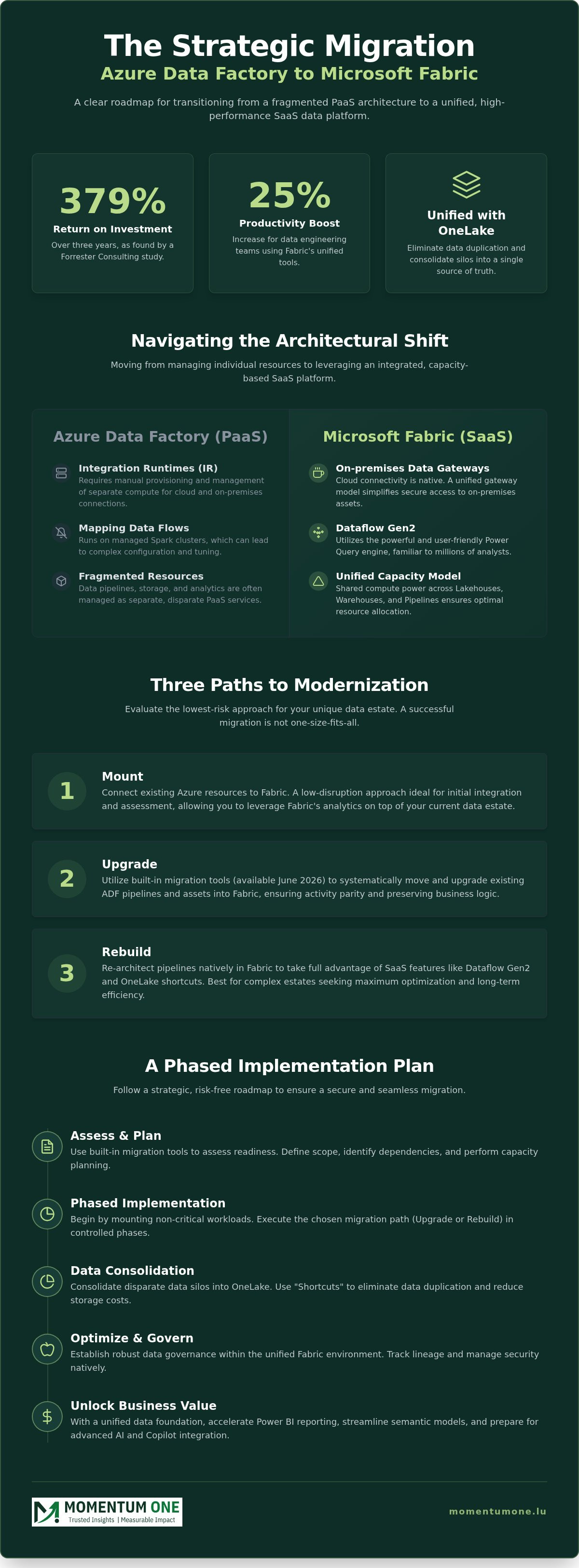
An Azure Data Factory to Microsoft Fabric migration involves more than a simple lift-and-shift of JSON files. You're moving from a platform where you manage individual resources to an integrated environment where services share a common backbone. This shift changes everything from how you connect to data sources to how you pay for compute power. It requires a fundamental rethink of your data orchestration strategy to ensure you're taking full advantage of the SaaS model's efficiency.
Integration Runtimes vs. Fabric Gateways
In the ADF environment, you're accustomed to provisioning and managing Integration Runtimes (IR). In Fabric, the Cloud IR is effectively absorbed into the Fabric capacity. You don't manage it as a separate resource; it's simply a native part of the platform. However, for hybrid scenarios, you'll need to transition to On-premises Data Gateways (OPDG). These gateways act as the secure bridge between your local data and the cloud, providing a consistent experience across Power BI and Data Factory. Connectivity management in 2026 shifts from maintaining complex runtime infrastructure to a streamlined, gateway-driven model that simplifies secure access to local assets.
Mapping Data Flows and Dataflow Gen2
One of the most significant changes is the engine behind data transformation. ADF Mapping Data Flows run on Spark clusters, while Fabric Dataflow Gen2 utilizes the Power Query engine. This is a massive win for teams already comfortable with Power BI, but it requires a different approach to performance optimization. To get the most out of Gen2, you should enable the "Staging" feature, which offloads transformations to SQL compute for significantly faster processing. If you have extremely complex logic that requires heavy Spark processing, transitioning those specific flows to Fabric Notebooks is often the better strategic choice for performance and scalability.
Security and cost management also undergo a total transformation. Security moves from the granular Azure RBAC model to Fabric Workspace roles, such as Admin, Member, Contributor, and Viewer. This simplifies governance by grouping permissions around the workspace rather than individual resources. Cost attribution also shifts from consumption-based vCore charges to Fabric Capacity Units (CUs). This allows for better predictability; for instance, a one-year reservation can reduce costs by approximately 41% compared to pay-as-you-go rates. If you're feeling uncertain about these architectural changes, our team can help you navigate the nuances of gateway connectivity and 24/7 support to ensure your hybrid environment remains stable and performant.
Evaluating Your Migration Paths: Mount, Upgrade, or Rebuild?
Every data estate is unique. Choosing the right path for your Azure Data Factory to Microsoft Fabric migration isn't a one-size-fits-all decision; it's a strategic choice that balances speed with long-term architectural health. You don't want to carry old technical debt into a modern SaaS environment. By evaluating your pipelines based on complexity and business criticality, you can select a method that ensures stability while unlocking new performance levels.
The Mount-First Approach for Continuity
The Mount-First strategy serves as an ideal entry point for teams prioritizing continuity. By using the Azure Data Factory item within the Fabric workspace, you can trigger existing ADF pipelines without immediate refactoring. This allows you to maintain your established artifacts while gradually exploring new SaaS features. It's a low-risk way to begin your Microsoft Fabric Migration Services journey without disrupting current production schedules. You get the benefit of a unified workspace immediately while deferring the technical heavy lifting until your team is ready.
Automated Upgrades and Technical Parity
For pipelines that align with Fabric's native capabilities, the built-in Pipeline Upgrade experience is the most efficient choice. This tool, available as of June 2026, assesses readiness directly within the ADF interface and highlights parity gaps before you commit. While many activities transition seamlessly, it's important to remember that ADF and Fabric use incompatible JSON structures. The tool handles the conversion for you, but some features, like SSIS integration runtimes, don't have a direct migration path. Post-migration validation is critical. You must verify that your "Connections" are correctly scoped and authenticated to replace the old Linked Services and Datasets.
When to Choose a Manual Modernization Strategy
Sometimes, the best way forward is to start fresh. Manual modernization is necessary when you're dealing with significant technical debt or legacy pipelines that rely heavily on custom code. Instead of forcing old patterns into a new environment, you can refactor these processes to leverage Fabric-native Spark or Notebooks. This approach often results in better performance and lower long-term maintenance costs. If your existing architecture feels brittle or overly complex, our Data Architecture Modernization expertise can help you design a more resilient, future-proof estate.
To choose the right path, use this simple framework:
- Automated Upgrade: Use for standard pipelines with high feature parity and clear documentation.
- Mount-First: Choose this for mission-critical workloads where zero downtime is the primary requirement.
- Manual Rebuild: Best for legacy flows that need optimization or use custom activities not supported in the SaaS model.
Taking the time to assess these paths now prevents costly rework later. It's about moving at a pace that suits your business while ensuring your new Fabric environment is built on a solid, scalable foundation.
A Strategic Roadmap for a Risk-Free Migration
A successful Azure Data Factory to Microsoft Fabric migration depends on a structured, multi-phase roadmap. You shouldn't treat this as a simple weekend project. It's a strategic transition that requires careful planning to avoid breaking production reporting or losing data lineage. By following a methodical path, you ensure that every pipeline is optimized for the SaaS environment rather than just copied into it. This approach minimizes downtime and helps your team adapt to the new orchestration patterns without the stress of a "big bang" cutover.
Audit and Readiness Assessment
Before moving a single byte, you must perform a deep audit of your current ADF estate. Categorize your pipelines based on their business criticality and technical complexity. Look for specific dependencies that don't have direct equivalents, such as custom activities or Azure Batch tasks. This is the time to identify which workloads are ready for the automated upgrade tool and which require a manual rebuild to leverage the Power Query engine. For a deeper dive into these technical prerequisites, consult our Microsoft Fabric Migration Services Guide.
Once your audit is complete, focus on capacity planning. Fabric pricing is based on Capacity Units (CUs), and choosing the right tier is vital for performance. For instance, as of August 2026, an F64 capacity costs approximately $8,410 per month on a pay-as-you-go basis. We recommend starting with a pilot migration of non-critical workloads. This allows your team to test the new "Connections" model and validate data integrity without risking your primary dashboards. It's a low-pressure way to learn the nuances of the SaaS model before migrating mission-critical data flows.
Governance and CI/CD in the Fabric Ecosystem
Transitioning to Fabric allows you to simplify your governance and deployment workflows significantly. Unlike the PaaS model, Fabric enables you to set up deployment pipelines without the heavy overhead of managing external Git dependencies for every minor change. This native integration reduces friction for your engineering team and speeds up the release cycle. Security also shifts from Azure RBAC to more intuitive workspace roles. You'll define permissions like Contributor or Member at the workspace level, ensuring that data access is consistent across pipelines and Lakehouses.
Establishing these guardrails early prevents the "Wild West" scenario often seen in unmanaged migrations. You need clear policies for data access and workspace management to maintain a scalable, governed environment. If you're looking to build a robust framework for your new data estate, our Power BI Consulting & Governance experts can help you design a secure, high-performance architecture. We focus on creating a environment that's both flexible for developers and secure for the enterprise.
Ready to begin your transition? Contact us today for a tailored Fabric Migration & Modernization strategy that minimizes risk and maximizes your ROI.
Partnering for Success: How Momentum One Facilitates Your Migration
Executing an Azure Data Factory to Microsoft Fabric migration requires more than technical proficiency; it demands a strategic partner who understands the long-term implications for your organizational data culture. We position Momentum One as the steady hand for these complex implementations, ensuring that your transition to a SaaS-native environment is both smooth and highly performant. Our collaborative approach focuses on simplifying the architectural complexity of modern data stacks so your team can focus on delivering actionable business value rather than managing infrastructure.
Expert Technical Implementation and Support
We handle the heavy lifting of pipeline refactoring, transforming legacy ADF artifacts into modern Fabric-native entities. This process involves more than just converting JSON files; we look for opportunities to optimize your data flows for the Power Query engine and Spark-based notebooks. Our experts ensure that your DAX optimization and report performance are prioritized from day one, preventing the common pitfalls of unmanaged migrations. By leveraging our Pipeline and Dataflow Automation services, you can minimize downtime and ensure that your production reporting remains accurate and reliable throughout the transition.
Managed Services for Long-Term Scalability
Our commitment to your success doesn't end when the migration is complete. We provide managed services designed for continuous performance tuning and governance oversight within your new Fabric environment. This includes regular architectural reviews to ensure your Capacity Unit (CU) usage remains efficient and cost-effective. We help you maintain a scalable, governed data estate that grows with your business needs. For a detailed look at how we maintain these standards, explore our Managed Power BI Services Guide, which outlines our approach to ensuring long-term stability.
Empowering your internal team is a core part of our philosophy. We offer tailored corporate training solutions that bridge the gap between traditional ADF knowledge and the new Fabric ecosystem. These sessions are designed to give your data engineers the confidence to manage the unified platform independently, from OneLake management to advanced AI-driven orchestration. As a certified Microsoft Solutions Partner with over 8 years of experience in the Microsoft data ecosystem, we bring the expertise needed to turn your migration into a catalyst for growth. We're here to ensure your journey to Microsoft Fabric is a resounding success for your entire organization across Luxembourg.
Securing Your High-Performance Data Future
Modernizing your data architecture is a defining step toward organizational agility. An Azure Data Factory to Microsoft Fabric migration represents more than a platform change; it's a strategic shift that replaces fragmented PaaS management with a unified, SaaS-native experience. By selecting the right migration path and establishing robust governance early, you're positioning your business to leverage the full power of OneLake and AI-driven orchestration.
You don't have to navigate this transition in isolation. As a Microsoft Solutions Partner, Momentum One offers the technical expertise and collaborative support needed to ensure a risk-free modernization. Our dedicated support from Luxembourg-based experts and comprehensive managed BI services provide the reliability your mission-critical workloads demand. We're committed to being your proactive ally, simplifying the technical hurdles so you can focus on growth.
Start your Microsoft Fabric migration journey with Momentum One and secure a resilient foundation for your data estate.
Frequently Asked Questions
Can I migrate all Azure Data Factory activities to Microsoft Fabric?
Not all activities have direct parity in the new environment. While the built-in tool handles many standard tasks, some components like SSIS integration runtimes and specific custom activities require manual workarounds. You'll need to assess each pipeline's readiness before starting your Azure Data Factory to Microsoft Fabric migration. Identifying these gaps early ensures your modernized estate remains functional and avoids unexpected breaks in your production data flows.
How does the cost of Fabric Data Factory compare to Azure Data Factory?
Fabric moves from consumption-based billing to capacity-based pricing measured in Capacity Units (CUs). While ADF charges for data flow execution at $0.274 per vCore-hour, Fabric allows you to share capacity across multiple services like Lakehouses and Warehouses. A one-year reservation for Fabric can reduce costs by approximately 41% compared to pay-as-you-go rates. This shift often results in more predictable monthly spending for large enterprise workloads.
What happens to my Self-Hosted Integration Runtimes (SHIR) after migration?
Self-Hosted Integration Runtimes are replaced by On-premises Data Gateways (OPDG) in the Fabric ecosystem. These gateways provide the necessary secure bridge to your local data sources. You'll need to install and configure the gateway to maintain hybrid connectivity. This transition simplifies management by unifying the gateway experience across both Power BI and Data Factory within the same SaaS tenant, reducing the need for separate runtime infrastructure.
Is there a built-in tool for ADF to Fabric migration?
Yes, a built-in migration experience is available as of June 2026 to facilitate the transition. This tool assesses your existing pipelines for readiness and handles the conversion of JSON structures, which are natively incompatible between the two platforms. It provides a detailed report on which activities can move automatically and which require manual intervention, helping you plan a risk-mitigated Azure Data Factory to Microsoft Fabric migration with precision.
How do I handle custom code or Azure Batch activities in Fabric?
Custom code and Azure Batch tasks should be refactored into Fabric Notebooks using Spark. This approach is often more performant and integrates better with the native OneLake architecture. By moving logic into Notebooks, you gain access to the full power of Spark-based processing without the overhead of managing external batch accounts. It's a key part of modernizing legacy pipelines for long-term scalability and significantly easier maintenance for your engineering team.
Do I need to rebuild my Power BI reports after migrating the underlying pipelines?
You don't need to rebuild your Power BI reports, but you'll need to update their data sources. Once your pipelines move to Fabric, the reports should point to the new Lakehouse or Warehouse tables in OneLake. Because Fabric and Power BI share the same underlying platform, this transition is usually seamless. It often results in faster report refreshes by eliminating the need for complex gateway hops and data duplication.
What is the "Mount" feature in Fabric Data Factory?
The Mount feature allows you to run existing Azure Data Factory pipelines directly within the Fabric interface without refactoring them first. It's a strategic "as-is" approach that provides immediate workspace consolidation while you plan a deeper modernization. This feature is perfect for maintaining continuity for mission-critical workloads. It lets your team test Fabric's capabilities while keeping your production data flows stable and operational during the transition period.
How does Fabric handle CI/CD compared to Azure Data Factory?
Fabric simplifies CI/CD by providing native deployment pipelines that don't require the same external Git overhead as ADF. You can manage versions and promote changes between workspaces directly within the SaaS portal. This reduces the complexity for your engineering team and speeds up the release cycle. While external Git integration is still supported for advanced scenarios, the native tools provide a much more streamlined and integrated experience for most organizations.