Azure Databricks Best Practices: Top Performance Tips
Discover top Azure databricks best practices to optimize performance, cut costs, and secure your Lakehouse. Master Unity Catalog and DBR 19 for faster insights.
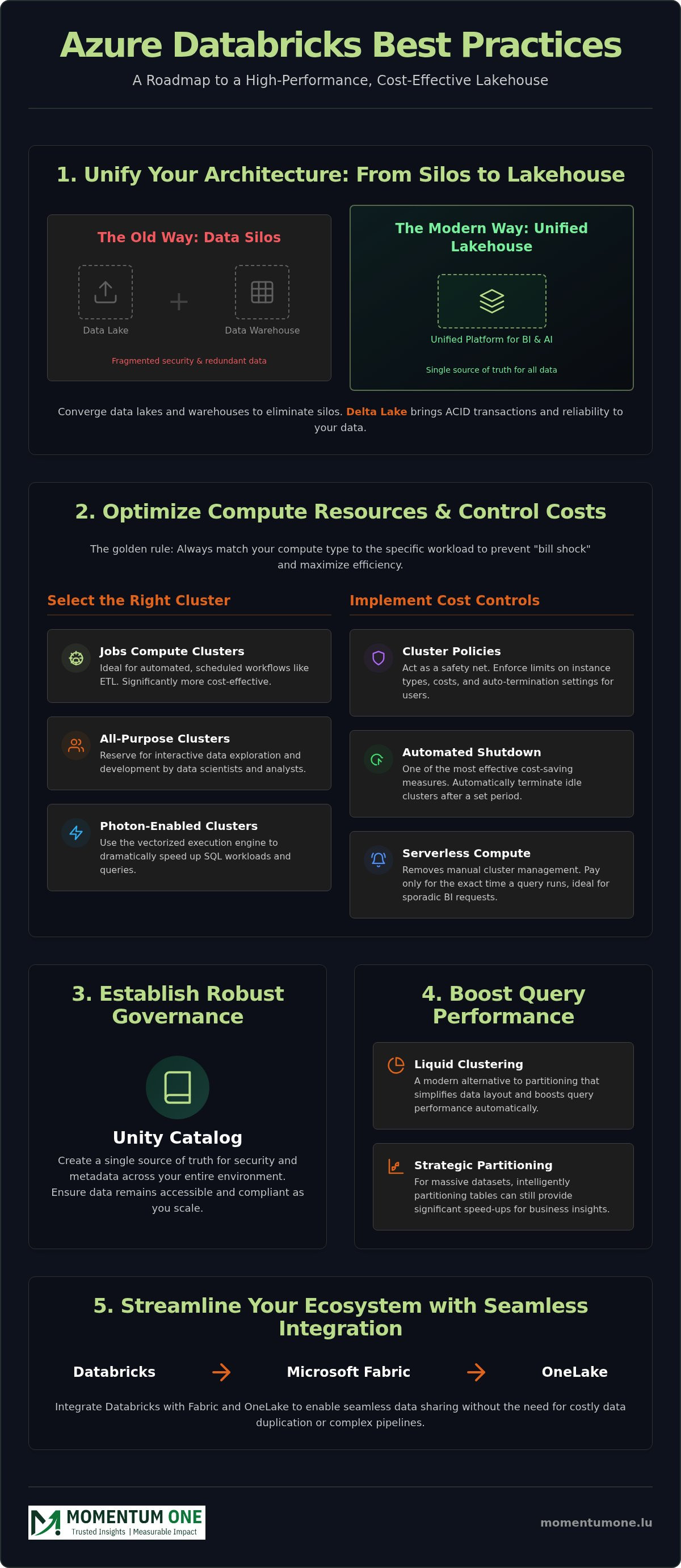
- Align your data strategy by converging data lakes and warehouses into a unified Lakehouse architecture to eliminate silos and improve data intelligence.
- Implement Azure databricks best practices for compute by matching specific resource types to workloads and leveraging serverless options to reduce operational overhead.
- Establish a robust governance framework using Unity Catalog to create a single source of truth for security and metadata across your entire environment.
- Boost query performance and data modelling efficiency by utilising Delta Lake features like Liquid Clustering and strategic partitioning for faster business insights.
- Streamline your ecosystem by integrating Databricks with Microsoft Fabric and OneLake to enable seamless data sharing without the need for costly data duplication.
What if your high-performance Lakehouse is actually a hidden drain on your operational budget? Many data teams struggle with the "wild west" of ungoverned data access and the sting of unpredictable cloud spend caused by poorly configured clusters. It's a common frustration to see downstream Power BI reports lagging while your Azure bills climb due to the complex dual billing model of DBU consumption and infrastructure costs. By implementing proven Azure databricks best practices, you can transform this complexity into a streamlined business asset and ensure your environment remains a reliable foundation for growth.
This guide provides a clear roadmap to master the architectural, security, and cost-optimisation strategies required for a modern Lakehouse. With the retirement of the Azure Databricks standard tier approaching in October 2026, now is the time to refine your setup for long-term stability. We'll preview how to leverage the latest Databricks Runtime 19, automate your environment to reduce overhead, and use Unity Catalog 0.6.0 to ensure your data remains secure. You'll gain the insights needed to build a scalable, secure ecosystem that delivers faster time-to-insight for every business user.
The Modern Lakehouse: Why Azure Databricks Best Practices Matter in 2026
The data landscape has evolved rapidly, and by 2026, the distinction between high-scale data lakes and high-performance data warehouses has largely vanished. This convergence is known as the Lakehouse architecture, and Databricks serves as the primary engine for this unified data intelligence. A Lakehouse is a unified platform for BI and AI. Without a structured approach, however, environments quickly accumulate architectural debt. This debt manifests as redundant datasets, spiralling costs, and fragmented security policies that hinder your team's agility. Adopting Azure databricks best practices isn't just a technical choice; it's a strategic necessity to keep your environment stable and productive.
The Shift from Data Silos to Unified Intelligence
In many traditional setups, data scientists and business analysts operate in separate worlds with different tools. Databricks breaks these barriers by providing a shared workspace where raw data and refined insights coexist. At the heart of this transition is Delta Lake, which brings ACID transactions and reliability to your data lake. In 2026, building a high-performance environment requires a governance-first mindset. With the retirement of the Azure Databricks standard tier workspace set for October 2026, moving toward a premium, governed architecture ensures your data remains accessible and compliant as your organisation scales. This shift ensures that every user, regardless of their technical depth, works from the same high-quality data source.
The Business Value of Architectural Rigour
Rigorous design directly translates to faster ROI for your data projects. When your architecture is optimised, business users get answers in seconds rather than minutes, and the total cost of ownership drops significantly. Proactive design prevents the surprise bills often associated with unmanaged compute clusters or inefficient data processing. By focusing on Data Warehouse & Lakehouse Design, you create a steady foundation that supports both current reporting needs and future AI initiatives. This structured approach reduces operational friction and lets your team focus on extracting value instead of fixing broken pipelines. Following these Azure databricks best practices ensures your technical environment remains a high-performance business asset rather than a complex liability.
Optimising Compute Resources and Cost Management
Managing cloud costs requires more than just monitoring a dashboard; it demands a proactive strategy that aligns infrastructure with intent. The golden rule for Azure databricks best practices is simple: always match your compute type to the specific workload. Using an expensive interactive cluster for a background ETL job is a common oversight that inflates bills without adding value. By categorising tasks into ETL or BI, you ensure that every dollar spent contributes directly to performance. This approach prevents the "bill shock" often associated with the dual billing model of DBU consumption and underlying Azure infrastructure.
Selecting the Right Cluster for the Job
Jobs Compute clusters are designed for automated, scheduled workflows. They are significantly more cost-effective than All-Purpose clusters, which you should reserve for interactive data exploration and development. For high-performance querying, Photon-enabled clusters provide a vectorised execution engine that dramatically speeds up SQL workloads. Choosing the right VM family is equally vital. Use memory-optimised instances for heavy data processing and compute-optimised instances for tasks that require intense calculations but less RAM. Matching these resources correctly ensures your environment remains snappy without wasting capacity.
Strategic Cost Control Frameworks
Cluster policies act as a safety net, preventing end-users from accidentally launching oversized, expensive instances. These policies allow administrators to enforce limits on instance types and auto-termination settings. In 2026, serverless compute has become a cornerstone of operational efficiency. It removes the need for manual cluster management and ensures you only pay for the exact time a query runs, which is particularly useful for sporadic BI requests. Using automated shut-down triggers is one of the most effective ways to protect your budget from idle resources.
Leveraging Spot Instances for non-critical batch processing can reduce your infrastructure costs by up to 70%. To ensure these settings are applied consistently across your organisation, it's often helpful to seek expert Workspace & Capacity Management. Applying tags to your clusters is another essential step for granular cost attribution. This allows finance teams to track spend by department or project, turning a vague cloud bill into a transparent report. If you're looking to maintain a lean environment, our team can partner with you to implement these controls through our managed services, ensuring your Lakehouse remains a high-performance asset.
Establishing Robust Data Governance with Unity Catalog
Data governance is often viewed as a trade-off between security and speed. However, Unity Catalog changes this dynamic by serving as a single source of truth for all metadata and security policies across your organisation. Unity Catalog simplifies multi-workspace management by providing a central location for managing users, groups, and permissions across all your Databricks environments. By adopting these Azure databricks best practices, you can ensure that your data remains secure without becoming inaccessible to the people who need it most. This centralised approach turns governance from a bottleneck into a catalyst for trust.
Centralising Access Control and Lineage
Traditional governance models often relied on workspace-local security, which created fragmented silos and inconsistent access rules. Transitioning to account-level governance allows you to manage permissions globally. This ensures a user has the same rights whether they are working in a development or production environment. Automated data lineage is a critical component of this setup. It tracks data from its raw source through every transformation until it reaches a final dashboard. This visibility is essential for regulatory compliance, such as meeting GDPR requirements, and helps teams verify the accuracy of their insights. Managed locations further support compliance by ensuring data resides in specific geographic regions as required by local laws.
Balancing User Freedom with Corporate Oversight
One of the biggest challenges in data management is allowing teams to innovate without risking production data. We recommend designing "Sandboxes" within your architecture. These environments allow data scientists to experiment with fresh datasets while remaining under the protective umbrella of corporate security policies. This approach prevents the "wild west" scenario where data is copied into ungoverned spreadsheets. Data stewards play a vital role here; they act as the bridge between technical teams and business units, ensuring data quality remains high. Effective Power BI Consulting & Governance ensures that these governed datasets translate into reliable reports. Implementing Attribute-Based Access Control (ABAC) further scales your security by granting access based on user characteristics like department or project role. This reduces the manual effort of managing individual permissions and makes your Azure databricks best practices more sustainable as your team grows.
Performance Tuning: Delta Lake and Data Modelling
High-performance data environments are built on a foundation of efficient storage and intelligent layout. One of the most effective Azure databricks best practices is moving beyond traditional partitioning to leverage Liquid Clustering. While partitioning was once the primary method for speed, it often led to data skew or "over-partitioning" on low-cardinality columns. Liquid Clustering simplifies this by dynamically adjusting data layout, ensuring that your queries remain fast even as your data volumes grow. This flexibility is essential for maintaining a responsive Lakehouse that scales with your business needs.
The "Small File Problem" remains a common performance killer in many environments. When thousands of tiny files accumulate, the overhead of opening each one slows down read operations significantly. We recommend using Auto-Optimize features, specifically Optimized Write and Auto Compaction, to handle this automatically. By consolidating these files in the background, you maintain a healthy storage layer without manual intervention. This proactive maintenance ensures your data remains ready for high-speed analysis and reduces the latency of downstream reports.
Optimising the Delta Storage Layer
For organisations operating within the Microsoft ecosystem, using V-Order is a game-changer. V-Order is a write-time optimisation that sorts and compresses data in a way that allows for lightning-fast reads, particularly when accessed by Fabric or Power BI. To keep your environment lean, implement Predictive Optimization. This feature handles the heavy lifting of vacuuming and compaction based on actual usage patterns. It also manages schema evolution gracefully, allowing you to add or modify columns without breaking downstream pipelines or requiring a full table rewrite. This ensures your architecture stays flexible as your data requirements change.
Modelling for Downstream Analytics
Your data modelling strategy should always keep the end-user in mind. We follow the Medallion architecture, moving data from Bronze (raw) to Silver (cleansed) and finally to Gold (business-ready). Designing Gold layer tables specifically for DirectLake mode in Power BI is a critical step for 2026. This allows Power BI to read Delta tables directly from OneLake, bypassing the need for a separate import or DirectQuery step. Following these Azure databricks best practices for modelling ensures that your Power BI reports are not just accurate but exceptionally fast.
Remember that DAX performance doesn't start in the report; it starts with the physical data model in Databricks. A clean star schema in your Gold layer reduces the complexity of your measures and speeds up visual rendering. If you're looking to refine your architecture, our team can help you implement a robust Data Warehouse & Lakehouse Design. Let's work together to ensure your data models are built for speed and scalability from day one. Optimise your data modelling with our expert guidance today.
Bridging the Gap: Databricks, Fabric, and Power BI Integration
Viewing Databricks as a standalone tool is a missed opportunity for modern data teams. In the current landscape, the synergy between Databricks and Microsoft Fabric's OneLake creates a powerful, unified environment that eliminates traditional data silos. By treating OneLake as the single storage layer, you can use Databricks as the heavy-duty processing engine while serving insights through the user-friendly Fabric interface. This integration is a cornerstone of Azure databricks best practices, ensuring that your technical power translates directly into business accessibility.
One of the most impactful features in this ecosystem is the use of 'Shortcuts'. These allow Fabric to point directly to your Databricks Delta tables without copying or moving any data. It eliminates the risk of data duplication and ensures that your Power BI reports always reflect the most recent processing run. This zero-copy architecture reduces storage costs and simplifies your pipeline management, allowing your team to focus on logic rather than data movement. It's a strategic way to maintain a lean, high-performance environment.
Databricks and Microsoft Fabric: Better Together
Using Databricks for complex Spark jobs while serving data via Fabric provides the best of both worlds. You get the raw computational power needed for advanced machine learning and large-scale ETL, combined with the seamless reporting capabilities of Power BI. A unified security model across the entire Microsoft stack makes this possible, with Unity Catalog providing a consistent governance layer. This ensures that permissions set in your Lakehouse are respected all the way through to the end-user report. For those planning a transition, our Microsoft Fabric Migration Services offer a detailed roadmap for this journey.
How Momentum One Elevates Your Strategy
Success in this complex field requires more than just technical knowledge; it requires a partner who understands how these pieces fit together. We act as a steady hand, conducting deep architectural audits to identify bottlenecks in your current setup. Our performance tuning ensures your clusters are sized correctly and your data models are optimised for the fastest possible insights. Through our managed services, we provide ongoing monitoring to keep your environment stable as your data volumes grow. It's about turning a complex technical stack into a reliable business asset. Modernise your data architecture with Momentum One to build a scalable, future-proof Lakehouse that delivers real value.
Next Steps for a High-Performance Lakehouse
Building a high-performance Lakehouse requires a blend of technical precision and strategic oversight. By moving toward a governed architecture with Unity Catalog and optimising your compute resources, you transform your data from a complex cost centre into a streamlined business asset. The integration of Databricks with Microsoft Fabric and Power BI ensures that your insights are not only deep but also accessible across the entire organisation. Implementing these Azure databricks best practices is the key to maintaining stability while scaling your data initiatives in 2026.
As a certified Microsoft Solutions Partner with over 8 years of enterprise data experience, Momentum One serves as a steady hand for complex migrations and performance tuning. We specialise in DAX optimisation and Fabric performance, ensuring your technical setup delivers maximum business value. If you're ready to identify bottlenecks and refine your strategy, our team is here to help you navigate the journey. Book a Strategic Azure Databricks Review to start your modernisation today. Your path to a faster, more secure data environment begins with a clear roadmap and a dedicated partner.
Frequently Asked Questions
What is the most effective way to control costs in Azure Databricks?
The most effective way to control costs while following Azure databricks best practices is by enforcing cluster policies that limit the size and type of virtual machines available to users. You should always enable auto-termination to ensure clusters don't sit idle while incurring DBU and infrastructure charges. Setting these triggers to 10 or 15 minutes of inactivity can save a significant portion of your budget. Using Jobs clusters for automated tasks is also much cheaper than using All-Purpose clusters.
Should I use Azure Databricks or Microsoft Fabric for my data engineering?
Choosing between these platforms depends on the complexity of your workloads and your team's expertise. Azure Databricks remains the superior choice for heavy-duty Spark processing, complex data science, and high-scale machine learning tasks. Microsoft Fabric is ideal for organisations seeking a unified, SaaS-based experience with tighter integration into the Power BI ecosystem. Many enterprises find success using both, leveraging Databricks as the engine and Fabric's OneLake as the central storage layer.
How does Unity Catalog improve data security compared to older methods?
Unity Catalog moves security from a workspace-local model to a centralised, account-level framework. This shift allows you to manage permissions globally across multiple workspaces, ensuring consistent access rules for every user. It introduces Attribute-Based Access Control (ABAC), which grants permissions based on user tags like department or project role. This is a major improvement over older methods that required manual, repetitive permission settings for every individual table and workspace, reducing the risk of human error.
What is the difference between Delta Lake and a traditional data warehouse?
Delta Lake is an open-source storage layer that brings reliability and ACID transactions to data lakes, while a traditional warehouse usually relies on a proprietary storage engine. Unlike a warehouse, Delta Lake keeps your data in open Parquet files, preventing vendor lock-in. It allows you to run both BI and AI workloads on the same data source. This architecture provides the performance of a warehouse with the flexibility and scale of a modern data lake.
How do I optimize Azure Databricks performance for Power BI reports?
Optimising for Power BI starts with a clean star schema in your Gold layer. You should enable V-Order on your Delta tables to accelerate read speeds for the Power BI engine. Leveraging DirectLake mode is another critical step, as it allows Power BI to read data directly from OneLake without the latency of DirectQuery or the overhead of Import mode. These Azure databricks best practices ensure your business users experience lightning-fast report rendering and data refreshes.
Is serverless compute always the best choice for Databricks clusters?
Serverless compute is excellent for sporadic SQL workloads and BI querying because it removes the need for manual cluster management and scaling. It ensures you only pay for the exact time a query is running. However, for predictable, 24/7 heavy ETL jobs, traditional Jobs clusters with reserved instances or spot VMs might still be more cost-effective. You should evaluate your workload patterns to decide if the convenience of serverless outweighs the potential savings of managed clusters.
What are the common mistakes to avoid during a Databricks migration?
A frequent mistake is "lifting and shifting" legacy code without refactoring it for Spark's distributed architecture. This often leads to poor performance and high costs. Another error is neglecting governance from the start; you should implement Unity Catalog immediately to avoid creating ungoverned data silos. Finally, don't ignore the dual billing model. Failing to set up cluster policies and auto-termination often results in unexpected cloud spend during the first few months of operation.