On August 1, 2026, the "trusted-services" function for Azure Synapse Analytics officially retires, creating a firm deadline for teams relying on managed identities to access their data. It's no longer a question of if you should move, but how quickly you can execute an Azure Synapse to Microsoft Fabric migration. We understand that the shift from PaaS to SaaS brings a fair share of anxiety, particularly regarding technical debt and the nuances of Fabric capacity pricing. You don't want the performance gains of a modern architecture to be overshadowed by the headache of a broken reporting suite.
This guide empowers you to master the transition using an expert-led roadmap designed for the 2026 technical landscape. We'll show you how to move from infrastructure management to data-driven agility while significantly improving your Power BI performance. You'll gain a clear, risk-mitigated plan to leverage OneLake and SaaS automation, ensuring your team spends less time on maintenance and more time delivering high-level results.
Why Migrate from Azure Synapse to Microsoft Fabric in 2026?
The data landscape has shifted. For years, Azure Synapse Analytics served as the cornerstone of enterprise data warehousing, offering a robust Platform-as-a-Service (PaaS) model. However, the operational overhead of managing dedicated pools and manual scaling has become a bottleneck for teams seeking agility. Moving from fragmented PaaS to a unified SaaS environment is no longer just a trend; it's a strategic necessity. An Azure Synapse to Microsoft Fabric migration allows your team to shed the burden of infrastructure management and focus entirely on extracting value from your data.
Organizations often waste an average of 30% of their cloud analytics budget on operational overhead, according to Gartner. Microsoft Fabric addresses this directly by consolidating storage, compute, and governance into a single, cohesive platform. By adopting OneLake and the Polaris engine, you gain performance that consistently outpaces legacy dedicated pools while significantly lowering your total cost of ownership (TCO). Initiating an Azure Synapse to Microsoft Fabric migration today positions your organization to lead rather than react, aligning your stack with Microsoft’s 2026 roadmap for deep AI and Copilot integration.
The SaaS Revolution in Data Analytics
Modern data teams don't have time for "knob-turning." Fabric eliminates the need for manual performance tuning and infrastructure provisioning. It features automatic scaling that adjusts to your workload demands in real time. This shift simplifies your financial model through unified billing and capacity management. Instead of juggling separate invoices for SQL pools, Spark clusters, and Data Factory, you manage everything through a single Fabric capacity. This transparency makes it easier to predict costs and allocate resources effectively across the business.
Bridging the Gap Between Synapse and Fabric
Transitioning requires a clear view of the current support landscape. As of July 2026, many core Synapse features have become native within the Fabric ecosystem, often with enhanced functionality. However, staying on Synapse brings growing risks. The retirement of "trusted-services" access on August 1, 2026, means workspaces relying on managed identities for storage access will stop functioning without significant manual intervention. Waiting longer only increases the complexity of your eventual modernization. A proactive Fabric Migration & Modernization strategy ensures you avoid these technical cliffs and maintain uninterrupted service for your stakeholders.
Understanding the Architecture Shift: From Dedicated Pools to OneLake
Successful modernization isn't just a technical swap; it's a fundamental architectural rethink. In the legacy environment, data often lived in fragmented silos between dedicated SQL pools and Spark environments. Fabric introduces OneLake, a unified logical data lake that serves as the "OneDrive for Data" for your entire organization. This shift eliminates the need to move or copy data between different engines. Every item in Fabric stores data in Delta Parquet, an open-source format that has become the industry standard in 2026 for interoperability and performance.
Choosing the right destination for your tables is a critical step in your Azure Synapse to Microsoft Fabric migration. You aren't limited to a single path. You can opt for a Warehouse for full T-SQL support or a Lakehouse for Spark-based flexibility. For teams that need to migrate Apache Spark workloads, the Lakehouse provides a familiar yet more integrated experience than Synapse Spark pools. This flexibility ensures your data architecture supports both structured reporting and exploratory data science without friction.
Dedicated SQL Pools vs. Fabric Warehouse
In Synapse, dedicated SQL pools required you to provision and manage specific compute levels. Fabric moves to a true SaaS model where compute is abstracted and scales automatically. While the T-SQL surface area is similar, there are nuances in DDL and DML support that require attention. For instance, certain distribution styles and indexing strategies from Synapse may need adjustment to thrive in the Fabric Warehouse environment. If you're unsure which path fits your current schema, our experts provide specialized Data Warehouse & Lakehouse Design to ensure your new architecture is optimized for performance from day one.
OneLake Shortcuts and Data Virtualization
One of the most powerful features in Fabric is the ability to use shortcuts. Shortcuts allow you to virtualize data by pointing to existing ADLS Gen2, AWS S3, or Google Cloud Storage buckets without actually moving the files. This capability drastically reduces migration downtime. You can begin surfacing legacy data in Fabric reports almost immediately while you work through the phased modernization of your pipelines. It's an effective way to maintain a "Single Source of Truth" across a multi-cloud or hybrid environment without incurring massive egress fees or storage duplication costs.
Strategy Selection: Lift and Shift vs. Phased Modernization
Choosing the right strategy for your Azure Synapse to Microsoft Fabric migration is more than a technical checkbox. It's an opportunity to evaluate years of accumulated technical debt. Some organizations prioritize speed to meet decommissioning deadlines, while others view the move as a chance to overhaul inefficient data models. You don't want to migrate "garbage" data; moving broken or unused pipelines only replicates legacy issues in a modern environment. A recent Forrester report indicates that 73% of enterprise data teams struggle with analytics sprawl. This migration is your chance to consolidate and clean.
For many, a hybrid approach offers the best of both worlds. By migrating high-value workloads first, you can prove ROI to stakeholders while maintaining business continuity. This phased method allows your team to learn the nuances of the Fabric environment without the pressure of an all-at-once cutover. It's a methodical way to ensure that your most critical reporting remains accurate and performant throughout the transition. We often suggest starting with the workloads that drive the most business value to build momentum early in the project.
When to Choose a Simple Lift and Shift
A lift and shift is ideal when speed is your primary driver, especially if you're racing against the August 1, 2026 retirement of trusted-services access. The Fabric Migration Assistant can automate much of the heavy lifting for standard pipelines and tables. However, these tools have limitations with complex stored procedures or Synapse-specific T-SQL that might not have a direct equivalent in Fabric. You must perform rigorous parity checks to ensure the outputs in Fabric match your legacy Synapse results exactly before decommissioning the old environment.
The Case for Architectural Modernization
Modernization is about unlocking the true power of the SaaS model. Instead of just moving data, you refactor it to take advantage of DirectLake mode in Power BI. This eliminates the need for time-consuming Import mode refreshes by allowing Power BI to query OneLake data directly. It's also the perfect time to refactor legacy ETL into modern Fabric Data Factory pipelines, which offer better integration and lower maintenance. To ensure your new setup is built for scale, you can Explore Fabric Migration & Modernization services that align your architecture with 2026 best practices.
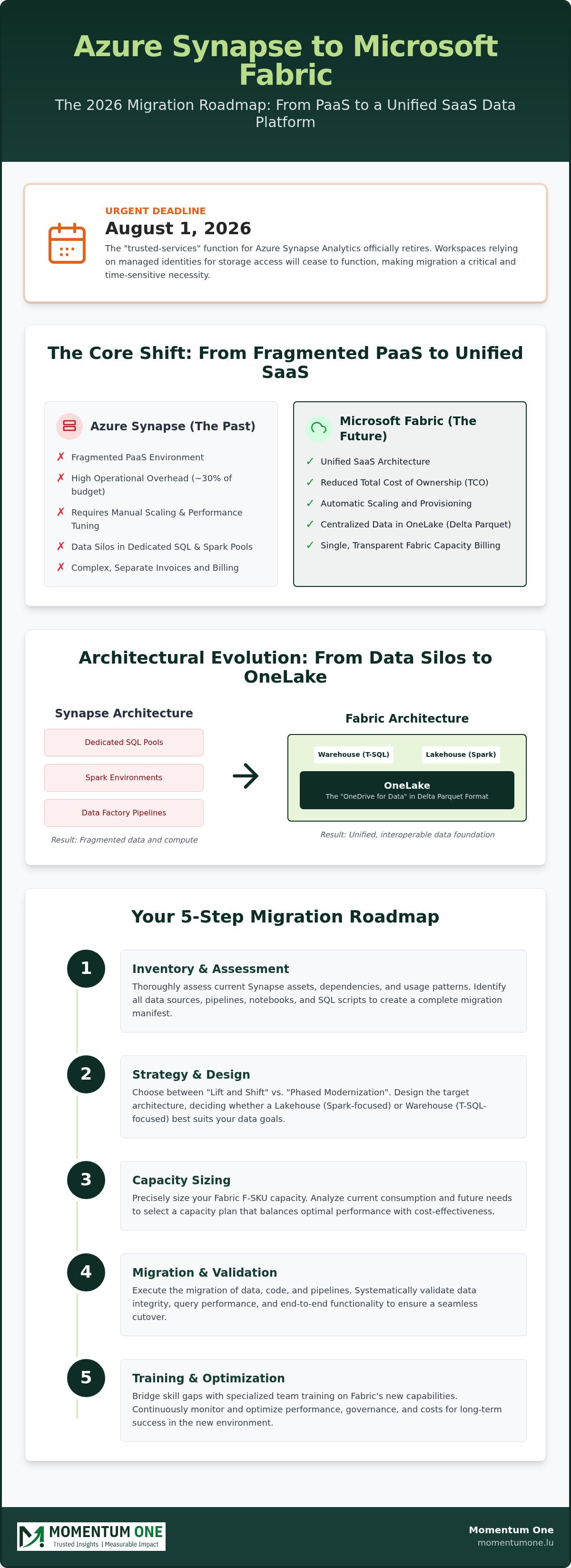
The 5-Step Roadmap for a Secure Fabric Migration
Transitioning from Synapse to Fabric isn't a weekend project; it's a strategic operation that requires precision. A structured roadmap ensures that your Azure Synapse to Microsoft Fabric migration remains secure and predictable. By following a methodical path, you can avoid the common pitfalls of data silos and performance bottlenecks that plague unmanaged transitions. You can't move what you don't know you have, so the process begins with total visibility.
- Step 1: Inventory and Assessment – Start by auditing your current environment. Map every dedicated SQL pool, Spark notebook, and Data Factory pipeline. Identify which assets are redundant and which are critical for daily operations.
- Step 2: Capacity Planning – Translate your provisioned Synapse DWUs or serverless consumption into the appropriate Fabric F-SKU. This step is vital to ensure your new environment handles peak loads without overspending.
- Step 3: Pilot Migration – Move a low-stakes, non-critical workload first. This allows your team to test security configurations, connectivity, and performance in a live Fabric environment without impacting business continuity.
- Step 4: Full Execution – Orchestrate the primary data move and schema refactoring. This is where the heavy lifting happens, converting legacy SQL scripts and Spark jobs into their modern Fabric equivalents.
- Step 5: Governance and Training – Empower your users on the new platform. Establish clear governance rules and provide targeted training to ensure your team can leverage the full power of the SaaS architecture.
Capacity Planning and Cost Optimization
In Luxembourg's competitive enterprise landscape, cost efficiency is paramount. Unlike the consumption-based model of Synapse serverless pools, Fabric relies on a capacity-based model using F-SKUs. You must monitor "burstable" capacity carefully. This feature allows you to handle sudden spikes in processing by borrowing from future capacity, but it requires diligent tracking to avoid unexpected throttling. For a deeper dive into these mechanics, see our specialized Workspace and Capacity Management services.
Security and Governance in Fabric
Security is often the biggest concern during an Azure Synapse to Microsoft Fabric migration. You'll need to map your existing Synapse Role-Based Access Control (RBAC) to Fabric's workspace roles. Fabric introduces OneSecurity, providing a unified layer for access control across all data items in OneLake. After the cutover, we recommend conducting a thorough post-migration architectural review to ensure no security gaps were introduced. If you want to ensure your environment is built on a rock-solid foundation, our team can help you design a custom Fabric Migration & Modernization plan tailored to your security requirements.
Why Partner with a Microsoft Solutions Partner for Your Migration?
Navigating a transition of this scale requires more than just technical documentation. It demands a partner who has spent years perfecting the nuances of the Microsoft data ecosystem. Partnering with a certified Microsoft Solutions Partner significantly reduces the risk of your Azure Synapse to Microsoft Fabric migration by applying 8+ years of deep technical expertise to your specific environment. We don't just move data. We refine it, ensuring that your new architecture is optimized for performance and scalability from the very first day.
Our team specializes in DAX Optimization and advanced data modeling. These skills are critical when moving to Fabric, as the shift to a SaaS model changes how compute resources interact with your Power BI reports. We help you bridge the skills gap within your internal teams through customized training, transforming the migration from a technical hurdle into a growth opportunity for your staff. By the time the project concludes, your team won't just be using the new platform; they'll be mastering it.
Strategic Consulting Beyond the Migration
A successful move doesn't end at the cutover. For enterprises in the Luxembourg market, it's about building a long-term data strategy that respects local governance requirements and business goals. We integrate Fabric seamlessly with your existing Power BI governance frameworks, ensuring that data security and compliance remain intact throughout the evolution. This holistic view prevents the "analytics sprawl" that often occurs when new tools are introduced without a clear plan. For a broader look at the strategic landscape, read our Microsoft Fabric Migration Services: A Strategic Guide.
Momentum One: Your Dedicated Ally
At Momentum One, we act as a steady hand through the most complex parts of the journey. We handle the intricacies of pipeline and dataflow automation, ensuring that your logic remains sound as it moves from Synapse to Fabric. Our proactive approach focuses on minimizing business disruption during the final cutover, so your stakeholders never lose access to their insights. Post-migration, our managed services provide the stability needed to maintain peak performance as your data volumes grow. We stay with you long after the initial setup is complete, acting as a proactive and dedicated ally in your continued success.
Ready to secure your data's future? Book a Fabric Migration Assessment today to see how we can simplify your transition and unlock the full potential of a modern data estate.
Secure Your Data's Future with a Modernized Analytics Estate
The transition to a SaaS-driven architecture is more than a technical upgrade; it's a strategic move toward organizational agility. By shifting from fragmented pools to a unified OneLake environment, you eliminate the friction of infrastructure management and focus on delivering actionable insights. You've explored how a structured roadmap and the right modernization strategy can turn legacy technical debt into a high-performance asset that scales with your business.
Executing a successful Azure Synapse to Microsoft Fabric migration requires a blend of deep technical knowledge and strategic foresight. As a Certified Microsoft Solutions Partner with a proven track record in Luxembourg corporate analytics, Momentum One provides the expertise in high-performance DAX and data modeling needed to ensure your transition is seamless. We're here to simplify the complexity and help your team embrace the next generation of data analytics with confidence. Your path to a more efficient, automated data future starts with a single, well-planned step.
Start your Microsoft Fabric journey with a professional assessment


 Microsoft Fabric
 02.08.2026