Branded Power BI Portals: Professional Client Data Sharing
Build a secure branded Power BI customer portal to share client analytics smoothly. Learn how to manage governance, identity access, and embedded reports.
- Identify what customers need to accomplish with analytics before choosing how reports are presented.
- A branded Power BI customer portal requires clear decisions about identity, authorization, and customer-specific data filtering.
- Compare report sharing, a portal-led experience, and embedded analytics against your customer journey, governance needs, and maintenance capacity.
- Use staged readiness workstreams to align business outcomes, data quality, access decisions, and experience design before building.
- Assess how Power BI consulting, governance, data architecture, and Power BI Embedded could support your approach. Reports alone do not make a complete portal.
A polished customer portal can still leave your team with the hardest work: controlling access, keeping data reliable, and maintaining the experience. A branded Power BI customer portal can give clients one consistent place to find useful analytics, but branding alone doesn’t make it secure or sustainable.
It’s understandable to want reports to feel like part of your customer experience, not a collection of disconnected links and files. Yet external access raises practical questions about identity, customer-specific permissions, and who will keep the solution working as needs change. The right approach depends on your audience, data, and operating model.
This article explains how to plan the experience, compare embedded analytics with a portal layer, and assess the data foundations and governance each option requires. You’ll also learn what to consider for secure access and ongoing maintenance before committing. Momentum One’s Power BI consulting and governance, data architecture, and Power BI Embedded offerings can help organizations evaluate the decisions that shape a manageable customer analytics service.
What Is a Branded Power BI Customer Portal, and What Does It Solve?
A useful report can still leave customers unsure where to find it, which figures matter, or how it relates to their account. A branded Power BI customer portal brings relevant analytics into a customer-facing experience designed around how clients access and use information. It can make reporting feel more coherent, but its value comes from the service it supports, not simply the colours or logo on screen.
A portal may bring together Power BI reports, navigation, and customer guidance in one place. The concept shares ground with an enterprise information portal (EIP), which organizes access to information and resources. The key distinction is simple: a portal organizes an experience; a report presents an analysis. A report answers analytical questions. The portal helps customers reach the right analysis and understand how to use it.
How Is a Customer Portal Different from a Power BI Report?
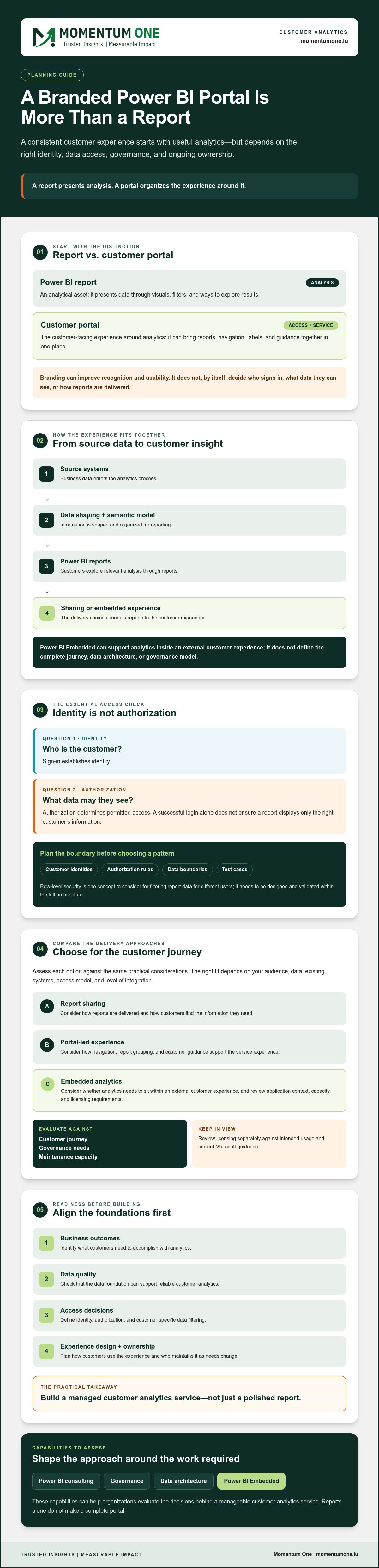
A Power BI report is an analytical asset. It presents data through visuals, filters, and other ways to explore results. A portal is the access and service experience around that asset. Depending on customer needs, it might group relevant reports with clear labels or explanatory guidance. It doesn’t have to use one fixed interface or technical design. The choice depends on the audience, existing systems, access model, and level of integration required.
That distinction matters during planning. Applying a logo to a report doesn’t, by itself, establish who can sign in, which customer’s data they can view, or how reports are delivered. Branding shapes recognition and usability; architecture and governance shape how the experience works and is managed.
When Does a Branded Analytics Experience Make Sense?
Consider a customer who regularly checks performance against agreed measures, reviews account insights, or monitors service analytics. If they need that information repeatedly, a consistent destination can make it easier to find and interpret. The use case is strongest when analytics supports an ongoing customer task, rather than a one-time presentation or a desire for a more polished appearance.
External customer experiences also have different design needs from internal employee dashboards. Customers may have different identities, permissions, and data entitlements, and they may need only a focused set of information. Internal teams, by contrast, can work within organizational access patterns and broader reporting contexts. Before choosing a design, assess the audience, data, identity, governance, usability, and who will own ongoing updates and support. Those factors guide the architecture before visual branding does.
How Power BI, Identity, and Customer Data Work Together
A customer analytics experience connects several layers. Data comes from source systems, is shaped and organized in a semantic model, and is presented through Power BI reports. Those reports then reach customers through a sharing or embedded experience. A branded Power BI customer portal is only as dependable as the data and access decisions behind it.
External sharing can help customers act on relevant information, but it also calls for deliberate boundaries. IBM’s overview of the benefits and risks of data sharing offers useful context for considering who receives information and how it is handled. Trusted external analytics depends on identity, data rules, and governance working together.
What Role Does Power BI Embedded Play?
Power BI Embedded is an option to consider when analytics needs to sit within an external customer experience. It addresses the analytics delivery layer, but it doesn’t by itself define the full customer journey, data architecture, or governance model. The right approach depends on the audience, application context, capacity, and licensing requirements. Review licensing separately against your intended usage and current Microsoft guidance.
How Should Customer Data Access Be Planned?
Start by separating two questions: Who is the customer? and What data is that customer authorized to see? Sign-in establishes identity; authorization determines permitted access. A successful login alone doesn’t ensure the report displays only the right customer’s information.
Before selecting an access pattern, document customer identities, authorization rules, data boundaries, and test cases. Row-level security is one concept teams may consider when planning how report data is filtered for different users, but it needs to be designed and validated within the full architecture. Include expected and unintended access scenarios in testing, such as whether one customer can see another customer’s records.
- Identity: How will each external user be recognized?
- Authorization: Which reports and actions may that user access?
- Data boundaries: How will customer records remain appropriately separated?
- Testing: How will teams verify both intended access and denied access?
These decisions belong in governance planning, not as a final layer added after the reports are ready. Explore Power BI consulting and governance to understand how access expectations and reporting practices can be considered together. If you’re assessing the architecture for an external analytics experience, you can also discuss your requirements with Momentum One.
How to Evaluate a Branded Power BI Portal Approach
Choose an approach by starting with the customer task, not the number of reports or visual customizations you want. A customer who checks an account summary periodically may need a different experience from one who monitors service activity frequently. A branded Power BI customer portal should make the right information easy to find while fitting your access model and your team’s ability to operate it.
Which Customer and Business Requirements Matter Most?
Identify user groups, the tasks they need to complete, how often they access analytics, and which decisions the information should support. Then assess navigation, branding, accessibility, mobile use, and support expectations. Name data owners and agree who approves customer-facing definitions and changes. These answers help distinguish useful experience requirements from visual preferences that don’t improve customer outcomes.
What Should a Portal Evaluation Compare?
Compare the customer experience alongside data architecture, identity needs, and operational ownership. The table is a starting point, not a specification. Implementation details vary, so validate your preferred pattern against current Microsoft requirements. For identity considerations, consult Microsoft’s documentation on Microsoft Entra B2B.
| Criterion | Simple report sharing | Portal-led experience | Embedded analytics |
|---|---|---|---|
| Control | Generally focused on report access and configuration. | Adds a layer for organizing customer access and guidance. | Places analytics within an external experience; the surrounding application context affects control. |
| Customer journey | Customers reach shared reports directly. | Navigation can bring relevant reports and guidance together. | Analytics appears as part of a broader customer workflow. |
| Identity needs | Determine how external users are identified and granted access. | Plan identity across the portal and report experience. | Align the embedded experience with the host context and intended users. |
| Governance | Set clear rules for report access and customer data. | Coordinate portal-level practices with report and data governance. | Review governance across analytics and its surrounding experience. |
| Maintenance | Maintain reports, access, and sharing processes. | Account for portal content, navigation, access, and support workflows. | Plan ownership across reports, capacity, integration, and monitoring. |
Also compare scalability, refresh expectations, and how teams will monitor issues and handle customer support. Keep the evaluation anchored to what clients need to do and the decisions analytics should enable. Licensing depends on the selected architecture and usage, so check current Microsoft guidance before deciding.
If you’re weighing these trade-offs, discuss your portal requirements with Momentum One as part of an architecture and governance assessment.
A Practical Readiness Checklist Before Building a Customer Portal
Before building a branded Power BI customer portal, establish what it must help customers do and how your team will keep it dependable. A staged readiness process brings business, data, identity, and experience decisions into view before they become costly to revisit.
What Should Teams Confirm Before a Pilot?
Choose a focused customer use case, such as reviewing account performance, and define the intended business outcome. Confirm which source data supports it, who owns that data, how often it needs to refresh, and which definitions stakeholders have approved. If the underlying sources or models need assessment, review your data warehouse and lakehouse design foundations.
Document who will participate in the pilot, what each user is permitted to access, and how success will be judged. Keep the workstreams distinct so a decision in one area doesn’t stand in for another:
- Business sign-off: Confirm the customer task, expected outcome, and approval owner for customer-facing measures.
- Data readiness: Check source quality, ownership, refresh expectations, and agreed definitions.
- Identity and access: Record customer access rules and identify representative test users.
- Experience design: Sketch how customers will find the right information and provide feedback on the experience.
Prototype with representative customer users before wider release. Test both expected access and denied access, including whether a user can see only the information intended for their customer. Agree acceptance criteria in advance, then use the results to refine the data, permissions, or experience before expanding the pilot.
How Should Teams Prepare for Ongoing Operations?
A portal needs ownership after launch. Assign responsibility for report changes, access reviews, incidents, and customer feedback. Define how teams will monitor data refreshes and experience issues, and clarify how support requests are handled. Set responsibilities that match your operating model rather than assuming a particular service level.
Use this final operating check before proceeding:
- Is there a named owner for data definitions and report changes?
- Are access reviews and permission changes part of an agreed process?
- Can the team identify and respond to refresh or access issues?
- Is there a way to capture customer feedback and decide what to change?
If you’re ready to turn these workstreams into a practical plan, discuss your Power BI customer portal requirements with Momentum One.
How Momentum One Can Help Shape a Branded Power BI Customer Portal
A branded Power BI customer portal brings together decisions about customer needs, data, access, and ongoing ownership. Momentum One can help organizations assess those decisions through Power BI consulting and governance, data modeling, and analytics architecture. The aim is to shape an approach around the business use case and operating model, not to treat a portal as a standalone product.
Power BI Embedded is one of Momentum One’s offerings and may be relevant to external analytics scenarios. It is an analytics option, not a complete portal by itself. The right scope depends on your existing systems, customer experience requirements, access model, and which responsibilities your organization or other providers will own. Make those boundaries clear before delivery begins.
What Can a Consulting Engagement Address?
An engagement can assess whether your existing Power BI models and data foundations fit the intended customer use case. For example, teams might review whether agreed customer measures are consistently defined and whether the underlying data supports reporting needs. Governance, data modeling, access planning, and architecture can then be considered together, with decisions grounded in business requirements. If model quality is a concern, explore data modeling and DAX optimization.
That assessment can also identify assumptions that need validation, such as which systems provide source data, how customer access should be handled, and who approves changes to customer-facing reports. The resulting scope should reflect actual requirements and agreed responsibilities. A portal experience may involve components beyond Power BI reports, so clarify what falls within the engagement rather than assuming analytics tools cover every part of the customer interface.
What Should You Bring to an Initial Discussion?
Bring a practical picture of the experience you want to provide. A concise outline helps focus the conversation and expose open questions early:
- Customers and use cases: Which customer groups need analytics, and what tasks should they complete?
- Current reporting: Which reports, models, and data sources are already in use?
- Access and governance: What identity constraints, customer data boundaries, and approval processes are known?
- Operations: Who expects to own report updates, access changes, monitoring, and customer feedback?
Ask how scope, responsibilities, and technical assumptions will be validated before delivery. A clear discovery process gives stakeholders a chance to confirm requirements and understand dependencies before committing to an approach.
To explore what fits your environment and customer needs, talk through your Power BI portal requirements with Momentum One.
Build the Customer Experience on a Clear Foundation
A branded Power BI customer portal works best when it’s planned as more than a polished place to display reports. Start with the customer tasks and decisions the analytics should support, then align the data foundations, identity and access model, governance, and ongoing ownership. The right approach depends on your audience and operating needs, not on how many reports or visual features you can add.
Momentum One can help assess the requirements through Power BI consulting and governance, data modeling, data architecture, and managed services. Power BI Embedded is also an offering for organizations considering external analytics, though it isn’t a complete portal product on its own. Clarifying scope and responsibilities early helps you make informed choices about the experience and its operation.
If you’re ready to assess your data foundations, access decisions, and next steps, discuss your Power BI customer portal requirements with Momentum One. A thoughtful plan can give customers a more useful analytics experience while helping your team build on a manageable foundation.
Frequently Asked Questions
How Is a Customer Portal Different from a Power BI Report?
A Power BI report is an analytical asset. It presents data through visuals, filters, and other ways to explore results. A portal is the access and service experience around that asset. Depending on customer needs, it might group relevant reports with clear labels or explanatory guidance. It doesn’t have to use one fixed interface or technical design. The choice depends on the audience, existing systems, access model, and level of integration required. That distinction matters during planning. Applying a logo to a report doesn’t, by itself, establish who can sign in, which customer’s data they can view, or how reports are delivered. Branding shapes recognition and usability; architecture and governance shape how the experience works and is managed.
When Does a Branded Analytics Experience Make Sense?
Consider a customer who regularly checks performance against agreed measures, reviews account insights, or monitors service analytics. If they need that information repeatedly, a consistent destination can make it easier to find and interpret. The use case is strongest when analytics supports an ongoing customer task, rather than a one-time presentation or a desire for a more polished appearance. External customer experiences also have different design needs from internal employee dashboards. Customers may have different identities, permissions, and data entitlements, and they may need only a focused set of information. Internal teams, by contrast, can work within organizational access patterns and broader reporting contexts. Before choosing a design, assess the audience, data, identity, governance, usability, and who will own ongoing updates and support. Those factors guide the architecture before visual branding does. A customer analytics experience connects several layers. Data comes from source systems, is shaped and organized in a semantic model, and is presented through Power BI reports. Those reports then reach customers through a sharing or embedded experience. A branded Power BI customer portal is only as dependable as the data and access decisions behind it. External sharing can help customers act on relevant information, but it also calls for deliberate boundaries. IBM’s overview of the benefits and risks of data sharing offers useful context for considering who receives information and how it is handled. Trusted external analytics depends on identity, data rules, and governance working together.
What Role Does Power BI Embedded Play?
Power BI Embedded is an option to consider when analytics needs to sit within an external customer experience. It addresses the analytics delivery layer, but it doesn’t by itself define the full customer journey, data architecture, or governance model. The right approach depends on the audience, application context, capacity, and licensing requirements. Review licensing separately against your intended usage and current Microsoft guidance.
How Should Customer Data Access Be Planned?
Start by separating two questions: Who is the customer? and What data is that customer authorized to see? Sign-in establishes identity; authorization determines permitted access. A successful login alone doesn’t ensure the report displays only the right customer’s information. Before selecting an access pattern, document customer identities, authorization rules, data boundaries, and test cases. Row-level security is one concept teams may consider when planning how report data is filtered for different users, but it needs to be designed and validated within the full architecture. Include expected and unintended access scenarios in testing, such as whether one customer can see another customer’s records. These decisions belong in governance planning, not as a final layer added after the reports are ready. Explore Power BI consulting and governance to understand how access expectations and reporting practices can be considered together. If you’re assessing the architecture for an external analytics experience, you can also discuss your requirements with Momentum One. Choose an approach by starting with the customer task, not the number of reports or visual customizations you want. A customer who checks an account summary periodically may need a different experience from one who monitors service activity frequently. A branded Power BI customer portal should make the right information easy to find while fitting your access model and your team’s ability to operate it.
Which Customer and Business Requirements Matter Most?
Identify user groups, the tasks they need to complete, how often they access analytics, and which decisions the information should support. Then assess navigation, branding, accessibility, mobile use, and support expectations. Name data owners and agree who approves customer-facing definitions and changes. These answers help distinguish useful experience requirements from visual preferences that don’t improve customer outcomes.
What Should a Portal Evaluation Compare?
Compare the customer experience alongside data architecture, identity needs, and operational ownership. The table is a starting point, not a specification. Implementation details vary, so validate your preferred pattern against current Microsoft requirements. For identity considerations, consult Microsoft’s documentation on Microsoft Entra B2B. Also compare scalability, refresh expectations, and how teams will monitor issues and handle customer support. Keep the evaluation anchored to what clients need to do and the decisions analytics should enable. Licensing depends on the selected architecture and usage, so check current Microsoft guidance before deciding. If you’re weighing these trade-offs, discuss your portal requirements with Momentum One as part of an architecture and governance assessment. Before building a branded Power BI customer portal, establish what it must help customers do and how your team will keep it dependable. A staged readiness process brings business, data, identity, and experience decisions into view before they become costly to revisit.
What Should Teams Confirm Before a Pilot?
Choose a focused customer use case, such as reviewing account performance, and define the intended business outcome. Confirm which source data supports it, who owns that data, how often it needs to refresh, and which definitions stakeholders have approved. If the underlying sources or models need assessment, review your data warehouse and lakehouse design foundations. Document who will participate in the pilot, what each user is permitted to access, and how success will be judged. Keep the workstreams distinct so a decision in one area doesn’t stand in for another: Prototype with representative customer users before wider release. Test both expected access and denied access, including whether a user can see only the information intended for their customer. Agree acceptance criteria in advance, then use the results to refine the data, permissions, or experience before expanding the pilot.
How Should Teams Prepare for Ongoing Operations?
A portal needs ownership after launch. Assign responsibility for report changes, access reviews, incidents, and customer feedback. Define how teams will monitor data refreshes and experience issues, and clarify how support requests are handled. Set responsibilities that match your operating model rather than assuming a particular service level. Use this final operating check before proceeding: If you’re ready to turn these workstreams into a practical plan, discuss your Power BI customer portal requirements with Momentum One. A branded Power BI customer portal brings together decisions about customer needs, data, access, and ongoing ownership. Momentum One can help organizations assess those decisions through Power BI consulting and governance, data modeling, and analytics architecture. The aim is to shape an approach around the business use case and operating model, not to treat a portal as a standalone product. Power BI Embedded is one of Momentum One’s offerings and may be relevant to external analytics scenarios. It is an analytics option, not a complete portal by itself. The right scope depends on your existing systems, customer experience requirements, access model, and which responsibilities your organization or other providers will own. Make those boundaries clear before delivery begins.
What Can a Consulting Engagement Address?
An engagement can assess whether your existing Power BI models and data foundations fit the intended customer use case. For example, teams might review whether agreed customer measures are consistently defined and whether the underlying data supports reporting needs. Governance, data modeling, access planning, and architecture can then be considered together, with decisions grounded in business requirements. If model quality is a concern, explore data modeling and DAX optimization. That assessment can also identify assumptions that need validation, such as which systems provide source data, how customer access should be handled, and who approves changes to customer-facing reports. The resulting scope should reflect actual requirements and agreed responsibilities. A portal experience may involve components beyond Power BI reports, so clarify what falls within the engagement rather than assuming analytics tools cover every part of the customer interface.
What Should You Bring to an Initial Discussion?
Bring a practical picture of the experience you want to provide. A concise outline helps focus the conversation and expose open questions early: Ask how scope, responsibilities, and technical assumptions will be validated before delivery. A clear discovery process gives stakeholders a chance to confirm requirements and understand dependencies before committing to an approach. To explore what fits your environment and customer needs, talk through your Power BI portal requirements with Momentum One. A branded Power BI customer portal works best when it’s planned as more than a polished place to display reports. Start with the customer tasks and decisions the analytics should support, then align the data foundations, identity and access model, governance, and ongoing ownership. The right approach depends on your audience and operating needs, not on how many reports or visual features you can add. Momentum One can help assess the requirements through Power BI consulting and governance, data modeling, data architecture, and managed services. Power BI Embedded is also an offering for organizations considering external analytics, though it isn’t a complete portal product on its own. Clarifying scope and responsibilities early helps you make informed choices about the experience and its operation. If you’re ready to assess your data foundations, access decisions, and next steps, discuss your Power BI customer portal requirements with Momentum One. A thoughtful plan can give customers a more useful analytics experience while helping your team build on a manageable foundation.
Is a branded Power BI customer portal the same as a Power BI report?
No. A Power BI report presents an analysis, while a portal organizes how customers access analytics and related guidance. A branded Power BI customer portal might bring selected reports together with navigation and customer-focused information. The underlying experience can use different architectures, from direct report sharing to embedded analytics. Branding affects presentation, but it doesn’t by itself set permissions, separate customer data, or determine how reports are delivered.
Can customers access Power BI analytics without individual Power BI licenses?
Sometimes, depending on the sharing architecture, capacity, and licensing terms. In a standard Power BI Pro sharing setup, report creators and viewers generally need paid licenses. Power BI Embedded or qualifying Microsoft Fabric capacity may allow external viewers to access reports without individual Power BI licenses. The right arrangement depends on how the analytics are delivered and who uses them, so verify current Microsoft licensing requirements before selecting an approach.
How can a Power BI customer portal keep each customer’s data separate?
Design separation through the data model, authorization rules, and customer identity rather than relying on the portal’s appearance. Row-level security is one Power BI concept that can filter data for different users, but it must fit the wider access architecture. Define which customer records each user may see, then test both permitted and denied scenarios with representative accounts before broader release. A successful sign-in alone doesn’t prove data is properly separated.
Can a Power BI customer portal use our company branding and domain?
Potentially, but the available branding depends on the delivery approach. Native Power BI has limitations for extensive white-labeling. A more integrated branded experience may involve Power BI Embedded within a portal or an appropriate third-party portal solution. Using your company’s domain depends on the portal layer and its configuration, not simply on a report setting. Confirm which branding, navigation, and domain options your chosen architecture supports before committing.
What should a branded Power BI customer portal include?
Start with the customer’s recurring tasks and include only the analytics and guidance needed to support them. A branded Power BI customer portal may provide clear navigation, relevant reports, understandable metric definitions, and a straightforward way to find account or service insights. Its design should also account for customer access, data boundaries, refresh expectations, and ownership of updates. Prioritize usefulness and trust over adding more reports or visual features.
How much customization does a Power BI customer portal require?
It depends on the customer journey and the level of control your organization needs. A straightforward sharing approach may require less surrounding experience design, while embedded analytics or a portal layer can involve additional integration and operational decisions. Identify requirements for branding, navigation, identity, and support before estimating scope. Power BI Embedded is an offering from Momentum One, but it isn’t a complete standalone portal product or a promise of custom application development.
What happens after a branded Power BI customer portal goes live?
Ongoing ownership begins. Teams need to manage report and model changes, review customer access, monitor data refreshes, handle incidents, and consider customer feedback. Assign clear owners and agree how changes to metrics or permissions are approved. The operating model should match the solution’s architecture and your team’s capabilities. Momentum One provides managed services, which organizations can consider when ongoing oversight of their analytics environment is relevant. Contact Momentum One to discuss your Power BI customer portal requirements.