Custom White Label Power BI Portals: A Professional Guide
Learn how to build a secure white label Power BI portal. Discover key architectures, licensing, governance, and branding strategies in our expert guide.
- Plan a complete customer-facing experience, not just branded reports. Sign-in, navigation and support all contribute to a coherent portal.
- Map how users move from authentication to analytics, and define the roles of the portal, Power BI content, data platform and identity layer.
- Compare direct sharing, portal platforms and custom applications by branding flexibility, access control, extensibility and ongoing ownership.
- Assess users, use cases, data sensitivity and integration needs before choosing a white label Power BI portal approach.
- Assign clear responsibility for security validation, licensing, launch and governance. Power BI expertise can guide analytics architecture, while custom application development may require a separate capability.
A white label Power BI portal is a governed product experience, not just a set of reports with your logo and colours. If you’re considering how to give customers branded analytics, start by defining the experience they need and how you’ll keep each customer’s data separate.
The right approach depends on more than appearance. Authentication, access controls, licensing, report governance and ongoing support all affect whether a portal is secure and maintainable. This guide explains the decisions to make before settling on an architecture.
We’ll compare Power BI Embedded, third-party portal platforms and custom development, then look at branding, customer-specific data protection and ongoing responsibilities. You’ll also see where Power BI consulting and governance expertise can help with planning, and when you may need a separate application-development capability. The aim is to clarify ownership of identity, licensing and operations from the outset.
What a White Label Power BI Portal Delivers Beyond Branded Reports
A branded Power BI report changes the appearance of an individual report. A customer-facing portal places analytics within a broader experience, with sign-in, navigation and supporting information arranged around the reports. A white label Power BI portal is a customer-facing experience that presents embedded analytics under an organisation’s brand, within a controlled interface.
The concept follows the broader white-label product model: an underlying capability is presented as part of another organisation’s offering. In practice, a portal may pair a consistent visual identity with report access and user guidance. Features such as account navigation or support details may come from a separate application rather than Power BI itself.
How a branded portal differs from a Power BI report
Adding a logo, colours and a suitable layout can align a report with a brand, but it doesn’t create the full customer journey. Authentication and portal navigation may sit outside Power BI, while reports provide analytics within that experience. The division of responsibilities depends on the architecture.
For example, a supplier might give each customer access to performance reports. A branded report can match the supplier’s visual identity; a portal could also provide a sign-in point and a clear route to relevant analytics. The example illustrates a possible experience, not a guarantee of particular features.
Branding alone doesn’t determine who can sign in, which data each user can see or what licensing applies. Those depend on the access model, data controls and implementation. Treat them as design decisions, not automatic benefits of removing another provider’s logo.
When external analytics make a portal worth evaluating
A portal may suit organisations that provide recurring customer reporting, partner dashboards or analytics as part of a subscription. A consistent experience can make it easier for users to find reports that would otherwise sit across separate tools. It can also bring analytics into a more cohesive customer offering.
Direct report sharing may be simpler for a limited audience or a straightforward use case. It may be less suitable when customers need a tailored interface or a unified route to multiple analytics resources. Compare the options against user experience, access requirements and operational ownership. A portal is useful when its broader experience solves a real need, not simply because more branding is possible.
How a White Label Power BI Portal Fits Together
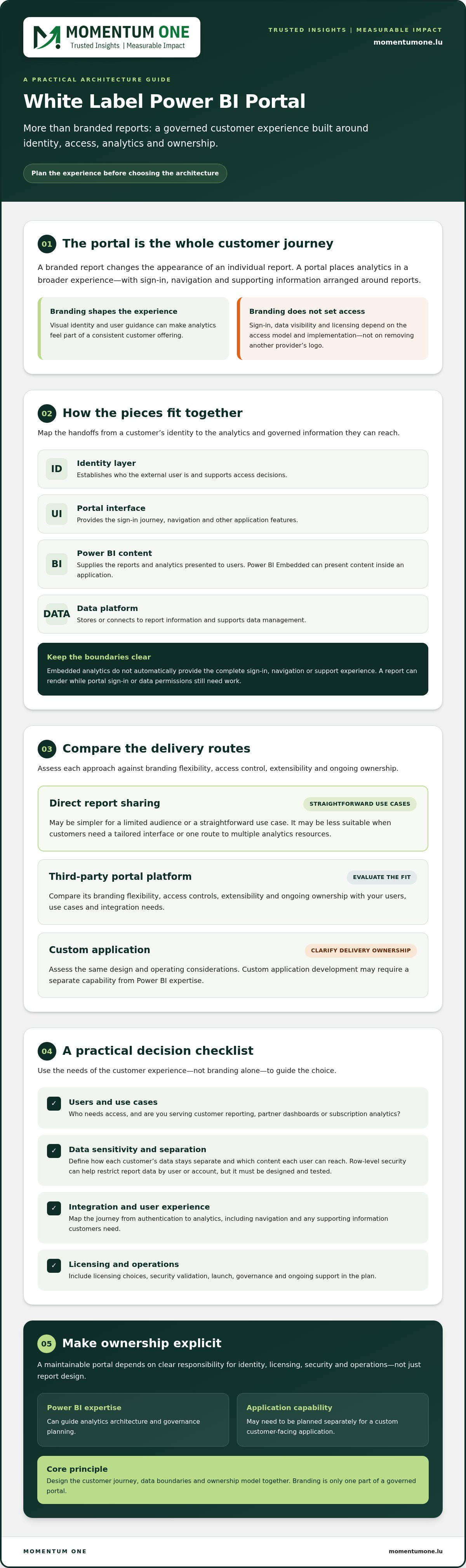
A customer’s journey might begin at a sign-in page, continue through portal navigation and end with an embedded report selected for their role or account. Behind that experience, several components must work together. The portal presents the experience, Power BI renders analytics, the data platform supplies governed information, and the identity layer establishes who can access it.
Separating these responsibilities helps clarify what the project involves. Power BI Embedded can present Power BI content within an application experience, but it doesn’t automatically provide every part of a customer-facing portal. The surrounding application and its owners still need to be defined.
- Identity layer: Establishes the user’s identity and supports access decisions.
- Portal interface: Provides the sign-in journey, navigation and other application features.
- Power BI content: Supplies the reports and analytics presented to users.
- Data platform: Stores or connects to the information used by reports and supports data management.
These layers connect, but they aren’t interchangeable. A report may render correctly while the portal’s sign-in flow or data permissions still need work. Map the handoffs early, including who configures and supports each component.
What Power BI Embedded contributes to the experience
Power BI Embedded is relevant when an organisation wants analytics presented inside an application. It concerns the Power BI content, not automatically the application’s complete sign-in, navigation or support experience. Those responsibilities depend on the wider solution and its delivery model. Licensing choices also affect planning. Consult Microsoft’s current terms and a dedicated Power BI Embedded pricing guide for licensing detail.
Where identity, data and governance fit
Identity helps establish who an external user is; the access design determines which content and data that user can reach. Row-level security (RLS) can help restrict report data by user or account, but it must be designed and tested against realistic customer scenarios. Microsoft’s Power BI security white paper provides foundational security context.
Governance turns these technical decisions into clear responsibilities: who manages access, changes reports and reviews permissions over time. Power BI consulting and governance can help assess analytics architecture and governance needs. Application development may require a separate capability. If you’re assessing these responsibilities for a portal project, you can discuss your requirements with Momentum One.
Branded Portal Options: Compare Fit, Security and Ownership
There’s no universally best route to a white label Power BI portal. Direct report sharing, a portal platform and a custom application involve different trade-offs in branding, user experience, access and ongoing responsibility. Choose based on who will use the analytics, the workflows they need and the capabilities available to deliver and maintain the solution.
| Approach | Branding control | User experience | Access model | Extensibility and ownership |
|---|---|---|---|---|
| Direct report sharing | Primarily report-level | Users access shared Power BI content | Managed through the applicable Power BI sharing and permissions model | Less surrounding application to manage; the organisation remains responsible for report access and governance |
| Portal platform | Depends on the platform’s configuration options | Can provide a more unified customer-facing interface | Depends on how the platform handles identity and maps users to content | Confirm configuration limits, integrations, support boundaries and who manages the underlying Power BI environment |
| Custom application | Potentially broader control over the interface and workflows | Can be shaped around specific user journeys | Designed as part of the application and its integration with Power BI | Requires suitable application-development capability and clear responsibility for ongoing maintenance |
Which portal approach matches your requirements?
Direct sharing may fit a simpler scenario if its access model and user experience meet customer needs. Consider a portal platform when standardised features and configuration are priorities. Check what can be branded, how identity and permissions work, and what the provider supports. A custom application may suit specialised workflows, but greater control over branding and functionality also requires application-development capability. That capability must be available in-house or through a separate provider.
How to assess external-user security and separation
Ask how each external user is authenticated and how the solution determines their permitted data scope. Request a documented explanation of how customer data is separated, then test representative scenarios before launch. Include users with different access levels and verify that each sees only the intended reports and data.
Don’t treat a hidden report page, filtered navigation menu or other interface rule as a security boundary. The underlying permissions and data controls must enforce the intended separation. Specify who reviews access, handles changes and investigates issues. This makes it easier to compare options on more than branding and identify operational responsibilities before choosing an approach.
A Practical Checklist for Choosing a White Label Power BI Portal
Use this sequence to turn a portal idea into requirements you can review with providers. It makes trade-offs visible before you commit to a white label Power BI portal approach.
- Define users and use cases. Identify who will use the analytics, what decisions they need to make and whether access is for customers, partners or both.
- Classify data sensitivity. Decide which information each user group may see and document the separation required between customers.
- Describe the experience. Specify sign-in expectations, navigation, branding, devices and the key tasks users should complete.
- Validate security and access. Ask how identity is verified, how permissions are applied and how customer separation will be tested, including when access changes.
- Review licensing and integrations. Confirm the applicable Power BI licensing and capacity assumptions, plus dependencies on identity providers, data sources or other systems. A dedicated Power BI licensing for portals guide can help with a deeper review.
- Assign ownership after launch. Name the parties responsible for report updates, access changes, monitoring, platform updates, user support and incident handling.
Ask every provider to state what’s included and what depends on separate development or third-party services. Request written assumptions, dependencies and responsibilities, plus acceptance tests that explain how the solution will be assessed before rollout. Confirm how branding is configured, who manages identity, and how access changes are approved and recorded.
Validate the design before rollout
Test realistic journeys, not just a successful sign-in. Use representative roles to check both permitted data and information they must not access. Include customer-specific scenarios, access changes and common navigation paths. Review the experience on the devices users are expected to use, and note where they may need guidance.
Agree on success measures before testing begins. These might include whether intended users can complete key tasks, whether access rules behave as designed and whether support and governance responsibilities are manageable. Set acceptance criteria for reliability and issue handling too, so launch decisions aren’t based on appearance alone.
A clear checklist gives your organisation a stronger basis for comparing platforms, delivery partners and licensing assumptions. To review portal requirements and governance considerations with an experienced Power BI team, discuss your portal requirements with Momentum One.
Plan the Portal Delivery with Power BI Expertise and Clear Ownership
A white-label portal project needs more than a technical design. Turn your evaluation into a phased plan so that decisions about analytics, application responsibilities and long-term support are made before launch.
- Requirements: Confirm users, reporting needs, data sensitivity, user journeys and success measures.
- Architecture: Document how Power BI content, data sources, identity and the portal application will work together, and who owns each component.
- Validation: Test report behaviour, access boundaries and common user journeys against agreed acceptance criteria.
- Launch: Confirm who approves release, communicates changes and supports users.
- Operations: Establish how access, content updates, monitoring and issues will be managed after launch.
Define project responsibilities before implementation
Assign an owner for Power BI content, data sources, identity, the portal application and user support. One team may cover several areas, but responsibilities should still be explicit. Document who approves access, manages changes, monitors the analytics environment and handles issue escalation. This helps prevent gaps when a report needs updating or a customer’s access changes.
Ongoing governance and managed support can help keep the analytics environment maintainable as content and requirements evolve. Review the scope of Power BI incident and support services alongside your operating model, and agree which party is responsible for each task.
Choose the right support for your analytics architecture
Power BI consulting can support assessment of the analytics architecture, data models and governance practices behind the portal. It doesn’t necessarily include building the surrounding application. If your requirements call for custom portal development, identify a separate application-development capability and define how that team will work with the Power BI specialists.
Before implementation, clarify dependencies, licensing assumptions and who will own each decision. Momentum One’s Power BI consulting and governance can help organisations assess analytics design and governance needs, while managed services can support ongoing Power BI operations. Confirm the scope and responsibilities that fit your project rather than assuming a single provider covers everything.
If you’re ready to assess the architecture, governance and ownership questions for your project, discuss your Power BI portal requirements with Momentum One.
Move Forward with a Clear Portal Plan
A successful white label Power BI portal is more than branded analytics. The right approach aligns the user experience with a clearly designed identity and access model, and assigns responsibility for the portal, data and Power BI content. Compare direct sharing, a portal platform and a custom application against your users, workflows and delivery capabilities instead of assuming one option fits every organisation.
Before committing, include security validation, licensing review and post-launch ownership in the plan. Clear responsibilities for access changes, content updates and support help keep the experience manageable as requirements evolve.
Momentum One provides Power BI consulting and governance expertise, as well as a Power BI Embedded offering to support analytics planning. Managed services can support ongoing maintenance and governance, with the engagement scope defined to match your needs. Custom application development may require a separate capability.
Start with the questions that matter to your architecture and operating model. Discuss your Power BI portal requirements with Momentum One to clarify what your project needs.
Frequently Asked Questions
Which portal approach matches your requirements?
Direct sharing may fit a simpler scenario if its access model and user experience meet customer needs. Consider a portal platform when standardised features and configuration are priorities. Check what can be branded, how identity and permissions work, and what the provider supports. A custom application may suit specialised workflows, but greater control over branding and functionality also requires application-development capability. That capability must be available in-house or through a separate provider.
What is a white-label Power BI portal?
A white-label Power BI portal is a customer-facing experience that presents Power BI analytics within an organisation’s branded interface. It may bring together sign-in, navigation and embedded reports, while the portal interface and identity functions can be handled outside Power BI. Branding doesn’t automatically define who can access the content or what data they can see. Design and validate those controls separately.
Is a white-label Power BI portal the same as a branded Power BI report?
No. A branded report applies visual elements such as a logo, colours or a customised layout to report content. A portal extends beyond the report to provide a broader customer experience, which may include sign-in and navigation. Those surrounding features may depend on an application or portal platform. Assess access controls and licensing separately, since a branded appearance establishes neither.
Can Power BI reports be embedded in a customer portal?
Yes. Power BI Embedded can present Power BI reports within a customer-facing application experience. It provides the embedded analytics component, not necessarily the complete portal. The application may handle sign-in, navigation and other customer workflows separately. Before choosing an approach, clarify which components are included, who will provide them and how the application will connect users to the appropriate reports.
How do you keep each customer’s Power BI data separate?
Start with a defined identity and access model: establish who each user is and how the solution determines their permitted data. Row-level security (RLS) can help restrict report data, but it must be designed for the data model and tested against representative customer accounts. Verify both permitted access and attempted access to another customer’s information. A hidden report page or interface rule isn’t a security boundary.
What licensing does a white-label Power BI portal need?
Licensing depends on the embedding model. For an app-owns-data scenario serving external customers, capacity licensing covers report viewing, while people who create and manage Power BI content still need appropriate authoring licenses. In user-owns-data scenarios, viewer requirements differ by capacity and licensing arrangement. Review the current Microsoft terms for your specific setup, including capacity, creators and administrators, before finalising the design.
What should I ask a provider before choosing a white-label portal?
Ask which components are included and which require separate development or third-party services. Request an explanation of branding options, identity management, customer data separation and how access changes are handled. Confirm who owns licensing assumptions, Power BI content, integrations and support after launch. Also ask for documented dependencies, security validation steps and acceptance tests so you can assess the proposal against your requirements.
Does a white-label Power BI portal require custom application development?
Not always. Direct sharing or a portal platform may fit requirements that don’t call for highly tailored workflows. A custom application may be appropriate when the desired experience needs greater control or specialised features, but it requires suitable application-development capability. Power BI consulting can support analytics architecture and governance, but doesn’t necessarily include building the portal application. Confirm responsibilities and scope before selecting a delivery approach.