Faster Queries: Optimize Your Lakehouse Delta Tables
Learn to optimize lakehouse delta tables in Microsoft Fabric. Fix the small file problem, speed up Power BI, and cut costs with our expert automation tips.
- Identify how the "small file problem" impacts read latency and learn to resolve the metadata bottlenecks that slow down your Power BI reports.
- Discover how to optimize lakehouse delta tables using V-Order and Z-Order to achieve a high-performance balance between data ingestion and query speed.
- Master essential maintenance commands like OPTIMIZE and VACUUM to keep your storage lean and prevent unexpected spikes in Fabric capacity costs.
- Learn to automate these technical workflows using Fabric Data Factory pipelines and Notebooks for consistent performance across your entire enterprise.
- Shift from reactive troubleshooting to proactive architectural design to ensure your data platform scales effectively for long-term growth in the 2026 landscape.
What if your Microsoft Fabric capacity consumption isn't actually a result of too much data, but rather the way that data is stored? You've likely felt the frustration of watching a Power BI visual spin while your capacity units burn through your budget. It's a common pain point for teams in Luxembourg trying to scale their analytics without skyrocketing costs. Managing the "small file problem" can feel like a losing battle when your report refresh times continue to climb. To solve this, you need to optimize lakehouse delta tables using a strategic governance approach rather than just reactive tuning.
We're here to help you bridge the gap between raw data storage and high-speed business intelligence. This guide reveals professional-grade techniques to streamline your environment, reduce latency, and lower costs through strategic Delta table optimization. We'll walk through how to implement automated maintenance pipelines and leverage 2026 Fabric runtimes to achieve faster interactive analytics. By the end of this article, you'll have a clear roadmap to predictable capacity costs and a more responsive data platform that empowers your entire organization.
The Performance Gap: Why Lakehouse Delta Tables Need Optimization
Many organizations in Luxembourg find that their initial excitement for Microsoft Fabric quickly meets a performance ceiling. As we move through 2026, the sheer volume of enterprise data makes it impossible to rely on default settings alone. To truly optimize lakehouse delta tables, you must first understand the structural "performance gap" that occurs when storage isn't managed proactively. This gap isn't just a technical nuance; it's a direct driver of costs and user frustration.
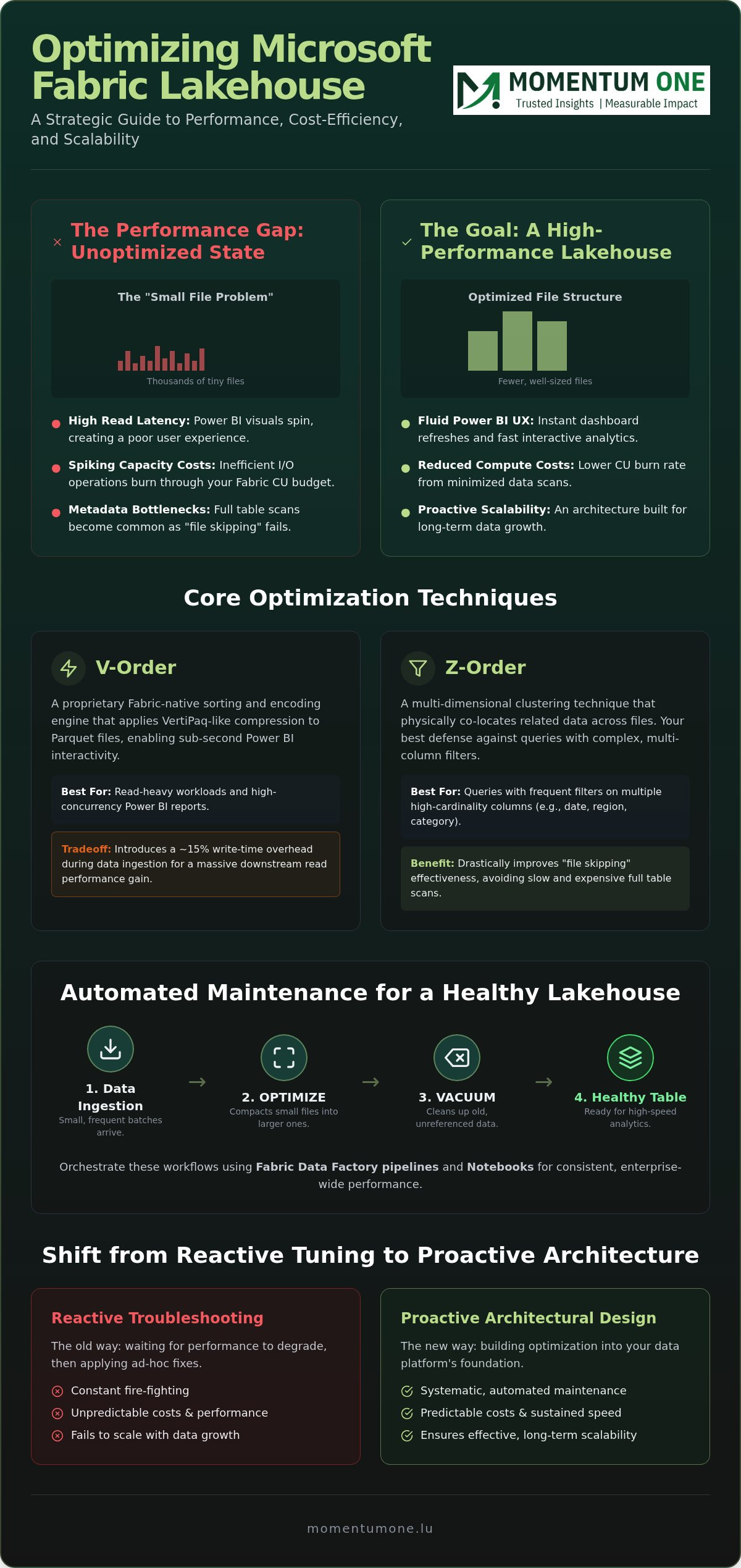
The most common culprit is the "small file problem." When data is ingested in frequent, small batches, the Lakehouse accumulates thousands of tiny Parquet files. Each file requires a separate I/O operation. For a Power BI report, this means the engine spends more time opening and closing files than actually processing data. This inefficiency directly impacts your Fabric capacity units (CU). Every unnecessary read cycle adds to your monthly consumption, turning a minor technical oversight into a significant financial burden.
Beyond file size, unoptimized metadata can cripple your queries. Delta Lake relies on "file skipping" to ignore data that doesn't match your filters. If your data layout is disorganized, the engine can't effectively skip files. This leads to full table scans. In a 2026 enterprise environment, these scans are simply too slow and too expensive to ignore. Manual tuning is no longer a viable path when dealing with petabyte-scale lakehouses; you need a systematic approach.
Anatomy of a High-Performance Delta Table
A healthy table isn't just about size. It's about internal structure and how the engine interacts with it. Consider these three pillars of table health:
- Row-Group Health: Optimal Parquet files should have well-sized row groups that align with memory buffers, ensuring the engine reads data in efficient chunks.
- The Delta Log: This transaction log is the brain of your table. If it becomes bloated with thousands of tiny entries, query planning takes longer than the query execution itself.
- Identifying Bottlenecks: You can spot "bottleneck" tables by looking for those where the file count is disproportionately high compared to the total data volume.
The ROI of Strategic Optimization
Investing in a strategic Fabric migration and modernization plan ensures that you optimize lakehouse delta tables as a standard part of your architecture. Strategic tuning delivers clear returns:
- Reduced Compute Costs: By minimizing data scans, you lower the CU burn rate for every query and report refresh.
- Fluid Power BI UX: Faster table reads mean your executive dashboards refresh instantly, even when handling complex DAX measures.
- National Scalability: As your data footprint grows across Luxembourg, a standardized optimization strategy prevents performance degradation before it starts.
Leveraging V-Order and Z-Order for Read-Heavy Workloads
To truly optimize lakehouse delta tables for high-concurrency environments, you must look beyond simple file management. Microsoft designed V-Order as a proprietary sorting and encoding engine specifically for the Fabric ecosystem. It applies VertiPaq-like compression to Parquet files, making them "Fabric-native." This alignment is critical because it allows the Power BI engine to read data directly from storage without expensive decompression or translation layers. If you're aiming for sub-second report interactivity, V-Order isn't optional; it's the foundation.
Performance always comes with a price. Applying V-Order introduces a 15% write-time tradeoff during data ingestion. While your pipelines might run slightly longer, the downstream benefits for read-heavy workloads are transformative. For most enterprise scenarios in 2026, accepting a few extra minutes of processing in the ETL phase is a logical exchange for the massive reduction in query latency and capacity consumption during business hours.
While V-Order handles how data is encoded within a file, Z-Order dictates how data is physically clustered across your storage. This multi-dimensional clustering technique is your best defense against complex filters. If your users frequently filter by date, region, and product category simultaneously, Z-Order ensures that related data points stay physically close together. This drastically improves the efficiency of file skipping, ensuring the engine only touches the exact data it needs.
V-Order vs. Z-Order: Choosing the Right Tool
Choosing between these two isn't always an "either-or" decision. They solve different parts of the performance puzzle:
- V-Order (Encoding): Best for optimizing the internal structure of Parquet files to accelerate the VertiPaq engine's read speed.
- Z-Order (Clustering): Best for reorganizing data across files to maximize the effectiveness of filter-based file skipping.
- The Hybrid Approach: For your most critical Gold-layer tables, applying both techniques provides the ultimate performance boost for Power BI Direct Lake mode.
Implementing V-Order in Your Spark Sessions
You can enable V-Order at the session level using Spark configuration or apply it during specific write operations. We recommend focusing these efforts on your Gold layer, where data is finalized for reporting. Monitoring the impact on your SQL analytics endpoints will reveal immediate drops in CU usage. If you're unsure how to balance these configurations, our team can help refine your data architecture modernization strategy to ensure peak efficiency across all layers. Consistent application through automated pipelines ensures that as your data grows, your performance remains stable and predictable.
Essential Maintenance: Compaction, VACUUM, and Deletion Vectors
Maintenance isn't a one-off event. It's a continuous commitment to performance. While V-Order and Z-Order define how data is structured, the OPTIMIZE and VACUUM commands ensure that structure remains efficient over time. To effectively optimize lakehouse delta tables, you must integrate these tasks into your post-ingestion routines. This proactive approach prevents the performance decay that often surprises teams after their first few months of operation.
The OPTIMIZE command performs a process known as "bin-packing." It takes the fragmented small files created during frequent data streams and merges them into larger, more efficient chunks. This consolidation reduces metadata overhead and significantly speeds up query planning. However, running OPTIMIZE too frequently can waste compute resources. The best practice in 2026 is to trigger these commands after significant data changes or during scheduled low-traffic windows to maximize efficiency without overspending on capacity.
For tables with high update frequencies, Deletion Vectors are essential. Instead of rewriting an entire data file every time a single row is updated or deleted, Delta Lake creates a small "vector" file that marks the change. This reduces write latency. Over time, these vectors accumulate and can eventually slow down reads. When you optimize lakehouse delta tables, your strategy must include a "collapse" phase where these changes are permanently committed to the main data files to maintain peak read speeds.
Step-by-Step Maintenance Workflow
A structured approach prevents technical debt from mounting. We recommend following these steps to maintain your Lakehouse health:
- Assessment: Use the Spark
DESCRIBE DETAILcommand to monitor file counts and table fragmentation. - Compaction: Run
OPTIMIZEto consolidate files. If the table is filtered heavily, includeZORDER BYon high-cardinality columns like CustomerID or TransactionDate. - Cleanup: Execute
VACUUMto remove files no longer needed by the transaction log. Be cautious; the default 7-day retention period is usually safe, but reducing it further can break "time travel" capabilities.
Managing Deletion Vectors for Write-Heavy Tables
In modern data warehouse design, we often encounter tables that require near-constant updates. Deletion Vectors allow these tables to stay responsive during ingestion. However, they aren't a set-and-forget feature. You must periodically run a full OPTIMIZE command to merge the vectors back into the base files. This ensures your read-heavy Power BI dashboards don't pay a performance penalty for the write-time efficiency gained during the initial data load.
Orchestrating Optimization at Scale Across the Enterprise
Running a single maintenance command is simple, but managing hundreds of tables across an enterprise environment requires a more sophisticated approach. To effectively optimize lakehouse delta tables at scale, you must move beyond ad-hoc scripts and embrace automated orchestration. In 2026, the complexity of data estates in Luxembourg demands that performance tuning becomes a background process rather than a manual chore for your engineering team.
Microsoft Fabric provides two primary paths for this orchestration. The "Lakehouse Maintenance Activity" in Fabric Data Factory offers a low-code solution for standard tasks like compaction and vacuuming. For teams requiring more control, Spark Notebooks allow for conditional logic. You can write scripts that only trigger an OPTIMIZE command if a table exceeds a specific file count or fragmentation threshold. This intelligence prevents unnecessary compute spend while ensuring your most active tables remain performant. Centralizing these logs in the Fabric Monitoring Hub allows your team to track job success and capacity impact from a single pane of glass.
Building the Optimization Pipeline
Timing is everything when it comes to resource management. We recommend scheduling your maintenance tasks during off-peak capacity hours to avoid contention with morning Power BI report refreshes. The most effective strategy is to link your pipeline automation directly to your ingestion cycles. By triggering a targeted optimization immediately after a large data load, you ensure that the data is "reporting-ready" before the first user logs in. Robust error handling and automated alerting are essential; a failed maintenance task shouldn't go unnoticed until a dashboard starts lagging.
Governance and Responsibility Models
Technical tools are only as effective as the governance surrounding them. Organizations must clearly define whether table health is the responsibility of the Data Engineering team or Platform Ops. Setting national standards for maintenance frequency and naming conventions ensures consistency as you scale. Regular Power BI architectural reviews help bridge the gap between technical storage health and the end-user experience. These reviews confirm that your efforts to optimize lakehouse delta tables are actually delivering the faster query times your business stakeholders expect.
If managing these complex orchestration layers feels like a drain on your internal resources, our team can take the lead. Explore our managed capacity and optimization services to ensure your Fabric environment stays lean and responsive 24/7.
Strategic Performance Design: Why Architecture Beats Ad-Hoc Tuning
Reactive tuning is like trying to fix a leaky boat while you're in the middle of the ocean. You might stop the immediate flood, but you haven't addressed why the hull is weak. In the data world, waiting for a dashboard to lag before you optimize lakehouse delta tables is a recipe for high costs and low user trust. True performance comes from an architectural foundation that anticipates growth rather than just reacting to it.
Our Fabric migration services are built on this proactive philosophy. Instead of treating optimization as a cleanup task, we bake it into the core of your Lakehouse design. This approach ensures that every table is created "performant," with correct partitioning, V-Order encoding, and maintenance triggers already in place. As a certified Microsoft Solutions Partner, we look beyond basic commands to identify hidden bottlenecks in metadata handling or capacity allocation that ad-hoc tuning often misses.
Momentum One's Approach to Performance Engineering
In 2026, we utilize a specialized framework designed for the Luxembourgish enterprise market. This framework prioritizes long-term scalability and internal data literacy. Technical tuning is only half the battle; your team must also understand the logic behind these configurations. We bridge this gap through corporate technical training, empowering your staff to maintain the high-performance standards we establish. This dual focus on technology and people turns a "messy lake" into a streamlined, high-value asset.
Achieving Long-Term Stability
Stable performance is not a destination; it's a state of continuous monitoring and refinement. Our managed services act as a safeguard, ensuring that as your data volumes grow, your query speeds don't suffer. We provide constant capacity management to keep your Fabric costs predictable and lean. If you're ready to move away from reactive firefighting and optimize lakehouse delta tables for the future, we invite you to contact us for a tailored data architecture review. This review provides a clear roadmap to modernize your environment and secure peak performance for years to come.
Securing Your Data Future with High-Performance Architecture
Achieving a high-performance Microsoft Fabric environment requires more than just running a few commands. It demands a shift from reactive troubleshooting to a proactive, architectural-first mindset. By implementing techniques like V-Order and automating essential maintenance cycles, you ensure your platform remains responsive as data volumes grow. When you optimize lakehouse delta tables with a strategic focus, you aren't just fixing slow reports; you're building a scalable foundation for the entire organization.
As a Certified Microsoft Solutions Partner with deep expertise in large-scale enterprise data modeling, Momentum One is here to help you navigate this complexity. We offer comprehensive managed BI services that ensure your environment stays lean and efficient. Optimize your Microsoft Fabric environment with Momentum One today and experience the difference of a truly modern data estate. We're ready to partner with you on this journey toward predictable costs and lightning-fast insights.
Frequently Asked Questions
What is the difference between V-Order and Z-Order in Microsoft Fabric?
V-Order and Z-Order serve distinct purposes in your data layout. V-Order is a Microsoft-proprietary encoding that optimizes Parquet files specifically for the VertiPaq engine, which is the heartbeat of Power BI Direct Lake mode. Z-Order clustering focuses on physical data locality across multiple columns. While V-Order makes individual files faster to read, Z-Order ensures the engine skips irrelevant files entirely. Combining both on critical Gold layer tables provides the best possible performance.
How often should I run the OPTIMIZE command on my Delta tables?
The frequency of your OPTIMIZE runs should align with your data ingestion patterns. For tables receiving continuous streams, a daily maintenance window is often ideal to prevent the "small file problem" from degrading performance. If you process data in weekly batches, running the command immediately after the load is more efficient. Avoid running it too frequently on small tables, as the compute cost for the maintenance itself might exceed the query savings.
Does V-Order work with non-Microsoft engines like Databricks?
V-Order produces Parquet files that remain fully compliant with open-source standards. This means non-Microsoft engines like Databricks or Spark can read these files without any issues. However, the specific "shuffling" and encoding benefits of V-Order are specifically designed to be recognized by the Fabric compute engines. While you won't lose compatibility by using it, you'll only see the maximum performance benefits when querying that data within the Microsoft Fabric ecosystem.
Can I use VACUUM to comply with GDPR data deletion requests?
VACUUM is a critical tool for regulatory compliance like GDPR. When you delete a record from a Delta table, the physical data still exists in older Parquet files to support "time travel" features. VACUUM permanently removes these files from your storage once they fall outside your retention period. For strict "right to be forgotten" requests, you might need to adjust your retention settings to ensure physical deletion happens within your legal timeframe.
Will optimizing my Delta tables reduce my Fabric capacity costs?
Strategic efforts to optimize lakehouse delta tables directly impact your bottom line. By reducing the volume of data scanned and the number of I/O operations required for a query, you lower the total Capacity Units (CU) consumed per operation. This efficiency is vital in 2026 for Luxembourgish enterprises looking to scale their analytics without moving to a more expensive Fabric SKU. Optimized tables ensure your existing capacity serves more users simultaneously.
What are Deletion Vectors and when should I enable them?
Deletion Vectors are a storage optimization feature that changes how Delta Lake handles updates and deletes. Instead of rewriting an entire data file for a single change, it creates a small bitmap file marking the affected rows. You should enable these for write-heavy tables to improve the speed of your MERGE operations. They reduce ingestion latency significantly, though you must still run OPTIMIZE periodically to consolidate these vectors into the main data files.
How do I monitor the performance impact of my optimization jobs?
You can monitor success through the Fabric Monitoring Hub, which provides detailed logs of every maintenance job. To see the real-world impact, use the Fabric Capacity Metrics app to compare CU consumption before and after you optimize lakehouse delta tables. For report-specific gains, Power BI Performance Analyzer will show reduced "Data Source" wait times. This data-driven approach allows you to prove the ROI of your optimization efforts to business stakeholders.
Is there a risk of data loss when running Delta table maintenance?
Maintenance operations in Delta Lake are inherently safe because they are fully ACID-compliant. The transaction log ensures that a table is never left in a corrupted state, even if a job is interrupted. The only operational risk is with the VACUUM command. If you set the retention period too low, you'll lose the ability to query older versions of your data. However, your current "active" data remains protected throughout the maintenance process.