How to Query Data with Databricks SQL: A Step-by-Step Guide
Unlock high-performance analytics. Learn how to query data with Databricks SQL, write efficient code with AI, and secure assets with Unity Catalog in this gu...
- Understand how to transition from traditional data warehousing to a serverless lakehouse architecture for greater operational agility.
- Master the SQL Editor workflow to query data with Databricks SQL while maintaining precise control over your catalog and schema context.
- Secure your enterprise assets using Unity Catalog to implement robust, fine-grained access control at both the row and column levels.
- Leverage the vectorized Photon Engine and AI-driven predictive optimizations to achieve high-performance analytics on even the largest datasets.
- Integrate Databricks with Microsoft Fabric and Power BI via Direct Lake mode to create a unified, high-speed reporting ecosystem.
What if the barrier between your massive data lake and your business intelligence tools wasn't a technical limitation, but simply a matter of choosing the right interface? Most data teams struggle with the friction of managing external tables or waiting minutes for queries to return results from a sprawling lakehouse. You've likely felt the frustration of trying to maintain performance while your datasets grow exponentially. Learning how to query data with Databricks SQL effectively can transform this experience from a bottleneck into a competitive advantage.
This guide will help you master the essentials of the Databricks SQL environment, allowing you to unlock high-performance analytics without the typical architectural headaches. We'll explore how to write efficient queries, leverage AI-assisted coding to speed up your workflow, and use Unity Catalog to ensure your data remains governed and secure. By the end, you'll have a clear path to building a scalable, high-speed data strategy that bridges the gap between raw storage and actionable insights.
Understanding Databricks SQL in the Lakehouse Era
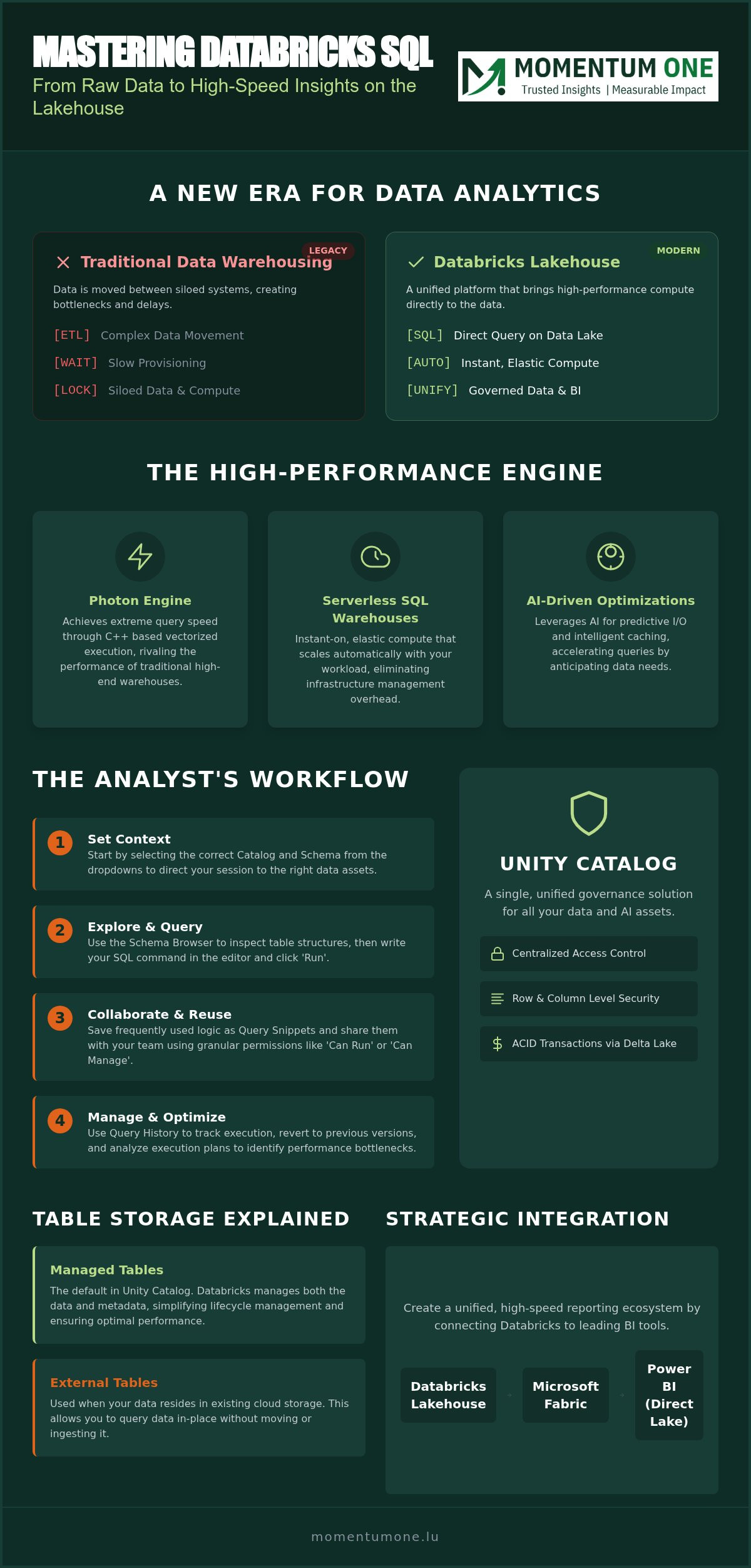
The shift from traditional data warehousing to a lakehouse architecture represents a fundamental change in how data teams operate. In the past, organizations had to move data between silos to gain insights; today, the goal is to bring the compute to the data. Databricks pioneered this approach, creating a unified platform that combines the best of data lakes and warehouses. At the heart of this strategy is Databricks SQL, a serverless compute layer designed specifically for high-performance analytics.
When you query data with Databricks SQL, you aren't just running a script. You're leveraging a specialized engine that understands the nuances of cloud storage while providing the familiar interface of a standard warehouse. SQL remains the lingua franca of data intelligence because it allows analysts and BI professionals to work within their existing skill sets without needing to learn complex Spark or Python code. By 2026, the transition from legacy editors to the unified SQL environment has become the standard, offering a more streamlined and responsive experience for technical teams.
Managed vs. External Tables
Understanding how your data is stored is critical for performance. Managed tables are the default within Unity Catalog; they allow the platform to handle both the data and the metadata, which simplifies lifecycle management. External tables are better suited for scenarios where data resides in existing cloud object storage and needs to be accessed without being moved. Regardless of the table type, Delta Lake provides the underlying reliability layer that ensures ACID transactions and prevents data corruption during complex operations.
The Role of Serverless SQL Warehouses
Managing infrastructure used to be a full-time job for data engineers. Serverless SQL warehouses change this by providing instant-on, elastic compute that scales automatically based on your workload. This reduces management overhead for BI teams, allowing them to focus on generating insights rather than tuning clusters. Choosing this serverless approach is a key decision in your Lakehouse vs Warehouse Design, as it directly impacts your ability to provide real-time reporting to stakeholders without the delay of traditional provisioning. It's a supportive, efficient way to maintain peak performance across complex enterprise data environments.
Navigating the Databricks SQL Editor and Workspaces
To start your journey, access the SQL Editor by selecting the 'SQL' icon in the sidebar. This workspace serves as your command center for all analytical tasks. Once the editor opens, your first priority is selecting the correct Catalog and Schema context from the dropdown menus at the top. This step is vital because it directs your session to the specific data assets managed within Unity Catalog. By 2026, this unified interface has become the primary way teams interact with the lakehouse, offering a seamless transition from raw data to insights.
The Schema Browser on the left provides a strategic map of your data environment. You can explore table structures, data types, and even preview sample rows before writing a single line of code. When you are ready to query data with Databricks SQL, simply enter your command and hit 'Run'. The results appear in real-time, often powered by the Photon Engine, which uses vectorized execution to deliver performance that rivals traditional high-end warehouses. This combination of visibility and speed allows you to validate your logic instantly.
Organization and Collaboration Features
Efficiency in a modern data team relies on reusable assets. Query snippets allow you to save frequently used SQL logic, such as complex joins or standard fiscal year calculations, making them available for the entire team. This supportive approach reduces errors and ensures consistency across reports. Sharing these queries is equally simple; you can grant specific permissions like 'Can Run' or 'Can Manage' to colleagues. Collaborative editing features even allow team members to work on the same script simultaneously, fostering a proactive environment where knowledge is shared freely.
Managing Query History and Versioning
Stability is key to professional data management. The Query History tab acts as a reliable ledger of every statement executed in your workspace. If a recent modification leads to unexpected results, you can quickly browse previous versions and revert to a known good state. This tab also offers deep technical transparency through execution plans. By reviewing these plans, you can identify performance bottlenecks, such as unnecessary data shuffling or missing indexes. For organizations aiming to optimize these environments for maximum throughput, our workspace and capacity management services offer the expertise needed to maintain a lean, high-performing lakehouse.
Beyond Basic Queries: Governance with Unity Catalog
Governance often feels like a hurdle, but in a mature lakehouse environment, it's the foundation of trust. Unity Catalog acts as the central brain for your data estate, providing a unified discovery interface that spans your entire enterprise. When you query data with Databricks SQL, you're operating within a framework that automatically tracks lineage. This means you can see exactly where a dataset originated and how it's been transformed through every stage of its lifecycle. For our clients in the Luxembourgish market, this centralized auditing isn't just a feature; it's a mandatory requirement for meeting strict compliance standards in 2026. It gives your DPO and IT teams the peace of mind they need to scale without compromising security.
Implementing Row-Level Security
Security needs to be dynamic, not static. By using SQL predicates within Unity Catalog, you can filter data based on specific user roles or attributes directly at the source. For example, a regional manager might only see sales figures for their specific territory, even though they're querying the same global table as the CFO. This ensures that sensitive financial or personal information remains protected when accessed via BI tools. It's a proactive way to manage risk without creating duplicate, stale datasets for different teams. If you're looking to align these security layers with your reporting strategy, our team provides specialized Power BI Consulting & Governance to help you build a seamless, secure pipeline from lakehouse to dashboard.
Lakehouse Federation and External Systems
Data silos often persist because moving massive datasets is slow, expensive, and prone to error. Lakehouse Federation solves this by allowing you to query external systems like SQL Server or Snowflake directly from your Databricks environment. You don't have to migrate every byte to see the full picture of your business performance. This capability allows you to maintain a "Single Source of Truth," which we define as a unified, governed access point where all stakeholders can find consistent, verified data regardless of its physical storage location. It's a strategic way to query data with Databricks SQL while leveraging your existing infrastructure. This approach effectively collapses the walls between disparate platforms, ensuring your team spends more time on analysis and less on data movement.
Maximizing Performance: Photon Engine and AI-Powered SQL
The Photon Engine represents the next stage in high-performance analytics. Unlike traditional row-based processing, Photon uses vectorized execution to process batches of data simultaneously. This architectural shift ensures that when you query data with Databricks SQL, you're getting the absolute maximum throughput from your underlying hardware. It's particularly effective for scan-heavy workloads and complex aggregations that typically bog down standard SQL engines. By 2026, these intelligent experiences have expanded to include natural language interfaces, allowing users to ask complex questions without needing to memorize every schema detail.
Predictive optimizations take this a step further by automatically tuning your data layout. The platform analyzes your query patterns and adjusts file sizes and metadata to ensure future runs are even faster. This hands-off approach to performance allows your team to focus on strategic insights rather than manual maintenance. It's a reliable way to maintain speed as your data lakehouse grows, ensuring that performance doesn't degrade over time.
Query Optimization Techniques
While the engine is powerful, specific techniques can significantly boost your results. Z-Order indexing is a standout method for data skipping; it co-locates related information in the same files, which drastically reduces the amount of data the engine needs to read. Optimizing joins and aggregations is also essential when working with enterprise-scale datasets. If you find that your front-end reporting is struggling to keep up with your high-speed lakehouse, our DAX optimization experts can help bridge the performance gap within your Power BI environment.
AI-Assisted SQL Development
Modern AI assistants integrated into the SQL Editor act as a collaborative partner for your analysts. These tools go beyond simple autocomplete; they suggest joins based on the semantic meaning of your data and can even auto-fix syntax errors in real-time. This reduces the barrier to entry for non-technical analysts, allowing them to query data with Databricks SQL with the confidence of a seasoned engineer. By providing intelligent suggestions that understand your specific Unity Catalog metadata, these assistants ensure that your code is both efficient and accurate from the first run.
To ensure your team is fully equipped to leverage these advanced features, consider our corporate data fabric training to master the latest in AI-assisted analytics.
Strategic Implementation: Integrating with Microsoft Fabric
By 2026, many organizations in Luxembourg have realized that a hybrid approach is the most robust path forward for enterprise analytics. Positioning Databricks SQL as the high-performance engine for Microsoft Fabric allows you to combine world-class compute with the most popular business intelligence ecosystem. When you query data with Databricks SQL within a Fabric environment, you're essentially collapsing the wall between data engineering and business intelligence. This strategic alignment ensures that your technical teams have the power they need, while your business users get the responsiveness they expect.
Direct Lake mode serves as the bridge in this architecture. It allows Power BI to connect to your Delta tables in OneLake without the traditional overhead of data movement or the latency of standard DirectQuery. Modernizing legacy data warehouses with a strategic roadmap is no longer just an IT project; it's a fundamental business transformation. A professional partner is essential for enterprise-grade migrations because they provide the steady hand needed to navigate technical complexity without disrupting daily operations. This collaborative approach ensures that your transition to a modern lakehouse is both smooth and performance-oriented.
Databricks SQL and Power BI Synergy
The connection between these platforms has never been tighter. You can now publish datasets directly to BI providers without the hassle of managing complex drivers or gateways. This ensures that the fine-grained governance you've established in Unity Catalog persists all the way to the end-user report. For teams looking to execute this transition smoothly, our Microsoft Fabric Migration Services provide a proven framework for success. This synergy allows you to query data with Databricks SQL while delivering lightning-fast visualizations to stakeholders across the organization.
Building a Scalable Data Architecture
Designing for future growth is a priority for the Luxembourgish corporate sector. As datasets become more complex and diverse, having a scalable foundation is the only way to maintain a competitive edge. We offer managed services for continuous environment monitoring, ensuring your lakehouse remains optimized and cost-effective as your business evolves. If you're ready to take the next step in your data journey, we invite you to Book a Data Architecture Review with our specialists. This proactive approach ensures your architecture is ready for the demands of 2026 and beyond, providing a stable platform for long-term growth and innovation.
Modernizing Your Analytics Workflow for 2026
Transitioning to a modern lakehouse architecture is about more than just raw speed; it's about creating a unified, governed environment where insights flow freely. You've seen how the Photon Engine and AI-assisted tools make it easier than ever to query data with databricks sql. By leveraging Unity Catalog for robust security and integrating seamlessly with Microsoft Fabric, your organization can finally bridge the gap between raw data storage and high-performance business intelligence.
Navigating these technical shifts requires a steady hand and a clear strategic roadmap. As a Luxembourg-based Certified Microsoft Solutions Partner, Momentum One provides strategic consulting and deep expertise in Fabric and Databricks integration. We're dedicated to helping corporate clients build scalable environments that stand the test of time. Optimize your data architecture with Momentum One to ensure your team has the tools and guidance needed for peak performance. Your data journey is an evolution, and with the right foundation, the possibilities for growth are limitless.
Frequently Asked Questions
What is the difference between Databricks SQL and standard SQL?
Databricks SQL is a specialized flavor of SQL optimized for the lakehouse architecture. It supports standard ANSI SQL but adds extensions for Delta Lake features like time travel and metadata management. Unlike standard SQL in a traditional RDBMS, it runs on a distributed compute engine designed for massive scale. This allows you to query data with Databricks SQL across petabytes of information without the performance degradation typically seen in legacy systems.
Can I query external data sources directly from Databricks SQL?
Yes, you can query external sources using Lakehouse Federation. This feature allows you to create connections to databases like SQL Server, Snowflake, or PostgreSQL directly within the Databricks environment. By mapping these external systems as catalogs, you can join data from disparate sources without performing a full migration. It's a strategic way to eliminate silos and maintain a single source of truth across your entire enterprise data estate.
How does the Photon engine improve query performance?
Photon is a high-performance vectorized query engine written in C++ that accelerates SQL workloads. It improves performance by processing data in batches rather than row by row, which maximizes CPU efficiency and memory bandwidth. This architecture is particularly effective for the complex joins and aggregations common in modern analytics. By leveraging Photon, teams can achieve significant speed improvements on large datasets compared to the standard Spark-based execution engines used in previous years.
Is Unity Catalog required for querying data in Databricks?
While not strictly mandatory for basic operations, Unity Catalog is highly recommended for any enterprise-grade implementation. It provides a centralized governance layer that manages permissions, auditing, and data lineage across your workspace. Without it, you're limited to legacy Hive Metastore configurations which lack fine-grained access control. In 2026, most organizations view Unity Catalog as an essential component for maintaining a secure and compliant lakehouse environment that meets national regulatory standards.
How do I connect Power BI to a Databricks SQL warehouse?
Connecting Power BI is straightforward using the native Databricks connector. You simply provide the Server Hostname and HTTP Path found in your SQL Warehouse settings. For the best experience, we recommend using the Direct Lake mode in 2026, which allows Power BI to read Delta tables directly without needing to import data or use slow DirectQuery connections. This synergy ensures that your reports remain responsive even as your underlying data volumes grow.
What are the cost implications of using serverless SQL warehouses?
Serverless SQL warehouses operate on a pay-per-use model, which can be highly cost-effective for variable workloads. You don't pay for idle time because the compute resources spin up and down automatically based on query demand. While the per-unit cost might be higher than classic clusters, the reduction in management overhead and the elimination of wasted capacity often lead to lower total costs. It's a reliable way to scale analytics without the burden of infrastructure provisioning.
Can I use natural language to query data in Databricks in 2026?
AI-powered assistants now allow you to query data with Databricks SQL using natural language prompts. The integrated AI assistant understands your schema context and can translate descriptive questions into valid SQL code. This capability significantly lowers the barrier to entry for business analysts who may not be SQL experts. It also helps seasoned developers by generating complex boilerplate code and fixing syntax errors instantly, making the development process more proactive and efficient.
How do I manage permissions for sensitive data in Databricks?
Permissions are managed through Unity Catalog using standard SQL GRANT statements or the account console UI. You can implement fine-grained access control, including row-level and column-level security, to ensure users only see the data relevant to their roles. This centralized approach simplifies auditing and compliance. For complex environments, our managed services provide ongoing oversight to ensure your security policies remain robust as your data architecture evolves and expands over time.