Integrating Business Central Data into Microsoft Fabric
Stop slow reports & high costs. Learn to integrate Business Central Data in Fabric using mirroring for a real-time lakehouse and advanced AI analytics.
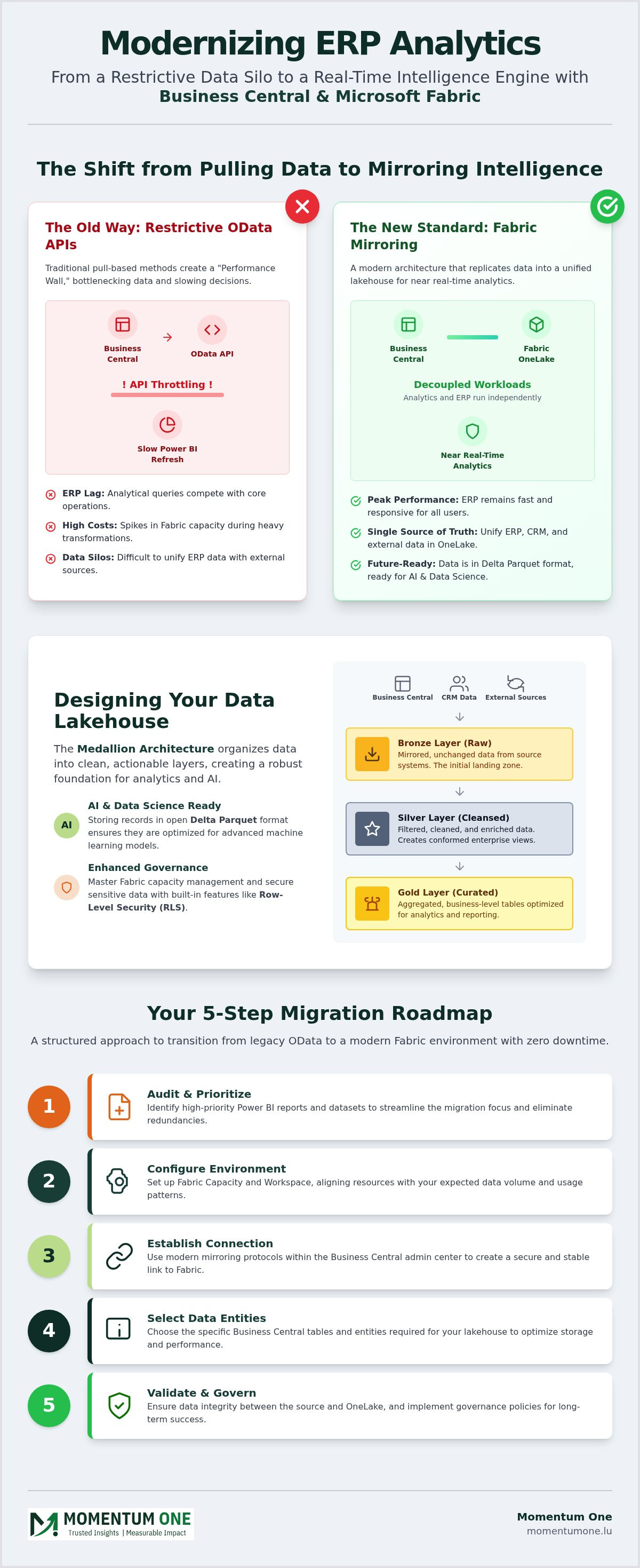
- Overcome the "Performance Wall" by moving from restrictive OData APIs to a more scalable mirroring architecture. You'll learn how to stop slow report refreshes from hindering your business decisions.
- Integrate your Business Central Data in Fabric to create a unified data lakehouse that serves as your single source of truth. This shift enables near real-time analytics without degrading your ERP's performance.
- Implement a Medallion Architecture to organize your data into clean, actionable layers. Storing your records in open Delta Parquet formats ensures they're ready for advanced AI and data science projects.
- Control your operational costs by mastering Fabric capacity management and governance. We'll cover how to secure your environment with Row-Level Security while maintaining a high-performance workspace.
- Transition your legacy data stack into a modern, unified environment with a clear strategic roadmap. Discover how expert-led training and managed services can support your long-term success in the 2026 landscape.
What if your ERP wasn't a data silo, but a real-time engine for your entire organization's intelligence? For many businesses in Luxembourg entering 2026, the reality is often the opposite. You're likely familiar with the frustration of waiting for Power BI reports to refresh, only to hit OData API limits or see your Fabric capacity costs spike during heavy transformations. It's a common struggle to unify your Dynamics 365 records with external sources without impacting your system's core performance.
This guide shows you how to break those barriers by effectively managing Business Central Data in Fabric. We'll move past the era of restrictive, pull-based reporting into a modern architecture that mirrors your data directly into a unified lakehouse. You'll learn how to establish a single source of truth that supports near real-time analytics and prepares your infrastructure for advanced AI and data science initiatives. We're going to walk through the technical shift from "pulling data" to "mirroring intelligence," ensuring your reporting environment is as agile as your business operations.
Why Business Central Data in Fabric is the New Standard for ERP Analytics
In the 2026 business environment, the synergy between Dynamics 365 Business Central and Microsoft Fabric has redefined how companies approach operational intelligence. Relying on traditional reporting methods often leads to what we call the "Performance Wall." This occurs when your data volumes grow to a point where standard OData and API-based extracts simply can't keep up. These legacy methods weren't designed for the high-velocity, high-volume demands of modern AI and data science. Instead of just pulling data, forward-thinking organizations are transitioning to a Data Lakehouse model, which represents the natural evolution of the traditional ERP data warehouse. By centralizing Business Central Data in Fabric, you're not just storing records; you're creating a strategic foundation where financial, operational, and external data live together in a single, logical OneLake.
The End of API Throttling and ERP Lag
One of the most immediate benefits of this integration is the way Fabric decouples analytical queries from your transactional ERP workloads. When you run heavy reports through OData, you're essentially competing for resources with your accounting team's daily entries. This often results in API throttling or noticeable lag in the ERP itself. By utilizing a dedicated Fabric workload, you ensure that your production environment remains fast and responsive. A Fabric workload in this context is the specific set of background processes and compute capacity that manages the continuous replication of Business Central tables into the Delta Parquet format within OneLake. This separation means your data team can run complex transformations at any time of day without ever impacting a user's ability to post an invoice or check inventory levels.
Building a Single Source of Truth
The true power of OneLake lies in its ability to eliminate the data silos that have traditionally plagued corporate environments. Integrating Business Central Data in Fabric allows you to weave ERP records together with CRM interactions, IoT sensor data, and external market trends effortlessly. This creates a unified landscape where every department works from the same verified numbers. Understanding the structural differences between these modern systems and legacy setups is crucial for long-term scalability. You can explore more about these architectural choices in our guide on Data Lakehouse vs Warehouse Design. Ultimately, this unified approach ensures that your organization isn't just collecting data, but is actively using it to drive growth and efficiency.
Transitioning from OData APIs to Fabric Open Mirroring
Traditional OData APIs were revolutionary for their time, but they rely on a pull mechanism that frequently creates performance bottlenecks. In 2026, the standard for managing Business Central Data in Fabric has shifted toward Open Mirroring. This architecture utilizes the BC2Fab workload to replicate data directly into OneLake. It's a fundamental change in how data moves. Instead of scheduled refreshes that might run once an hour and strain your ERP, mirroring captures incremental changes as they occur. This incremental change detection is the heartbeat of modern data pipelines. It ensures you aren't re-processing massive datasets unnecessarily; you're only syncing the deltas. The result is a reporting environment that's always current without the heavy lift of legacy extraction methods.
Step-by-Step Migration Roadmap
Moving away from legacy OData requires a methodical approach to ensure zero downtime for your business users. We recommend a structured 5-step process to establish your Fabric link. First, audit your existing Power BI reports to identify high-priority datasets and eliminate redundant ones. Second, configure your Fabric Capacity and Workspace environments to align with your expected data volume. Third, establish the connection using the latest 2026 mirroring protocols within the Business Central admin center. Fourth, select the specific tables and entities required for your lakehouse. Finally, validate data integrity between the source and OneLake to ensure parity. If you're looking for a steady hand to guide this transition, our Fabric Migration & Modernization services provide the technical expertise needed for a seamless shift.
Handling Custom Fields and Extensions
Most Business Central environments are heavily customized with AL-based extensions. A common concern is how these specific fields translate to a data lakehouse. Mirroring simplifies this by maintaining metadata consistency automatically. When an extension changes in Business Central, the mirroring process detects the schema update and reflects it within the Delta Parquet files in OneLake. It's no longer a manual chore to update your data pipelines every time a developer adds a field to a table. This automated synchronization ensures your downstream analytics stay accurate without constant developer intervention. By replicating AL-based customizations directly into an open format, you make your most valuable proprietary data accessible to every engine in the Fabric ecosystem.
Architecture and OneLake: Designing Your BC Data Lakehouse
Organizing your integrated Business Central Data in Fabric effectively requires more than just syncing tables; it demands a structured data strategy. Once your records land in OneLake, they need a logical home that balances accessibility with performance. We advocate for a Medallion Architecture to manage this flow. This approach ensures your financial data remains auditable while becoming business-ready for end users. By utilizing Fabric Dataflows Gen2 for lightweight transformations, you can shape your data using a low-code interface that runs entirely on Fabric compute. This preserves your ERP's resources for its primary job: running your business operations.
Medallion Architecture for Financial Data
The Medallion framework categorizes data into three distinct layers. The Bronze layer holds raw replication of your BC tables. It's the landing zone where tables like G/L Entry or Sales Invoice Header arrive in their original state, providing a complete audit trail. The Silver layer is where we refine that data. We standardize naming conventions, handle null values, and align date formats to create a clean, reliable middle ground. Finally, the Gold layer delivers business-ready aggregates and KPIs. This is where the C-suite finds their EBITDA, cash flow projections, and inventory turnover ratios. This tiered structure is a cornerstone of our Data Warehouse & Lakehouse Design methodology, ensuring scalability as your volume grows.
Optimizing Storage with Delta Parquet
Storing your ERP data in open Delta Parquet formats is a strategic move for the 2026 ecosystem. This format is compressed and highly performant, but its true value lies in its openness. It prevents vendor lock-in by allowing multiple compute engines to read the same data files simultaneously. When managing Business Central Data in Fabric, this format enables Direct Lake mode. This is a genuine game-changer for Power BI performance. Direct Lake allows Power BI reports to read data directly from the lakehouse without the need for traditional data imports or slow DirectQuery connections. You get the speed of Import mode with the real-time nature of DirectQuery. It effectively removes the lag between a transaction being posted in BC and appearing in your executive dashboard.
Building this architecture correctly from the start prevents costly rework as your data initiatives expand. If you're planning a transition, our Microsoft Fabric Migration Services guide provides a deeper look at the strategic roadmap required for a successful implementation. By focusing on a clean, open architecture, you ensure your data remains an asset rather than a maintenance burden.
Solving Performance Bottlenecks and Data Governance Challenges
Establishing a technical link is just the first step. Managing Business Central Data in Fabric at scale requires a dedicated focus on efficiency and safety. Without a clear governance framework, your modern lakehouse can quickly turn into an unmanaged data swamp where redundant datasets inflate your operational overhead. We prioritize DAX optimization as a core pillar of this strategy. Querying millions of ERP rows requires lean, efficient measures to keep report latency low and ensure your financial models remain responsive during critical decision-making moments.
Fabric Capacity Management and Cost Control
The most common concern we hear from leadership teams in 2026 is how to scale analytics without unpredictable costs. Fabric operates on Capacity Units (CUs), and unoptimized transformations or heavy mirroring tasks can lead to unexpected billing spikes. It's vital to monitor your CU consumption through the Fabric Capacity Metrics app to identify which workloads are the most resource-intensive. We recommend strategies for smoothing peak loads, especially during high-demand periods like month-end financial closing. By staggering non-critical data refreshes and optimizing your Silver-to-Gold layer transformations, you can maintain high performance without over-provisioning your capacity. You can explore more about maintaining this balance in our guide on Managed Power BI Services.
Security and Compliance for Financial Data
Financial data is sensitive by nature, and moving it into a unified lakehouse doesn't mean you should relax your security standards. We focus on mapping your existing Business Central permissions directly to Fabric roles using Row-Level Security (RLS) and Object-Level Security (OLS). This ensures that a regional manager in your Luxembourg office only sees the records relevant to their specific department or territory. For organizations operating within the national market, ensuring GDPR and data residency compliance is a non-negotiable requirement. Your Fabric tenant must be configured to respect these boundaries while still providing the visibility your executive team needs. Implementing automated auditing within a governed Fabric tenant provides a continuous trail of data access, ensuring that your environment remains compliant with both internal policies and external regulations.
Effective governance isn't about restriction; it's about creating a safe, high-performance environment where your team can innovate with confidence. If you're ready to optimize your current workspace or need a strategic review of your usage, our Workspace and Capacity Management services can help you secure your environment while controlling costs.
Implementing Your Fabric Roadmap with Momentum One
Transitioning your Business Central Data in Fabric represents a major technical milestone, yet the real value is found in how your organization utilizes that intelligence. At Momentum One, we serve as a dedicated ally for businesses across Luxembourg. We bridge the gap between complex cloud architecture and practical business utility. Our team doesn't just establish a data link; we ensure your entire infrastructure is scalable, governed, and optimized for 2026 and beyond. We combine our status as a Microsoft Solutions Partner with a supportive, boutique partnership that prioritizes your unique corporate objectives.
Tailored Training and Managed Services
Sustainable growth requires more than a successful migration. It's about building internal capability. We empower your teams through specialized Corporate Data Fabric Training. These workshops move beyond generic tutorials to solve the specific ERP challenges your staff faces daily. Our managed services also offer continuous support for DAX Optimization. This keeps your reports responsive even as your data volume expands. By focusing on proactive maintenance, we help you reduce technical debt and keep your Fabric capacity costs under control.
Next Steps: From Strategy to Execution
We've refined a 90-day Fabric migration roadmap that moves your organization from planning to production with minimal friction. This structured timeline covers everything from initial audits to the final cut-over to mirroring. Working with a boutique consultancy means you receive personalized expertise tailored to the Luxembourg market. You aren't just another ticket in a queue; you're a partner in a shared journey toward data maturity. We apply enterprise-grade standards to every project while maintaining the agility and dedication of a focused team.
The move from restrictive OData APIs to a unified lakehouse begins with an honest assessment of your current environment. We invite you to a complimentary architectural review of your existing Business Central reporting stack. Our experts will help you identify performance gaps and outline a clear path toward a modernized data environment. Reach out to us today to schedule your consultation and take the first step toward a high-performance future.
Modernizing Your ERP Analytics Strategy
Transitioning your data strategy is about more than just speed; it's about creating a scalable foundation for the next decade of innovation. By shifting your Business Central Data in Fabric, you eliminate the bottlenecks of legacy APIs and embrace a high-performance, mirrored architecture. This move ensures your financial and operational records are always ready for advanced analytics while keeping your ERP environment fast and responsive. You've seen how a well-structured lakehouse can turn raw numbers into a single source of truth for your entire organization.
As a Certified Microsoft Solutions Partner with national coverage across Luxembourg, Momentum One is here to guide you through every step of this evolution. We specialize in enterprise-grade DAX optimization and robust Fabric architecture, ensuring your migration is both efficient and cost-effective. We're a partner invested in your long-term growth, helping you simplify complexity rather than hiding behind it. You don't have to navigate the technical shift to 2026 standards alone.
Start Your Microsoft Fabric Migration Strategy with Momentum One. We're ready to help you turn your ERP data into your most powerful strategic asset.
Frequently Asked Questions
Is Microsoft Fabric included in my Business Central license?
No, Microsoft Fabric is a separate platform with its own licensing model. While Business Central provides the core mirroring capability for Business Central Data in Fabric, you need an active Fabric capacity, such as an F-SKU or P-SKU, to store and process that data in OneLake. You can start with smaller capacities and scale up as your data volume and analytical needs grow throughout the 2026 ecosystem.
Can I still use OData APIs if I move my data to Microsoft Fabric?
Yes, you can continue to use OData APIs, but we generally advise against it for high-volume reporting. Mirroring is a more efficient alternative that significantly reduces the load on your ERP. OData remains useful for ad-hoc queries or lightweight integrations, but Fabric provides a more scalable architecture for enterprise-wide analytics. This allows you to phase out legacy API dependencies at a pace that suits your organization.
How much Fabric Capacity do I need for a standard Business Central implementation?
Most standard implementations begin with an F2 or F4 capacity, though this depends entirely on your data volume and transformation complexity. These entry-level tiers provide enough compute for mirroring and basic lakehouse operations. We recommend monitoring your Capacity Unit consumption during high-demand periods like month-end closing to determine if a higher tier is necessary. Proper workspace management ensures you only pay for the resources you actually use.
Does mirroring Business Central data impact the performance of my ERP?
No, mirroring is designed to be a non-intrusive background process that doesn't impact your daily ERP operations. Unlike traditional OData extracts that pull data and consume transactional resources, mirroring pushes incremental changes to OneLake. This decoupling ensures your accounting team can post invoices and run processes without experiencing the lag often caused by heavy analytical reporting queries. It's a much more stable approach for large-scale data environments.
How does Fabric handle custom fields and AL extensions from Business Central?
Fabric handles custom fields and AL extensions automatically through the mirroring process. When you add new fields or modify existing tables in Business Central, the system detects these schema changes and updates the Delta Parquet files in OneLake. You don't need to manually rebuild your data pipelines. This ensures your custom Business Central Data in Fabric remains synchronized and available for reporting without constant developer intervention or manual maintenance.
Is it possible to combine Business Central data with on-premise SQL data in Fabric?
Yes, you can unify data from disparate sources using Fabric shortcuts and pipelines. By creating a shortcut to your on-premise SQL Server or using a Data Gateway, you can land that data in the same OneLake environment as your ERP records. This allows you to build cross-functional reports that combine financial data with legacy systems. It provides a truly holistic view of your corporate performance across the entire national market.
What is the difference between Power BI DirectQuery and Fabric Direct Lake for BC?
Direct Lake is a massive performance upgrade over traditional DirectQuery. While DirectQuery sends queries back to the source which can be slow, Direct Lake reads the Delta Parquet files directly from OneLake at the speed of memory. It offers the performance of Import mode without the need to schedule refreshes. This makes it the preferred choice for real-time reporting on large ERP datasets as we move further into 2026.
How do I ensure financial data security when moving data to OneLake?
You secure your data by implementing Row-Level Security and Object-Level Security directly within the Fabric workspace. This ensures that users only see the specific financial records they're authorized to access. Additionally, Fabric integrates with Microsoft Purview for advanced governance and auditing. For Luxembourg-based entities, this setup ensures compliance with national data residency requirements and GDPR standards while maintaining a transparent and secure audit trail for all financial records.