Mastering Power BI Embedded with Microsoft Fabric
Master Power BI Embedded and Microsoft Fabric. Learn to cut costs and latency with OneLake, Direct Lake mode, and F-SKUs for high-performance embedded analyt...
- Learn how OneLake creates a single source of truth for your data, eliminating the need for complex pipelines.
- Understand the strategic shift from Azure A-SKUs to Fabric F-SKUs to optimize your Power BI Embedded and Microsoft Fabric costs.
- Discover the performance benefits of Direct Lake mode, which allows you to query large datasets with minimal latency.
- Follow a clear roadmap for provisioning capacity and configuring your Lakehouse environment to ensure a smooth deployment.
- Explore how partnering with a certified specialist simplifies your transition to a modern, unified analytics architecture.
What if you could eliminate the lag between your data warehouse and your customer-facing dashboards without doubling your storage costs? For many developers and architects in Luxembourg, managing the intersection of Power BI Embedded and Microsoft Fabric often feels like a balancing act where complexity and high latency are the only constants. You've likely felt the frustration of navigating the "alphabet soup" of A, EM, and now F SKUs while trying to maintain seamless performance for your end users.
We understand that the shift toward a unified data environment can feel daunting, but it also presents a significant opportunity to streamline your operations. This article explores how to leverage the combined power of these platforms to deliver scalable, high-performance analytics within your custom applications. By transitioning to a unified architecture, you can finally move away from simple data visualization and toward real-time data activation.
We'll show you how to utilize OneLake as your single source of truth and explain why Direct Lake mode is a game changer for reducing data duplication. You will also learn how to navigate the F64 capacity threshold effectively, ensuring your licensing strategy is as efficient as your code. Whether you're migrating from legacy P-SKUs or building a new SaaS offering, these insights will help you master a more agile data strategy.
What is Power BI Embedded and Microsoft Fabric Integration?
Power BI Embedded has long been the gold standard for developers who want to integrate analytics into their own software. It's a Platform-as-a-Service (PaaS) offering that lets you avoid building complex charting engines from scratch. However, the backend of this technology is undergoing a massive transformation. The integration of Power BI Embedded and Microsoft Fabric represents a shift from siloed data environments to a unified, AI-ready architecture. By August 2026, the retirement of legacy Power BI Premium P-SKUs has made Fabric-backed environments the new baseline for any serious application developer.
Microsoft Fabric serves as an all-in-one data platform. It brings together data lakehouse architecture, data engineering, and real-time analytics into a single environment. For businesses in Luxembourg, this means you can manage your entire data lifecycle without jumping between different Azure portals or Microsoft 365 interfaces. If you're planning for the future, our Fabric Migration & Modernization experts can help you navigate this transition smoothly.
The Core Components of the Integration
Understanding how these two worlds collide requires a look at three fundamental pillars:
- OneLake: Often called the "OneDrive for data," OneLake provides a single, logical data lake for your entire organization. It simplifies storage by allowing embedded reports to access data directly without expensive duplication.
- Fabric Capacities (F-SKUs): These provide the unified compute power for your workloads. Whether you use a small F2 SKU at approximately €156.33 per month (reserved) or scale up to an F64 for larger user bases, you're tapping into a flexible resource pool.
- Power BI REST APIs: These APIs act as the essential bridge. They allow your custom application to interact with Microsoft Power BI, managing everything from report embedding to automated data refreshes.
Key Benefits for Modern Applications
The synergy between Power BI Embedded and Microsoft Fabric offers several practical advantages for your development team:
- Eliminating Data Silos: With OneLake, you maintain a single source of truth. This reduces the risk of conflicting data appearing in different parts of your application and ensures that every user sees the same numbers.
- Dynamic Scaling: You can adjust your compute power based on real-time application usage patterns. This ensures high performance during peak hours while controlling costs during quieter periods.
- Simplified Governance: The Fabric admin portal provides a centralized view of all your capacities and workspaces. It's much easier to monitor performance and manage security across your entire data estate from one place.
The Architecture of Unified Analytics: OneLake and Direct Lake
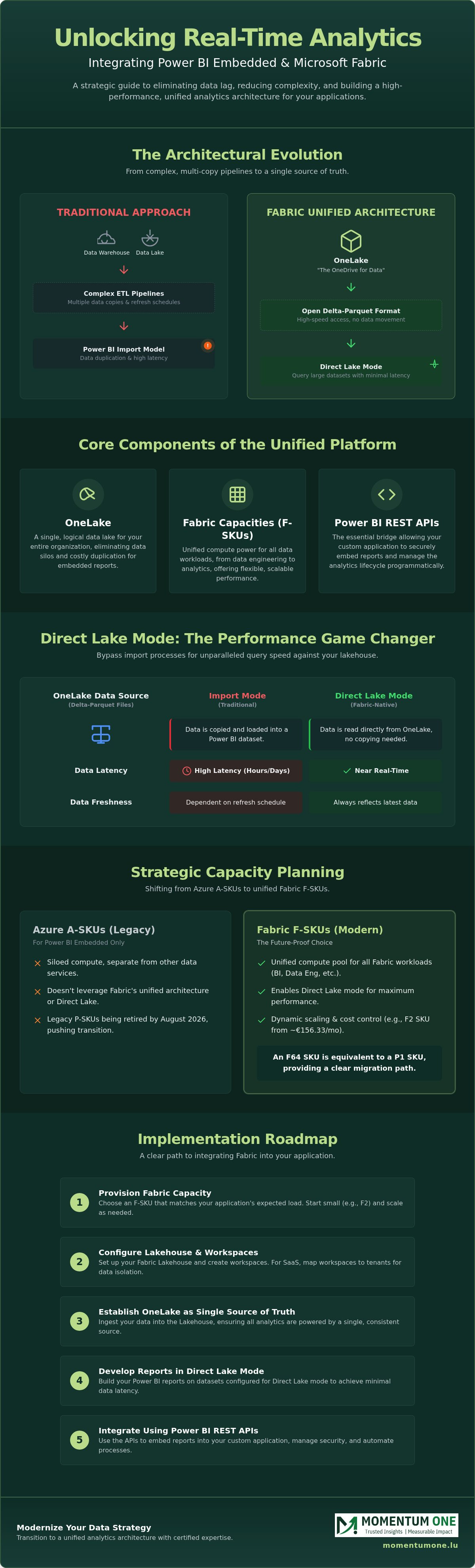
The traditional approach to embedding analytics often involved complex ETL pipelines, multiple data copies, and the constant headache of managing refresh schedules. Microsoft Fabric redefines this backend by introducing a unified data layer. In this new architecture, your embedded reports don't live in isolation. Instead, they sit directly on top of OneLake, which serves as the single logical foundation for all your data. This shift simplifies the relationship between Fabric Workspaces and your application, as data is stored in the open Delta-Parquet format, allowing for high-speed access without the usual overhead of data movement.
When you architect for multi-tenancy in a Power BI Embedded and Microsoft Fabric environment, you can map specific Fabric Workspaces to individual customers or groups. This logical separation ensures data isolation while benefiting from shared capacity compute. If you're building a SaaS platform, this unified approach allows you to scale your backend horizontally without the friction of legacy infrastructure. For those looking to optimize this setup, our specialists can assist with Data Warehouse & Lakehouse Design to ensure your architecture is both performant and cost-effective.
Direct Lake Mode: The Game Changer
Direct Lake mode is perhaps the most significant advancement for large-scale embedding. Unlike Import mode, which requires time-consuming data refreshes, or DirectQuery, which can suffer from high latency when hitting a SQL database, Direct Lake reads Parquet files directly from OneLake. It loads data into the VertiPaq engine memory on demand, providing the performance of Import mode with the real-time nature of DirectQuery. This is a primary reason why the official announcement of Power BI Embedded with Microsoft Fabric has generated such excitement among developers; it effectively removes the "refresh tax" for customer-facing dashboards.
Data Security and Row-Level Security (RLS)
Security remains a top priority when exposing data to external users. Implementing Row-Level Security (RLS) within Fabric ensures that users only see the data they are authorized to view, regardless of how they access the report. By using Service Principals for secure authentication, your application can interact with Fabric capacities without requiring individual user licenses for every end viewer. This setup is particularly effective when integrated with established Power BI governance frameworks. These frameworks provide the necessary guardrails for managed growth, ensuring that as your application scales, your data remains secure and your environment stays organized.
Capacity Planning: F-SKUs vs. A-SKUs for Embedding
The landscape of analytics licensing has shifted dramatically. With the retirement of legacy P-SKUs, choosing between F-SKUs and A-SKUs is now a core strategic decision for any technical lead. While A-SKUs remain a valid option for specific Azure-based embedding scenarios, Fabric F-SKUs have become the default for organizations wanting a unified experience. Understanding how Power BI Embedded and Microsoft Fabric interact at a billing level is essential for maintaining a healthy bottom line.
One of the most important factors to consider is the "F64 threshold." For organizations with a large base of report viewers, the F64 SKU is a critical milestone. At this level and above, users with a free license can view Power BI content without needing a €14 per month Pro license. If your application serves more than 179 report viewers, moving to an F64 capacity often proves more cost-effective than managing individual per-user fees. For smaller workloads, an F2 SKU starting at approximately €156.33 per month (reserved) provides an accessible entry point. Our team often uses Workspace and Capacity Management strategies to help clients find the sweet spot between performance and spend.
Choosing the Right SKU for Your Workload
A-SKUs (Azure) are specifically designed for "App Owns Data" scenarios and offer the unique flexibility of being pausable. This makes them excellent for development or testing environments where you don't need 24/7 availability. In contrast, F-SKUs provide a more holistic foundation for Power BI and Microsoft Fabric integration. They allow you to share compute resources across data engineering, warehouse, and reporting tasks. By opting for a one-year reservation, you can secure a discount of roughly 40% compared to pay-as-you-go pricing, which is a significant advantage for stable production workloads in the Luxembourg market.
Monitoring and Optimization
Performance isn't just about raw power; it's about efficiency. The Fabric Capacity Metrics app is your primary tool for identifying bottlenecks. It helps you understand how "smoothing" and "throttling" affect your user experience. Fabric averages out high-intensity spikes over time, but consistent over-consumption will eventually lead to slower load times for your embedded reports. Focusing on DAX optimization can significantly lower your capacity consumption, allowing you to stay on a lower, more affordable SKU for longer. We recommend regular audits of your data models to ensure your Power BI Embedded and Microsoft Fabric environment remains lean and responsive.
Implementation Roadmap: Integrating Fabric into Your App
Integrating Power BI Embedded and Microsoft Fabric into your production environment is a structured process that moves from infrastructure setup to front-end delivery. It's a journey that requires aligning your Azure resources with your application code to ensure a seamless user experience. Following a methodical roadmap helps you avoid common deployment delays and ensures your architecture is ready for scale from day one.
- Step 1: Provision your Microsoft Fabric capacity in the Azure portal. You'll need to select an F-SKU that aligns with your performance requirements and regional compliance needs in Luxembourg.
- Step 2: Configure OneLake within the Fabric portal and create your Lakehouse or Warehouse. This becomes the central repository for the Delta-Parquet files that power your reports.
- Step 3: Develop your reports in Power BI Desktop. Use the dedicated Fabric connector to connect directly to your Lakehouse, ensuring you can take advantage of Direct Lake performance.
- Step 4: Set up a Service Principal in Microsoft Entra ID. You must grant this identity the necessary API permissions and add it as a member to your Fabric workspace to allow your app to authenticate.
- Step 5: Embed the content using the Power BI JavaScript SDK. This library provides the client-side control needed to manage filters, bookmarks, and events within your custom application.
Data Pipeline Automation
Efficient data movement is the heartbeat of a modern application. You can leverage Dataflow and Pipeline automation to ensure your Lakehouse stays updated without manual intervention. This is vital for real-time dashboards where customer decisions depend on the latest figures. For advanced teams, automating workspace deployments with Fabric REST APIs ensures consistency across your development, testing, and production environments.
Common Integration Pitfalls
Many developers encounter "Capacity Overload" when too many users hit complex reports simultaneously. This often happens if the SKU is undersized for the concurrent demand. Another frequent issue is misconfiguring Service Principal permissions, which leads to frustrating authentication failures in the embedded iframe. Direct Lake fallback occurs when the engine automatically switches to DirectQuery mode if the dataset exceeds the available memory limits of the current Fabric capacity. If you need a steady hand to guide your implementation, our experts offer tailored Fabric Migration & Modernization services to accelerate your journey.
Modernizing with a Microsoft Solutions Partner
Transitioning to a unified data architecture is a strategic move that requires more than just technical configuration. It demands a clear vision of how your data will evolve alongside your business goals. As a certified Microsoft Solutions Partner, Momentum One acts as your expert facilitator, helping you navigate the complexities of Power BI Embedded and Microsoft Fabric integration. We focus on turning technical potential into practical performance, ensuring your migration results in a faster, more reliable application environment.
Our approach to Fabric Migration & Modernization is never one-size-fits-all. We develop custom strategies that respect your existing investments while preparing you for a lakehouse future. By focusing on expert architectural design, we ensure your solution is built for long-term scalability. This prevents the technical debt that often occurs when organizations rush into new platforms without a structured governance plan. We also bridge the critical skills gap within your team through tailored technical training, empowering your developers to manage the new environment with confidence.
Why Momentum One for Your Embedded Project?
We bring over eight years of experience in technical implementations to every project. Our team possesses deep expertise in both the Power BI PaaS layer and the broader Fabric SaaS ecosystem. This dual perspective is essential for optimizing high-concurrency applications where every millisecond of latency matters. We offer proactive managed services that monitor your capacity in real-time, ensuring your analytics stay online and responsive. Our specialists are particularly skilled in DAX and data model optimization, which is vital for keeping your Fabric consumption within budget and avoiding unnecessary SKU upgrades.
Next Steps for Your Data Strategy
The first step toward a more agile data estate is understanding where you stand today. We recommend requesting a comprehensive architectural review of your current BI stack to identify immediate opportunities for optimization. You can explore the Microsoft Fabric Migration roadmap to see how a structured transition can benefit your specific use case. When you're ready to start your journey to a modern lakehouse architecture, contact our specialists. We'll work as your dedicated ally to ensure your Power BI Embedded and Microsoft Fabric environment is a steady foundation for your company's growth.
Building the Future of Integrated Analytics
Mastering the synergy between Power BI Embedded and Microsoft Fabric is no longer just a technical advantage; it's a strategic necessity for staying competitive. By consolidating your data into OneLake and utilizing Direct Lake mode, you can eliminate the "refresh tax" and provide your users with near real-time insights. We've explored how the right capacity planning, specifically navigating the F64 threshold, can significantly reduce your licensing overhead while ensuring high performance for every end viewer.
As a certified Microsoft Solutions Partner, Momentum One is here to act as your steady hand in this transition. Our certified technical experts specialize in delivering tailored enterprise roadmaps that simplify complex migrations. We don't just set up the infrastructure; we ensure your data models and DAX are optimized for long-term growth and high concurrency. Whether you're refining an existing SaaS application or building a new platform from the ground up, we're dedicated to your success.
Ready to modernize your analytics stack? Explore our Microsoft Fabric Migration Services. Your journey toward a more agile, unified data estate starts today.
Frequently Asked Questions
Why Momentum One for Your Embedded Project?
We bring over eight years of experience in technical implementations to every project. Our team possesses deep expertise in both the Power BI PaaS layer and the broader Fabric SaaS ecosystem. This dual perspective is essential for optimizing high-concurrency applications where every millisecond of latency matters. We offer proactive managed services that monitor your capacity in real-time, ensuring your analytics stay online and responsive. Our specialists are particularly skilled in DAX and data model optimization, which is vital for keeping your Fabric consumption within budget and avoiding unnecessary SKU upgrades.
Do I need a Power BI Pro license for every user when using Power BI Embedded with Fabric?
No, end users viewing reports within your custom application don't require a Power BI Pro license in an "App Owns Data" scenario. However, the developers who publish the reports and manage the workspace still need a Pro license, which costs €14 per month as of 2026. If you use a capacity below the F64 SKU, any internal users viewing content outside the application will still need their own Pro or PPU licenses.
What is the minimum Fabric SKU required to support Power BI Embedded?
The entry point for using Power BI Embedded and Microsoft Fabric together is the F2 SKU. This capacity provides the necessary compute for small-scale applications and starts at approximately €156.33 per month when using a one-year reservation. While the F2 is excellent for development, larger applications often scale to higher SKUs to maintain performance during peak usage periods.
Can I use Direct Lake mode with Power BI Embedded?
Yes, Direct Lake mode is fully supported and highly recommended for embedded scenarios involving large datasets. It allows your reports to read Delta-Parquet files directly from OneLake, providing the speed of Import mode without the need for scheduled data refreshes. This capability is a major reason to choose a Fabric-backed environment over traditional Azure A-SKUs for modern application development.
How does Microsoft Fabric capacity pricing differ from Azure Power BI Embedded (A-SKUs)?
Fabric F-SKUs offer a lower entry price but are billed differently than Azure A-SKUs. For instance, an A1 SKU starts at approximately €735 per month for 24/7 operation, whereas a reserved F2 SKU is significantly more affordable at around €156.33 per month. While A-SKUs are specifically for embedding and can be paused to save costs, F-SKUs provide a unified compute pool for all Fabric services.
Is it possible to migrate an existing Power BI Embedded setup to Microsoft Fabric?
Yes, you can migrate by reassigning your existing workspaces from an A-SKU or P-SKU to a new Fabric F-SKU capacity. This process is generally straightforward and doesn't require rewriting your application code or report logic. It's an ideal time to evaluate your data architecture to ensure you're taking full advantage of OneLake and Direct Lake features during the transition.
What happens to my data if I pause my Microsoft Fabric capacity?
Your data remains safely stored in OneLake even if the compute capacity is paused. OneLake storage is billed separately at a rate of approximately €0.023 per GB per month, so you don't lose any information. However, your embedded reports will stop rendering for users since there is no active compute power to process the queries and generate the visuals.
How does Service Principal authentication work with Fabric-backed reports?
Service Principal authentication allows your application to act as its own identity when communicating with the Fabric API. You register the application in Microsoft Entra ID and grant it the necessary permissions within the Fabric admin portal. This method is the standard for Power BI Embedded and Microsoft Fabric integrations because it doesn't require individual user credentials or interactive logins.
Can I embed Microsoft Fabric paginated reports into my application?
Yes, you can embed paginated reports into your application using Fabric capacities. This is particularly useful for operational reports that require a fixed-page format or are designed for printing. Fabric F-SKUs support these workloads natively, allowing you to provide a diverse range of analytics, from interactive dashboards to detailed financial statements, all within the same unified environment.