Microsoft Fabric Capacity Planning: Strategic Guide 2026
Unlock predictable costs with our strategic guide to Microsoft Fabric capacity planning. Master F-SKUs, CUs, and governance to scale without budget surprises.
- Understand how Capacity Units (CUs) act as the engine for your entire data ecosystem and why the shift to consumption-based billing requires a new governance mindset.
- Learn how to navigate Microsoft Fabric capacity planning by balancing SKU Estimator results with the realities of burst capacity and the 30-second evaluation window.
- Identify when to consolidate resources for maximum efficiency and when to isolate business units with dedicated F-SKUs to protect mission-critical performance.
- Follow a proven four-step deployment roadmap that moves your organization safely from an initial audit to a fully scaled enterprise environment.
- Explore how proactive monitoring and managed services help you transition from reactive troubleshooting to a state of predictable, high-performance data operations.
What if your data platform’s greatest strength, its elastic, consumption-based power, was also the single biggest threat to your annual budget? It's a valid concern that many data leaders share. You want the agility of Microsoft Fabric, but the fear of unpredictable billing or seeing mission-critical reports throttled during peak hours can be paralyzing. Effective Microsoft Fabric capacity planning has become a core governance discipline, yet the shift from older P-SKUs to the current F-SKU model still creates significant confusion for many organizations.
Master the complexities of Capacity Units (CUs), SKU selection, and cost governance with a partner who understands the stakes. This guide provides the strategic framework you need to build a high-performance data ecosystem that scales alongside your business goals. You'll learn how to secure a predictable monthly budget, leveraging options like 1-year reservations for 41% savings, while ensuring zero downtime for your most vital operations. We'll outline a clear roadmap from your initial POC to full enterprise scale, positioning your team for long-term technical and financial success.
What is Microsoft Fabric Capacity and Why Does it Matter?
Microsoft Fabric Capacity is a dedicated pool of computational power. Within the broader scope of cloud computing, this represents a fundamental shift. You're no longer just buying software; you're securing the raw performance needed to drive your entire data ecosystem. This pool powers everything from data ingestion to advanced analytics. Because compute and OneLake storage are decoupled, your Microsoft Fabric migration strategy depends heavily on how you allocate these resources. Successful Microsoft Fabric capacity planning ensures your monthly budget remains predictable while your data platform stays responsive.
Understanding Capacity Units (CUs) and SKUs
Visualize CUs as the engine room of your data operations. The more CUs you assign, the more horsepower your environment has to process complex queries and large datasets. Capacity Units are the universal currency of Fabric compute power. While legacy users may still rely on P-SKUs, the current 2026 standard focuses on F-SKUs. These offer a granular approach to scaling, allowing you to adjust resources based on actual demand. This transition is a strategic step in Microsoft Fabric capacity planning, enabling a more elastic infrastructure than traditional fixed licensing allowed.
The Risks of Poor Capacity Planning
Underestimating your requirements leads to immediate operational friction. When workloads exceed allocated CUs, the platform initiates throttling. Microsoft Fabric monitors usage over a 30-second evaluation window. If your demand consistently outstrips your SKU's capacity, performance will degrade. This often results in SLA breaches, leaving mission-critical reports lagging when they're needed most. Beyond technical hurdles, poor planning triggers financial strain. Without expert workspace and capacity management, the consumption-based model can lead to unexpected cost overruns that disrupt your annual budget.
Calculating Your Initial Capacity: The Estimator vs. Reality
Microsoft offers a dedicated SKU Estimator to help you find a starting point. It's a useful tool for baseline projections, asking for team size and general usage patterns. However, these estimates often fail to account for the nuances of real-world operations. Microsoft Fabric capacity planning is more than a headcount exercise. It requires a deep dive into how your specific DAX measures, Spark notebooks, and Data Factory pipelines interact with the underlying compute. While the estimator provides a floor, your production reality often sets a much higher ceiling.
Workload diversity is a defining factor in 2026. A Power BI report, a Spark job, and a Real-Time Intelligence stream all consume Capacity Units (CUs) at different rates. Many organizations find that their Proof of Concept (POC) data sizes don't reflect actual compute demand. Small, "clean" datasets used in testing rarely trigger the complex resource contention seen at scale. Furthermore, the 30-second evaluation window is a double-edged sword. Fabric's "smoothing" feature averages out usage bursts, but if your baseline demand is consistently high, you'll still face performance throttling when those bursts occur.
Key Metrics for Accurate Estimation
Query complexity is often a more significant driver of CU consumption than raw data volume. A simple query on a billion rows might be more efficient than a nested DAX measure on a million rows. You must also account for user concurrency. When your entire management team accesses dashboards at 9:00 AM on Monday, your CUs will spike. Orchestrating your pipeline and dataflow automation to run during off-peak hours is a strategic move. It helps you avoid compute spikes that would otherwise force an expensive SKU upgrade.
Leveraging the Fabric Capacity Metrics App
Visibility is your strongest defense against unpredictable billing. You should install the Fabric Capacity Metrics App early in your deployment. It provides granular, real-time visibility into how every workspace and item is using your resources. You'll quickly identify "noisy neighbors," which are specific reports or jobs that consume a disproportionate share of your CUs. This historical data is essential for predicting future scaling needs. If the technical monitoring feels like a full-time job, our workspace and capacity management services can take that weight off your shoulders, ensuring your environment stays optimized and cost-effective.
Strategic Capacity Architectures: Consolidation vs. Isolation
Choosing between a consolidated or isolated architecture is a pivotal decision in your Microsoft Fabric capacity planning journey. A consolidated model pools all Capacity Units (CUs) into a single, large F-SKU. This approach maximizes utilization because idle resources from one department can automatically support a peak in another. However, it introduces the 'Noisy Neighbor' risk. You don't want a heavy, unscheduled Spark job in data engineering to slow down a high-priority executive dashboard. Isolation solves this by assigning dedicated F-SKUs to specific business units, ensuring guaranteed performance even during high-traffic periods.
We've found that the most successful organizations strike a balance. It's about aligning your technical setup with established Power BI governance frameworks. By setting clear boundaries, you protect performance for your most vital users without sacrificing the inherent cost-efficiency of the cloud. This strategic alignment prevents technical debt and ensures that your capacity grows in lockstep with your actual business value.
Tiered Planning for Enterprise Content
Effective Microsoft Fabric capacity planning requires a tiered approach to resource allocation. Tier 1 covers mission-critical enterprise data. These environments require high isolation and strict SLAs to ensure they're always available. Tier 2 is for managed self-service, where departments share a governed capacity pool to keep costs down while maintaining standards. Finally, Tier 3 focuses on sandbox and POC environments. These use lower-cost SKUs or even trial capacities, providing a safe space for innovation and testing without impacting production stability.
Multi-Capacity Management and Chargebacks
Transparency is essential for long-term internal adoption. The Fabric Chargeback app provides the granular visibility needed to allocate costs fairly across different departments. It helps you answer the difficult question: who is actually paying for the compute? Defining ownership early prevents friction between IT and business units. Establishing robust workspace and capacity management protocols ensures every team understands their limits and their financial responsibilities. This level of governance transforms your data platform from a cost center into a transparent, value-driven asset for the entire company.
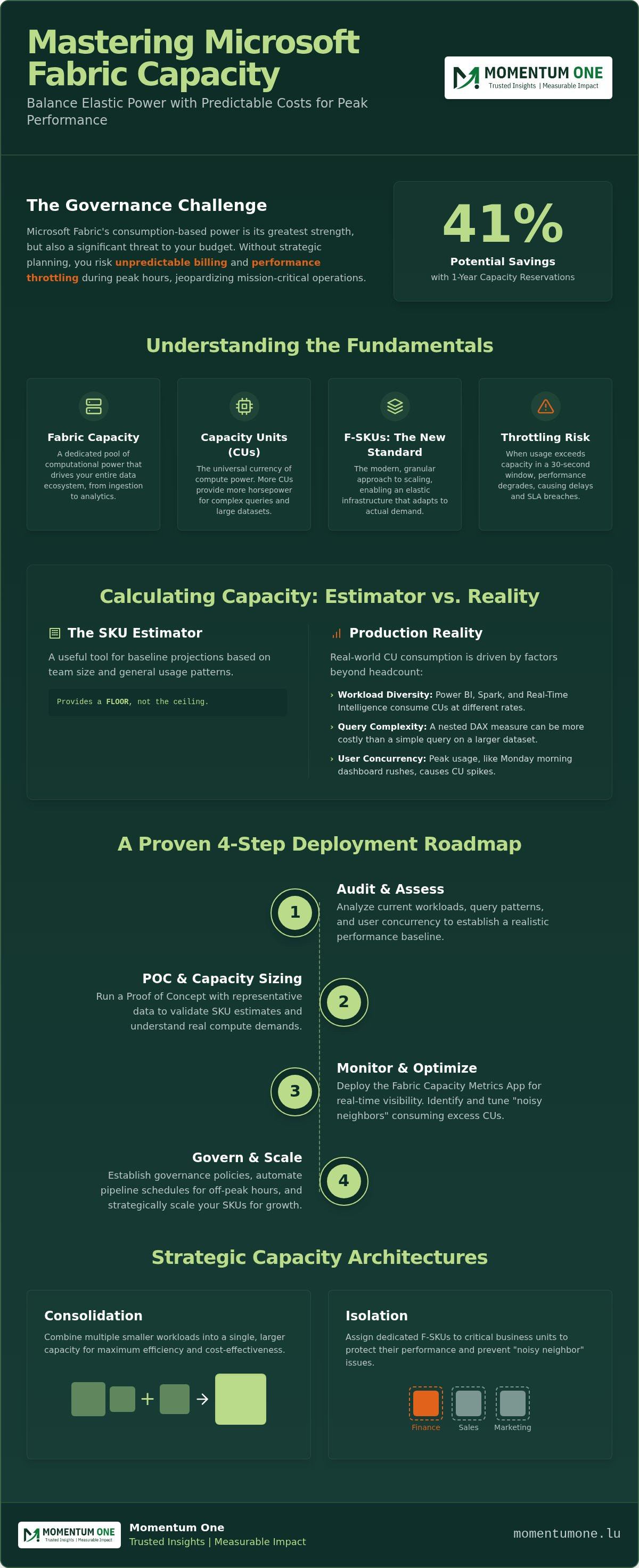
The 4-Step Roadmap for Fabric Capacity Deployment
Successful deployment follows a methodical path. It starts with a comprehensive audit of your existing Synapse and Power BI workloads. You need to understand your current footprint before moving a single byte. Next, deploy a trial capacity for a 60-day Proof of Concept. This period is your opportunity to stress-test workloads without financial risk. During the pilot, use the Fabric Capacity Metrics App to baseline performance across different times of day. Finally, right-size your production SKU and implement automated scaling to handle unforeseen peaks. This structured approach to Microsoft Fabric capacity planning ensures you don't overprovision early or starve your reports of necessary resources.
From Trial to Production: The Critical Transition
Transitioning from a trial to a live environment is a high-stakes moment. You shouldn't simply flip the switch to an F64 SKU and hope for the best. Production environments require stricter security protocols and a more robust data lakehouse design to ensure data integrity. The Pilot phase serves as the essential bridge between theoretical architecture and enterprise reality. It's during this time that you'll discover how your real-world data volumes interact with the computational limits of your chosen SKU, allowing for adjustments before the official launch.
Continuous Optimization and Scaling
Scaling isn't always the answer to performance issues. Sometimes, the most cost-effective move is to refine your DAX performance instead of paying for more CUs. Set up alerts for CU threshold breaches so you aren't caught off guard by a surprise bill. For non-production environments, pausing and resuming capacities during off-hours can significantly reduce your monthly spend. This level of active management keeps your platform lean and responsive. If you're ready to move from theory to implementation, our team can help you navigate a Fabric migration and modernization project with confidence.
Governing Growth: How Momentum One Ensures Peak Performance
Navigating the 2026 updates requires more than just technical knowledge; it demands a strategist who understands how these changes impact your bottom line. As a Microsoft Solutions Partner with over 8 years of experience in the data ecosystem, we act as that steady hand. Our role is to simplify the complexities of Microsoft Fabric capacity planning, ensuring your infrastructure remains an asset rather than a liability. We bridge the gap between technical compute power and tangible business ROI by aligning every CU with a specific organizational goal. For teams looking to build these skills internally, we offer customized corporate data fabric training designed to foster self-sufficiency.
Our Managed BI Services represent a shift from reactive troubleshooting to a proactive partnership. We don't just fix problems after they occur; we anticipate them through constant monitoring and optimization. This approach ensures that your data platform stays ahead of the curve, allowing your leadership team to focus on growth instead of infrastructure fatigue. By moving from a state of firefighting to one of forecasting, your organization can leverage Microsoft Fabric capacity planning to maintain a competitive edge in the Luxembourg market.
Proactive Capacity Monitoring
Effective governance is a continuous cycle. Our incident and support services provide a safety net for your daily operations, but our value goes deeper. We conduct monthly architectural reviews to verify that your chosen SKU still fits your current growth trajectory. These sessions are vital for identifying and eliminating technical debt within your pipelines and dataflows. By refining your logic before scaling your hardware, we keep your environment lean and your performance at its peak. This methodical approach ensures your budget is spent on value-adding activities rather than inefficient compute cycles.
Establishing a Data Center of Excellence (COE)
True success with Microsoft Fabric comes when your internal teams feel empowered. We help you establish a Data Center of Excellence that provides the governance tools and frameworks needed for secure, scalable growth. This strategic alignment ensures that your data stack isn't just functional but is actively supporting your 2026 business objectives. We move beyond the basics of Microsoft Fabric capacity planning to create a culture of data-driven excellence. If you're ready to secure your environment's future, Contact Momentum One for a tailored Fabric Capacity Audit.
Future-Proofing Your Data Ecosystem for 2026
Building a high-performance data platform requires more than just raw compute power; it demands a strategic commitment to governance and continuous optimization. We've explored how Microsoft Fabric capacity planning has evolved into a discipline that balances technical SKU selection with real-world business ROI. Growth depends on clarity. By following a structured roadmap from initial audit to automated scaling, you protect your organization from unpredictable costs and performance bottlenecks. Whether you're consolidating resources for efficiency or isolating mission-critical workloads, the goal remains the same: a stable, scalable environment that grows with your ambitions.
As a Microsoft Solutions Partner and specialists in Fabric Modernization, we provide the steady hand needed to navigate these technical shifts. Our Managed Performance Retainers ensure your platform remains optimized long after the initial deployment. Take the next step in your journey and optimise your data environment with Momentum One's Capacity Management services. We're here to bridge the gap between complex infrastructure and your long-term success, ensuring your data stack remains a powerful engine for growth.
Frequently Asked Questions
What is the minimum Microsoft Fabric SKU required for production?
The minimum entry point for Microsoft Fabric is the F2 SKU, which provides 2 Capacity Units (CUs). While this is technically sufficient for development, most production environments in 2026 require at least an F64 SKU to enable Power BI content distribution to users without individual Pro licenses. Your choice depends on the complexity of your data engineering jobs and the concurrency of your report consumers.
How do I calculate the cost of Microsoft Fabric capacity in Luxembourg?
To estimate the cost for a Luxembourg-based organization, you should use the Azure Pricing Calculator and select the region that best serves your users, typically West Europe or North Europe. Microsoft Fabric capacity planning involves choosing between pay-as-you-go pricing for flexibility or a 1-year reservation to secure approximately 41% savings. Remember that networking and storage costs are billed as separate line items from your compute CUs.
Can I change my Fabric SKU size after deployment without downtime?
Yes, you can scale your Fabric SKU up or down at any time through the Azure Portal without experiencing service downtime. This elasticity is a core benefit of the platform, allowing you to react to seasonal demand or unexpected processing spikes. When you change the SKU, the platform automatically adjusts the available Capacity Units, ensuring your reports and data pipelines continue to run smoothly during the transition.
What happens to my Power BI Premium P1 capacity in 2026?
By 2026, existing Power BI Premium P-SKUs are considered legacy infrastructure. While Microsoft has supported the transition by allowing P-SKUs to run Fabric workloads, new investments should focus on the F-SKU model. Transitioning to an F64 or higher ensures you maintain the same capabilities as a P1 while gaining the flexibility of the unified Fabric ecosystem. We recommend auditing your current usage before making the final switch.
How does Fabric capacity planning differ from Azure Synapse scaling?
Unlike Azure Synapse, which requires managing separate compute pools for SQL, Spark, and Data Explorer, Fabric uses a single pool of Capacity Units for all workloads. This unification simplifies Microsoft Fabric capacity planning because idle resources from a data warehouse task can be immediately utilized by a Power BI query. You no longer need to provision and manage multiple disparate clusters, significantly reducing administrative overhead and improving resource efficiency.
Is there a way to automate the scaling of Fabric CUs based on demand?
You can automate the scaling of Fabric CUs using the Fabric REST APIs or Azure PowerShell scripts integrated with Azure Automation. This allows you to programmatically increase capacity during heavy month-end processing and scale back down during weekends to optimize costs. Implementing these automated routines helps maintain a balance between high performance and budget control, ensuring you only pay for the computational power you actually need.
Do I need a separate capacity for every workspace in my organization?
No, you don't need a separate capacity for every workspace. A single Fabric capacity can host multiple workspaces, allowing you to consolidate resources and maximize your CU utilization. However, for large organizations, we often suggest isolating mission-critical environments into their own dedicated capacities. This prevents "noisy neighbor" scenarios where a complex data science experiment might impact the performance of essential executive dashboards.
How does OneLake storage billing interact with my compute capacity?
OneLake storage is billed separately from your computational capacity units, similar to how Azure Data Lake Storage Gen2 functions. You're charged for the amount of data stored per month, with rates varying based on whether you use hot, cool, or cold storage tiers. It's important to monitor your storage footprint independently of your compute SKU to ensure your total data platform budget remains transparent and predictable.