Microsoft Fabric F4 Pricing: A Guide to Optimizing Costs
Master Microsoft Fabric F4 pricing with our complete cost guide. Compare PAYG vs reserved rates, manage licensing, and optimize your cloud data budget today.
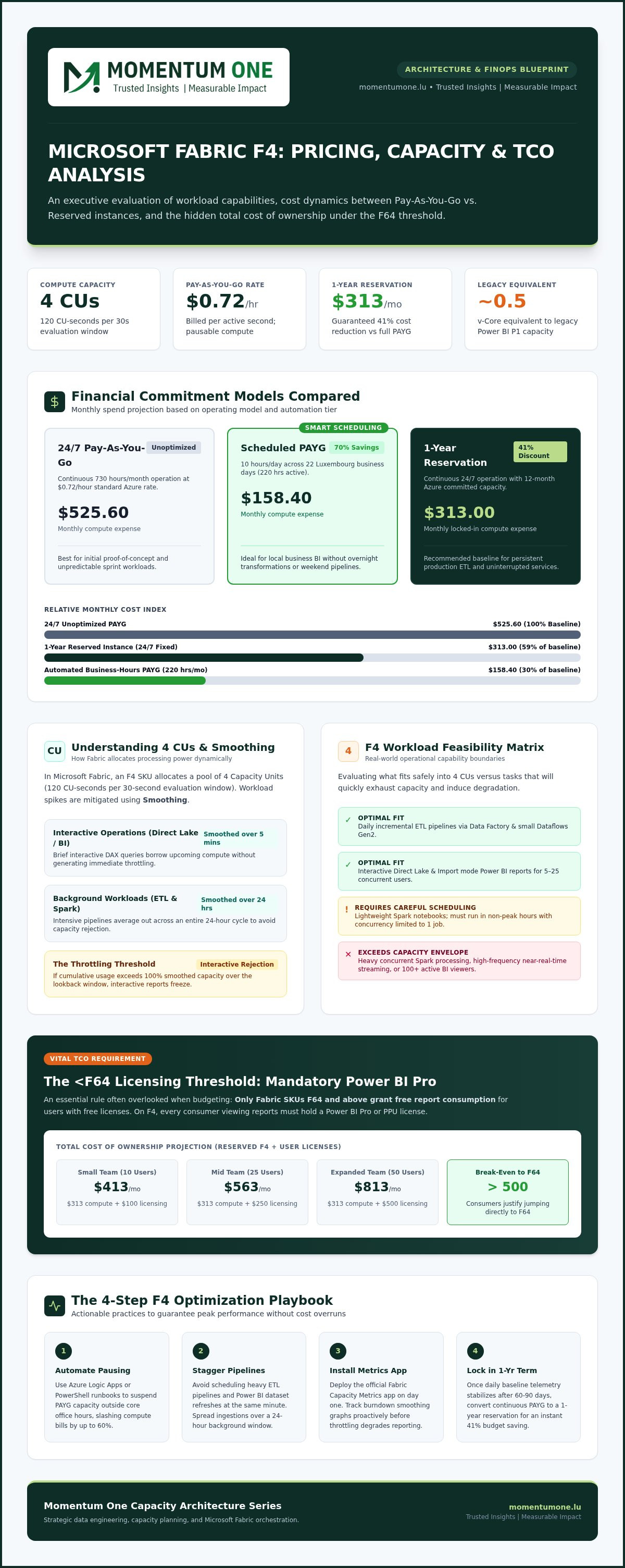
- Compare the $0.72 hourly Pay-As-You-Go rate with the 41% savings available through a 1-year reservation to find your organization's economic break-even point.
- Assess the performance limits of 4 Capacity Units to determine if your Spark workloads and concurrent Power BI report rendering require additional scaling.
- Calculate the total cost of ownership by including mandatory Power BI Pro licenses for all report viewers, an essential requirement for SKUs below F64.
- Optimize your Microsoft Fabric F4 Pricing strategy by deploying automated orchestration scripts that pause capacity during non-business hours.
- Leverage the Microsoft Fabric Capacity Metrics app to proactively monitor background smoothing and prevent interactive throttling before it impacts your users.
Is it possible to run a robust enterprise data platform for roughly the same price as a monthly office lease? Most data leaders worry that moving to the cloud means signing a blank check, especially when trying to decipher Microsoft Fabric F4 Pricing for the first time. You've likely felt the tension between wanting high-level performance and the fear of an unpredictable bill hitting your desk at the end of the month. It's a common concern, but managing your budget doesn't have to feel like a guessing game.
This guide provides a clear roadmap for mastering the economics of your capacity so you can build a predictable, high-ROI data strategy. We'll break down the $0.72 per hour Pay-As-You-Go rate versus the $313 monthly reserved instance. You'll learn exactly how 4 Capacity Units perform under real-world pressure and how to navigate the per-user licensing requirements that apply to SKUs below F64. From understanding the 41% savings found in reservations to avoiding Spark-related throttling, we'll give you the technical insights needed to scale with confidence and precision.
Understanding Microsoft Fabric F4 Capacity: Performance Meets Value
Choosing the right entry point for your data journey involves a delicate balance between cost and capability. The F4 SKU serves as a strategic mid-entry tier within the Microsoft Fabric ecosystem; it offers enough power to move beyond simple proof-of-concepts into functional, small-scale production environments. While smaller SKUs like F2 are excellent for sandboxing, the F4 capacity provides a more stable foundation for teams ready to integrate their data workflows. Provisioned through the Microsoft Azure cloud platform, this capacity allows organizations to unify their data engineering, warehousing, and business intelligence under a single, manageable umbrella.
An F4 capacity unlocks the full suite of Fabric's core engines. This includes Data Factory for complex pipeline orchestration, Synapse Data Engineering for Spark-based processing, and Power BI for visualization. For many organizations, this tier represents a "Goldilocks" zone. It's powerful enough to handle daily ETL cycles and interactive reporting for smaller teams without the steep financial commitment of higher-tier SKUs. Understanding Microsoft Fabric F4 Pricing begins with recognizing that you aren't just buying compute. You're investing in a unified environment that eliminates the need for fragmented, legacy services.
What are Fabric Capacity Units (CUs)?
Capacity Units, or CUs, represent the shared processing power available to your Fabric environment. Think of them as a pool of resources that every engine draws from. An F4 SKU provides exactly 4 CUs, which translates to 120 CU-seconds per 30-second evaluation interval. One of the most supportive features of this architecture is "smoothing." This mechanism allows your capacity to borrow future compute power to handle brief bursts of activity, such as a complex DAX query or a sudden data refresh. CUs function as a single currency of power shared across OneLake storage interactions and all active compute jobs, ensuring your resources are used where they're needed most.
F4 vs. Legacy Power BI Licensing
The transition from legacy Power BI Premium Per Capacity (P-SKUs) to the Fabric F-SKUs represents a significant shift toward flexibility. In legacy terms, an F4 SKU is roughly equivalent to 0.5 v-cores of a traditional P1 capacity. However, there's a vital licensing distinction to keep in mind. Unlike the F64 SKU and above, which include "free" report viewing for all users, F4 requires every report consumer to have a Power BI Pro or Premium Per User (PPU) license. This makes proactive workspace and capacity management essential for controlling the total cost of ownership. This shift allows for more granular control over Microsoft Fabric F4 Pricing, letting you pay for the power you actually consume rather than maintaining idle, over-provisioned hardware.
Calculating the Real Cost of F4: Pay-As-You-Go vs. Reserved Pricing
Calculating the true impact of Microsoft Fabric F4 Pricing on your bottom line requires looking beyond the base compute meter. While the Azure portal displays a clear hourly rate, your actual monthly expenditure includes storage, licensing, and potential data movement fees. Most organizations start with the Pay-As-You-Go (PAYG) model to maintain agility. Shifting to a commitment-based strategy is often the smartest move for long-term stability once your usage patterns become predictable. Understanding the nuances of Microsoft Fabric F4 Pricing ensures your data strategy remains sustainable as your data volumes grow.
The Pay-As-You-Go (PAYG) Model
The PAYG model offers the ultimate flexibility for teams exploring Fabric's capabilities. At a rate of $0.72 per hour for the F4 SKU, you only pay for the seconds your capacity is active. This makes it ideal for development, testing, or migration projects where workloads are intermittent. For a full 730-hour month of continuous operation, this translates to roughly $525.60. The real power of PAYG lies in the ability to pause the capacity during off-hours. You can cut that bill by more than half if your team only operates during business hours, making it a cost-effective choice for national organizations in Luxembourg that don't require 24/7 data processing.
Reserved Instances: Committing for ROI
Once your production environment stabilizes, moving to a 1-year reservation is the most effective way to secure rate optimization and commitment discounts. By committing to the F4 capacity for a year, you can reduce your monthly compute cost from $525.60 to approximately $313. This represents a significant 41% saving. The economic break-even point occurs at roughly 435 hours of usage per month. If your workloads run more than 60% of the time, a reservation is mathematically superior to staying on the hourly rate. This predictability is vital for maintaining a steady hand in complex financial planning.
To reach a realistic Total Cost of Ownership (TCO), you must account for OneLake storage and user licensing. Standard OneLake storage is billed separately at $0.023 per GB per month, which is about $23 per TB. Additionally, because F4 doesn't include free viewer licenses, you'll need to budget $14 per user monthly for Power BI Pro licenses. For a team of 25 users with 1 TB of data on a reserved instance, your total monthly budget would be roughly $709. This includes the $313 compute charge, $23 for storage, and $350 for licenses. If you're unsure which model fits your current data volume, our team can help you perform a detailed capacity cost analysis to avoid unexpected bill spikes.
F4 SKU Performance Analysis: What Can 4 CUs Actually Do?
Determining if 4 Capacity Units (CUs) can handle your daily workload is the most critical step when evaluating Microsoft Fabric F4 Pricing. It's not just a matter of cost; it's a question of whether your users will experience seamless performance or frustrating latency. Fabric's architecture is designed to be resilient. Through a feature called "Bursting," an F4 capacity can temporarily exceed its 4-CU limit to handle sudden spikes in activity. This is complemented by "Smoothing," which averages out the resource consumption of heavy ETL jobs over a 24-hour window, preventing your system from crashing during intensive data loads. This unique compute handling allows the F4 SKU to support more complex operations than its baseline number suggests.
Power BI Workloads on F4
For most mid-market organizations, an F4 capacity comfortably supports concurrent report rendering for teams of 25 to 50 users. However, the true ceiling isn't defined by user count alone, but by the complexity of your data models. Highly fragmented models or poorly written measures will exhaust your 4 CUs quickly, leading to "Interactive Delay" throttling. To maintain a snappy user experience, we recommend engaging DAX optimization experts who can streamline your calculations. When your measures are efficient, F4 provides a remarkably smooth experience for standard business dashboards and exploratory analytics.
Data Engineering and Integration
On the data engineering side, an F4 SKU provides a baseline of 8 Spark vCores. This is typically sufficient for running one concurrent interactive notebook session or a few small-to-medium batch jobs. If you try to run multiple heavy Spark clusters simultaneously, you'll likely encounter queueing or HTTP 429 errors. Data Factory pipelines also perform well at this tier, provided you aren't attempting to orchestrate hundreds of concurrent activities. Leveraging Pipeline and Dataflow Automation services can help you stagger these tasks across non-peak hours, ensuring you stay within your performance envelope.
Mastering these performance boundaries is a cornerstone of strategic cloud cost optimization. By understanding that Microsoft Fabric F4 Pricing gives you access to a flexible pool of power rather than a rigid limit, you can build more ambitious data products without immediately jumping to a more expensive tier. Success at this level requires a steady hand and a commitment to clean data architecture. When you prioritize optimization, 4 CUs go much further than most teams expect.
Strategic Cost Optimization: Maximizing Your F4 Investment
Managing Microsoft Fabric F4 Pricing effectively requires moving from reactive monitoring to proactive orchestration. One of the most impactful ways to slash your monthly bill is by deploying auto-pause and scaling scripts. Since Pay-As-You-Go capacities are billed per second, shutting down your F4 instance during weekends or overnight can reduce your compute spend by up to 70%. Organizations that master this rhythm treat their data capacity like a utility; it's active when needed and silent when it's not. This approach ensures you aren't paying for idle resources while your team is away.
Workspace organization also plays a pivotal role in cost control. By grouping related workloads and isolating high-demand experimental projects, you prevent resource contention that could otherwise trigger unnecessary throttling. When multiple teams share a single 4-CU capacity, a single inefficient Spark notebook can impact every Power BI user in that environment. Proper logical separation allows you to apply different scaling rules to different business units, ensuring that your most critical production reports always have the priority they deserve.
Monitoring with the Capacity Metrics App
The Microsoft Fabric Capacity Metrics app provides the visibility needed to distinguish between "interactive" and "background" credit usage. Interactive credits cover real-time actions like report viewing and DAX queries, while background credits handle scheduled tasks like data refreshes and pipeline executions. By analyzing these trends, you can use "smoothing" to your advantage. This feature allows heavy background jobs to process over a 24-hour window without forcing a premature upgrade to an F8 SKU. For companies that need a steady hand, our Workspace and Capacity Management services provide the professional oversight required to keep costs under control and spot throttling before it impacts end-users.
Governance and Scaling Strategies
Establishing a robust governance framework is your best defense against "bill shock." Without clear rules on who can create Fabric items or provision new capacities, cloud costs can spiral quickly. We recommend a "Scale-Up" strategy that utilizes the F4 SKU as your baseline, only jumping to F8 during known peak fiscal periods like end-of-quarter reporting or annual audits. This keeps your standard budget predictable while providing the flexibility to handle temporary surges in demand. You can find detailed steps for building these guardrails in our Microsoft Fabric Governance Framework guide.
If you want to ensure your Microsoft Fabric F4 Pricing strategy is fully optimized, contact our specialists for a cost audit to identify immediate savings and performance gains in your environment.
Scaling Your Data Strategy: Why F4 is the Ideal Entry Point
For many national organizations in Luxembourg, the F4 SKU represents the optimal balance between enterprise capability and financial discipline. It allows you to move beyond the fragmented legacy silos of the past and embrace a unified analytics future. By consolidating your data engineering, warehousing, and business intelligence into one environment, you eliminate the overhead of managing multiple disparate services. Understanding Microsoft Fabric F4 Pricing is the first step toward building a data platform that scales with your growth without demanding a massive upfront investment. This tier provides enough compute power to prove value quickly while maintaining a predictable monthly budget.
The strategic shift from per-user licensing to a capacity-based model like F4 represents a fundamental change in how organizations value their data. Instead of being restricted by rigid seat counts, you're empowered by compute power that you can scale up or down as your business dictates. This flexibility is particularly valuable for organizations that experience seasonal data surges or those that are gradually expanding their analytics footprint. By starting with F4, you establish a professional-grade foundation that can evolve into an F64 or higher as your data culture matures. It's a low-risk, high-reward entry point into the most advanced data ecosystem Microsoft has ever built.
The Migration Roadmap to Fabric
Moving from Azure Synapse or legacy Power BI Premium environments doesn't have to be a leap into the unknown. The transition to an F4 capacity is a structured process that begins with evaluating your current workload intensity and identifying the right migration candidates. Our Fabric Migration & Modernization services are designed to help you map your existing v-cores to the appropriate Fabric CUs without over-provisioning. We follow a proven Microsoft Fabric Deployment Roadmap, ensuring that your security, governance, and architecture are future-proofed from day one. This methodical approach minimizes disruption and allows your team to start realizing the benefits of a unified lakehouse architecture immediately.
Partnering for Success with Momentum One
As a certified Microsoft Solutions Partner specializing in the Luxembourg market, Momentum One acts as your steady hand in the complex world of cloud data. We don't just provision capacity; we partner with you to ensure your internal teams are equipped to succeed. Our tailored training solutions help your developers master the nuances of Spark and DAX within the Fabric environment, maximizing the value of your Microsoft Fabric F4 Pricing strategy. Whether you're modernizing a legacy warehouse or launching a new analytics initiative, we provide the technical expertise and supportive partnership needed to navigate the transition with confidence. We focus on outcomes, ensuring your data platform becomes a driver of growth rather than a cost center.
Ready to define your path forward and eliminate the guesswork from your cloud budget? Contact Momentum One for a Fabric Capacity Audit to ensure your environment is sized for performance and optimized for long-term cost efficiency.
Mastering Your Data Economics with Confidence
Transitioning to a unified data platform doesn't have to be a journey into financial uncertainty. You've seen that the F4 SKU offers a robust entry point for mid-sized organizations, provided you manage its 4 Capacity Units with precision. By leveraging 1-year reservations and automated orchestration, you can maintain a predictable monthly budget while unlocking enterprise-grade analytics. Mastery of Microsoft Fabric F4 Pricing isn't just about cutting costs; it's about ensuring your data infrastructure works as hard as your team does.
Success in the cloud depends on having a steady hand at the helm. As a Certified Microsoft Solutions Partner with 8+ years of data analytics expertise, we help you navigate these technical complexities through our specialized Fabric Migration Framework. We focus on building a stable foundation that grows alongside your business goals. Optimize your Fabric capacity with a professional audit from Momentum One and take the first step toward a more efficient, high-performance data future. Your path to unified analytics is clear, and we're here to help you every step of the way.
Frequently Asked Questions
What are Fabric Capacity Units (CUs)?
Capacity Units, or CUs, represent the shared processing power available to your Fabric environment. Think of them as a pool of resources that every engine draws from. An F4 SKU provides exactly 4 CUs, which translates to 120 CU-seconds per 30-second evaluation interval. One of the most supportive features of this architecture is "smoothing." This mechanism allows your capacity to borrow future compute power to handle brief bursts of activity, such as a complex DAX query or a sudden data refresh. CUs function as a single currency of power shared across OneLake storage interactions and all active compute jobs, ensuring your resources are used where they're needed most.
How much does Microsoft Fabric F4 cost per month in 2026?
In 2026, the monthly cost depends on your chosen commitment level. The Pay-As-You-Go rate is approximately $525.60 per month based on a continuous run time of 730 hours at $0.72 per hour. If you opt for a 1-year reservation, the cost drops to roughly $313 per month. This 41% saving makes reservations the preferred choice for stable production environments. These figures represent compute power alone and exclude OneLake storage or licensing fees.
Is Power BI Premium included with the Fabric F4 SKU?
No, traditional Power BI Premium capacity benefits like free report viewing are not included at this tier. The F4 SKU provides 4 Capacity Units of compute power, which is roughly equivalent to 0.5 v-cores in the retired Premium P-SKU model. Free viewer distribution only becomes available at the F64 level. For F4 deployments, you must account for individual license costs as part of your total Microsoft Fabric F4 Pricing strategy.
Can I pause my Microsoft Fabric F4 capacity to save money?
Yes, you can pause your capacity at any time to eliminate compute charges during idle periods. Because Microsoft bills Pay-As-You-Go capacities per second with a one-minute minimum, automated scripts can shut down your environment overnight or on weekends. This strategy is highly effective for development teams that only work during standard business hours. Pausing can reduce your monthly bill by more than 60% compared to a continuous run.
What is the difference between F4 and F64 pricing models?
The primary difference lies in how report viewers are licensed. F4 is a "pay-for-compute" model where every user still requires a Power BI Pro license to view content. In contrast, F64 acts as an organizational license that allows an unlimited number of users to view reports without individual Pro seats. While F4 is much cheaper for small teams, the F64 SKU becomes more economical once your organization surpasses approximately 300 active consumers.
Do I still need Power BI Pro licenses if I have Fabric F4?
Yes, you still need Power BI Pro licenses for both creators and report viewers when using the F4 SKU. Since April 2025, these licenses are priced at $14 per user monthly. This requirement applies to all Fabric capacities below F64. When calculating your Microsoft Fabric F4 Pricing, ensure you add these per-user costs to your monthly compute and storage estimates to get an accurate total cost of ownership for your project.
How many concurrent users can a Fabric F4 capacity support?
A Fabric F4 capacity typically supports between 25 and 50 concurrent Power BI users for standard reporting tasks. However, this number fluctuates based on the complexity of your DAX measures and the size of your semantic models. High-intensity workloads like complex Spark notebooks or frequent data refreshes will consume CUs more quickly, potentially leading to throttling. We recommend monitoring your usage via the Capacity Metrics app to identify your specific performance ceiling.
Can I upgrade from F4 to F8 instantly if I hit a performance ceiling?
You can scale your capacity from F4 to F8 almost instantly through the Azure portal or CLI. This process generally takes between one and two minutes and involves zero downtime for your users. This flexibility allows you to stay at a lower cost tier during normal operations and only upgrade during peak periods, such as end-of-month financial reporting. It's a key tactic for maintaining a lean and responsive data environment.
Is storage included in the F4 capacity price?
No, OneLake storage is billed as a separate line item from your F4 compute capacity. Standard hot storage in European regions costs approximately $0.023 per GB per month, which equates to roughly $23 per TB. This decoupled billing ensures you only pay for the storage you actually use. You should also account for minor additional costs related to data egress and geo-redundant disaster recovery storage if your organization requires those specific features.