Microsoft Fabric Migration Checklist: A Strategic Enterprise Framework for 2026
Get the ultimate Microsoft Fabric migration checklist for your 2026 enterprise strategy. De-risk your transition, optimize costs, and build a future-proof da...
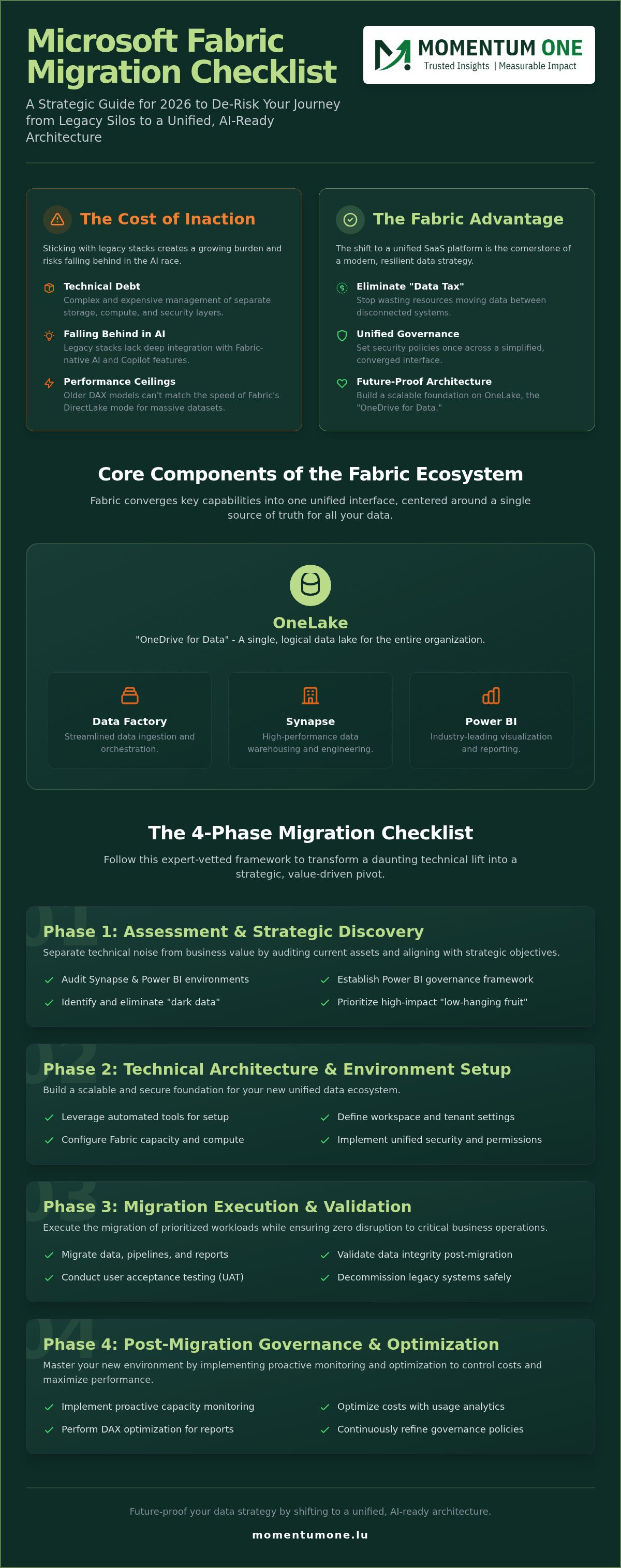
- Future-proof your data strategy by shifting from fragmented silos to a unified, AI-ready architecture using the OneLake foundation.
- Follow our comprehensive microsoft fabric migration checklist to de-risk the transition and ensure zero disruption to business-critical operations.
- Identify high-impact workloads through strategic discovery and leverage automated tools to streamline your technical environment setup.
- Master post-migration governance by implementing proactive capacity monitoring and DAX optimization to control costs and maximize report performance.
What if the greatest threat to your 2026 data strategy isn't the technical complexity of the cloud, but the fragmented legacy silos you're still trying to maintain? Most enterprise leaders understand that a unified data ecosystem is the only way to stay competitive, yet the transition often feels like a high-stakes gamble. You're likely concerned about potential data downtime, the confusing choice between Lakehouse and Warehouse architectures, or the risk of spiraling capacity costs. It's a common pressure point for teams that lack deep internal Fabric expertise but need to deliver immediate results.
We're here to help you move forward with confidence. This guide introduces a comprehensive microsoft fabric migration checklist built for 2026 enterprise standards, designed to de-risk every stage of your journey. By following this expert-vetted framework, you'll transform a daunting technical lift into a strategic pivot that prioritizes governance and performance. We'll walk through the essential steps to secure stakeholder buy-in, optimize your architectural decisions, and build a scalable foundation that justifies your investment through clear, measurable ROI.
Why Microsoft Fabric Migration is the Standard in 2026
Microsoft Fabric has matured rapidly. What began as a promising preview tool has solidified into the definitive enterprise standard for 2026. This evolution represents more than just a software update; it's a fundamental shift in how organizations manage their most valuable asset. For teams still relying on fragmented Azure services, the move to a unified SaaS platform is no longer optional. It's the cornerstone of a modern, resilient data strategy.
Legacy Synapse and Power BI Premium users are prioritizing this transition to eliminate the "data tax" caused by moving information between disconnected systems. By utilizing a microsoft fabric migration checklist, enterprises are finally breaking down the walls between data engineering and business intelligence. This strategic alignment is why Microsoft Fabric migration services have become a central focus for forward-thinking leadership. We see this as a necessary step to future-proof your operations against the complexities of the modern data landscape.
The Cost of Inaction: Risks of Staying on Legacy Stacks
Sticking with legacy stacks creates a growing burden of technical debt. Managing separate storage, compute, and security layers across multiple Azure PaaS services is complex and expensive. Organizations that delay their fabric migration and modernization risk falling behind in the AI race. Fabric-native AI and Copilot integrations are built specifically for this ecosystem; they don't offer the same depth of insight on older architectures. Additionally, legacy DAX models often hit performance ceilings that only Fabric's DirectLake mode can shatter. DirectLake allows Power BI to query massive datasets in OneLake directly, bypassing the need for slow, traditional refreshes.
Core Components of the Fabric Ecosystem
At the heart of this shift is OneLake, often described as "OneDrive for Data." It provides a single, logical location for all organizational data, regardless of where it physically resides. This architecture eliminates the need for expensive and redundant data duplication. The Fabric experience converges several key capabilities into one interface:
- Data Factory: Streamlined ingestion and orchestration for complex pipelines.
- Synapse: High-performance warehousing and lakehouse engineering in a single workspace.
- Power BI: Industry-leading visualization and reporting with deeper backend integration.
This convergence simplifies security through a unified governance layer. Instead of managing permissions across five different tools, administrators can set policies once. This streamlined approach ensures that your microsoft fabric migration checklist results in a governed, secure, and highly efficient environment. We focus on these core components to help you build a foundation that scales with your business needs without the friction of legacy silos.
Phase 1: Assessment and Strategic Discovery
Phase 1 is the most critical step in your microsoft fabric migration checklist. It's where you separate technical noise from business value. Moving to Fabric isn't just about moving files; it's about evaluating the quality and relevance of your current data assets. A comprehensive audit of your Azure Synapse and Power BI environments often reveals that a significant portion of legacy reports are no longer in use. Identifying these redundant assets early prevents you from wasting migration effort on "dark data" that adds no value.
Before moving the first byte, you must establish a Power BI governance framework. This ensures that security policies, workspace permissions, and naming conventions are locked in from day one. By mapping your current business objectives to Fabric capacities, you can guarantee a measurable ROI. We recommend starting with "low-hanging fruit" workloads, such as standalone Power BI datasets that benefit immediately from DirectLake performance, to demonstrate early success to your stakeholders.
Inventory and Workload Prioritization
Success begins with a clear inventory. You should categorize every dataset, report, and pipeline by business criticality. Focus on high-impact reports used by executive leadership or customer-facing teams first. During this process, look for overlapping data sources that can be consolidated into a single OneLake shortcut. Workload Profiling is the process of mapping technical requirements to Fabric compute power. This step ensures you don't over-provision capacity for simple tasks or under-provision for complex engineering pipelines.
Stakeholder Alignment and KPI Definition
Strategic migration requires buy-in from both IT and business unit leaders. IT teams focus on security and architectural integrity, while business leaders prioritize speed to insight and intuitive reporting. You must define what success looks like before the transition begins. Are you aiming for a 30% reduction in report load times? Or perhaps a 15% drop in total cost of ownership? Clear KPIs provide the justification needed for continued investment. Proper workspace and capacity management planning is essential here to avoid budget overruns during the initial rollout phase. If the discovery phase feels overwhelming, our team can help you design a custom migration roadmap tailored to your specific enterprise needs.
Phase 2: Technical Architecture and Environment Setup
Once the discovery phase is complete, the focus shifts to building a resilient foundation. This stage of the microsoft fabric migration checklist involves configuring the Fabric Tenant with precision. You'll need to select the correct geographical region to minimize latency and ensure your capacity allocation matches the workload profiles identified in Phase 1. Designing a logical workspace hierarchy is equally vital. It creates a structured environment where collaboration thrives without compromising security boundaries. We recommend a workspace structure that reflects your business domains, ensuring that data ownership remains clear and manageable.
Implementing the Medallion Architecture within OneLake is a non-negotiable standard for 2026. This framework organizes data into three distinct layers: Bronze for raw ingestion, Silver for cleaned and validated data, and Gold for business-ready aggregates. This layered approach ensures data quality and provides a clear lineage for every insight. It transforms OneLake from a simple storage repository into a governed, high-performance data engine that supports both engineering and analytics teams simultaneously.
Lakehouse vs. Warehouse: Choosing the Right Path
Choosing between a Lakehouse and a Warehouse is a pivotal decision that impacts your long-term scalability. Use the Fabric Warehouse if your team is SQL-centric and requires full ACID transactions with familiar T-SQL syntax. It's the best fit for structured data and traditional reporting. Conversely, the Fabric Lakehouse is the superior choice for Spark-based data engineering and advanced AI workloads. Many enterprises find success with a hybrid approach. By leveraging OneLake shortcuts, you can reference data across different items without moving it physically. This minimizes duplication and keeps your architecture lean. For a deeper dive into these options, consult our guide on Data Lakehouse vs Warehouse Design.
Security and Governance Configuration
Security in Fabric is unified, but it requires careful configuration to be effective. You can implement Row-Level Security (RLS) and Object-Level Security (OLS) once at the data level. These settings then persist across the entire ecosystem, from the Lakehouse to the final Power BI report. Integrating Microsoft Purview and applying Sensitivity Labels ensures that your data remains compliant with internal and external regulations. This level of data architecture modernization is essential for meeting national regulatory standards. It transforms security from a bottleneck into a business enabler, allowing you to scale with confidence without risking data exposure.
Phase 3: Migration Execution and Validation
Execution is the stage where your microsoft fabric migration checklist transforms from a plan into a functional reality. It's the most labor-intensive part of the journey, requiring a meticulous approach to schema migration and code refactoring. While tools like the Fabric Migration Assistant handle much of the initial structure, your team must manually refactor legacy T-SQL or Spark code that doesn't align with the new SaaS engine. This ensures that your logic remains performant and accurate within the Delta Parquet environment.
This part of the microsoft fabric migration checklist involves moving beyond simple data transfers to full pipeline reconfiguration. You aren't just moving files; you're translating the "brain" of your data operations into a more agile, unified system. This translation requires a deep understanding of how Fabric's compute engine differs from legacy SQL Server or Synapse environments.
Automating Data Ingestion and Pipelines
Transitioning from Azure Data Factory (ADF) to the native Fabric Data Factory allows you to consolidate your orchestration within a single interface. We focus on pipeline and dataflow automation to eliminate the manual errors that often plague large-scale migrations. This stage involves mapping existing ADF activities to Fabric equivalents and configuring incremental refreshes to keep data current without overloading capacity. Automation isn't just a convenience; it's a risk mitigation strategy that ensures consistency across thousands of tables while managing historical data loads effectively.
Testing, Validation, and User Acceptance
Validation is where you prove the migration's success to the business. You can't rely on spot checks alone. We implement automated data quality checks that compare row counts, checksums, and schema integrity between the source and the Fabric destination. It's equally important to run parallel reports to ensure that your complex DAX measures produce identical results in the new environment as they did in the old.
Parallel Validation is the critical 48-hour window where legacy and Fabric systems run concurrently for audit purposes. This brief period of overlap provides the final "green light" needed for a full cutover. It gives stakeholders the peace of mind that the new system is ready for production. If the technical nuances of this execution phase seem daunting, our fabric migration and modernization team can manage the entire process for you.
Phase 4: Post-Migration Governance and Optimization
Many organizations mistakenly treat the "cutover" as the finish line. In reality, the most critical item on your microsoft fabric migration checklist is the establishment of a robust post-migration governance framework. Without it, the initial gains in speed and efficiency can quickly be eroded by unmanaged growth and rising costs. We focus on building a 'Center of Excellence' (CoE) that empowers business units to explore data while maintaining the guardrails necessary for enterprise-grade security and performance.
Effective governance isn't about restriction; it's about enablement. It ensures that as your self-service BI environment expands, it remains a scalable, governed data environment. This phase transforms your technical setup into a strategic asset that provides clear justification for stakeholders through sustained ROI and operational stability. It's the point where your migration truly begins to pay dividends across the organization.
Performance Tuning and Cost Management
The first month after migration is often when "bill shock" occurs if capacity is left unmonitored. We recommend using the Fabric Capacity Metrics app daily to identify 'noisy neighbor' workloads that might be consuming more than their fair share of resources. Optimizing Delta files and implementing V-Order for your tables can significantly boost query speeds and reduce compute overhead. Additionally, a continuous DAX optimization strategy is essential for DirectLake reports to ensure they remain snappy and cost-effective. Relying on professional incident and support services during this transition provides the peace of mind that platform stability is always a priority.
Empowering the Organization: Training and Adoption
A technical migration is only successful if your people know how to use the new tools. Bridging the internal skills gap is a core component of our microsoft fabric migration checklist. Moving toward cultural data literacy requires more than just a software manual. It demands customized corporate data fabric training for your technical teams and specialized corporate Power BI training for business users. These programs ensure that your staff can leverage the 2026 standards of Fabric to their full potential. Once the foundation is solid, you can begin building a roadmap for future AI and Machine Learning initiatives, turning your unified data ecosystem into a true engine for innovation.
Building Your Future-Ready Data Foundation
Transitioning to Microsoft Fabric is more than a technical upgrade; it's a strategic move toward a unified, AI-ready data culture. By following a structured microsoft fabric migration checklist, you've seen how to assess legacy assets, design a high-performance Medallion architecture, and implement the governance needed to prevent bill shock. The journey from fragmented silos to a single SaaS experience ensures your organization is ready for the advancements of 2026 and beyond.
At Momentum One, we're dedicated to simplifying this complex middle ground. As a certified Microsoft Solutions Partner, our dedicated Fabric migration specialists provide the expert DAX and architecture support you need to de-risk your transition. We're ready to act as your steady hand, ensuring your migration results in a scalable, high-performance environment that delivers real business value.
Book a Strategic Fabric Migration Assessment with Momentum One to begin your transformation today. Your path to a modernized data ecosystem is within reach, and we're here to help you lead the way.
Frequently Asked Questions
Is Microsoft Fabric a replacement for Azure Synapse Analytics?
Microsoft Fabric is the logical successor to Azure Synapse Analytics, offering a streamlined SaaS experience that replaces the complexity of managing separate PaaS components. While existing Synapse instances remain supported, Microsoft is prioritizing innovation within the Fabric ecosystem. Transitioning allows your organization to leverage a unified compute engine and OneLake storage, effectively consolidating data warehousing and big data analytics into a single, cohesive environment without the overhead of infrastructure management.
How long does a typical enterprise Microsoft Fabric migration take?
A typical enterprise migration usually spans three to nine months, depending on the volume of legacy assets and architectural complexity. Small-scale pilot projects can be completed in weeks, while full-scale migrations involving hundreds of reports and complex pipelines require a phased approach. Following a microsoft fabric migration checklist helps streamline this timeline by identifying high-priority workloads and automating repetitive technical tasks during the initial discovery and setup phases.
Can I migrate from Power BI Premium to Fabric without losing my reports?
You can migrate from Power BI Premium to Fabric without losing any existing reports or datasets. Since Fabric is built on the same foundation as Power BI, your current workspaces and content remain intact during the capacity transition. The process involves reassigning your existing workspaces to a Fabric capacity, which immediately unlocks advanced features like OneLake integration and DirectLake mode without requiring a complete rebuild of your visualization layer.
What are the hidden costs of migrating to Microsoft Fabric?
Hidden costs often stem from unmanaged capacity consumption and data egress fees when connecting to external clouds. Bill shock can occur if noisy neighbor workloads aren't identified and throttled early in the process. Additionally, the investment required for internal team upskilling and the refactoring of legacy T-SQL or Spark code can be significant. Proactive monitoring and a clear governance strategy are essential to keep these operational expenses predictable and aligned with your budget.
Does Microsoft Fabric support on-premise data sources?
Microsoft Fabric fully supports on-premise data sources through the On-Premises Data Gateway. This allows you to securely bridge your local SQL servers or file shares with the Fabric cloud environment. By using these gateways, you can ingest on-premise data into OneLake or query it directly via shortcuts. This hybrid capability ensures that your migration doesn't require a complete move of all physical infrastructure to the cloud at once, supporting a more gradual transition.
What happens to my existing Azure Data Factory pipelines during migration?
Your existing Azure Data Factory (ADF) pipelines can be transitioned to the native Fabric Data Factory environment. While many activities map directly, some complex custom scripts or legacy connectors might require manual refactoring for full compatibility. We recommend a phased approach where critical pipelines are migrated first, leveraging automation tools to reduce manual errors. This consolidation ensures that your orchestration logic is managed within a single, unified SaaS interface for better visibility.
Is the Fabric Migration Assistant available for all data types?
The Fabric Migration Assistant primarily focuses on migrating data warehouse schemas and objects from Azure Synapse or SQL Server. It automates the conversion of tables, views, and stored procedures into Fabric-compatible formats. However, it doesn't currently cover every data type or complex Spark-based notebook automatically. For these more nuanced assets, a manual review remains a necessary step in any microsoft fabric migration checklist to ensure code performance and data integrity across the environment.
How does Fabric handle data residency and compliance for national organizations?
Fabric addresses data residency by allowing you to pin capacities to specific geographical regions, ensuring your data remains within national borders. This is critical for organizations that must comply with strict local regulations. Through the Admin Portal, you can configure tenant-level settings and use Microsoft Purview integration to maintain a high level of governance. These tools provide the transparency and control needed to meet enterprise compliance standards without sacrificing platform agility or performance.