Migrating from On-Premise Data Warehouse to Microsoft Fabric: A 2026 Strategic Guide
Ready to start migrating from on-premise data warehouse to Microsoft Fabric? Our 2026 guide offers a proven framework to unify data and prepare for the AI era.
- Identify why transitioning to OneLake eliminates data silos and breaks the cycle of expensive, recurring hardware refreshes.
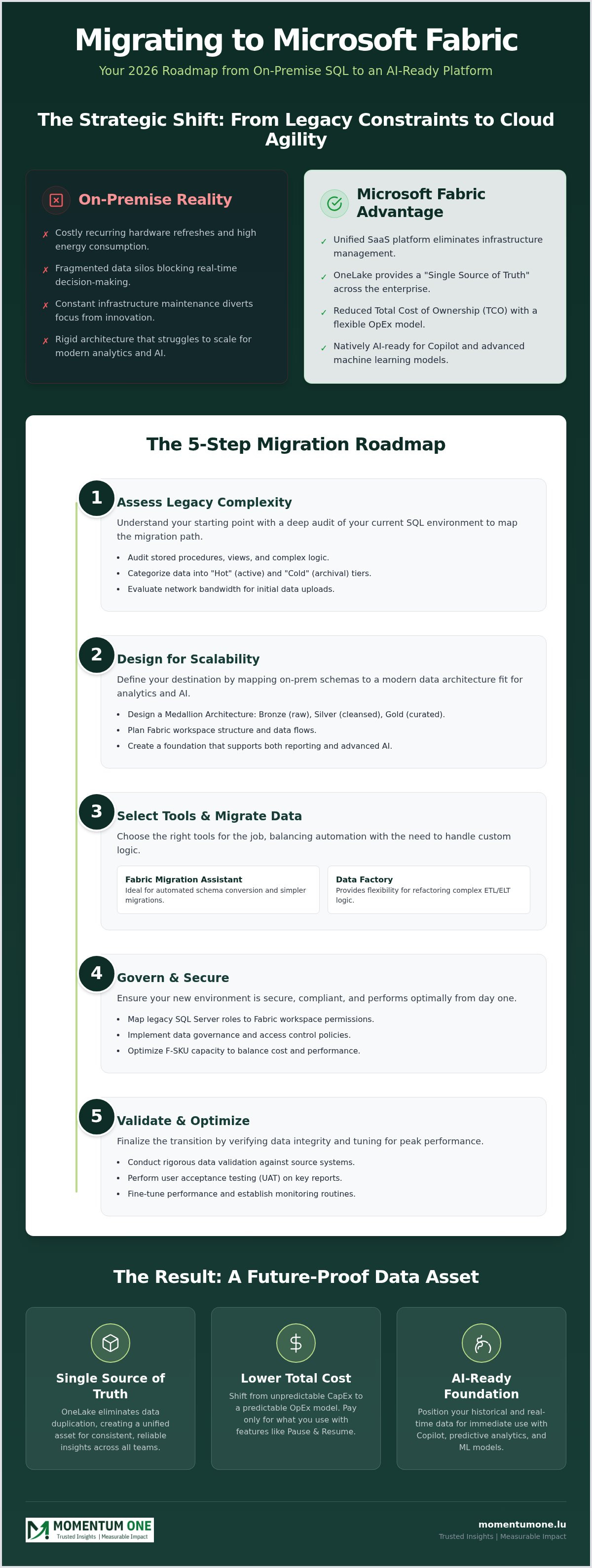
- Master a proven five-step strategy for migrating from on-premise data warehouse to Microsoft Fabric, beginning with a comprehensive audit of your legacy SQL objects.
- Compare the efficiency of automated schema conversion via the Fabric Migration Assistant against the flexibility of Data Factory for complex ETL logic.
- Secure your environment by mapping SQL Server roles to Fabric's workspace permissions while optimizing F-SKU capacity to maintain high performance.
- Position your organization for 2026 by creating a "Single Source of Truth" that turns fragmented data into an AI-ready strategic asset.
What if your legacy server room isn't just costing you electricity, but actually holding your entire AI strategy hostage? In 2026, the gap between traditional SQL environments and agile, data-driven businesses is wider than ever. Maintaining an on-premise environment often feels like a constant battle against rising hardware costs and fragmented data silos that block real-time decision-making. You've likely realized that scaling for modern analytics requires more than just adding another rack of servers; it requires a fundamental shift in how you handle information.
We understand that migrating from on-premise data warehouse to Microsoft Fabric can feel like a daunting leap for even the most experienced IT teams. Our goal is to simplify this complexity and turn it into a strategic advantage for your organization. This guide provides a proven enterprise framework to help you master the transition from rigid legacy systems to a unified SaaS analytics platform. We'll explore how to establish a "Single Source of Truth" through OneLake, reduce your total cost of ownership, and achieve faster time-to-insight with seamless Power BI integration. By the end of this article, you'll have a clear roadmap to evolve your data culture for the AI era.
Why Migrate? The Case for Moving On-Premise Data to Microsoft Fabric
On-premise systems are often tethered to physical constraints that simply don't match the speed of modern business. Maintaining legacy hardware involves a relentless cycle of security patches, physical space management, and high electricity costs. This "refresh cycle" trap forces IT teams to spend more time on infrastructure maintenance than on extracting actual value from their data. When you consider migrating from on-premise data warehouse to Microsoft Fabric, you're choosing to break away from these rigid limitations and embrace a more agile future.
The SaaS simplicity of Fabric means you no longer need to manage underlying virtual machines, clusters, or complex infrastructure. Everything is handled for you, allowing your team to focus on high-impact data modeling and reporting. This transition isn't just about moving data; it's about evolving your entire analytics culture into one that is faster, more reliable, and ready for the demands of 2026.
From Rigid Silos to OneLake
OneLake acts as a "OneDrive for Data," providing a unified storage layer where information is accessible across the entire enterprise. On-premise environments typically suffer from data duplication as different departments create their own silos to bypass centralized bottlenecks. OneLake eliminates this friction by allowing various compute engines to work on the same data without ever needing to move or copy it. OneLake is the unified storage foundation that powers modern, decentralized data architectures. This approach drastically reduces the complexity of your Fabric Migration & Modernization journey by creating a single, trustworthy source of truth.
Cost Efficiency and TCO in 2026
In 2026, the financial argument for cloud migration has shifted from simple hosting to total operational efficiency. Moving from capital expenditure (CapEx) for physical servers to the operational expenditure (OpEx) of Fabric capacities gives you unprecedented financial flexibility. Features like "Pause and Resume" allow you to stop paying for compute power during off-peak hours, a feat impossible with on-premise hardware. This transition also simplifies your licensing, replacing fragmented toolsets with a single, predictable SaaS model that scales with your growth. By migrating from on-premise data warehouse to Microsoft Fabric, you can significantly lower your total cost of ownership while gaining superior performance.
AI-Readiness and Future-Proofing
Microsoft Fabric is built from the ground up for the AI era. It natively prepares your data for tools like Copilot and advanced machine learning models without the need for complex custom integrations. By housing your data within this ecosystem, you ensure your historical records are immediately available for predictive analytics. This prepares your organization to lead in a market where AI-driven insights are the primary differentiator.
The Fabric Migration Roadmap: A 5-Step Strategy for 2026
A successful migration isn't a single event. It's a methodical transition that balances technical precision with business continuity. When migrating from on-premise data warehouse to Microsoft Fabric, a structured five-step roadmap ensures your data remains accurate and accessible throughout the journey. This process moves beyond simple data transfers to focus on architectural modernization that serves your organization for years to come.
Phase 1: Assessing Legacy Complexity
You can't move what you don't understand. Start with a deep audit of your current SQL environment. Identify stored procedures, views, and complex logic that may require refactoring for the cloud. Categorizing your data into "Hot" (frequently accessed) and "Cold" (archival) tiers allows you to prioritize the migration of critical assets first. Don't forget to evaluate your network bandwidth; initial data uploads can be substantial and may require dedicated gateway configurations to avoid disrupting daily operations.
Phase 2: Designing for Scalability
Once you understand your source, you must define your destination. This involves mapping your on-prem schemas to a modern Medallion Architecture. By organizing data into Bronze (raw), Silver (cleansed), and Gold (curated) layers, you create a foundation that supports both standard reporting and advanced AI. Choosing the right Data Warehouse and Lakehouse Design is essential here. You need a setup that scales with your growth while embedding security protocols directly into the architecture.
Establishing a hybrid coexistence phase is often where many organizations struggle. It's common to run your on-premise system and Fabric environment in parallel for a set period. This allows for rigorous validation, ensuring that cloud outputs match your legacy reports exactly. During this time, our experts often provide Fabric Migration & Modernization support to ensure data integrity remains uncompromised as new pipelines are finalized.
The final stages involve cutover and optimization. After validating the data, you'll redirect your applications and Power BI reports to the new Fabric endpoints. Once the switch is made, the focus shifts to fine-tuning performance. This includes optimizing DAX queries and managing Fabric capacities to ensure you're getting the best performance for your investment. This structured path turns a complex technical hurdle into a manageable strategic evolution.
Technical Approaches: Migration Assistant vs. Data Factory
Choosing the right tool determines the speed and success of your project. For standard SQL structures, DACPAC files serve as a reliable bridge to deploy schema definitions directly into the Fabric environment. When migrating from on-premise data warehouse to Microsoft Fabric, you'll often find yourself choosing between the simplicity of the Migration Assistant and the deep customization of Data Factory. Each path offers specific advantages depending on the complexity of your legacy environment and the volume of data you need to move.
The Fabric Migration Assistant Experience
This tool is designed to automate the heavy lifting of schema mapping. It identifies T-SQL incompatibilities and suggests corrections, often using AI-powered insights to resolve errors in real-time. While it's excellent for rapid deployments, it has limitations in highly customized legacy environments where complex dependencies might break automated logic. It's best used for relatively clean SQL schemas that don't rely on deprecated features or heavy cross-database queries that aren't yet supported in a unified SaaS model.
Building Robust Pipelines with Data Factory
For organizations with complex ETL requirements, Data Factory is the preferred choice. It allows you to modernize legacy SSIS packages into automated data pipelines that are native to the cloud. This approach is vital for migrating from on-premise data warehouse to Microsoft Fabric when handling terabyte-scale data transfers. By using watermarking and change data capture (CDC), you can keep your new environment synchronized with on-premise sources until you're ready for the final cutover, significantly minimizing potential downtime.
Monitoring pipeline health and lineage within Fabric provides a level of visibility that legacy SSIS simply can't match. You gain a clear view of how data flows from your local servers into OneLake, making it easier to troubleshoot bottlenecks. For high-volume transfers, we recommend utilizing parallel copy activities and staging areas to maintain high throughput. This ensures that even the largest data estates move to the cloud without disrupting daily business operations. This technical precision is what allows for a steady hand during the most complex phases of your digital transformation.
Governance and Performance: Ensuring Post-Migration Success
Completing the technical transfer is only the first step toward a modern data culture. Long-term success when migrating from on-premise data warehouse to Microsoft Fabric depends on how effectively you govern the new ecosystem. You must shift from managing fixed physical server permissions to a more fluid, item-level security model. This approach supports a decentralized data environment while maintaining the strict compliance standards required in 2026. Proper governance ensures that your data remains a strategic asset rather than a liability.
Modern Security and Governance
Transitioning requires mapping your legacy SQL Server roles to Fabric Workspace and item-level permissions. This isn't a simple one-to-one swap; it's a chance to implement Row-Level Security (RLS) more effectively across a unified platform. You can now manage data sensitivity labels globally, ensuring that protected information remains secure as it moves through the lakehouse. For a structured approach to these controls, our Power BI Consulting & Governance framework provides the essential guardrails for enterprise-grade security and compliance.
Capacity planning is another critical pillar of post-migration stability. In the Fabric ecosystem, you manage performance via F-SKUs rather than physical CPU cores. Fabric uses a "smoothing and bursting" model, which allows for high-intensity tasks to finish quickly by borrowing future capacity. However, you must proactively oversee this to avoid performance throttling during peak business hours. This shift from hardware maintenance to capacity management is a core benefit of the SaaS model.
Optimizing for 2026 Performance
Fine-tuning the SQL Analytics Endpoint is essential for maintaining low latency in high-concurrency scenarios. You should also leverage the Fabric Capacity Metrics app to identify which specific items or reports are consuming the most resources. This level of visibility allows you to optimize complex DAX queries or data models before they impact the end-user experience. Proactive monitoring ensures that your cloud environment remains faster and more responsive than your old on-premise hardware ever was.
Moving to the cloud doesn't automatically fix inefficient data models. High-performance reporting still depends heavily on DAX optimization and proper star schema design. Establishing a Center of Excellence (CoE) helps your team share these best practices and maintain high standards across the organization. If you need help maintaining stability and performance after your transition, explore our Gateway Connection & 7/24 Support Services to ensure your environment remains optimized around the clock.
Partnering for the Future: Why Choose Momentum One?
Navigating the technical and cultural shifts of a cloud transition requires more than just a software vendor. It demands a dedicated ally who understands the deep nuances of legacy SQL environments. When you're migrating from on-premise data warehouse to Microsoft Fabric, Momentum One serves as that knowledgeable guide. We specialize in high-value implementations that prioritize performance and scalability, ensuring your data estate isn't just moved, but truly modernized for the demands of 2026.
Our boutique approach ensures that every project receives senior-level attention. We don't believe in generic "lift and shift" operations that carry old inefficiencies into a new environment. Instead, we focus on high-performance data modeling and DAX optimization to ensure your end-users experience lightning-fast reporting from day one. By choosing our Fabric Migration & Modernization services, you're investing in a future-proof architecture that grows alongside your business goals.
Upskilling Your Team for the Cloud
Technology is only as effective as the people who manage it. We bridge the gap between on-premise SQL expertise and cloud-native analytics through customized technical Fabric training for your data developers. Our workshops go beyond the basics; we focus on building a robust data-driven culture and improving data literacy across your organization. This empowers your internal team to maintain the environment with confidence long after the initial migration is complete.
Strategic Implementation Partnership
We act as a steady hand during complex technical shifts. Our commitment is to deliver a scalable "Single Source of Truth" via OneLake, eliminating the silos that previously hindered your real-time decision-making. We provide ongoing support through our managed services to ensure long-term stability and continuous performance tuning. This proactive partnership allows you to focus on your core business while we handle the technical intricacies of the Fabric ecosystem.
Ready to evolve your data strategy? Start your journey with a comprehensive architectural review of your legacy warehouse. We'll help you map out a clear, low-risk path to the cloud that aligns with your specific operational needs. Let's build a faster, more agile future together.
Evolve Your Data Strategy for the AI Era
Transitioning to a unified SaaS platform represents a fundamental shift from maintaining aging hardware to driving business growth through real-time insights. Success requires more than just moving files; it demands a strategic roadmap that balances technical precision with robust post-migration governance. By establishing a "Single Source of Truth" via OneLake and optimizing your capacity for high-concurrency workloads, you position your organization to lead in an increasingly AI-driven market.
Successfully migrating from on-premise data warehouse to Microsoft Fabric is a journey that benefits from a steady, expert hand. As a Certified Microsoft Solutions Partner with over 8 years of data ecosystem expertise, Momentum One specializes in high-performance DAX and modeling to ensure your environment remains fast and scalable. We're committed to helping you navigate this complexity with confidence and clarity.
Don't let legacy infrastructure hold your potential hostage. Begin your modernization journey with Momentum One’s Fabric Migration Services and unlock the full power of your enterprise data. Your future in the cloud is ready for you to claim it.
Frequently Asked Questions
Is it possible to migrate from on-premise SQL Server to Microsoft Fabric without downtime?
You can achieve a near-zero downtime transition by running your legacy SQL Server and the new Fabric environment in parallel. By utilizing Data Factory pipelines with watermarking or Change Data Capture (CDC), you keep the cloud environment synchronized with your on-premise source. This allows for a final cutover that involves only a brief redirection of connection strings once validation is complete. This methodical overlap ensures business continuity during the most critical phases of the migration.
What are the main differences between a Fabric Warehouse and a Fabric Lakehouse?
The Fabric Warehouse is optimized for traditional SQL developers who require full T-SQL support and ACID transactions in a structured environment. In contrast, the Fabric Lakehouse is designed for big data scenarios, supporting Spark notebooks and handling semi-structured data alongside structured Delta tables. Both store data in the open Delta Parquet format, but the choice depends on whether your team prefers a SQL-centric experience or a more flexible, Spark-driven data engineering approach.
How does Microsoft Fabric handle legacy stored procedures during migration?
Fabric supports a vast majority of T-SQL features used in stored procedures, but certain legacy syntax or cross-database queries may require refactoring. When migrating from on-premise data warehouse to Microsoft Fabric, tools like the Fabric Migration Assistant help identify these incompatibilities early. Our team often assists in modernizing these scripts to ensure they leverage the cloud-native compute power of Fabric while maintaining the original business logic you've built over the years.
What is the role of OneLake in a migrated data environment?
OneLake serves as the "Single Source of Truth" by providing a unified, logical storage layer for all organizational data. It eliminates the need for data duplication across different business units because multiple compute engines can access the same data files without moving them. This architecture simplifies governance and ensures that whether you're using Power BI, Spark, or T-SQL, everyone is working with the most current and consistent version of the information.
How should I plan my Fabric capacity (F-SKUs) when coming from an on-premise server?
Planning capacity requires moving away from the fixed-core mindset of physical servers toward a workload-based F-SKU model. Fabric utilizes a "smoothing and bursting" mechanism that allows for high-intensity tasks to borrow future capacity to finish quickly. We recommend starting with a mid-range SKU and using the Fabric Capacity Metrics app to monitor actual consumption. This data-driven approach helps you avoid performance throttling while ensuring you aren't overpaying for unused compute power.
Can I still use my existing Power BI reports after migrating the underlying warehouse?
You can absolutely continue using your existing Power BI reports after migrating from on-premise data warehouse to Microsoft Fabric. The transition primarily involves updating the data source connections to point to the new Fabric SQL Analytics Endpoint. In many cases, you'll see a performance boost by switching to Direct Lake mode, which allows Power BI to read data directly from OneLake without the need for traditional data refreshes or imports.
What security measures does Microsoft Fabric provide for sensitive enterprise data?
Fabric provides a multi-layered security framework that includes Microsoft Entra ID integration, workspace-level permissions, and item-level security. You can implement Row-Level Security (RLS) to control data access at a granular level based on user roles. Additionally, Microsoft Purview integration allows you to apply sensitivity labels and manage compliance across your entire data estate, ensuring that sensitive enterprise information remains protected even as it moves through various analytics engines.
How does Momentum One assist with the technical schema conversion process?
We act as a steady hand during the technical schema conversion by conducting deep architectural audits of your legacy environment. Our experts leverage automated tools like the Fabric Migration Assistant while providing manual refactoring for complex stored procedures and views. We don't just move your data; we modernize your schemas for high performance. This collaborative approach ensures that your new environment is optimized for scalability and ready to support advanced AI-driven insights from day one.