Real-Time Business Central Insights via Fabric Mirroring
Unlock real-time Business Central insights. Learn how Open Mirroring in Microsoft Fabric in Microsoft Business Central ends ETL delays and OData bottlenecks.
- Eliminate manual ingestion delays by adopting a zero-ETL strategy that moves data directly into OneLake for immediate analysis.
- Solve the persistent OData bottleneck and protect your ERP performance by leveraging Open Mirroring in Microsoft Fabric in Microsoft Business Central.
- Master the technical architecture behind the BC2Fab workload to establish a stable, Microsoft-sanctioned replication layer for your corporate data.
- Streamline your reporting roadmap through targeted capacity planning and a comprehensive audit of your existing Business Central data pipelines.
- Transform your operational insights into a scalable single source of truth by transitioning to a unified Lakehouse environment.
Your Business Central reporting shouldn't feel like a compromise between data freshness and system performance. Many teams struggle with the "ETL tax" and slow Power BI refreshes caused by OData limitations. Implementing Open Mirroring in Microsoft Fabric in Microsoft Business Central changes this dynamic by allowing for a seamless, low-latency connection between your ERP and your analytics workspace. You've likely experienced the frustration of production performance hits during heavy queries, a bottleneck that often forces a choice between operational speed and data accuracy.
We're here to show you how to eliminate those bottlenecks and achieve near real-time analytics by mirroring your data directly into OneLake. This guide explores the transition from complex transformation notebooks to a streamlined, mirrored architecture that reduces maintenance overhead. We'll preview how this shift provides a single source of truth for your financial and operational data while optimizing your Fabric capacity consumption. It's time to move beyond batch-based reporting and embrace a unified, high-performance data strategy.
What is Open Mirroring in Microsoft Fabric for Business Central?
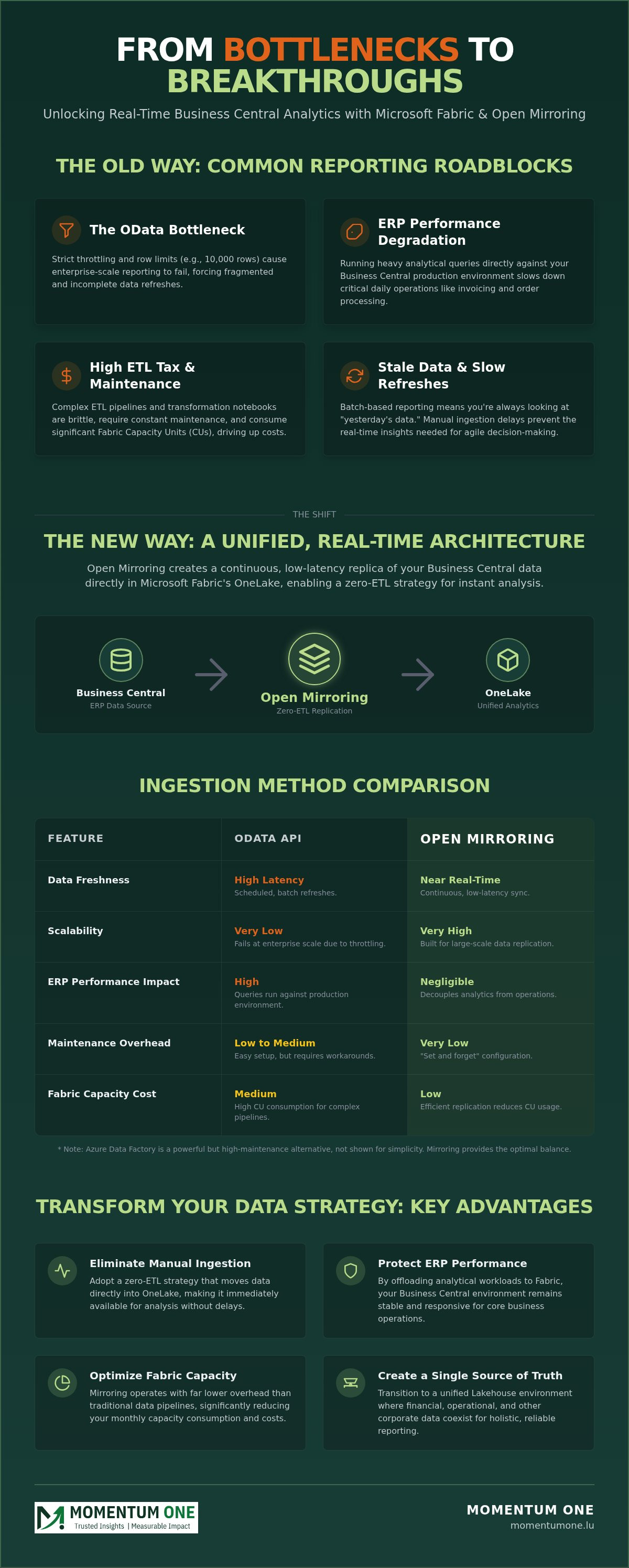
Open Mirroring in Microsoft Fabric in Microsoft Business Central represents a fundamental shift in how we handle enterprise data. Traditionally, getting information out of your ERP required complex ETL (Extract, Transform, Load) pipelines that were often brittle and slow. In 2026, we've reached a turning point where "Mirroring" has effectively replaced manual ingestion. This zero-ETL approach creates a continuous, low-latency replica of your Business Central data directly within Fabric's OneLake. It's built on the technical principle of data mirroring, ensuring that your analytical environment stays synchronized with your production database without the manual overhead of scheduled refreshes.
The "Open" designation is particularly significant for modern enterprises. Unlike standard mirroring for SQL Server or Snowflake, Open Mirroring provides a Landing Zone, often using Parquet or CSV formats, that acts as a staging area. This allows the system to capture changes as they happen through Change Data Capture (CDC). Because this architecture is open, it allows third-party tools and custom applications to contribute to the Fabric ecosystem. This makes your data architecture more flexible and future-proof than ever before.
How Open Mirroring Differs from Standard Mirroring
While standard mirroring creates a direct link between a source and a destination, the Open Mirroring framework for Business Central utilizes a Landing Zone for greater extensibility. This staging area ensures that data remains accessible and readable even before it's fully integrated into the Mirroring Database. It's a more resilient approach for cloud-based ERPs where direct database access is restricted. Open Mirroring acts as the bridge between external ERP data and Fabric's native Delta Lake format.
The Role of OneLake in the 2026 Data Ecosystem
In the current 2026 data landscape, OneLake serves as the central hub for all organizational intelligence. Mirrored Business Central information becomes instantly available to Power BI reports, data science experiments, and real-time analytics engines without requiring additional copies. This eliminates traditional data silos. Your financial records can now sit right alongside CRM data or legacy warehouse tables in a unified environment.
The "Shortcut" feature is a major advantage here. It allows you to reference mirrored data across different workspaces without moving or duplicating the underlying files. This reduces storage costs and simplifies your Fabric Migration & Modernization efforts. By centralizing everything in OneLake, you establish a reliable foundation for high-performance analytics and governance across the entire business.
Why Business Central Users are Migrating to Open Mirroring
For years, Business Central users have hit a glass ceiling with their reporting. The "OData Bottleneck" is the primary culprit. While OData is easy to configure, it often fails at enterprise scale due to strict throttling and row limits. These limitations force data teams into a cycle of fragmented refreshes that can't keep pace with modern business demands. Open Mirroring in Microsoft Fabric in Microsoft Business Central removes these barriers by creating a direct replication path that bypasses the traditional API layer entirely.
This shift also protects your production environment. Running heavy analytical queries directly against an ERP can cause performance hits for operational users. By moving the analytical load to Fabric's OneLake, you ensure that your ERP remains responsive for daily tasks like order processing and invoicing. It's about decoupling your operations from your intelligence so both can run at full speed.
Cost efficiency is another major driver for this migration. Traditional data pipelines often rely on heavy transformation notebooks that consume significant Fabric Capacity Units (CUs). Mirroring operates with much lower overhead, reducing your monthly capacity consumption while providing near real-time visibility. You move from waiting for "yesterday's data" to seeing "now's data" without the high price tag of complex ETL maintenance.
Comparing Ingestion Methods: OData vs. Data Factory vs. Mirroring
Choosing the right ingestion method is critical for long-term scalability. OData is suitable for small datasets but remains limited by its 10,000 row limit and architectural constraints. Azure Data Factory offers immense power but demands high technical skill and constant pipeline maintenance. In contrast, Open Mirroring serves as the "set and forget" solution for 2026 enterprise reporting. It provides the reliability of a professional data warehouse with the ease of a native integration, allowing your team to focus on insights rather than plumbing.
Strategic Benefits for CFOs and Data Leaders
From a leadership perspective, the benefits go beyond technical metrics. CFOs gain faster month-end closing capabilities because transactional data is instantly accessible. You don't have to wait for batch jobs to finish before starting your reconciliation process. This approach also reduces technical debt by simplifying your overall data architecture. If you're looking to align your technical stack with these high-level goals, exploring a Fabric Migration & Modernization project is a logical next step. We can help you establish a governance framework that ensures your mirrored data remains secure and accurate as your organization grows.
Technical Architecture: How BC2Fab and BC2ADLS Enable Mirroring
The movement of data starts within the Business Central environment, where the system identifies changes through a robust replication layer. This architecture relies on a sophisticated metadata framework to translate Business Central’s complex schema into a format Fabric can digest. Open Mirroring in Microsoft Fabric in Microsoft Business Central utilizes the BC2Fab workload to handle this heavy lifting automatically. By focusing on Incremental Change Detection, the system ensures that only modified or new records are synchronized. This approach saves significant bandwidth and processing time compared to traditional full table reloads.
Understanding the schema is where many data projects encounter friction. Business Central tables often contain hundreds of fields with specific relational dependencies that are difficult to map manually. The BC2Fab workload uses a metadata-driven approach to map these tables accurately into your Lakehouse. This ensures that when a transaction is updated in the ERP, the change is reflected correctly in your analytical environment without breaking downstream Power BI models. It's a reliable mechanism that bridges the gap between operational data and executive insights.
Setting Up the Landing Zone
In 2026, choosing the right file format for your Landing Zone is a balance between performance and compatibility. While CSV remains a readable option, Parquet has become the standard for high-performance analytics due to its superior compression and columnar storage. Your storage account must be configured with hierarchical namespaces and strict access controls to maintain enterprise-grade security. The Landing Zone acts as the 'waiting room' where Fabric's engine picks up changes for OneLake.
Configuring this storage account correctly is essential for maximum performance. We recommend using Managed Identities to ensure that data movement remains secure and private. This setup allows Fabric to pull data from the Landing Zone without exposing your storage keys. It's a methodical approach that prioritizes data integrity while preparing the information for its final destination in the Delta Lake format.
Integration with Tools like BC2ADLS and BC2Fab
The journey toward enterprise-grade mirroring often begins with community-driven innovations. Bert Verbeek’s BC2ADLS tool has been a cornerstone for many organizations, providing a reliable way to push Business Central data into Azure Data Lake Storage. This tool paved the way for the modern "BC2Fab" workload, which is now the Microsoft-sanctioned path for general availability (GA) integration. Transitioning to the native BC2Fab workload offers the stability and support required for large-scale corporate environments.
However, as organizations scale, the complexity of managing these connections can grow. For teams managing diverse data sources, utilizing Pipeline and Dataflow Automation can help streamline these technical connections and reduce manual overhead. This ensures your architecture isn't just functional but also optimized for long-term growth. By moving from community tools to enterprise workloads, you establish a steady hand over your data ecosystem.
Implementation Roadmap: From Legacy Reporting to Fabric Mirroring
Transitioning to a modern data architecture requires more than just flipping a switch. Successful adoption of Open Mirroring in Microsoft Fabric in Microsoft Business Central begins with a thorough audit of your current reporting landscape. You must identify which OData feeds are currently throttling your system and which reports are critical for daily operations. Once these bottlenecks are documented, you can move to Fabric capacity planning. For many organizations in 2026, starting with an F2 SKU is a cost-effective entry point, though reaching the F64 threshold is often a strategic goal to eliminate individual Power BI Pro license requirements for viewers.
The technical phase involves configuring your Landing Zone and exporting the necessary metadata from Business Central. This step ensures that Fabric's mirroring engine understands the specific schema of your ERP tables. After the data begins flowing into OneLake, you must establish a clear governance framework. This framework defines who can access mirrored tables and how that data is used across different business units. Finally, you'll transition your existing Power BI reports to point toward OneLake, creating a unified and high-performance source of truth for your entire organization.
Governance and Security Best Practices
Security must be a foundational element of your mirroring project, not an afterthought. You need to replicate Row-Level Security (RLS) within the Fabric environment to ensure that users only see the financial or operational data relevant to their roles. Compliance remains a top priority, especially when handling sensitive transactional records within the Microsoft Fabric tenant. Establishing these guardrails early protects your data integrity and builds trust with stakeholders. If you need assistance setting up these complex permissions, our Power BI Consulting & Governance services provide the expert oversight required for enterprise environments.
Avoiding Common Pitfalls in Mirroring Projects
One common mistake is the "mirror everything" approach. While it's tempting to replicate every table, doing so can clutter your environment and lead to unnecessary storage costs. You still need a curated data model that prioritizes actionable insights over raw data volume. Another challenge is handling schema changes. When you add custom fields in Business Central, you must ensure your Fabric pipelines are resilient enough to incorporate these changes without breaking downstream reports. For a deeper look at long-term strategy, refer to our Microsoft Fabric Migration Services: A Strategic Guide for 2026. We help you navigate these complexities to ensure a smooth transition that delivers immediate value.
Maximizing ROI: Beyond Mirroring to a Modern Lakehouse
Implementing Open Mirroring in Microsoft Fabric in Microsoft Business Central isn't the final destination; it's the launchpad for a comprehensive organizational data strategy. While getting your data into OneLake solves the immediate refresh problem, the real ROI comes from integrating that data into a wider ecosystem. You can now combine Business Central's financial records with CRM interactions, web telemetry, or external logistics data to build a truly holistic view of your operations. This unified approach transforms your ERP from a siloed record-keeper into the heartbeat of a modern, scalable Lakehouse.
The introduction of Direct Lake mode is a game-changer for Power BI performance in this new architecture. By connecting directly to the mirrored Delta tables in OneLake, your reports gain the speed of traditional Import mode without the need for data movement or the latency of scheduled refreshes. This instant access allows decision-makers to act on the most current data available, providing a competitive edge that legacy architectures simply couldn't support. It moves your team from reactive reporting to proactive business intelligence that responds to market changes in real time.
Designing the Lakehouse Architecture
To maximize the value of your mirrored data, we recommend adopting a Medallion architecture. This involves organizing your data into 'Raw' (the initial mirrored state), 'Silver' (cleansed and standardized), and 'Gold' (business-ready aggregates) layers. This structure ensures that your reporting remains accurate and governed even as your data volume grows. For a deeper comparison of these strategies, explore our guide on Data Lakehouse vs Warehouse Design: Choosing Your Architecture in 2026. High-performance dashboards also require precise DAX optimization to ensure that complex financial calculations remain responsive under heavy user load.
The Momentum One Approach to Fabric Success
We believe that a successful Fabric deployment requires both technical excellence and organizational readiness. Our managed services provide the steady hand needed to keep your mirrored environment performant and secure as Microsoft continues to evolve the platform. We don't just set up the pipelines; we ensure your internal teams are equipped to use them through customized training solutions. This collaborative journey helps you master the Fabric ecosystem and drive long-term growth. If you're ready to evaluate your current setup, contact Momentum One for a strategic Fabric Architectural Review. We'll help you refine your capacity management and ensure your architecture is built for 2026 and beyond.
Future-Proof Your Enterprise Data Strategy
The shift toward real-time intelligence is no longer a luxury for growing enterprises; it's a necessity. By implementing Open Mirroring in Microsoft Fabric in Microsoft Business Central, you effectively remove the technical barriers that have historically slowed down financial reporting. This zero-ETL approach protects your ERP performance while providing a scalable foundation for a modern Lakehouse. It isn't just about faster refreshes. It's about establishing a single source of truth that empowers your entire organization to make data-driven decisions with confidence.
As a Microsoft Solutions Partner with specialized expertise in Fabric and Power BI governance, Momentum One acts as your steady hand through this transition. We bring a proven track record in Luxembourg corporate data projects to help you navigate the complexities of data architecture and capacity management. Ready to modernize your Business Central reporting? Book a Fabric Migration Discovery Session with Momentum One today. We look forward to helping you unlock the full potential of your business data through a collaborative and reliable partnership.
Frequently Asked Questions
Is Open Mirroring in Microsoft Fabric generally available for Business Central?
Yes, as of September 2026, Open Mirroring in Microsoft Fabric in Microsoft Business Central is generally available for all global regions. This transition from the preview stage means enterprises can now implement this zero-ETL workload with full Microsoft support. It provides a stable and reliable replication path for organizations looking to modernize their data architecture without the risks associated with experimental features.
Does Open Mirroring require a specific version of Business Central?
Open Mirroring is exclusively available for Business Central Online environments running the latest 2026 updates. This feature relies on modern cloud-based Change Data Capture (CDC) capabilities that aren't present in older iterations. You must ensure your environment is fully managed in the cloud to leverage the native integration between the Dynamics 365 ecosystem and the Fabric platform's OneLake storage.
How does mirroring affect the performance of my Business Central ERP?
Mirroring actually improves overall system performance by decoupling your analytical load from your production database. Instead of running complex Power BI queries directly against your ERP, those requests are handled by the mirrored data in OneLake. This prevents production slowdowns during peak hours. It ensures that your operational users can process orders and invoices without interference from heavy reporting tasks.
Can I use Open Mirroring with Business Central On-Premise?
No, this specific mirroring technology doesn't support Business Central On-Premise installations. The architecture is built on a direct cloud-to-cloud connection that requires the SaaS version of Business Central. Organizations still using on-premise infrastructure will need to consider a cloud migration or use traditional Azure Data Factory pipelines to move their data into the Microsoft Fabric ecosystem for advanced analytics.
What is the difference between BC2Fab and traditional Data Factory pipelines?
The primary difference is that BC2Fab is a zero-ETL approach, while Data Factory requires manual pipeline construction and maintenance. Traditional pipelines often break when schemas change or row limits are reached. Open Mirroring in Microsoft Fabric in Microsoft Business Central automates the replication of both data and metadata. This reduces the technical debt and managed service overhead typically associated with complex enterprise data movements.
How does Open Mirroring handle custom tables and fields in Business Central?
The system handles custom tables and fields seamlessly through a metadata-driven architecture. When your developers add new fields or tables to Business Central, the mirroring workload automatically detects these schema changes. It then updates the corresponding tables in your Fabric Lakehouse. This automation ensures that your reports remain accurate and up to date without requiring manual intervention from your data engineering team.
Is data mirrored in real-time or on a schedule?
Data is replicated in near real-time, providing much faster visibility than traditional daily or hourly schedules. The system uses a continuous synchronization process that captures changes as they occur in the ERP. While there's a very slight latency as data moves through the Landing Zone, it's the closest experience to live reporting currently available. This allows for proactive decision-making based on current transactional data.
What are the licensing requirements for using Open Mirroring in Fabric?
You need an active Microsoft Fabric capacity, which is billed through "F" SKUs starting at the F2 level. These capacities are flexible and can be scaled based on your processing needs. It's also important to note that reaching the F64 capacity threshold removes the need for individual Power BI Pro licenses for users who only view reports. Storage is billed separately at standard Azure Data Lake rates.