Semantic Model Optimization: Enhancing Performance in Power BI and Microsoft Fabric
A well-optimized semantic model is the key to fast, scalable, and reliable analytics. This guide covers model design, DAX optimization, relationship management, storage strategies, and performance tuning techniques to improve Power BI and Microsoft Fabric performance while supporting enterprise-scale reporting and AI-ready analytics.
- Understand the "Performance-Trust Loop" and how slow reports directly undermine your organization’s single source of truth.
- Learn to balance storage and calculation by leveraging the VertiPaq engine's columnar storage for maximum efficiency.
- Adopt a Star Schema architecture to simplify your DAX measures and eliminate the performance bottlenecks common in complex Snowflake models.
- Follow a methodical roadmap for semantic model optimization using professional diagnostics like DAX Studio and Performance Analyzer.
- Identify the benefits of an external performance audit to stabilize your Microsoft Fabric costs and ensure your data architecture is ready for future growth.
Your enterprise data is only as valuable as the speed at which your team can actually use it. If your users are waiting more than three seconds for a visual to render, they aren't just losing time; they're losing trust in the data itself. Many organizations find that as their data grows, so do their Microsoft Fabric capacity fees, which can start around €263 per month for an F2 SKU on a pay-as-you-go basis. It's a frustrating cycle where performance drops while costs climb. Semantic model optimization is the critical lever you need to pull to regain control over your environment and stop paying for inefficiency.
We know that managing complex DAX measures and massive datasets can feel like a constant uphill battle. You deserve sub-second report response times and a scalable architecture that doesn't break the budget. This article provides a clear roadmap to master the technical and strategic pillars of semantic model optimization. We'll show you how to reduce model size, minimize storage costs, and ensure your Power BI and Fabric implementations are built for future growth. We'll move from broad performance principles to the specific technical steps that turn your data into a lean, high-speed asset.
Why Semantic Model Optimization is Critical for Enterprise Scalability
Semantic model optimization is the disciplined process of refining data structures, relationships, and DAX calculations to maximize query speed and resource efficiency. At its core, it ensures that your semantic data model acts as a high-performance bridge between raw data and business insights. When reports lag, users experience what we call the Performance-Trust Loop. A delay of just a few seconds often prompts stakeholders to abandon the official dashboard in favor of local Excel files. This shift creates fragmented data silos and destroys the Single Source of Truth you've worked hard to build. Effective optimization is a cornerstone of Power BI Consulting & Governance, ensuring that your architecture remains sustainable as your data volume grows.
The Cost of Inefficiency in 2026
In the current Microsoft Fabric ecosystem, inefficiency has a direct price tag. Unoptimized models consume excessive Compute Units (CUs), which can quickly escalate your monthly spend. With Fabric capacity starting at roughly €263 per month for an F2 SKU on a pay-as-you-go basis, every wasted cycle impacts your bottom line. Large, bloated models also lead to sluggish refresh times and increased data latency, preventing real-time decision-making. The efficiency of Direct Lake performance is fundamentally tied to the compression and partitioning strategies applied during model design.
User Experience and Data Adoption
Executive engagement relies on speed. If a dashboard doesn't load within three seconds, it's often perceived as broken or unreliable. This three-second window is a psychological threshold for most professional users. Sub-second response times aren't just a technical luxury; they are the baseline for high data adoption. By prioritizing semantic model optimization, you remove the friction that prevents teams from exploring data deeply. In complex enterprise environments, a lean model also reduces the risk of calculation errors, leading to higher accuracy and more confident strategy sessions.
Mastering these optimizations allows your team to move from reactive troubleshooting to proactive strategy. It's about building a foundation that supports thousands of users without a corresponding spike in infrastructure costs. As we explore the technical engine behind these models, you'll see how specific design choices directly influence these business outcomes.
Understanding the Engine: Storage vs. Calculation Optimization
Effective semantic model optimization requires you to look under the hood at the VertiPaq engine. This columnar storage engine is the powerhouse behind Power BI and Microsoft Fabric, designed to compress and query massive datasets at lightning speed. However, performance isn't just about file size. We distinguish between 'Data at Rest', which refers to the physical storage footprint, and 'Data in Motion', which involves the CPU cycles required for calculations. It's a common misconception that a small model is always a fast one. A tiny dataset can still feel sluggish if the DAX logic is inefficiently structured. Your primary objective is to minimize cardinality, which directly improves how the engine compresses and retrieves your data.
Optimizing the Storage Layer
Reducing column cardinality is the most impactful way to shrink your model and improve response times. Each unique value in a column requires a dictionary entry; high-cardinality columns like GUIDs or millisecond-level timestamps bloat this dictionary and slow down the engine. You should aggressively remove unused columns and disable 'Attribute Hierarchies' for fields that don't require them. These hidden hierarchies can double the size of your model without adding any analytical value. If you're preparing for a Fabric migration and modernization, this storage cleanup is a vital first step to ensure your new environment remains cost-efficient.
The Calculation Layer and DAX Efficiency
When a query runs, the Formula Engine (FE) and the Storage Engine (SE) work together. The SE is multi-threaded and incredibly fast at retrieving data, while the FE handles complex logic but is often single-threaded. 'Expensive' DAX functions, such as certain iterators or complex filters, can force the FE to do the heavy lifting, creating a bottleneck that frustrates users. You can find a detailed technical explanation of Power BI semantic models to see how these engines interact across different storage modes. A Star Schema is the superior architecture for VertiPaq because it minimizes the work the engines must do to join and filter data.
By balancing storage reduction with lean calculation logic, you create a model that is both compact and responsive. This dual-layered approach to semantic model optimization ensures that your reports stay fast even as your data grows. In the next section, we'll dive deeper into specific design patterns that help you avoid common performance traps.
DAX Performance vs. Model Design: Where the Real Bottlenecks Hide
Creating a "Golden Dataset" requires more than just technical proficiency; it demands a strategic balance between clean architecture and lean code. We often see teams attempt to "fix" a disorganized data model by writing increasingly complex DAX measures. This approach is a common trap. While DAX is powerful, it cannot fully compensate for a foundation that lacks structural integrity. In the context of semantic model optimization, the data model itself should do the heavy lifting, allowing your DAX to remain simple, readable, and fast. If you find your measures becoming unmanageable, it might be time to revisit your Data Modeling & DAX Optimization strategy to ensure your core architecture isn't working against you.
The choice between a Snowflake and a Star Schema is a perfect example of this principle. While Snowflake schemas might seem more normalized from a traditional database perspective, a Star Schema is the undisputed winner for semantic models. It reduces the number of joins the VertiPaq engine must perform, which directly translates to faster query response times for your users. By flattening dimensions and creating clear relationships, you simplify the engine's path to the data, significantly reducing the CPU overhead for every visual on your report.
Advanced Data Modeling for Scalable BI
Scalability often hinges on how you handle relationships and calculated data. Bidirectional filters, for instance, are frequently used to solve specific reporting requirements, but they introduce ambiguity and can severely degrade query performance. They force the engine to evaluate filters in multiple directions, which often leads to unexpected results and slower renders. You should also be intentional about where you place your logic. While calculated columns are processed during the refresh and consume memory, measures are calculated on the fly and consume CPU. Striking the right balance is essential. For a deeper look at how your foundational data choices impact this, explore our guide on Data Lakehouse vs Warehouse Design.
Common DAX Anti-Patterns to Avoid
Even with a perfect model, certain DAX habits can devastate performance. One of the most frequent offenders is the unnecessary use of the FILTER() function. When you use FILTER() on a large table instead of applying a simple boolean filter within CALCULATE(), you force the engine to scan every single row. This row-by-row processing is far slower than the optimized column-based filtering the engine is built for. Other anti-patterns include:
- IFERROR() and FORMAT(): These functions often prevent the engine from using its most efficient internal optimizations, forcing calculations into the slower Formula Engine.
- Excessive Iterators: Functions like SUMX() or AVERAGEX() are powerful but should be used sparingly on high-cardinality columns.
- Complex String Manipulations: Performing heavy text processing within DAX measures rather than in the upstream data transformation layer.
The goal of semantic model optimization is to transform these complex, high-maintenance measures into simpler, model-driven logic. By shifting the complexity from the code to the model design, you create a system that is easier to maintain and far more responsive for your end users.
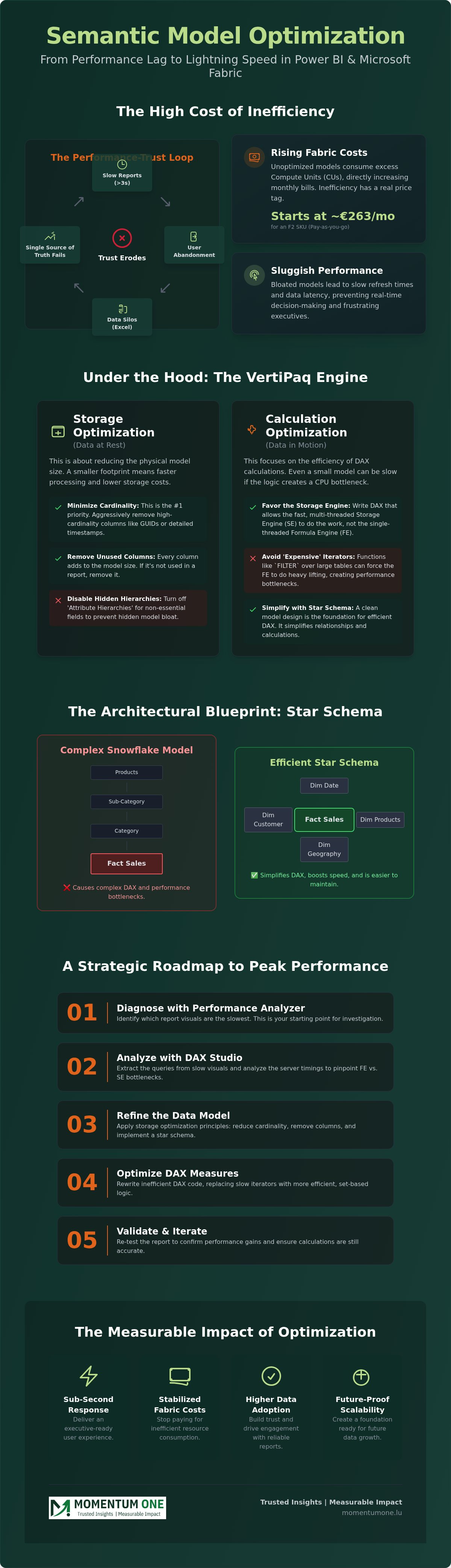
A Strategic Roadmap for Optimizing Power BI and Fabric Models
Successful semantic model optimization follows a structured diagnostic path rather than a trial-and-error approach. We recommend a five-step cycle to ensure your data remains lean and responsive. First, establish a baseline using the Power BI Performance Analyzer to identify which visuals are lagging. Second, perform a deep-dive analysis using DAX Studio to isolate whether the bottleneck sits in the Formula Engine or the Storage Engine. Third, use Tabular Editor and its Best Practice Analyzer to automate the removal of unused objects and enforce modeling standards. Fourth, for massive datasets, implement User-Defined Aggregations to pre-summarize data and reduce the load on your fact tables. Finally, establish a continuous monitoring cycle via the Fabric Capacity Metrics app to track resource consumption in real time and prevent unexpected cost spikes.
The Essential Optimization Toolkit
Mastery of the right tools is what separates high-performance models from average ones. DAX Studio is your primary diagnostic hub. By analyzing server timings, you can see if your queries are spending too much time in the single-threaded Formula Engine (FE) or the multi-threaded Storage Engine (SE). If the FE is the culprit, your DAX logic likely needs simplification. If the SE is slow, your model design or cardinality is the problem. VertiPaq Analyzer helps you identify the "heaviest" columns by dictionary size or cardinality, showing you exactly where storage is being wasted. For long-term governance, we use Tabular Editor 3 scripts to automate quality checks, ensuring that every new measure meets your organization’s performance standards before it reaches production.
Optimization in the Microsoft Fabric Era
Microsoft Fabric introduces new architectural possibilities that change the game for performance. Direct Lake mode, for example, allows you to query data directly from OneLake without the need for traditional data imports or the latency of DirectQuery. This mode offers the speed of Import with the real-time nature of DirectQuery, provided your delta files are properly optimized and compressed. Managing OneLake storage is equally critical to prevent data sprawl and redundant models that inflate your capacity costs. If you're looking to modernize your stack, our Microsoft Fabric Migration Services provide a dedicated framework to transition your legacy models into this high-performance environment. For teams that need ongoing support to maintain these gains, our Managed Optimization Services provide the steady hand needed to keep capacity costs predictable and report speeds consistently fast.
Partnering for Peak Performance: Managed Optimization Services
Maintaining a high-performance data environment is a full-time commitment. Internal teams often find themselves buried under urgent report requests and data pipeline maintenance, leaving little room for the deep technical work required for ongoing semantic model optimization. Performance tuning isn't just a one-off task; it's a constant cycle of monitoring and refinement. Without dedicated oversight, small inefficiencies in DAX or model design compound over time. This leads to the rising Fabric costs and sluggish response times that frustrate users and drain budgets. Partnering with an external specialist provides the objective perspective needed to identify hidden bottlenecks that internal eyes might overlook. Our Managed Power BI Services provide this long-term stability, moving your organization beyond reactive fixes to a state of sustained excellence.
Momentum One’s approach is rooted in technical precision and strategic partnership. We don't just address the symptoms of a slow report; we refactor the underlying architecture to ensure peak efficiency. Our process moves from a rigorous review of your data warehouse structure to targeted DAX refactoring, ensuring every calculation is as lean as possible. This proactive stance protects your investment and ensures your platform remains a reliable asset for the business, regardless of how much your data volume grows.
Momentum One's Performance Framework
We apply a 360-degree review that examines governance, architecture, and code in unison. For Luxembourg enterprises navigating the complexities of Fabric migrations, we provide the steady hand needed to move from legacy systems to a modern, optimized stack. We also believe in empowering your internal team. Through custom Corporate Power BI Training, we help your developers internalize these performance-first best practices. This prevents issues at the source and reduces the need for constant troubleshooting in the future. Our goal is to build a scalable foundation that supports your growth without technical debt.
Next Steps for Your Data Environment
Transitioning from reactive troubleshooting to proactive performance management is a strategic shift. It starts with a comprehensive technical audit of your existing semantic models to establish a clear baseline. We'll map out your current resource consumption and provide an actionable plan to reach sub-second response times. This audit is the first step toward regaining control over your capacity costs and restoring user trust in your data. If you're ready to stabilize your environment and unlock the full potential of your architecture, you can Book a Performance Review with Momentum One to begin your journey toward peak efficiency.
Future-Proof Your Data Architecture
Achieving sub-second response times isn't just a technical goal; it's about making sure your business moves as fast as its data. We've explored how a robust Star Schema and lean DAX logic form the bedrock of a scalable environment. By prioritizing semantic model optimization, you don't just lower your Microsoft Fabric capacity costs; you rebuild the trust your users have in their daily dashboards. Maintaining this level of performance requires a disciplined approach to both storage and calculation layers.
As a certified Microsoft Solutions Partner and Luxembourg-based strategic consultancy, Momentum One specializes in turning complex data hurdles into streamlined opportunities. Our DAX optimization experts are ready to audit your environment and help you transition from reactive troubleshooting to a proactive, growth-ready strategy. We're here to ensure your architecture supports your ambitions without the burden of technical debt. Ready to see the difference? Optimize your Power BI performance with Momentum One and ensure your enterprise data remains fast, scalable, and cost-efficient. Your journey toward a more efficient data culture starts with a single, strategic step.
Frequently Asked Questions
What is the difference between a semantic model and a dataset?
A semantic model is the new name for what was previously called a dataset in Power BI. Microsoft rebranded the term to better describe the business logic, relationships, and DAX measures that live within the model. It acts as the single source of truth for your reporting, regardless of whether you're using Power BI Desktop or the Microsoft Fabric ecosystem.
How do I know if my Power BI report is slow because of DAX or the model?
You should use the Power BI Performance Analyzer to isolate the cause. If the "DAX Query" time is high, the bottleneck is likely in your measures or relationship complexity. If the "Visual Display" time is high, the issue might be the number of visuals on the page. DAX Studio can further clarify if the delay sits in the Formula Engine or the Storage Engine.
Can a large semantic model be fast?
Yes, a large model can achieve sub-second response times if it's built with semantic model optimization in mind. By utilizing a Star Schema and minimizing column cardinality, you allow the VertiPaq engine to compress data efficiently. This setup enables the engine to scan millions of rows in milliseconds, proving that efficiency matters more than total data volume.
What is the maximumAs of 2026, a semantic model in a Pro workspace is limited to 1 GB. If you're using Microsoft Fabric or Power BI Premium, you can enable the "Large semantic model storage format" to exceed this limit, restricted only by your capacity's memory. While the upload limit for a Power BI Desktop file remains 10 GB, the in-memory size can grow much larger in a cloud environment. size for a Power BI semantic model in 2026?
As of 2026, a semantic model in a Pro workspace is limited to 1 GB. If you're using Microsoft Fabric or Power BI Premium, you can enable the "Large semantic model storage format" to exceed this limit, restricted only by your capacity's memory. While the upload limit for a Power BI Desktop file remains 10 GB, the in-memory size can grow much larger in a cloud environment.
How often should I perform semantic model optimization?
Optimization should be an ongoing part of your data governance rather than a one-off task. We recommend a technical review every quarter or after any major update to your data sources. Regular semantic model optimization prevents the accumulation of technical debt and ensures your Microsoft Fabric capacity costs don't spike unexpectedly as your data grows.
Does Microsoft Fabric require different optimization techniques than Power BI?
The foundational principles are the same, but Fabric introduces Direct Lake mode, which requires specific optimization of Delta files in OneLake. You'll need to monitor Compute Unit (CU) consumption more closely than in traditional Power BI. While DAX best practices still apply, the way you manage storage and partitions in the lakehouse becomes a critical part of the performance equation.
What are the best tools for semantic model optimization?
The industry standard toolkit includes DAX Studio, VertiPaq Analyzer, and Tabular Editor. DAX Studio is essential for profiling query speed, while VertiPaq Analyzer helps you identify which columns are consuming the most memory. Tabular Editor allows you to run Best Practice Analyzer scripts to automate the cleanup of unused columns and measures across your entire model.
How does cardinality affect the performance of my reports?
Cardinality refers to the number of unique values in a column, and high cardinality is the main cause of model bloat. Columns with many unique values, such as GUIDs or high-precision timestamps, don't compress well and slow down the Storage Engine. Reducing cardinality by rounding values or removing unnecessary columns is the most effective way to shrink your model and speed up queries.