Share Power BI Reports Without Individual User Licenses
Learn how to share Power BI reports without individual user licenses using Microsoft Fabric capacity and Power BI Embedded to cut costs and scale easily.
- Compare per-user licensing with capacity-based options to see which model fits your audience size and growth plans.
- Explore how to share Power BI reports without individual user licenses, while accounting for the licenses report creators still need.
- Understand why Microsoft Fabric capacity has replaced Power BI Premium P-SKUs and what that means for internal report sharing.
- Assess whether Power BI Embedded suits external audiences, and what to weigh when planning the experience and cost model.
- Consider how row-level security, service principals, and workspace and capacity management can support governed access as usage scales.
What if sharing a Power BI report with hundreds of people didn’t mean buying a license for every viewer? The question of how to share Power BI reports without individual user licenses becomes more pressing as audiences grow, especially when monthly costs are hard to predict, account administration adds friction, or external partners need access.
Those concerns are valid. With standard sharing, report creators and viewers generally need paid licenses, so the audience can shape the bill as much as the team building the reports. In 2026, Microsoft Fabric capacity offers another route for eligible internal audiences: with F64 or higher, viewers can consume reports without individual Power BI licenses, while publishers still need an appropriate license.
This article explains how capacity-based sharing works, when Power BI Embedded may suit external audiences, and what to consider for cost planning, access, and governance. You’ll also see how workspace and capacity management, Fabric migration, and data architecture modernization can help create a scalable approach without losing control of your data.
The Licensing Bottleneck: Why Per-User Fees Limit Growth
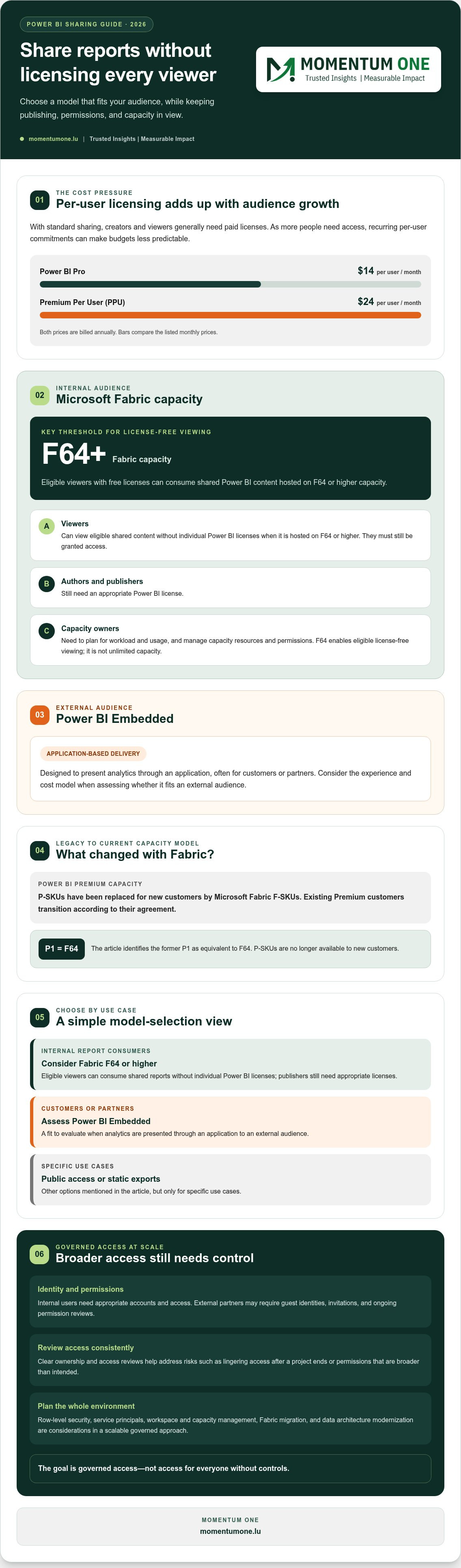
Power BI sharing can become harder to scale when every viewer adds another licensing decision. As of September 2026, Power BI Pro costs $14 per user per month and Premium Per User (PPU) costs $24 per user per month, both billed annually. If your audience expands, recurring per-user commitments can make budgets less predictable, particularly when viewers need access to several reports but don’t create them.
The issue isn’t simply the license line on a budget. Teams may restrict report access to control costs, leaving decisions with a small group instead of the people who need the information. That can slow data-informed work. The goal should be governed access, not access for everyone without controls. Understanding the options for Power BI reports without individual user licenses helps organizations plan for broad access without treating every new viewer as an isolated purchase.
Power BI includes services such as report creation, sharing, and embedded analytics. For a neutral overview of the platform and its components, see Microsoft Power BI. The right sharing model depends on who needs access, how they’ll use reports, and what governance the organization requires.
The Hidden Costs of Identity Management
Licensing each viewer also creates identity work. Internal staff need appropriate accounts and access; external partners may need guest identities, invitations, and ongoing permission reviews. With hundreds of people, these tasks can become a recurring administrative queue rather than a one-time setup.
Manual processes can also create avoidable risk. For example, an account may retain access after a project ends, or a user may receive broader permissions than intended. Clear ownership, access reviews, and consistent governance help reduce these gaps. Delays in account setup or license assignment can frustrate users and discourage adoption, especially when a report is needed for a time-sensitive decision.
Scalability Limits in the Modern Enterprise
As audiences grow, distributing reports sustainably becomes an architecture decision, not just a purchasing task. Microsoft’s current capacity model uses Fabric F-SKUs; report consumers can view content without individual Power BI licenses on F64 or higher capacity, while publishers still need an appropriate license. Capacity planning must therefore account for workload and usage, not only headcount.
For organizations in 2026, data democratization means making useful insights available to the right people with appropriate controls. It doesn’t mean removing governance. A deliberate shift from individual seats toward organizational capacity can support broader consumption while keeping creator access and security requirements in view. Workspace and capacity management can help align licensing decisions with growth plans, and may connect naturally with Fabric migration or data architecture modernization.
Proven Methods to Share Power BI Reports Without Individual Licenses
There are several ways to share reports without assigning every viewer an individual Power BI license, but they serve different audiences and come with different security considerations. For internal teams, the current capacity-based route is Microsoft Fabric. For external users, Power BI Embedded can deliver reports through an application. Public access and static exports are options only for specific use cases.
Use Microsoft Fabric capacity for internal viewers
Power BI Premium capacity based on P-SKUs has been replaced for new customers by Microsoft Fabric F-SKUs. Existing Premium customers transition according to their agreement. In 2026, viewers with free licenses can consume shared Power BI content when it’s hosted on F64 or higher capacity. Report authors and publishers still need an appropriate Power BI license, and viewers must still be granted access to the content.
This isn’t unlimited capacity: the F64 threshold enables license-free viewing for eligible consumers, but capacity resources and permissions still need to be managed. Microsoft explains the distinction in its guidance on Power BI licenses and subscriptions. Centralized capacity planning can help align report workloads, access, and governance. The former P1 is equivalent to F64, but P-SKUs are no longer available to new customers.
Use Power BI Embedded for external audiences
Power BI Embedded is designed for presenting analytics through an application, often for customers or partners. In the “App owns data” model, the application authenticates its users, so those end users don’t need individual Power BI licenses or Microsoft 365 accounts. Internal report creators and publishers still need appropriate Power BI licenses.
This approach can provide a consistent, branded experience within a customer-facing portal. However, embedding requires an application and careful decisions about authentication, permissions, and capacity. Organizations should account for the work involved in implementation and ongoing management; Embedded capacity is not simply a way to share a standard Power BI workspace with guests.
Choose public or static sharing only when appropriate
Publish to web creates a publicly accessible report. Anyone with the link may be able to view it, so don’t use it for confidential, personal, or otherwise restricted data. It isn’t a secure alternative to managing viewer licenses.
For information that doesn’t need interactivity, a PDF export can be simpler. It avoids interactive report access, but the export is a snapshot rather than a live, filterable experience.
To choose between internal Fabric capacity and Embedded access, first map who needs reports, how they authenticate, and what controls the data requires. A review of your sharing architecture with a Power BI specialist can help clarify the right capacity and governance approach.
Premium Capacity vs. Embedded: Choosing Your Cost Model
The right model depends less on the number of reports than on who consumes them and how they access them. Fabric capacity is designed for sharing within an organization. Power BI Embedded is suited to delivering analytics through an application to customers or partners. Both can support Power BI reports without individual user licenses, but they place costs, identity management, and user experience in different parts of your architecture.
Internal enterprise distribution with Fabric capacity
For a large internal workforce that needs access to shared reports, Fabric capacity can shift planning from a separate viewer license for each eligible user to capacity sized for the workload. In 2026, F64 or higher is required for free-license users to view Power BI content. Publishers still need an appropriate license, and content access must still be governed.
Compared with a client-facing application, this model keeps report access within the organization’s Power BI environment. That can make it easier to apply consistent workspace permissions and governance, though capacity performance and access still require active management. Existing P-SKU customers transition according to their agreements; P-SKUs are no longer available to new customers. Plan around expected report usage, refresh patterns, and capacity needs rather than assuming that one capacity automatically fits every workload. Workspace and Capacity Management is a natural part of evaluating that approach.
External client reporting with Power BI Embedded
Embedded is generally a better fit for a SaaS provider or consultancy presenting analytics to clients through an application. In the “App owns data” model, the application authenticates end users, separating report access from the organization’s Microsoft 365 identity setup. Report creators and publishers still need appropriate Power BI licenses.
This gives customers a more integrated experience than inviting each person into an internal reporting environment. It also means the application must handle authentication and securely determine what data each user can see. Embedded capacity is Azure-based and billed hourly, which can support workload-based planning. Whether capacity can be paused or adjusted to reduce spend depends on the configuration and operating needs, so validate those details before building a forecast.
Compare the full operating model
Capacity-based sharing isn’t automatically cheaper. Compare expected consumption, operating effort, and the cost of maintaining an application or internal reporting environment. A steady, broad internal audience may make Fabric capacity easier to plan for; variable external usage may suit Embedded, provided scaling decisions reflect actual demand.
Before choosing, confirm current Microsoft licensing terms for your scenario, including publisher requirements, viewer eligibility, and access controls. Then compare the user journey and governance needs alongside capacity assumptions. This turns the decision from a simple SKU comparison into a sustainable architecture choice.
Governance and Security in a License-Free Environment
Removing the need for an individual viewer license doesn’t remove the need to control access. Capacity-based sharing changes how eligible users consume reports, not who should see sensitive data. A sound governance framework should define who can publish, how viewers are authorized, how data is filtered, and how access is reviewed over time.
Start with a Power BI Governance Framework that matches the sharing model. For internal users, grant access through appropriate groups and workspace permissions rather than relying on ad hoc individual assignments. Workspace roles such as Viewer, Contributor, and Member carry different permissions, so reserve elevated roles for people who need them. A Viewer role is generally more appropriate for report consumers than a role that allows content changes.
Secure data for embedded and external viewers
Row-level security (RLS) can restrict which rows a report user sees, but it must be designed and tested for the actual identity model. In an embedded “App owns data” scenario, the application authenticates its user and supplies an effective identity when generating an embed token. The model’s RLS rules can then filter the report for that identity, such as showing a client only that client’s records.
A service principal can support automated, controlled access to Power BI APIs. Treat it as a privileged identity: limit its permissions, protect its credentials, and avoid exposing them to browsers or end users. For multi-tenant reporting, validate that tenant context is passed correctly and test with accounts representing different customers. RLS is a safeguard, not a substitute for authorization checks or careful model design.
Manage permissions and monitor usage
Centralized capacity doesn’t mean every user should receive workspace access. Separate publishing and administration from consumption, and use defined access groups and an approval process. Automating requests can reduce repetitive IT work, but approvals should still confirm the person’s business need and the data they’re entitled to see.
Build routine reviews into operations. Check workspace membership, remove access that’s no longer needed, and monitor available usage and activity records to spot unexpected patterns or capacity pressure. Keep ownership clear so someone is accountable for investigating issues and maintaining permissions.
For organizations in Luxembourg, align access, retention, and data handling with applicable internal policies and privacy obligations. Don’t assume a license-free viewing route changes those responsibilities. A documented approach makes broad report access more manageable while helping protect sensitive information.
If you’re planning wider report access, discuss your Power BI governance and security needs with a specialist.
Strategic Implementation: How Momentum One Optimizes Your Architecture
Choosing a sharing model is only the start. To make Power BI reports without individual user licenses work at scale, first map who creates reports, who views them, how often they’re used, and whether audiences are internal or external. This licensing and architecture review can reveal unused seats, clarify governance needs, and show where a hybrid model may make sense.
Size capacity around real usage
Keep individual Pro licenses for report authors and for users who need Pro features, then assess whether eligible viewers can consume reports on Fabric capacity. Pro costs $14 per user per month, billed annually. In 2026, free-license viewers need F64 or higher capacity to view shared Power BI content, while publishers still need an appropriate license.
There isn’t a universal break-even point: the comparison depends on current licensing, the number of viewers, workload patterns, and current Fabric capacity pricing. Model those inputs before selecting a capacity. Right-sizing means considering report concurrency and refresh demands, not just audience size, then reviewing assumptions as usage changes. Avoid treating a rough user-count estimate as a substitute for a workload-based assessment.
Plan the transition, not just the license change
A hybrid setup can retain Pro seats for creators while using capacity-based access for eligible consumers. If your data platform also needs modernization, a planned Fabric migration can connect licensing decisions with the way data is stored, modeled, and delivered. That creates a more coherent roadmap than shifting reports first and addressing architecture later.
Performance matters too. Inefficient models or DAX calculations can place unnecessary demand on capacity, so include model health in the planning process. Momentum One’s DAX optimization work can complement licensing decisions. Team enablement matters as well: Corporate Power BI Training helps teams build the skills to create and use governed reports effectively.
Build for ongoing change
Capacity use, report adoption, and Microsoft licensing options can evolve. Establish ownership for reviewing usage, permissions, performance, and licensing assumptions rather than treating deployment as a one-time task. Workspace and capacity management, supported by appropriate managed services, can help keep the environment aligned with business needs as your audience grows.
Momentum One brings together Power BI consulting and governance, Fabric migration, data modeling, and training to help organizations make these decisions in context. Contact Momentum One to review your licensing and architecture and identify a practical path toward scalable, well-governed report access.
Make Scalable Report Access Your Next Step
Sharing Power BI reports without individual user licenses starts with choosing an approach that fits your audience, not simply minimizing license counts. Internal viewers and external clients may need different access models, while both require thoughtful governance. A review of your current licensing, usage, and data architecture can help identify a practical path forward.
Momentum One brings Power BI consulting and governance together with expertise in Microsoft Fabric and Power BI Embedded. As a Microsoft Solutions Partner, the team can help assess how capacity planning, report performance, and data controls fit your broader analytics strategy. The aim is to make insight easier to access while keeping security and oversight central.
Ready to turn licensing questions into a clear architecture plan? Optimize your Power BI licensing with Momentum One. With a measured approach and the right foundations, your organization can extend the value of its reports and build confidence in how people use data.
Frequently Asked Questions
Can I share a Power BI report with a free user?
Yes, if the report is hosted on eligible capacity, or if you use another appropriate sharing method. In 2026, a free-license user can view shared Power BI content on Microsoft Fabric capacity of F64 or higher. The report publisher still needs an appropriate Power BI license, and access permissions must be configured. A free license alone doesn’t enable standard sharing and collaboration from a Pro or PPU workspace.
What is the minimum Microsoft Fabric capacity needed for free user sharing?
The minimum is F64 capacity for free-license users to consume shared Power BI content. Smaller Fabric capacities don’t meet this threshold for license-free Power BI viewing. This requirement applies to viewers, not report authors: publishers still need an appropriate Power BI license. Before selecting capacity, check current Microsoft licensing guidance and assess expected usage, since meeting the minimum licensing threshold doesn’t guarantee capacity will suit your workload.
Is Power BI Embedded cheaper than buying Pro licenses for 500 users?
It may be, but there isn’t enough information to determine that from user count alone. At the verified Pro rate of $14 per user per month, 500 Pro licenses would total $84,000 per year when billed annually. Embedded pricing depends on Azure capacity and usage, plus implementation and operating effort. Compare expected workload and scaling needs against the full cost of licensing before choosing.
Do external users need a Microsoft account to view embedded reports?
No, not necessarily. In the “App owns data” model, the application authenticates external users, so they don’t need individual Power BI licenses or Microsoft 365 accounts to view embedded reports. The application still needs a way to authenticate each user and authorize the data they can access. Internal report authors and publishers continue to need appropriate Power BI licenses.
Can I still use Row-Level Security (RLS) with capacity-based licensing?
Yes. Capacity-based licensing doesn’t remove the ability to apply Row-Level Security (RLS). In an embedded “App owns data” setup, the application can provide an effective identity through an embed token so the model’s RLS rules filter data for that user. Test access with different user identities, especially in multi-tenant scenarios, and verify that permissions and filters prevent users from seeing other customers’ data.
What happens if my capacity reaches its limit during peak usage?
High demand can affect report responsiveness and the experience for users sharing that capacity. The exact impact depends on the workload and capacity configuration, so monitor usage and performance rather than assuming a fixed outcome. Review peak activity, report efficiency, and refresh demands; then consider adjusting capacity or scheduling workloads differently. Capacity planning should include periods of heavy use, not just typical daily consumption.
Is “Publish to Web” safe for internal corporate data?
No. Publish to Web makes a report publicly accessible, so it isn’t suitable for confidential, personal, or otherwise restricted corporate information. A public link is not a secure way to share a report with employees or selected partners. Use an authenticated sharing method with appropriate permissions, or consider capacity-based access for eligible internal viewers. Review the data in a report before making it public.
How do I transition from Pro licenses to a Fabric F-SKU?
Start by identifying report authors, viewers, external audiences, current licenses, and expected usage. Keep appropriate licenses for publishers, then assess whether eligible internal viewers can use shared content on F64 or higher capacity. Plan how workspaces and reports will be assigned to capacity, and test access, governance, and performance before expanding. Review current Microsoft terms and capacity pricing; moving to an F-SKU doesn’t automatically replace every Pro license.