Power BI Embedded Pricing Guide for External Customers
Understand Power BI Embedded pricing for external customers. Learn how to estimate Azure capacity, evaluate workloads, and build an accurate monthly budget.
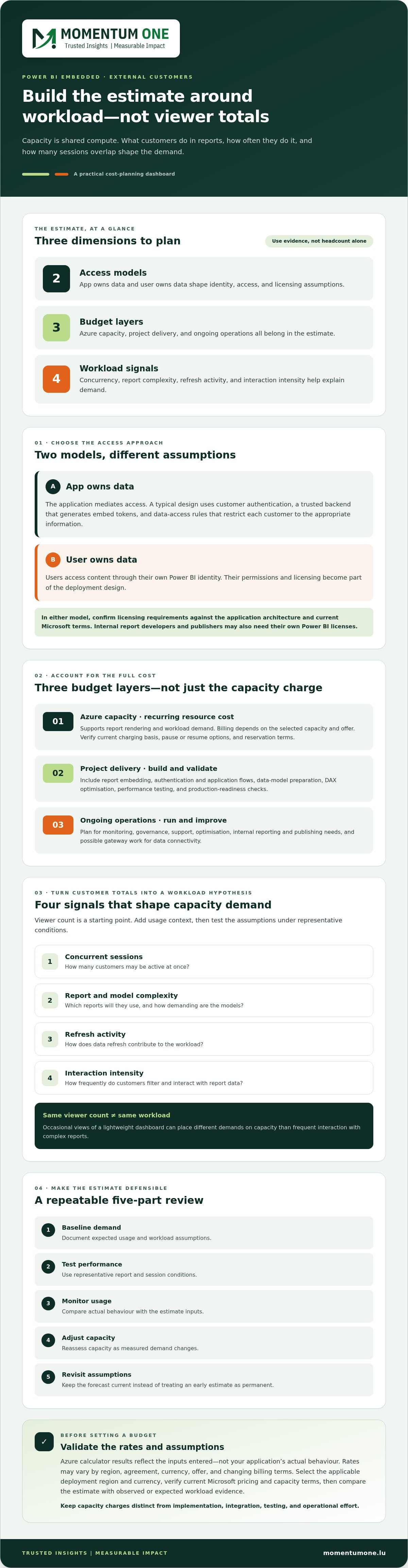
- Build your Power BI Embedded pricing for external customers estimate around shared capacity and realistic workload assumptions, not viewer totals alone.
- Separate Azure capacity charges from implementation, integration, testing, and ongoing operational effort to make the budget more complete.
- Compare low, typical, and peak demand by considering concurrent sessions, report complexity, refresh patterns, and interaction intensity.
- Use a repeatable review cycle to baseline demand, test performance, monitor usage, adjust capacity, and revisit assumptions.
- Document your access model, workload scenarios, capacity assumptions, and operational ownership, then validate current rates in the official Azure pricing calculator.
A large customer base doesn’t automatically require a large Power BI capacity, and a modest viewer count doesn’t guarantee a low-cost deployment. Power BI Embedded pricing for external customers depends on how people use reports, how often they use them, and how demanding the workload is. Viewer totals are a starting point, not a budget.
Azure capacity pricing can be difficult to translate into a monthly estimate. The access model matters too: with “app owns data,” external users access analytics through your application, while “user owns data” can bring viewer licensing into the picture. Internal report developers and publishers may also need their own Power BI licenses, leading many organisations to use platforms like LicenseIQ to track utilization and recover wasted spend on Microsoft licenses.
This guide breaks down the cost components to include, how to estimate capacity from usage patterns and report workloads, and what to validate before choosing an approach. It also covers implementation, ongoing monitoring, scaling, and potential gateway needs, so you can build a more defensible budget using current Azure pricing for your deployment region. With a clearer view of demand and operational effort, you can assess the business case before committing.
Power BI Embedded pricing for external customers: what goes into the total?
Power BI Embedded pricing for external customers is best treated as a capacity-led estimate, not a fixed charge per viewer. Azure capacity provides shared compute for serving reports, and the estimate depends on how the solution is deployed and the workload it must handle. An application with occasional, simple report views has different demands from one serving frequent, interactive analytics and complex models.
Separate the estimate into two parts: Azure resource consumption and the effort to make the solution production-ready. Microsoft’s Power BI Embedded overview describes how Power BI analytics can be integrated into applications. That integration also requires planning, implementation, and testing. Azure consumption is a recurring resource cost; project delivery is the work required to build, validate, and operate the experience.
Which costs belong in an external analytics budget?
Map the budget categories before selecting capacity. This helps prevent a cloud calculator estimate from being mistaken for the full cost of an external analytics deployment.
- Azure capacity: the resource component used to render reports and support workload demand. Billing depends on the selected capacity and offer. Verify the current charging basis, pause or resume options, and any reservation terms against Microsoft’s latest information.
- Project delivery: effort for embedding reports, integrating authentication and application flows, preparing data models, optimising DAX, testing performance, and confirming production readiness. The scope depends on the existing application and data environment.
- Ongoing operations: monitoring, governance, support, and optimisation. Also account for internal reporting and publishing needs, and assess whether data connectivity requires gateway work.
These categories connect capacity planning with the broader work of embedding Power BI reports for your customers. A capacity estimate is more useful when it includes clear ownership for deployment and ongoing operation.
Why a pricing-page figure is not a project estimate
Microsoft’s pricing pages and Azure calculator help model cloud resource charges, but displayed rates can vary by region, agreement, currency, offer, and changing billing terms. Select the deployment region and currency that apply, then verify the assumptions against the current Microsoft offer before approving a budget.
A calculator output reflects the inputs entered, not the behaviour of your application. It can’t establish whether concurrent customer sessions, report complexity, refresh activity, or interaction patterns are represented accurately. Treat it as a rate-based estimate, then test it against observed or expected workload evidence. The Power BI Fabric capacity planning guide offers a useful framework for connecting workload assumptions to capacity decisions. Revisit those assumptions as usage changes instead of treating an early estimate as a permanent forecast.
How Power BI Embedded capacity and external access shape pricing
Capacity is shared compute that supports report rendering and other analytics workloads. It isn’t a separate charge for every viewer. The same capacity may serve multiple customer sessions, so demand depends on what those sessions are doing and how the solution is configured. That’s why Power BI Embedded pricing for external customers can’t be estimated reliably from customer totals alone.
Consider two applications with the same number of users. One might show a lightweight dashboard that customers open occasionally; the other might serve complex reports with frequent filtering and data interactions. Those workloads can place different demands on capacity. Concurrent sessions, model design, report complexity, and refresh activity help explain the difference.
What capacity tells you about the estimate
Capacity identifies the compute resource available to support the embedded workload, but it doesn’t predict performance or consumption by itself. Validate Microsoft’s current terminology and service terms for the capacity under consideration, including its billing basis and whether it can be scaled or paused. Don’t assume every capacity option works the same way.
Use expected usage as a planning input, then test reports under representative conditions. Viewer count is useful for understanding potential demand, but it needs context: how many people may be active at once, which reports they’ll use, and how much interaction each session creates. This turns a headcount into a workload hypothesis that can be tested and refined.
How the access model changes the architecture
With app owns data, the application mediates access to embedded content. A typical design includes customer authentication in the application, a trusted backend that generates embed tokens, and data-access rules that restrict each customer to the appropriate information. The application architecture and current Microsoft terms determine whether this model fits and what licensing requirements apply.
With user owns data, users access content through their own Power BI identity, and their permissions and licensing are part of the design. These models affect more than the viewer experience: they influence identity flows, access controls, and the assumptions behind your deployment estimate. Confirm current eligibility and licensing requirements with Microsoft rather than applying a blanket rule to every external-user scenario.
Keep the detailed licensing comparison separate from capacity sizing. For implementation considerations such as authentication, token generation, and report integration, the guide to embedding Power BI reports for customers provides a useful next step. Microsoft’s Power BI Embedded pricing page can help you review current pricing information, while your application design provides the context needed to interpret it.
Before approving an estimate, map the access model, expected workload, and operational responsibilities together. A focused review of those assumptions makes capacity planning more defensible. Momentum One helps teams plan external analytics environments through Power BI consulting and governance services. Discuss your project requirements.
Estimate Power BI Embedded costs from customer usage, not headcount
A registered customer is not the same as an active report session. To estimate capacity, focus on how many people are likely to use analytics at the same time and what those sessions ask the service to do. Power BI Embedded pricing for external customers is easier to assess when you compare realistic usage scenarios instead of multiplying a customer list by a guessed rate.
Start with a baseline, then describe typical and peak demand. The following comparison is a planning tool, not a Microsoft price quote or performance guarantee. The actual result depends on your design, data, capacity choice, and current Microsoft terms.
| Scenario | Usage pattern | What to examine |
|---|---|---|
| Low demand | A small share of customers are active together, opening straightforward reports with light filtering. Refresh activity is limited or scheduled outside the main usage window. | Confirm that common report pages respond as expected, and note whether refreshes overlap with viewing sessions. |
| Typical demand | Several customer groups use dashboards during normal business periods. Reports include interactive filters, multiple visuals, or more involved data models. | Test common customer journeys, query complexity, refresh patterns, and the amount of simultaneous interaction. |
| Peak demand | Usage rises during a predictable business cycle, product event, or seasonal period. More customers explore complex reports at once, potentially alongside refresh activity. | Stress-test overlapping sessions and refreshes, then observe whether performance remains acceptable under the expected peak. |
Which usage assumptions matter most?
Record active concurrent viewers separately from the total number of registered external customers. Then document the factors that shape workload rather than relying on a single audience figure:
- Report and model complexity, including demanding queries and high-interaction pages.
- Dataset size, refresh frequency, and whether refreshes may coincide with customer activity.
- Expected peaks, seasonality, customer growth, and the service availability users will expect.
Keep each assumption visible. If you expect more customers during a recurring business event, state that as a scenario to test, not an unverified capacity requirement. Microsoft’s Power BI Embedded capacity planning guidance also discusses workload factors such as data models, query complexity, and usage patterns.
How to validate an estimate before launch
Test representative reports with representative data. Reproduce real customer journeys, including opening a report, applying filters, switching pages, and using the interactions customers are expected to rely on. Run both normal and peak scenarios; a quiet test can miss contention that appears when sessions overlap.
Observe capacity utilisation alongside user experience, including report responsiveness and any errors or slowdowns. If results fall short, investigate the model, report design, refresh timing, and capacity assumptions before settling on a revised estimate. Revisit the model as usage changes. The Power BI cost optimisation guide can help connect this evidence to ongoing cost management.
Control Power BI Embedded costs with capacity planning and governance
Capacity decisions shouldn’t be made once and left untouched. Usage evolves as customers join, reports change, and activity shifts. A structured review cycle makes Power BI Embedded pricing for external customers easier to govern: compare observed workload and user experience with your original assumptions, then adjust when the evidence supports it.
Scaling is a balance. A larger capacity may support a more demanding workload, but the decision should reflect measured usage, the experience customers need, and current Microsoft billing rules for your capacity and agreement. Base the estimate on current terms, not assumptions about how scaling or billing works.
Build a practical capacity review cycle
Use the same sequence for routine reviews and significant changes. Record what you observe so the next decision can be compared with a clear baseline.
- Baseline demand. Capture utilisation, report responsiveness, refresh activity, and customer usage before changing capacity assumptions. Note the workload scenario and the period the observations represent.
- Test. Reproduce typical and peak customer journeys with representative reports and data. Include demanding interactions and overlapping activity, not just a simple report opening.
- Monitor. Compare capacity signals with user-impact evidence. Look for recurring periods of elevated demand, slow interactions, or refreshes that coincide with customer use.
- Adjust. Evaluate changes to report design, refresh timing, or capacity against the observed issue. Check current Microsoft billing terms before applying a capacity change.
- Revisit assumptions. Repeat the review when customer numbers, report design, or usage patterns materially change. Update the forecast and document why the estimate has changed.
This process treats optimisation as measured work, not a promise of savings. A review may show that capacity assumptions need to change, or that the underlying report or model deserves attention first. Record the reason for each decision, its expected effect, and what you’ll monitor afterward.
Keep cost management connected to data governance
Assign clear ownership. The person responsible for capacity reviews and cost visibility should work with the people who govern data access and approve report releases. Otherwise, a report change can alter workload or customer access without being reflected in capacity planning.
Set release practices that account for both performance and access: test material report changes, maintain clear approval responsibilities, and apply consistent customer data isolation as the environment grows. Review access design alongside capacity, but don’t treat utilisation monitoring as a substitute for governance. The Power BI customer data isolation architecture best practices guide can help frame that part of the review.
Momentum One’s Power BI consulting and governance expertise can support a workload review that connects capacity evidence with operational ownership. The company also provides data modelling and DAX optimisation services. Explore a project-specific capacity planning approach.
Plan a Power BI Embedded pricing model that can scale with customers
A scalable estimate is built from connected decisions, not a capacity choice in isolation. Bring together the customer access model, expected workload scenarios, capacity assumptions, and operational ownership. This gives your team a practical basis for discussing Power BI Embedded pricing for external customers and shows how the estimate may need to evolve as the service grows.
Before approving a budget, validate live rates and billing assumptions in the official Azure pricing calculator. Select the deployment region and currency that apply, and use the current Microsoft offer and agreement terms. Treat the calculator result as a resource estimate, then add the project and operational effort required to deliver and run the environment.
What to prepare for a project-specific estimate
A short discovery brief helps turn general usage expectations into decisions that can be assessed. Capture the following inputs before settling on an approach:
- Customers and activity: the customer groups to serve, likely active usage patterns, peak periods, and assumptions about future growth.
- Report workload: the reports customers need, their interaction patterns, model complexity, data volumes, and refresh expectations.
- Existing architecture: the Power BI, Azure, or Fabric components already in use, including relevant data sources and how they connect to the proposed deployment.
- Operating requirements: access controls, customer data separation, governance, support responsibilities, and reporting or service expectations.
Distinguish known facts from assumptions. For example, if customer demand is expected to rise after a product launch, record the expected pattern and plan a scenario to test instead of treating it as a confirmed capacity requirement. This makes the estimate easier to update when usage evidence becomes available.
Turn the pricing model into a delivery plan
Capacity assumptions have practical consequences for architecture and delivery. They should inform how data is modelled, which report interactions need performance testing, how customer access is governed, and who reviews usage after launch. When reporting relies on operational or financial workflows, teams often explore Microsoft Dynamics 365 Business Central to structure their core enterprise data before connecting it to external dashboards. A cost estimate that excludes these decisions can miss effort that matters to production readiness.
Momentum One brings Power BI Embedded consulting together with governance and data-modelling expertise to shape planning around your environment. Project scope can reflect your existing architecture, workload evidence, and operational responsibilities. Managed services can support ongoing environment maintenance and governance as part of an engagement.
With the inputs documented and live Microsoft rates validated, you can move from a rough capacity figure to a more useful delivery and budget plan. For a project-specific discussion about architecture, capacity planning, and governance, discuss your Power BI Embedded project with Momentum One.
Turn your estimate into a confident next step
A useful budget is more than a figure to approve. It gives your team a basis for sequencing the work, assigning ownership, and deciding what evidence to collect as customer usage grows. Treat your first estimate as a working model, then keep it aligned with the service you’re building and the needs of the people who rely on it. That’s a practical way to make Power BI Embedded pricing for external customers part of sound delivery planning, rather than a one-time calculation.
Momentum One combines Power BI Embedded consulting with governance, data modelling, and managed services to support project-specific planning and ongoing oversight. Discuss your Power BI Embedded project to identify the next steps for your environment. With a clear plan and workload evidence, you can move forward with greater confidence as your customer analytics grows.
Frequently Asked Questions
Which costs belong in an external analytics budget?
Map the budget categories before selecting capacity. This helps prevent a cloud calculator estimate from being mistaken for the full cost of an external analytics deployment. These categories connect capacity planning with the broader work of embedding Power BI reports for your customers. A capacity estimate is more useful when it includes clear ownership for deployment and ongoing operation.
Which usage assumptions matter most?
Record active concurrent viewers separately from the total number of registered external customers. Then document the factors that shape workload rather than relying on a single audience figure: Keep each assumption visible. If you expect more customers during a recurring business event, state that as a scenario to test, not an unverified capacity requirement. Microsoft’s Power BI Embedded capacity planning guidance also discusses workload factors such as data models, query complexity, and usage patterns.
How much does Power BI Embedded cost per month?
There isn’t one fixed monthly amount for every deployment. Your Azure capacity choice, runtime, region, currency, and billing terms all affect the estimate. The monthly budget may also need to account for internal Power BI licences and project delivery effort, which are separate from Azure capacity charges. Use the official Azure pricing calculator with the relevant deployment settings, then treat its output as a cloud estimate rather than a complete project budget.
Does Power BI Embedded pricing depend on the number of external customers?
Not as a simple fee per registered customer. The number of customers matters indirectly if it leads to more concurrent report sessions or heavier use. A large customer base with occasional visits may create a different workload from a smaller group opening complex reports at the same time. The access model also affects licensing considerations, so distinguish customer accounts from active sessions when planning.
Is Power BI Embedded charged when customers are not viewing reports?
For an Azure Power BI Embedded A capacity that remains running, billing is hourly, so an empty viewing period doesn’t by itself stop charges. Microsoft’s current terms determine the exact billing behaviour for the capacity you select. Don’t assume the service pauses automatically when customers leave. If usage is intermittent, model operating hours and verify the capacity’s pause behaviour and billing rules before relying on idle periods to change your estimate.
Can Power BI Embedded capacity be paused or scaled down?
Some capacity options support pausing or changing capacity, but the available controls and billing effects depend on the specific offer and current Microsoft terms. For an A capacity, Microsoft describes hourly Azure billing and the ability to pause it when not in use. Pausing means reports can’t be served by that capacity during the pause. Check the selected capacity’s current options and plan how changes affect customer access before applying them.
What happens if Power BI Embedded capacity cannot handle demand?
Customers may experience slower report interactions, delayed rendering, or errors when demand exceeds available resources. The right response depends on the cause: a complex model or inefficient query may need attention, while a genuine increase in concurrent workload may call for a capacity change. Review utilisation alongside user-impact evidence and recent report or refresh changes. Don’t treat adding capacity as the only remedy before identifying the bottleneck.
Does Power BI Embedded pricing differ by Azure region?
Yes. Microsoft’s rates can vary by Azure region, and the displayed estimate may also depend on currency, offer, and agreement. Select the region where the Azure resources will run and use the appropriate currency settings where available. The deployment region and the organisation’s location aren’t necessarily the same thing. Recheck the calculator before approval because rates and terms can change.
Can I estimate Power BI Embedded costs before building the application?
Yes. Before development, create low, typical, and peak workload assumptions using expected concurrent sessions, report complexity, and refresh activity. Enter the relevant capacity and operating assumptions in the Azure calculator to estimate resource charges. This won’t capture every delivery requirement or prove how the finished application will perform. Refine the model with prototype testing and representative data as the architecture takes shape, then update the estimate with what you learn.