Power BI Premium Per User vs Capacity: Which Should You Choose
Compare Power BI premium per user vs capacity by cost, features, workloads, and viewer access to find the right licensing model for your reporting team.
- Compare licensing by separating report creators from viewers; the balance between these groups can change which model fits best.
- Match premium capabilities to actual workloads, such as larger semantic models, frequent refreshes, paginated reports, or advanced dataflows.
- PPU can suit a focused team or pilot when each participant needs premium features, while capacity can better support broad report distribution.
- Model the full licensing scenarios against user roles and access needs, then revisit capacity sizing as usage patterns evolve.
- Use Fabric migration and modernization planning to align licensing decisions with your data platform and reporting architecture.
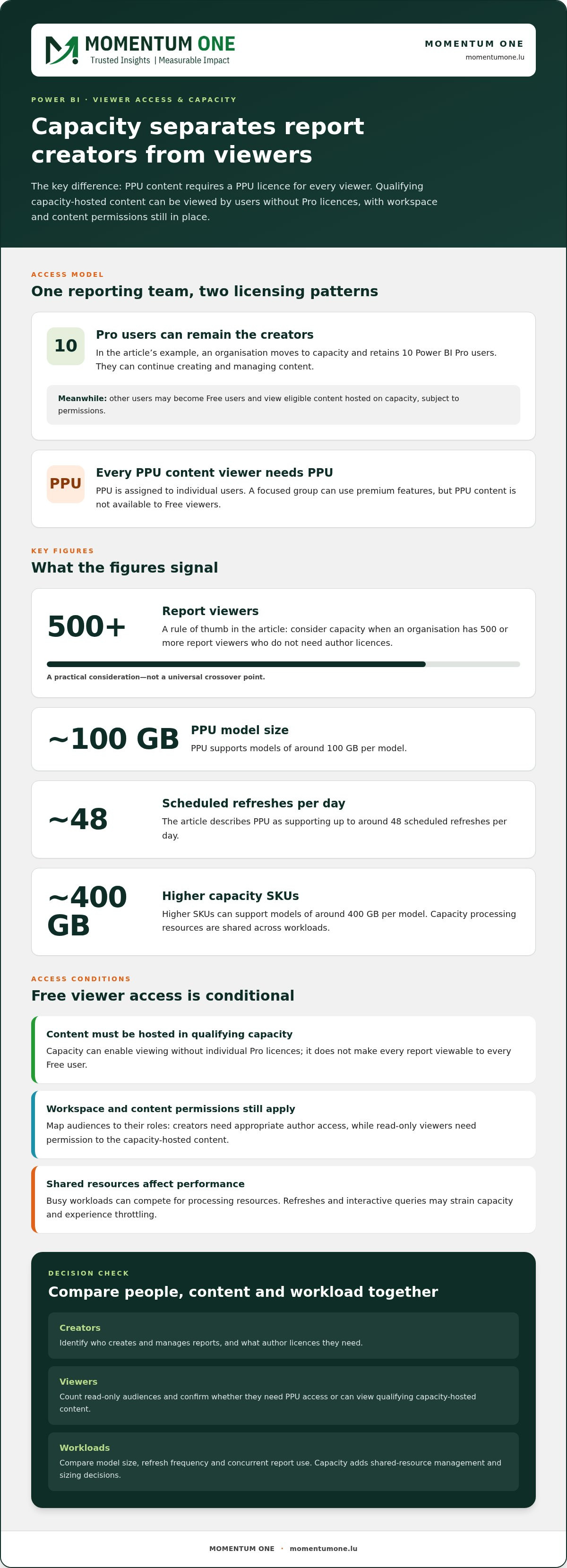
Premium features aren't always the deciding factor; who can view reports may matter more. In the Power BI Premium Per User vs capacity decision, PPU content can be viewed only by users with PPU, while Premium capacity can distribute content to users without Pro licences. An organisation planning to keep 10 Pro users after moving to capacity can have its other users become Free users.
It’s natural to compare Power BI Premium Per User (PPU) and capacity by licence cost and features, but the right fit also depends on how many people create reports, how many only view them, and what workloads your analytics team runs. This guide explains how PPU and capacity differ in cost structure, premium capabilities, team fit, and viewer access. Use the practical criteria to weigh a focused group of report creators against broad report distribution, including when Free viewer access may make capacity more suitable.
Free viewer eligibility on capacity
Capacity can let people view hosted Power BI content without individual Pro licences. PPU content, by contrast, can only be viewed by users with a PPU licence. Resource limits and throttling also matter: PPU and capacity have model and processing constraints, while capacity performance depends on shared resources and workload demand.
For a practical example, an organisation moving to capacity may retain 10 Power BI Pro users while its other users become Free users. Those Pro users can continue creating and managing content, while Free users can view eligible content hosted on capacity. This separates creator licensing from viewer access, which can be useful when a small reporting team serves a broader audience.
Free access isn’t blanket permission to view every report. Content must be hosted in qualifying capacity, and access still depends on the organisation’s workspace and content permissions. Before changing licences, map each audience to its role: creators need appropriate author access, while read-only viewers need permission to the capacity-hosted content. This helps avoid granting broader permissions than necessary.
| Option | Viewer access | Resource considerations | Useful fit |
|---|---|---|---|
| PPU | Each viewer of PPU content needs a PPU licence | Supports models of around 100 GB per model and up to around 48 scheduled refreshes per day | A defined group where each participant needs PPU features |
| Capacity | Can distribute content to users without Pro licences | Higher SKUs can support models of around 400 GB per model; capacity shares processing resources | A broad read-only audience alongside licensed creators |
Choose capacity when viewer access is a central requirement, not just a way to reduce licence assignments. A rule of thumb is to consider capacity when an organisation has 500 or more report viewers who don’t need author licences. Model the viewer and creator mix before deciding; the crossover depends on user roles and required access.
Capacity also involves shared-resource considerations. A busy workload can strain available processing resources, so refreshes and interactive queries may compete for capacity and experience throttling. PPU has per-user eligibility and model limits; capacity adds workload management and sizing decisions. Compare actual model size, refresh frequency, and concurrent report use before placing workloads.
For customer-facing reports, plan data isolation alongside viewer permissions. A Power BI customer data isolation architecture can help structure how different audiences access their content. Treat licence choice, workspace access, and data separation as connected design decisions, especially when one capacity serves multiple viewer groups.
Which Power BI License Should You Choose?
The Power BI Premium Per User vs capacity comparison starts with how licences are assigned. PPU is assigned to individual users; Premium or Fabric capacity provides shared resources for workspaces. PPU includes Pro functionality and premium features, while capacity can support broader distribution and scale with its selected SKU. Compare creators, viewer access, model requirements, and workload demand before choosing.
In Luxembourg, compare the monthly cost structure in EUR using current local licensing terms. PPU costs scale with the number of licensed users; capacity costs depend on the selected Fabric SKU and billing arrangement. For an F64 scenario, include the capacity charge and any creator licences your organisation will retain. Assess workload needs too, rather than judging the SKU by its name alone.
Microsoft transitioned Power BI Premium capacities to Fabric capacity SKUs during 2024-2025. Fabric capacity is therefore relevant when planning a new deployment or reviewing an existing Premium setup. Direct Lake runs on any Fabric F SKU, so consider the data architecture and required workload capabilities alongside viewer numbers.
| Option | Licensing model | Features and scale | Consider when |
|---|---|---|---|
| PPU | Assigned per user | Premium features for licensed users; models around 100 GB per model | A defined group needs advanced features |
| Fabric capacity | Shared capacity assigned to workspaces | Scale depends on SKU; higher SKUs can support models around 400 GB per model | Workloads or wider distribution need shared resources |
Before cancelling or downgrading PPU, identify users and content that rely on premium entitlements. Those users lose PPU access when their licences change, so plan a suitable replacement licence or capacity arrangement to preserve access. Review dependent features and workspace assignments before making the change.
To assign a workspace, open its settings in the Power BI service and select its licensing or capacity option. Choose PPU for a PPU workspace, or select an available Fabric capacity for capacity hosting. Confirm that the workspace’s content and users fit the selected model.
A sound Power BI premium per user vs capacity decision also accounts for shared-resource limits. Capacity workloads can compete for resources and experience throttling; PPU remains subject to its per-user model and refresh limits. For practical sizing considerations, use this Fabric capacity planning guide.
Model creator roles, viewer access, and workloads together in EUR-based scenarios. To structure that comparison around your workspace requirements while planning alongside user requirements, discuss licensing and capacity requirements with Momentum One.
Premium features and enterprise use cases
Power BI Premium Per User (PPU) adds premium capabilities to Power BI Pro, including paginated reports, AI, and advanced dataflows. These features can distinguish a focused group of advanced users from workloads better served by shared capacity.
PPU Features
PPU includes Pro functionality, plus paginated reports, AI capabilities, and advanced dataflow features. Its dataflow tools include an enhanced compute engine, DirectQuery, computed entities, linked entities, and incremental refresh. These capabilities are assigned through user licences, making PPU a practical fit when a defined set of analysts needs premium functionality. Unlike capacity licensing, access to PPU content requires a PPU licence for each viewer.
For data engineering workflows, the enhanced compute engine can reduce refresh time for long-running ETL steps over computed entities. It can also enable DirectQuery queries over those entities. Teams can use these options to shape dataflows around their refresh and query needs, rather than treating every transformation as a basic scheduled load.
Enterprise Use Cases
Enterprise use depends on workload shape, creator roles, and who needs premium features. A central BI team might include 5-10 BI developers serving 40-80 business stakeholders. That structure can suit PPU when the developers and stakeholders who use premium content can all receive PPU licences. Capacity can be more suitable when content needs broader distribution or workloads should draw on shared resources.
For larger authoring groups, consider an enterprise scenario with 20-40 report creators. Assess whether those creators work in separate teams or share models, dataflows, and refresh schedules. Shared capacity can centralise resource use across workspaces, while PPU assigns premium access individually. The choice should reflect both the publishing workflow and the audience’s access requirements.
Use these checks to connect features with workload needs:
- Paginated reports: Choose PPU when named report creators need this premium format.
- Dataflows: Consider enhanced compute, linked entities, and incremental refresh for complex data preparation.
- Frequent updates: Premium capacity supports up to 48 scheduled refreshes per dataset per day.
- Broader enterprise workloads: Compare shared capacity against the number of creators and the distribution model.
For example, a BI team using computed entities for long-running ETL can assess enhanced compute alongside its refresh schedule. A team publishing widely should also weigh capacity’s shared-resource model against PPU’s per-user access. Make the feature comparison practical: match the premium capability to a defined workload, then choose the licensing model that supports its users.
Choosing PPU for small teams and pilots
PPU can suit a focused analytics group when every participant needs author access and premium features. A small Power BI team of 15-30 people is one example; the licensing model keeps access tied to individual users rather than shared capacity. This makes it easier to align licence assignments with the people building, editing, and using premium content.
A practical rule of thumb is to consider PPU for 10-100 power users who all need author access. For a pilot, identify the analysts, report creators, and stakeholders who need to work with PPU content. Because viewers of that content also require PPU licences, include them in the planned user group rather than counting creators alone.
PPU licences are billed monthly from the date of purchase. In each tenant, one PPU capacity becomes available when the first user receives a PPU licence. This tenant-level arrangement differs from selecting a Fabric capacity SKU for shared workspace workloads, so map the pilot’s workspaces and users before assigning licences.
Use these steps to shape a small-team assessment:
- Define the pilot group: List each person who needs to create, edit, or view PPU content.
- Separate roles: Mark report authors and viewers so the licence count reflects actual access needs.
- Identify premium requirements: Record which PPU capabilities the team will use in its workflows.
- Compare scenarios: Model the required PPU user licences against a capacity option using the same user roles.
For example, a 15-person analytics team may favour PPU if all members need premium access and authoring. If the same team publishes reports for a much wider audience, reassess the audience and workspace model. Capacity can change the viewer-access equation, while PPU remains user-based. The key distinction is whether the pilot serves a defined group or a broader organisation.
Keep the pilot decision grounded in observed work. Track which roles use premium content, whether additional viewers need access, and whether report creation stays within the original group. If the user profile expands beyond the planned 10-100 power-user range, compare the updated PPU assignment with a capacity scenario before extending the model. This review turns a small deployment into a useful basis for later licensing decisions, rather than assuming its first setup will fit every future audience.
As a final check, compare the pilot’s actual tasks with the capabilities available to Power BI Professional users. They can publish reports, share dashboards, collaborate in workspaces, edit and save customised views, create personal dashboards, analyse data in Excel or Power BI Desktop, and integrate content with Microsoft Teams.
Use this list to note which activities are part of the pilot’s routine and which PPU requirements go beyond the stated Professional capabilities. For each role, record whether it publishes reports, shares dashboards, collaborates in workspaces, edits and saves customised views, creates personal dashboards, analyses data in Excel or Power BI Desktop, or integrates content with Microsoft Teams. This keeps the licensing review tied to concrete tasks, alongside the separate PPU capability check.
Free-user access to capacity-hosted content
Capacity’s key viewer advantage is that Power BI content can be distributed to users without Pro licences. PPU works differently: everyone viewing PPU content needs a PPU licence. For an organisation with a small group of report authors and a much wider read-only audience, this access distinction can matter more than premium features alone.
Consider an organisation retaining 10 Pro users after moving to capacity. Those users can continue working with reports, while other users can become Free users and view eligible content hosted on capacity. This separates the licences needed for content creation from the access model used by readers. It does not remove the need to grant each viewer appropriate permissions.
Can PPU content be shared with users who have Power BI Pro or Free licences? No. PPU content can only be viewed by users with a PPU licence, so a Pro or Free licence alone isn’t enough. For Free viewers, the relevant alternative is content hosted on qualifying capacity, with access granted through the organisation’s workspace and report permissions.
Before moving reports, plan the access model with a simple audience map:
- Identify authors: Record which users publish, edit, or manage Power BI content, then assign their required licences.
- Identify readers: Separate read-only viewers from creators, including teams that need reports but don’t author them.
- Match hosting to access: Keep PPU content for audiences with PPU licences; use capacity-hosted content when Free viewers need access.
- Test permissions: Sign in as a representative reader and confirm they can open the intended report.
This distinction matters in practice: if a department publishes a report for staff who only read it, capacity may allow those viewers to use Free licences. If the report remains in a PPU workspace, each viewer needs PPU. Count the full audience in your comparison, not just the analysts who build dashboards.
Capacity viewer access isn’t unlimited. Free users still need permission to the report, and hosting must meet capacity eligibility requirements. Keep sensitive reports separated by audience, especially when a workspace serves multiple teams. Reviewing the workspace and permissions can catch access mismatches before broad distribution begins.
For Luxembourg teams planning wider report distribution, map authors, Free viewers, and workspace access together. Discuss your Power BI viewer-access model to structure the decision around your audience and capacity-hosted content.
Momentum One: Fabric Migration & Modernization
Momentum One helps organisations align Fabric migration and modernisation with their Power BI licensing and reporting needs. Consider this work when moving from Premium capacity to Fabric, restructuring workspaces, or matching a data platform to changing creator and viewer requirements.
For a stronger foundation, Data Modeling & DAX Optimization can support efficient semantic models, while Data Warehouse & Lakehouse Design helps shape the underlying data architecture. Corporate Power BI and Microsoft Fabric training can also help teams build the skills needed to work effectively with updated tools and processes.
If your licensing decision is prompting a wider platform review, contact Momentum One to discuss your Fabric migration and modernisation needs.
Set up your next stage of analytics
The Power BI Premium Per User vs capacity decision can also prompt a broader review of how your analytics environment should evolve. As teams, reporting needs, and data platforms change, licensing choices work best when considered alongside governance, architecture, and model maintenance.
Momentum One can help with that next step through Power BI Consulting, Governance & Performance, Microsoft Fabric Migration & Modernization, and Data Modeling & DAX Optimization. These services can support organisations refining their Power BI environment, planning a Fabric transition, or improving the models behind their reports. The right focus depends on what your current setup needs to support next.
Bring your licensing questions and platform priorities together in a practical conversation. Plan your next Power BI step with Momentum One, and move forward with a clearer foundation for your analytics.
Frequently Asked Questions
What is Power BI capacity licensing, including Microsoft Fabric capacity and legacy Premium capacity?
Capacity licensing assigns shared computing resources to Power BI workspaces instead of licensing every viewer individually. Microsoft Fabric capacity uses Fabric SKUs to provide resources for workloads, including Power BI; legacy Power BI Premium capacity used Premium capacity SKUs. Microsoft transitioned Premium capacities to Fabric capacity SKUs during 2024–2025. For an existing deployment, identify the SKU and workspace assignments first, then assess whether the current setup supports its reporting and data workloads.
What are the Power BI licensing rules for sharing reports with free users under PPU versus capacity?
Free users can view eligible Power BI content hosted on capacity, subject to workspace permissions and capacity eligibility. They can’t view PPU content unless they have a PPU licence. For example, if a partner team has Free licences, moving a report into an eligible capacity-hosted workspace may allow read-only access without assigning PPU to every partner. Keep authoring rights separate from viewing permissions, and test access using a representative Free account.
How can you estimate the break-even point between PPU licenses and capacity for an organization?
Compare the total monthly cost for each licensing scenario using the same user roles and workload assumptions. For PPU, multiply the number of users who need PPU access by the applicable per-user monthly price. For capacity, compare the selected capacity’s monthly charge with licences retained for creators. Include viewer access, workload size, and refresh needs; the crossover changes when those assumptions change.
Which Power BI licensing option is best for different team sizes and usage patterns?
PPU often fits a defined group where each participant needs premium features, while capacity suits shared workloads or broad report distribution. For a pilot, assess whether the audience is limited to licensed analysts and stakeholders. For an organisation-wide dashboard, count readers separately from creators and consider capacity. Choose based on actual usage, including who authors reports, who only reads them, and which workloads need premium capabilities.