Power BI Pro vs Embedded: Licensing for External Users
Weighing Power BI Pro vs Embedded external users? Compare licensing, authentication, security, and scalability costs to choose the right reporting model.
- Define who your external users are and how they should access reports, through individual user access or an application experience.
- For Power BI Pro vs Embedded external users, compare sign-in expectations, audience size, report experience, and administration, not just licensing labels.
- Validate the licensing requirements for your specific sharing scenario against current Microsoft terms before implementation.
- Plan user roles, data boundaries, row-level security, and tenant isolation as part of the architecture, then test a representative external-user scenario.
- Assess the full operating model, including capacity and ongoing integration responsibilities, before deciding whether Embedded fits your needs.
The obvious choice for external Power BI access may not be the right one. The key question isn’t just whether to use individual licenses or capacity; it’s who authenticates users and operates the reporting experience. That’s the real distinction behind Power BI Pro vs Embedded external users.
If you’re weighing Pro against Embedded, you’re likely balancing straightforward access for a small partner group against a customer-facing experience that needs to scale. You also need an approach that supports your security and governance requirements without creating unnecessary administrative work.
This guide compares user-based licensing with application-mediated access and explains how each model shapes the viewer experience. It covers the practical trade-offs around audience size, authentication, report creators’ licensing, capacity planning, and ongoing integration responsibilities. Use these considerations to identify what to resolve before implementation and choose an approach that fits your users and operating model. Momentum One provides Power BI consulting, governance, and Embedded expertise to help organizations assess the architecture and licensing together.
Power BI Pro vs Embedded for external users: define the decision
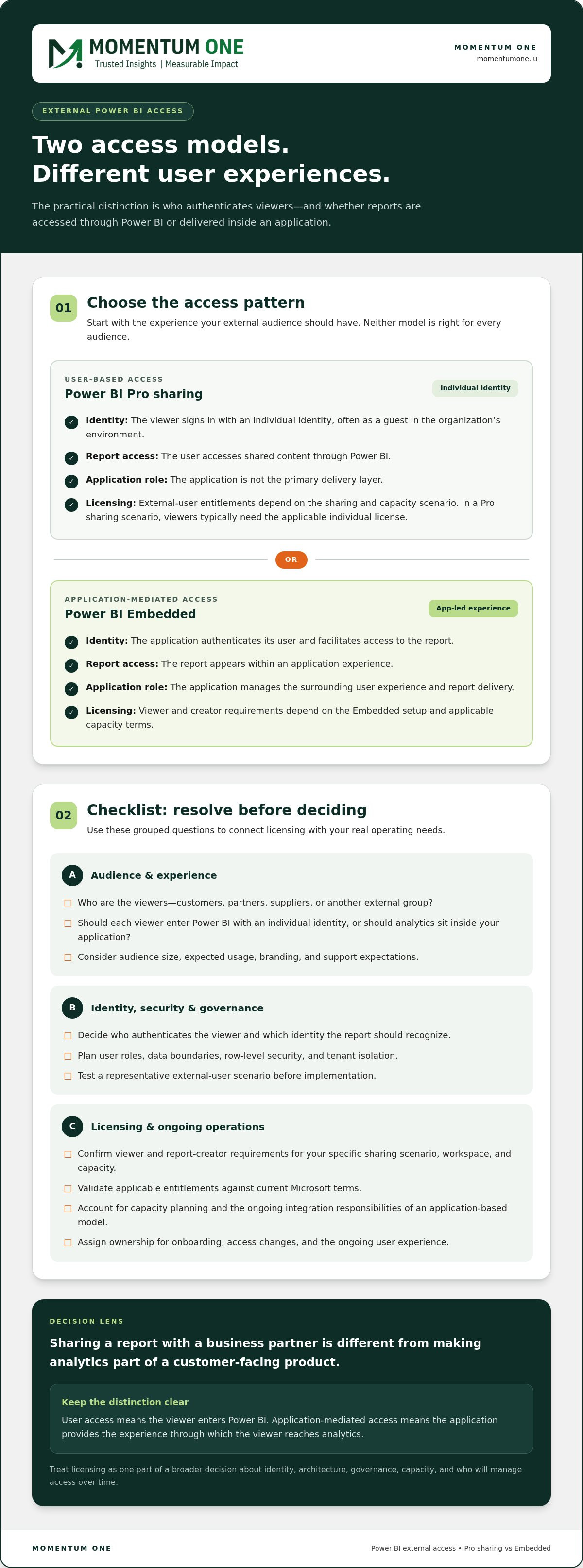
Start with the experience you want to provide. Will each external viewer access Power BI using an individual identity, or will reports appear inside an application your organization operates? That practical choice frames the Power BI Pro vs Embedded external users decision. External users can include customers, partners, suppliers, or anyone outside your organization who needs access to reports.
Sharing a report with a business partner is different from making analytics part of a customer-facing product. In the first case, the viewer may access Power BI directly. In the second, your organization’s application provides the route to the report and shapes the surrounding experience. Neither pattern is right for every audience.
Licensing depends on the specific sharing scenario and applicable Microsoft terms. Treat it as one part of a broader decision about identity, architecture, governance, and who will manage access over time. This section sets out the key choice rather than providing a detailed Embedded pricing analysis or implementation tutorial.
When external sharing becomes a licensing decision
External viewers introduce an additional boundary. They may belong to a customer, supplier, or partner organization, with different identities, permissions, and expectations from your internal users. The important question is not simply where someone works, but how they’ll reach the report and which access model supports that scenario.
Compare a supplier reviewing a shared operational report with customers viewing account-specific analytics in a company portal. Audience size, expected usage, and whether users need to enter Power BI directly all affect the design. So does ownership of the experience: is your team sharing a report, or delivering analytics as part of an application?
Why the access experience matters as much as the license
Sign-in shapes the first interaction. Direct access may involve a user entering a Power BI environment, while an application-mediated pattern places the report within a broader product journey. This affects how users are onboarded, how they find reports, and how your team manages their access. Branding and support expectations also matter when analytics are part of a customer-facing service.
User access means the viewer enters Power BI; application-mediated access means the application provides the experience through which the viewer reaches analytics. Use this distinction to discuss the operating model before settling on a license. For an overview of the platform’s components and background, see the Microsoft Power BI Wikipedia article.
- Identity: Who authenticates the viewer, and which identity should the report recognize?
- Experience: Should viewers navigate Power BI, or should analytics sit within an existing application?
- Operations: Who handles onboarding, access changes, and the ongoing user experience?
Answering these questions gives the licensing comparison a practical foundation. If an application-based experience is central to your requirements, embedding Power BI reports for customers is a relevant design path. The following comparison shows how each approach aligns with your audience and operational responsibilities.
How Power BI Pro and Embedded handle external access
Power BI Pro and Power BI Embedded support different access patterns. In a Pro sharing scenario, an external person accesses content using an individual identity, often as a guest in the organization’s environment. With Embedded, an application delivers reports within its own user experience. These are architecture choices as well as licensing choices, and the applicable entitlement depends on the exact sharing scenario and current Microsoft terms.
Power BI Pro and named-user access
In a user-based model, access is associated with a named person, so identity and sign-in are central to sharing and administration. For example, a partner may access a report using their own sign-in rather than through a customer portal. In a Pro sharing scenario, external viewers typically need the applicable individual license. Confirm the precise requirement against current Microsoft licensing terms for the workspace and capacity involved.
Power BI Embedded and application-mediated access
Embedded is designed for reports presented through an application. The application handles its user-facing sign-in flow and requests access to the report, which is delivered as part of that experience. In the “app owns data” pattern, the application mediates access; in “user owns data,” the user accesses content in their own Power BI context. These names describe architecture patterns, not interchangeable license types.
For a general overview of Power BI and its capabilities across Microsoft services, consult the Official Microsoft Power BI Overview. For licensing decisions, use the current Microsoft terms for the specific sharing pattern. Embedded capacity, viewer access, and licenses for report creators all matter. A suitable capacity-based arrangement can allow external viewers to use an application without individual Power BI licenses, while internal creators may still need qualifying licenses.
The access pattern determines how people reach reports; the selected scenario and current Microsoft terms determine the licensing requirements. Treat this as a design checkpoint, then validate the applicable entitlement before rollout. A joined-up review of architecture and governance can clarify the decision. Details are available through Momentum One’s Power BI access model contact page.
Compare Pro and Embedded against your external-user requirements
There’s no universal winner in the Power BI Pro vs Embedded external users comparison. A small, stable group of named business partners has different needs from a changing customer audience that expects analytics inside a product. Compare the models against how people will use reports and the work your organization is prepared to own. A license that looks suitable in isolation may not fit the day-to-day operating model.
- Audience: Estimate how many external people need access, how often that group changes, and whether viewers use reports individually or during concentrated periods.
- Sign-in: Decide whether users can work with an individual authenticated experience or expect access to feel like part of your own service.
- Report experience: Consider whether standard Power BI access meets the need, or whether reports should sit within an existing product, portal, or application journey.
- Administration: Identify who will onboard users, update access as roles change, and handle support questions.
- Usage: Understand which reports people will use, how frequently, and whether demand may vary. These patterns inform capacity and operational planning.
When a Pro-based sharing model may fit
A Pro-based approach may suit a controlled audience whose members can sign in individually and access reports through Power BI. It can align with existing identity and user-management processes, particularly when administrators already manage external collaboration. Map who needs access and how often the list changes, then validate licensing for the exact workspace, sharing configuration, and audience against current Microsoft terms.
When Embedded may fit a customer-facing application
Embedded may be a better architectural fit when analytics belong inside an existing product, portal, or application journey and your organization needs to shape that experience. This pattern brings additional responsibilities: application integration and maintenance, capacity planning, security design, and operational monitoring. Include the teams and processes needed to support those tasks in the decision. Embedded is not simply a license change.
Embedded isn’t automatically cheaper or simpler. A capacity model changes how resources are provisioned, but it doesn’t remove the work of operating the application, planning for demand, or governing access. A user-based model can also involve ongoing identity and individual entitlement management. Compare the full operating model before deciding. This section focuses on licensing fit, not a detailed cost calculation.
For example, a professional association sharing periodic reports with a defined group may prioritize familiar sign-in and straightforward viewer administration. A software provider offering analytics through a customer portal may prioritize an integrated experience and plan for the engineering and capacity work that supports it. The right answer depends on the actual audience, not an assumption that one model always scales or costs better. Similarly, if external reporting needs are straightforward and do not require dedicated cloud infrastructure, you can check out Biz Infographs for ready-to-use dashboard and infographic templates that present key metrics clearly.
Make the next step practical: document the expected audience, sign-in expectations, report experience, user-management workload, and usage pattern. Then validate licensing for the selected configuration using current Microsoft documentation. A broader Power BI cost optimization approach can help frame costs separately, while keeping this decision focused on access and the responsibilities it entails.
Plan security, governance, and operations before sharing reports
Licensing determines how access may be provided, but it doesn’t define which data each external user should see. Before choosing a deployment pattern, map the audience to the reports, roles, and data they’re permitted to access. For example, customers may share a report structure while each customer must see only their own records. Make sure the identity model and data boundaries work together from the start.
For customer-facing analytics, document where one customer’s data ends and another’s begins, and how the chosen architecture enforces that separation. Use a Power BI customer data isolation architecture guide as a reference for the design questions to resolve. Treat isolation as an architectural requirement to validate, not an assumption based on how a report is presented.
Protect customer data across report audiences
Segment report audiences deliberately. Define which roles can access which reports and data, then assess how those rules map to your chosen sharing or Embedded pattern. Row-level security can help restrict records by user, but it isn’t an automatic guarantee of separation. Test with representative identities, including users from different audiences, and confirm that each sees only the data intended for them. Broader controls should be considered as part of the Power BI data security design.
Assign ownership for capacity and ongoing governance
External access needs an operational owner after launch. Assign responsibility for reviewing access changes, monitoring usage and performance, handling support issues, and coordinating responses when a report or integration behaves unexpectedly. For Embedded, include capacity oversight in that plan. Review demand and performance patterns so the team can assess whether provisioned resources continue to fit actual use.
Set a clear review rhythm and record who can change report access, data rules, and capacity. Without named ownership, a small change, such as a user moving between customer accounts, can leave permissions out of step with business roles. Working with experienced Microsoft partners can help teams navigate these complexities; learn more about leveraging enterprise consultancy and managed services to support sustained governance and operational oversight.
A practical pre-launch review brings architecture, security, and day-to-day responsibilities together. For the Power BI Pro vs Embedded external users decision, check that the selected access pattern aligns with user identities, audience boundaries, tested data rules, and a realistic operating plan. Revisit those assumptions when the audience or experience changes.
- Access: Map each audience to the reports and data it should be able to reach.
- Validation: Test security rules using identities that represent distinct customer or partner roles.
- Ownership: Name the people responsible for user administration, monitoring, support, and capacity review.
- Governance: Establish how access and design changes are reviewed and recorded.
Momentum One provides Power BI consulting and governance expertise for secure, manageable analytics environments. The contact page includes more information about external-user security and governance discussions.
Choose your Power BI external-user model and move forward
Once you’ve compared access patterns and operating responsibilities, turn the decision into a sequence your team can validate. The Power BI Pro vs Embedded external users choice should reflect real users and a real reporting experience, not assumptions about which license or architecture is inherently better. Define the audience, choose how people will reach reports, validate licensing against current Microsoft documentation, then design security and governance controls around that model.
Use a decision checklist before committing
Record who the external users are, how they’ll authenticate, and whether reports belong in Power BI or an application experience. Capture the data boundaries each audience must respect, who will administer access, and what ongoing support looks like. Then validate the planned sharing configuration, capacity arrangement, and creator requirements against Microsoft’s current licensing documentation.
- Define the users: Identify the customer, partner, supplier, or other audience, and note how identities and access will be managed.
- Select the experience: Decide whether users will access reports directly or through an application, based on how they need to use the analytics.
- Validate licensing: Check the precise scenario, capacity, viewer, and report-creator requirements against current Microsoft terms.
- Design controls: Specify roles, report audiences, data boundaries, and ownership for administration and ongoing operations.
Turn the decision into a governed implementation
Before wider deployment, test a representative external-user scenario. Include identities with different roles or data access, and check that sign-in, report visibility, and the intended user experience work as designed. Test operational tasks too, such as granting or removing access, reviewing usage, and responding to an issue. A focused pilot can reveal architecture or governance gaps while they’re still manageable.
Use the findings to refine the design. If users see more or less data than intended, revisit access rules and test them again. If the application journey is confusing, adjust it before extending access to a broader audience. For an Embedded deployment, review capacity behaviour and clarify who monitors it as demand changes. Scale based on what testing shows, not in advance of it.
This is a joint licensing, architecture, and governance decision. Momentum One’s Power BI consulting and governance expertise, together with its Power BI Embedded experience, can help your team assess the access model, design appropriate controls, and plan a governed approach. Keep the decision record with the implementation so future changes to users, reports, or usage can be reviewed against the same criteria.
For a review of your audience, licensing scenario, and architecture, contact Momentum One about your Power BI licensing and architecture requirements.
Make your external analytics model ready to evolve
Your external-user approach should support more than the first report launch. As products, audiences, and data needs change, today’s decisions can shape how easily access and governance adapt. Capture the reasons behind your Power BI Pro vs Embedded external users choice, along with the assumptions it depends on. That record gives your team a useful reference when the audience grows or the reporting experience changes.
Momentum One connects licensing considerations with architecture and governance through its Power BI Consulting & Governance and Power BI Embedded offerings. As a certified Microsoft Solutions Partner, Momentum One helps organizations plan an approach that fits their needs and operating model.
Use the contact page to outline your audience, desired experience, and governance priorities, then discuss your Power BI external-user requirements with Momentum One.
A well-designed decision today can give your team a stronger foundation for delivering trusted analytics as your needs evolve.
Frequently Asked Questions
Do external users need Power BI Pro to view reports?
Not always. A viewer’s requirement depends on how the report is shared and Microsoft’s current terms. With direct Power BI access, the external person is treated as an individual user, and the applicable user licensing must be checked. In an application-mediated Embedded scenario, the viewer may not need an individual Power BI license, but conditions apply. Confirm the workspace, capacity, creator, and viewer entitlements in current documentation before launch.
Can Power BI Pro users share reports with customers outside their organization?
External sharing can be possible, but the customer’s identity setup, workspace configuration, and licensing all matter. Inviting a customer as a guest doesn’t by itself establish that the person has the right license for the content. Before sending an invitation, identify the sharing method, the customer’s sign-in identity, the workspace’s licensing context, and the applicable Microsoft terms. Validate those details for the exact configuration rather than relying on a blanket yes or no.
What is the difference between user-owned data and app-owned data in Power BI Embedded?
In a user-owns-data pattern, each viewer accesses Power BI content in their own authenticated context. In an app-owns-data pattern, an application mediates the report experience for its users. This affects how people reach analytics and how much responsibility the application takes on, but neither pattern automatically settles licensing or security. An app still needs deliberate authorization and data-separation controls, while direct user access still needs appropriate entitlements.
Is Power BI Embedded always cheaper than giving external users Pro licenses?
No model is universally less expensive. A comparison should account for the number of viewers, how often they use reports, demand peaks, capacity needs, and the work required to build and maintain an application-based experience. A small group with limited access needs can have a different profile from a large customer audience. Compare the full operating model for your scenario, including internal report creators, rather than judging by license type alone.
Can external users access Power BI reports without a Microsoft account?
It depends on the architecture. Direct access to Power BI relies on a supported user sign-in and identity configuration. With an app-owns-data Embedded design, an application can authenticate users through its own experience, and viewers may not need a Microsoft account for the report experience. That doesn’t mean every setup supports every identity method. Check Microsoft’s current documentation for the exact configuration and validate it with representative users.
Does Power BI Embedded require row-level security for customer reports?
Not in every design. The data model and isolation architecture determine which controls are appropriate. If multiple customers use a shared report or model, row-level security may help restrict records, but it isn’t a substitute for reviewing the full access path. Test with identities representing different customers and verify that queries, report interactions, and any application-level authorization expose only the intended data.
How should a business choose between Power BI Pro and Embedded for customers?
Match the audience and sign-in model to the report experience, then assess licensing, data separation, administration, and ongoing operations. A defined group that can use individual access may have different needs from customers expecting analytics inside a product. Validate the selected configuration against current Microsoft terms and test it with a representative external-user scenario before expanding access. This makes the decision practical and evidence-based, rather than driven by assumptions about scale.