Microsoft Fabric F64 Pricing: A Comprehensive Cost Guide
Master Microsoft Fabric F64 Pricing with our cost guide. Compare PAYG vs reserved instances, cut Power BI viewer license costs, and optimize your cloud ROI.
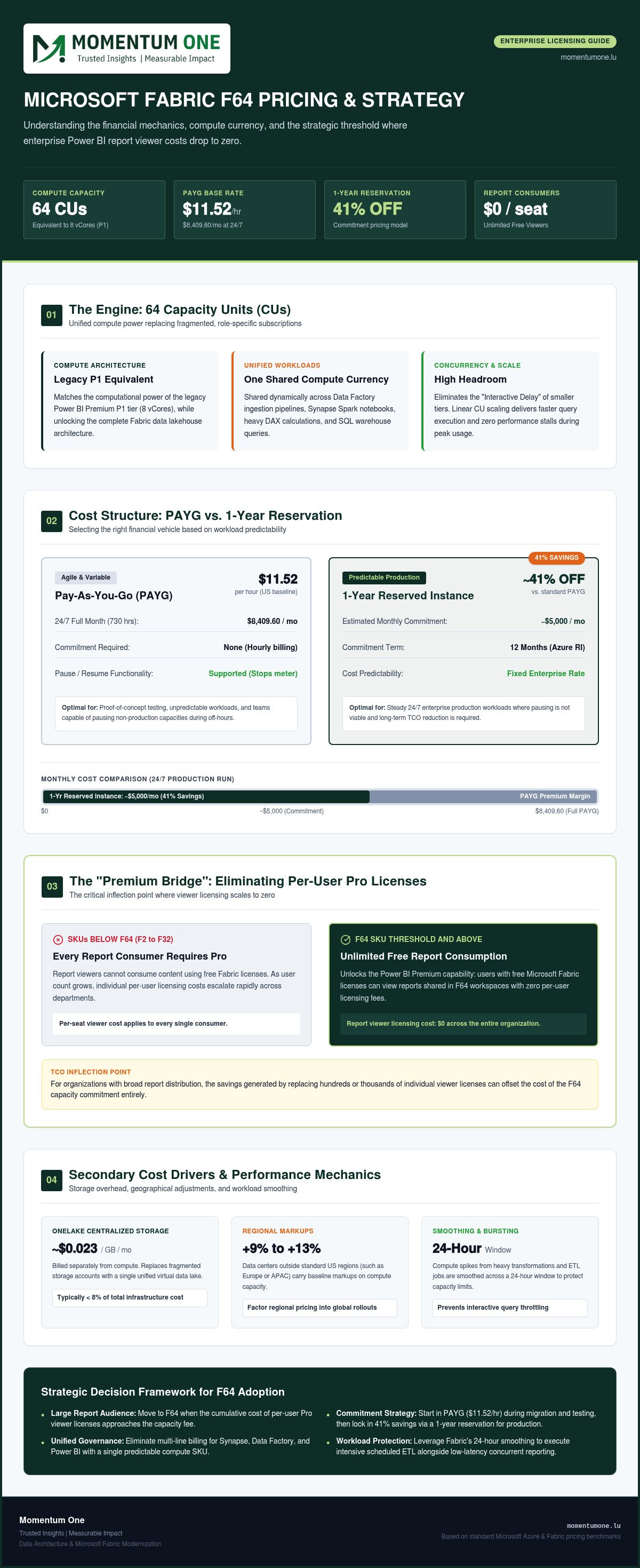
- Understand how the 64 Capacity Units (CUs) in an F64 SKU provide unified compute power across Data Factory, Synapse, and Power BI for enterprise-grade analytics.
- Compare Microsoft Fabric F64 Pricing models to determine when to utilize Pay-As-You-Go flexibility versus locking in the 41% savings found in Reserved Instances.
- Identify the "Premium Bridge" threshold where F64 enables unlimited report consumption for users with free licenses, significantly reducing your total cost of ownership.
- Learn to leverage Fabric’s smoothing and bursting capabilities to distribute compute-intensive tasks over a 24-hour window and prevent performance throttling.
- Discover why a strategic approach to capacity management and modernization is essential for transitioning legacy data warehouses into a scalable Fabric environment.
For many enterprises, the jump to an F64 SKU feels like a massive financial leap, but it's actually the exact point where your Power BI licensing costs can drop to zero for every single report viewer. Navigating Microsoft Fabric F64 Pricing can be frustrating when you're caught between legacy P-SKUs and the new reality of Fabric. You want to scale your data strategy without your budget spiraling out of control, yet justifying a $5,000 monthly commitment to stakeholders requires more than just a guess.
In this guide, we'll help you master the financial and technical nuances of the F64 capacity so you can optimize your licensing strategy with confidence. You'll gain a clear understanding of the $11.52 hourly PAYG rate compared to the 41% discount available through 1-year reserved instances. We'll also confirm exactly how the F64 tier eliminates the need for individual Pro licenses for your report consumers. By the end, you'll have a practical roadmap for capacity planning that justifies every dollar while positioning your team for long-term growth.
Understanding the Microsoft Fabric F64 Capacity
F64 isn't just another tier in a long list of options; it's the standard for organizations moving beyond basic reporting into full-scale data engineering. It provides 64 Capacity Units (CUs), which act as the engine for the entire Fabric ecosystem. Whether you're running Data Factory pipelines, executing Spark notebooks, or hosting complex Synapse queries, this SKU ensures you have the horsepower needed for production-grade workloads. It represents a shift from fragmented tools to a single, powerful environment where compute is shared across every data role.
For those transitioning from legacy systems, F64 aligns directly with the old Power BI Premium P1 capacity. It offers the same 8 vCores of compute power but adds the flexibility of the Fabric architecture. This transition is a primary driver in the conversation around Microsoft Fabric F64 Pricing, as it shifts the focus from simple visualization to a unified data lakehouse model. By moving to this tier, you're not just buying report space; you're investing in a foundation that supports real-time analytics and advanced data science at scale.
OneLake changes the pricing conversation by centralizing your storage layer. Instead of paying for separate storage buckets across different Azure services, OneLake provides a single, virtualized layer for all your data. This reduces expensive data duplication and simplifies your monthly bill. It allows your 64 CUs to focus entirely on processing and intelligence rather than managing fragmented silos. When you engage in Fabric Migration & Modernization, this architectural shift becomes the catalyst for both cost efficiency and technical agility.
What are Capacity Units (CUs)?
CUs represent the "currency" of compute within the platform. While entry-level SKUs are excellent for development or small team projects, they often struggle with high concurrency. An F64 capacity provides enough headroom to handle multiple heavy DAX queries and Spark jobs simultaneously without hitting performance walls. The relationship between CUs and query performance is generally linear; more CUs mean faster processing and lower latency for your end users. This SKU provides the stability needed to avoid the "Interactive Delay" that can plague smaller, over-utilized capacities during peak hours.
Unified Billing: One SKU for Every Data Role
Managing multiple subscriptions for Synapse, Data Factory, and Power BI used to be a procurement headache. Fabric simplifies this by wrapping every capability into a single SKU. This unified approach provides total transparency in how resources are allocated across different departments. When you look at your Power BI workspace licensing, you'll see that F64 covers the entire lifecycle from ingestion to final insight. Microsoft Fabric F64 Pricing reflects this consolidation, replacing several line items with one predictable cost. F64 stands as the enterprise benchmark for building a scalable and resilient data architecture.
Breaking Down the F64 Cost Structure: PAYG vs. Reserved Instances
Choosing the right consumption model is the most impactful decision you'll make regarding Microsoft Fabric F64 Pricing. You have two primary paths: the agility of Pay-As-You-Go (PAYG) or the deep savings of Reserved Instances (RI). In standard US regions, the PAYG rate for an F64 capacity is $11.52 per hour. If you leave this running 24/7, your monthly bill will sit around $8,409.60. This model is perfect for the initial testing phase or for teams with highly variable workloads who can pause the capacity during off-hours to stop the meter.
Don't forget that compute is only one part of the financial equation. OneLake storage is billed separately at approximately $0.023 per GB per month. While storage typically represents less than 8% of the total infrastructure investment for most architectures, networking and data egress fees can add up if you're moving massive datasets across different regions. You should always consult the official Microsoft Fabric pricing details to account for regional markups. For instance, data centers in Europe or APAC often carry local markups ranging from 9% to 13% over US baselines.
The ROI of Commitment: 1-Year vs. 3-Year Reservations
Switching to a 1-year Azure Capacity Reservation provides a massive 41% discount, bringing the monthly cost for an F64 instance down to approximately $5,003. The break-even point is clear. If you know your capacity will be active for more than 14 hours a day, the reservation is the smarter financial move. Managing these commitments effectively requires proactive Workspace and Capacity Management to ensure you aren't paying for idle units as your data needs grow. If you're unsure which commitment level fits your growth trajectory, reach out to our team for a tailored cost analysis.
Comparing F64 to F32 and F128
F64 is often the "Goldilocks" SKU for national enterprises. It provides double the compute power of an F32 while serving as the critical threshold for free report viewing. If your concurrent user base grows or your Spark jobs begin to hit throttling limits frequently, a jump to F128 might become a technical necessity. For smaller teams just starting their journey, our F4 pricing guide offers a look at how entry-level options compare before you scale into the enterprise tier.
The Premium Bridge: Why F64 is the Strategic Minimum for Large Teams
The F64 SKU acts as a critical boundary in the Microsoft ecosystem. It's the exact point where the licensing model shifts from per-user to per-capacity for report consumption. While smaller tiers require every single viewer to hold a paid Power BI Pro or Premium Per User license, F64 unlocks unlimited viewing for anyone with a free Fabric license. This "Premium Bridge" is the reason many organizations prioritize Microsoft Fabric F64 Pricing in their long-term budgets. It transforms data from a metered expense into a democratized corporate asset.
If you're evaluating the move from a legacy Power BI Premium P1, the F64 tier is your direct functional successor. It maintains the compute power you're used to while integrating it into the broader Fabric lakehouse. The strategic value here is immense. You aren't just buying compute; you're buying the freedom to scale your audience without a linear increase in costs. According to the Microsoft Fabric capacity and licensing guidelines, this tier is the absolute floor for tenant-wide unmetered viewing.
Eliminating Individual User License Bottlenecks
Managing hundreds of individual Pro licenses creates significant administrative friction. It often forces departments to ration access to data to stay within budget. By anchoring your strategy on an F64 capacity, you remove these hurdles entirely. Every member of your national workforce can interact with reports via the Viewer role or a Power BI App without triggering additional fees. This shift allows for more robust Power BI Consulting & Governance, as your team can focus on data quality and security rather than license auditing. The breakeven point often occurs at approximately 180 viewers. Beyond that, F64 becomes more cost-effective than buying individual seats.
Feature Parity: F64 vs. Power BI Premium
F64 doesn't just match the old Premium P-SKUs; it expands upon them with advanced AI capabilities. At this level, you gain access to Copilot for Power BI and Data Science, allowing your team to generate insights using natural language. It also supports professional DevOps workflows through Git integration and deployment pipelines. These tools ensure that your data engineering is as disciplined as your software development. Investing in Microsoft Fabric F64 Pricing ensures your team has the high-end features required to maintain a competitive edge in a data-driven market.
Capacity Planning: Avoiding Over-Provisioning and Optimizing CU Usage
Purchasing an F64 capacity is a significant commitment, but the real value comes from how you manage those 64 Capacity Units. Many organizations over-provision because they fear performance drops during peak hours. However, understanding the native mechanics of the platform allows you to maintain high performance without moving to a more expensive tier. The Microsoft Fabric Capacity Metrics app is your primary tool here, providing granular visibility into which workloads are consuming your resources and where you might be over-spending.
A key feature often overlooked in discussions about Microsoft Fabric F64 Pricing is 'Bursting'. This allows your capacity to use idle compute power to complete tasks faster than the 64 CU limit would normally allow. It's essentially a performance bonus that doesn't cost extra, provided your overall consumption stays within the smoothed limits. By monitoring these patterns, you can determine if you're truly hitting the ceiling or if you're just experiencing healthy, temporary spikes that the system handles automatically.
Managing Workload Spikes with Smoothing
Smoothing is the mechanism that protects your budget from query-heavy days. It works by averaging out compute-intensive operations over time to prevent immediate throttling. Interactive operations, like a user clicking a Power BI visual, are smoothed over five minutes. Background operations, such as Data Factory pipelines or Spark jobs, are averaged over a full 24-hour window. This distinction is vital for cost control. By using Pipeline and Dataflow Automation, you can schedule heavy data loads during off-peak hours, ensuring they utilize the 24-hour smoothing window without impacting the interactive experience for your business users.
The Financial Impact of Pausing Capacity
If you're using the Pay-As-You-Go model for your development or test environments, you don't need to pay for 24/7 availability. Implementing an automated pause and resume cycle for national business hours can save you up to 60% on your monthly Microsoft Fabric F64 Pricing for those specific workspaces. While production environments usually require the stability of a Reserved Instance, your non-production tiers can remain lean. We've seen teams significantly reduce their burn rate by simply scaling down to an F32 or pausing entirely over the weekend. If you need help rightsizing your environment to stop over-provisioning, get in touch with our experts today.
Strategic Implementation: Maximizing Your F64 Investment
Successfully deploying an F64 capacity isn't just about procurement. It's a foundational shift for your data culture. While Microsoft Fabric F64 Pricing provides a clear financial target, the true ROI comes from how your organization adapts its workflows to this unified environment. Without a strong governance framework, you risk "CU sprawl," where unoptimized queries and redundant data pipelines quickly exhaust your 64 Capacity Units. It's vital to remember that compute power is a finite resource that needs careful stewardship.
Establishing guardrails is essential. You should define who can create workspaces and how resources are allocated across departments. This ensures that a single data science experiment doesn't throttle the reports your executive team relies on. Equally important is investing in your people. Training your team ensures they can leverage the full Fabric suite, from real-time analytics to advanced data science, rather than just using it as a glorified storage bucket. When your workforce understands how to write efficient DAX and Spark code, your F64 capacity goes much further.
The Roadmap to Fabric Modernization
Before making the move, you need a clear assessment of your legacy SQL or Synapse environments. Migrating "as-is" often carries over technical debt and inefficiencies that waste compute power. A strategic transition involves Fabric Migration & Modernization to ensure your data structures are optimized for the lakehouse from day one. This prevents the performance bottlenecks that lead to frustration and over-spending.
Your architecture should align with modern Data Warehouse & Lakehouse Design principles. This means moving toward a Medallion architecture to maintain data quality and processing efficiency. For a step-by-step guide on timing and execution, refer to our Microsoft Fabric Deployment Roadmap. This framework helps national enterprises navigate the complexities of modern data standards while keeping costs predictable and performance high.
Partnering for Performance
Momentum One acts as a dedicated strategist for national enterprises looking to master their data estate. We don't just set up your capacity and leave; we provide ongoing managed services to monitor and optimize your F64 usage monthly. This proactive approach ensures that your Microsoft Fabric F64 Pricing remains a value driver rather than a growing expense. We help you refine DAX queries, optimize Spark jobs, and manage your OneLake footprint to ensure every Capacity Unit is working toward your business goals. If you're ready to move beyond the basics and build a resilient data strategy, contact our experts for a tailored Fabric cost assessment.
Future-Proofing Your Enterprise Data Architecture
Mastering Microsoft Fabric F64 Pricing is about more than just managing a monthly bill; it's about unlocking a scalable foundation for your entire national workforce. By transitioning from the flexibility of Pay-As-You-Go to the significant 41% savings of a 1-year reservation, you ensure that your data strategy remains financially sustainable. Remember that F64 serves as the critical bridge for democratizing insights, allowing you to serve unlimited report viewers without the administrative burden of individual Pro licenses. Utilizing native features like smoothing and bursting will keep your operations lean while maintaining high performance for every user.
As a Certified Microsoft Solutions Partner specialized in 2026 Fabric migrations, Momentum One is here to act as your steady hand in this complex transition. Our national data governance experts help you establish the frameworks needed to prevent resource sprawl and maximize every Capacity Unit. Don't let unpredictable cloud costs stall your digital transformation. Optimize your Microsoft Fabric investment with Momentum One and build a data estate that truly powers your growth. You've got the power of Fabric at your fingertips; let's make sure you're using it to its full potential.
Frequently Asked Questions
What are Capacity Units (CUs)?
CUs represent the "currency" of compute within the platform. While entry-level SKUs are excellent for development or small team projects, they often struggle with high concurrency. An F64 capacity provides enough headroom to handle multiple heavy DAX queries and Spark jobs simultaneously without hitting performance walls. The relationship between CUs and query performance is generally linear; more CUs mean faster processing and lower latency for your end users. This SKU provides the stability needed to avoid the "Interactive Delay" that can plague smaller, over-utilized capacities during peak hours.
How much does Microsoft Fabric F64 cost per month in 2026?
In 2026, the cost depends on your billing model. For Pay-As-You-Go, the rate is $11.52 per hour, which totals approximately $8,409.60 for a standard 730-hour month. However, you can secure a 1-year Reserved Instance for roughly $5,003 per month. This commitment offers about a 41% discount over the flexible hourly rate. These figures reflect standard US region rates, so check your specific Azure region for local markups.
Does the F64 SKU include Power BI Premium features?
Yes, the F64 SKU provides full feature parity with legacy Power BI Premium capacities. It includes advanced capabilities like Copilot, deployment pipelines, and Git integration for professional DevOps workflows. Since it's a Fabric SKU, it also unlocks the broader lakehouse ecosystem, including Spark notebooks and Data Factory pipelines. It effectively replaces the retired P1 capacity while offering a more unified approach to enterprise data management across your entire organization.
Can I share reports with users who don't have a Pro license using F64?
Yes, F64 is the exact entry point where Power BI viewer licensing changes. At this tier and above, users with a Microsoft Fabric (Free) license can view and interact with reports shared in an F64-backed workspace. This eliminates the need for individual $14 per month Pro licenses for every report consumer. Keep in mind that users who create, publish, or share content still require their own individual Pro or PPU license.
What is the difference between F64 and the old P1 Premium capacity?
Technically, F64 provides the same 8 vCores of compute power as the legacy P1 capacity but uses the more flexible Fabric architecture. The primary difference is the breadth of service. While P1 focused on Power BI, F64 covers the entire data lifecycle, including data engineering and warehousing. Microsoft Fabric F64 Pricing also introduces the ability to pause and resume capacity, a feature that wasn't available with the old P-SKU model.
Can I pause my Microsoft Fabric F64 capacity to save money?
You can pause and resume your capacity at any time if you're using the Pay-As-You-Go billing model. This is an excellent strategy for non-production environments that only need to be active during business hours. When paused, compute charges stop immediately, though separate OneLake storage costs continue to accrue. If you've committed to a Reserved Instance, you're paying for the capacity regardless of whether it's active or paused, as that's a flat-fee commitment.
Is OneLake storage included in the F64 monthly price?
OneLake storage is not included in the base compute price and is billed separately at approximately $0.023 per GB per month. However, an F64 capacity includes a free Mirroring quota of up to 64 TB for source database replicas. For most enterprises, storage costs represent less than 8% of the total infrastructure spend. It's important to monitor your data footprint to avoid unexpected charges as your lakehouse expands and your data engineering workloads grow.
How do I know if my organization needs F64 or can stay on F32?
The decision usually comes down to your report viewer count. An F32 requires a paid Pro license for every viewer, while F64 allows for unlimited free viewers. If you have more than 180 report consumers, the jump to F64 pays for itself through license savings alone. You should also monitor your CU usage via the Metrics app. If your F32 frequently hits throttling limits during peak hours, it's time to scale up your capacity.
What happens if my workload exceeds the 64 CUs provided?
Fabric uses a mechanism called "smoothing" to manage spikes. If you exceed 64 CUs briefly, the system averages the load over a 5-minute window for interactive tasks or 24 hours for background jobs. If you consistently over-utilize the capacity, you'll experience "Interactive Delay" or rejection of new requests. Monitoring your Microsoft Fabric F64 Pricing and usage patterns helps you decide when to optimize your DAX queries or scale to an F128 tier.