Microsoft Fabric Capacity Pricing: Cost Optimization Guide
Master Microsoft Fabric capacity pricing with our cost optimization guide. Learn how to right-size F-SKUs, avoid throttling, and lower cloud compute expenses.
- Learn how Microsoft Fabric Capacity pricing models share compute units across all workloads to avoid over-provisioning separate cloud services.
- Discover why F-SKU selection requires balancing user concurrency against licensing rules, including the critical F64 tier threshold.
- Uncover how compute smoothing and bursting mechanisms impact consumption metrics, protecting your budgets from sudden throttling.
- Apply a structured four-stage capacity planning framework to accurately forecast workload demands before locking into long-term commitments.
- Establish proactive tenant governance and semantic model optimization routines to eliminate wasteful queries and lower ongoing operational spend.
Upgrading to a larger compute tier won't fix an unpredictable cloud bill; it just makes unoptimized workloads more expensive. Understanding Microsoft Fabric Capacity pricing begins with a simple truth: long-term cost efficiency depends on deliberate workload governance rather than defaulting to higher compute tiers. If you're struggling to track shared Capacity Unit (CU) consumption across Lakehouses and Power BI, or weighing the move from legacy Power BI Premium to modern Fabric F-SKUs, that frustration is completely justified. Nobody wants to risk capacity throttling or face unexpected overage bills during peak month-end reporting.
We're here to help you regain full control over your platform spend. This guide demystifies the mechanics of Fabric capacity, walks you through evaluating pay-as-you-go rates against reserved commitments, and shows you how to right-size your F-SKU based on genuine organizational demand. You'll gain a reliable methodology to eliminate wasted compute cycles and prevent costly performance bottlenecks. Ahead, we break down the operational differences between tiers, clarify key licensing rules around the F64 threshold, and share practical governance tactics to keep your cloud investments predictable and lean.
Understanding Microsoft Fabric Capacity Pricing and Compute Units
Calculating cloud data costs often feels like assembling a puzzle where the pieces keep shifting. Grasping the foundation of Microsoft Fabric Capacity Pricing requires looking past traditional infrastructure silos. Instead of provisioning separate servers, virtual machines, and clusters for every data discipline, Microsoft Fabric bundles processing power into a unified currency called Capacity Units (CUs). This shared pool powers data warehousing, ingestion pipelines, lakehouse queries, and semantic models without artificial boundaries between your teams.
Under this unified engine, storage and compute operate independently. You pay approximately $0.023 per gigabyte each month for OneLake storage (roughly $23 per terabyte), while your compute bill reflects provisioned CUs. One Fabric CU delivers computational power equivalent to 0.383 SQL database vCores. Because compute stays decoupled from disk volume, teams can scale analytical processing dynamically without inflating base storage overhead.
The Role of Capacity Units Across Unified Workloads
Every analytical task inside your environment draws from the same centralized CU allocation. When your Data Factory pipeline finishes an early-morning ingestion cycle, those freed compute resources instantly become available for interactive user queries in Power BI. You avoid paying for idle Spark clusters while business analysts build reports, and you don't overpay for dedicated semantic servers overnight.
However, shared pools introduce a common risk: one poorly constructed measure can consume capacity that other departments rely on. Engaging in rigorous data modeling and DAX optimization keeps individual consumption lean, ensuring heavy queries don't monopolize shared resources during operational peaks.
Pay-As-You-Go Billing vs 1-Year Reserved Instances
Structuring your deployment comes down to two procurement options. Pay-as-you-go (PAYG) bills on an hourly basis at roughly $0.18 per CU per hour. An entry-level F2 instance runs around $0.36 per hour, which equals approximately $263 per month when operating continuously. PAYG offers valuable agility; you can pause capacities during non-working hours, slashing dev-test costs to zero when engineers go home.
For consistent production workloads, committing to a one-year reservation unlocks roughly a 41% discount across every tier:
- F2 (2 CUs): Drops from ~$263/month on PAYG to ~$156/month on a 1-year commitment.
- F8 (8 CUs): Drops from ~$1,051/month to ~$623/month.
- F64 (64 CUs): Drops from ~$8,410/month down to ~$4,982/month.
Aligning baseline production tasks with reserved instances while running experimental sandboxes on pay-as-you-go keeps monthly Microsoft Fabric Capacity pricing entirely transparent and predictable.
Evaluating Microsoft Fabric F-SKUs vs Legacy Power BI Premium
Migrating from traditional capacity models requires a clear view of how workload dynamics change under modern Azure infrastructure. When assessing Microsoft Fabric Capacity Pricing, enterprise teams must recognize that Fabric F-SKUs completely replace legacy Power BI Premium P-SKUs. Rather than locking organizations into rigid, pre-allocated hardware brackets, Fabric capacity ranges elastically from entry-level F2 all the way up to enterprise F2048 tiers. Planning this shift successfully means understanding both architectural parity and user licensing dependencies, especially when planning enterprise modernizations with specialized Microsoft Fabric migration services.
Structural Differences Between F-SKUs and Legacy P-SKUs
Legacy P-SKUs operated under Microsoft 365 licensing structures, meaning capacity was static and complex to resize dynamically. Fabric F-SKUs live directly inside Microsoft Azure subscriptions. This shift unlocks native cloud automation, allowing platform owners to scale tiers up or down as processing requirements fluctuate, or pause instances entirely during predictable maintenance windows.
Architecturally, an F64 capacity directly mirrors the 64 vCore computational power of a legacy P1 tier. It delivers 64 CU-seconds every second, yielding approximately 166 million CU-seconds over a standard 30-day billing cycle. Teams evaluating this specific tier can examine realistic consumption thresholds in our detailed Microsoft Fabric F64 Pricing guide.
Licensing Thresholds for Power BI Report Consumer Access
The boundary between sub-F64 and enterprise tiers directly alters your total cost equation. According to the official Microsoft Fabric licensing model, any tier below an F64 requires every single report creator and viewer to maintain an active Power BI Pro license ($10 to $14 per user monthly, or included in Microsoft 365 E5). Premium Per User (PPU) remains an alternative at roughly $24 monthly, but it doesn't unlock broader Fabric storage benefits.
At F64 and higher, report consumers only need a free Microsoft Fabric user license to access published workspace content. The tipping point becomes simple mathematics:
- Small footprint: An F16 reserved capacity (~$1,245/mo) combined with 20 Pro licenses (~$200-$280/mo) yields an agile mid-market solution around $1,500 monthly.
- Broad distribution: An organization with 500+ consumers saves substantially with an F64 reserved instance (~$4,982/mo) and 40 creator licenses, bypassing thousands of dollars in individual viewer subscriptions.
Selecting the Right Starting Tier for Enterprise Demands
Starting small prevents premature cloud overspend. Proof-of-concept projects and departmental pilots function smoothly on an F2, F4, or F8 SKU. A lean team running an F2 reserved instance with 5 Pro licenses spends roughly $226 monthly for base compute and user access. For larger analytical environments transitioning off older stacks, weighing options in our Microsoft Fabric vs Azure Synapse guide clarifies when F16 or F32 instances fit best. If you'd like an objective evaluation of your current reporting footprint, you can always speak with our team to identify the ideal capacity tier for your architecture.
Core Cost Drivers: Compute Smoothing, Bursts, and Storage Economics
Anticipating your cloud billing requires mastering the runtime physics beneath the platform. While baseline hardware sizing sets your initial commitment, practical Microsoft Fabric Capacity Pricing is heavily influenced by how Fabric manages peak usage against provisioned Capacity Units. The architecture doesn't restrict you strictly to your SKU limit every second. Instead, it relies on sophisticated smoothing algorithms and dynamic bursting to handle intense data operations smoothly.
Understanding Smoothing and Burstable Capacity Mechanisms
To avoid frequent query failures, Fabric splits compute operations into two categories. Interactive jobs, such as rendering visuals or running immediate DAX calculations, smooth their CU consumption over a rolling five-minute evaluation window. Background tasks, including scheduled lakehouse notebooks, pipeline copy jobs, and semantic model refreshes, distribute their heavy compute footprints over a full 24-hour window.
Bursting allows an execution thread to consume significantly more CUs than your base tier specifies by drawing from unallocated headroom. This mechanism lets an F8 capacity absorb an intensive ingestion pipeline without forcing you into an immediate tier upgrade.
Mitigating Throttling and Peak Interactive Concurrency
Burstable headroom isn't bottomless. If background jobs repeatedly outpace your total daily CU allowance, cumulative debt builds up. Once that ceiling is breached, the platform initiates throttling: first delaying background ingestion jobs, and eventually rejecting interactive report queries outright.
Preventing these disruptions comes down to structured operational hygiene:
- Track consumption patterns: Deploy the Microsoft Fabric Capacity Metrics app to identify top consuming artifacts and pinpoint recurring spikes.
- Stagger scheduled refreshes: Separate heavy dataflows from the morning rush when end users open executive dashboards.
- Audit AI services: Monitor Data Agent activities closely, as AI queries consume 100 CU-seconds per 1,000 input tokens and 400 CU-seconds per 1,000 output tokens.
OneLake Storage and Data Ingestion Economics
Storage management introduces another distinct layer to your monthly ledger. OneLake stores all enterprise information as unified Delta Parquet tables, keeping raw storage economical at roughly $23 per terabyte monthly. Rather than copying datasets across multiple analytical engines, teams can use OneLake shortcuts to virtualize data into lakehouses without duplicating underlying storage bytes.
Keep in mind that cross-region read operations, disaster recovery replications, and external outbound data transfers add egress fees to your standard subscription bill. Establishing disciplined storage lifecycle policies ensures your data footprint remains lean, keeping overall Microsoft Fabric Capacity pricing aligned with active business needs.
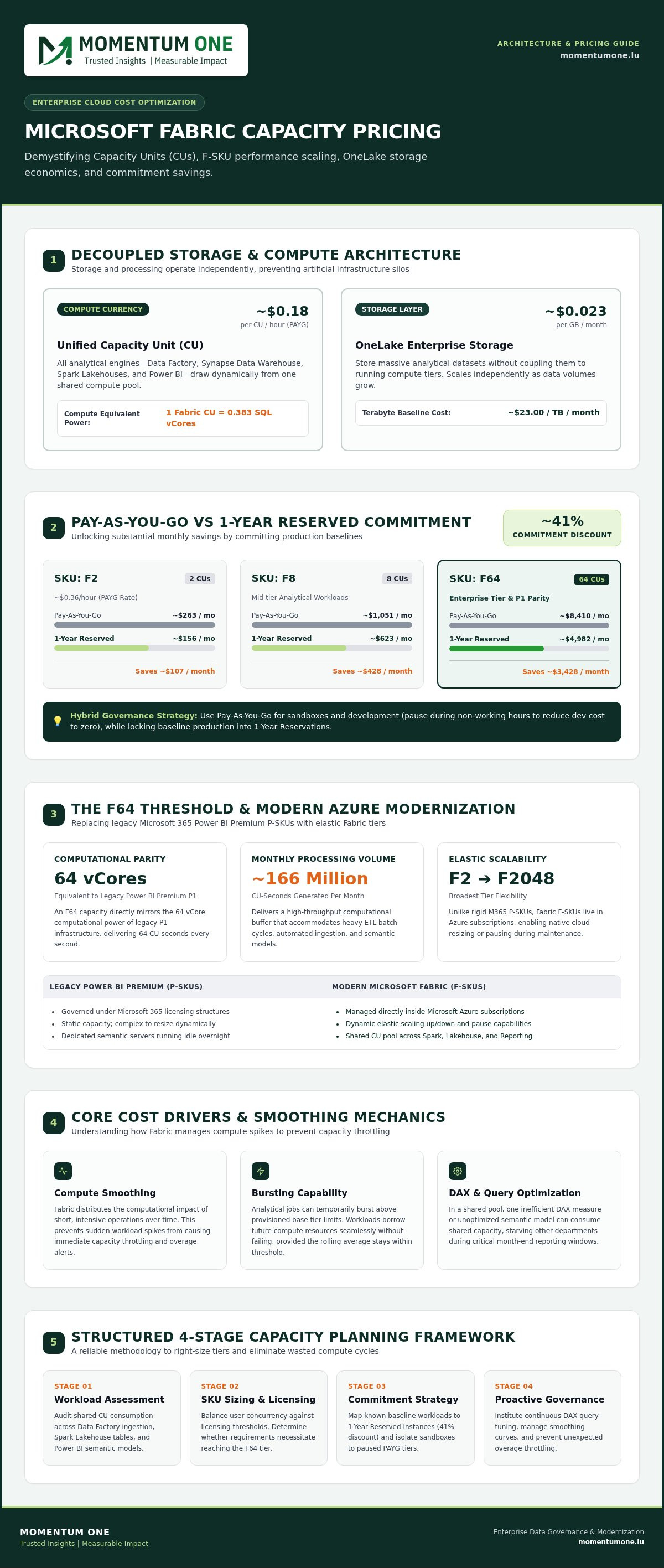
Strategic Framework to Size and Optimize Fabric Capacity Costs
Defaulting to a larger SKU tier when query performance slows down is an expensive habit. Many organizations treat compute scaling as an operational shortcut, yet real control over Microsoft Fabric Capacity Pricing requires addressing root execution inefficiencies first. Rather than inflating monthly cloud commitments prematurely, enterprise platform teams achieve far greater stability by running their analytics footprint through a disciplined optimization framework.
Step 1: Audit Current Workloads and Pipeline Frequencies
Begin by mapping every scheduled operation across your workspaces. Catalog ingestion schedules, notebook executions, and hourly semantic model refreshes. Teams frequently discover that multiple dataflows refresh nearly identical data intervals throughout the day, needlessly consuming burstable capacity headroom. Eliminating abandoned proof-of-concept datasets and pruning duplicate extracts sets a lean baseline, preventing you from over-purchasing your initial SKU commitment.
Step 2: Optimize Semantic Models and Query Structures
Inefficient modeling structures are often the primary cause of compute spikes. Converting messy snowflake relationships into clean star schemas significantly reduces memory footprints and VertiPaq engine churn. Refactoring iterative DAX measures that rely on resource-heavy row evaluations protects your capacity units during business-critical query periods. Whenever feasible, shift legacy DirectQuery architectures to Direct Lake mode to query OneLake Delta tables without memory duplication.
Targeted adjustments at this layer consistently yield substantial performance gains. Partnering with specialists for data modeling and DAX optimization ensures your analytical models execute with minimal compute overhead, keeping operational consumption well within budget.
Step 3: Implement Automated Scaling and Workspace Segmentation
Avoid pooling development experimentation with core enterprise reporting on a single capacity. Segregate sandboxes into distinct pay-as-you-go workspaces. This separation lets you deploy automated Azure Runbooks that suspend dev-test compute outside standard business hours, immediately curbing off-hours spend while reserving your primary production tier for stable workloads.
Adopting proactive workspace and capacity management provides granular visibility across cross-departmental usage, isolating heavy batch jobs so they never impact shared interactive reports. Ready to stop guessing your SKU requirements and eliminate wasteful cloud expenditure? Schedule a capacity sizing consultation to optimize your tenant architecture today.
Maximizing Fabric ROI Through Enterprise Governance and Managed Services
Technology adoption alone does not guarantee predictable operational expenditures. While understanding Microsoft Fabric Capacity Pricing helps you calculate initial ledger costs, sustained ROI depends on strict operational governance. Without defined administrative boundaries, self-service capabilities quickly trigger workspace sprawl, redundant artifact generation, and unmonitored compute consumption across departments.
Controlling enterprise spend requires treating capacity units as shared corporate assets. When analytical teams understand the financial impact of their queries, pipelines, and semantic models, efficiency becomes an intentional business priority rather than an afterthought.
Designing a Proactive Capacity Governance Model
Preventing runaway expenditure starts at the tenant administration level. Establish centralized guardrails that regulate workspace creation, ensuring developers cannot spin up unmonitored pay-as-you-go capacities without managerial sign-off. Enforce strict workspace naming conventions and metadata tags indicating ownership, cost center, and environment type.
Tagging workspaces enables accurate internal chargeback models. When individual business units receive transparent monthly reporting detailing their exact CU utilization, resource hoarding ceases. Automated alerts should trigger administrative notifications whenever cumulative consumption reaches 75% of your baseline threshold, giving your engineers ample runway to intervene before interactive reports face throttling.
Partnering for Sustainable Data Modernization
Modernizing an analytics ecosystem involves complex architectural choices. Engaging certified specialists brings proven methodology to your deployment, preventing expensive trial-and-error cycles during migration phases. Drawing on over 8 years of specialized enterprise analytics and data warehouse experience, Momentum One helps organizations implement structured governance frameworks that keep monthly platform spend lean and completely transparent.
Through comprehensive Microsoft Fabric migration services, our team delivers strategic guidance across the entire modernization lifecycle:
- Architectural reviews: Audit existing reporting assets, pipelines, and semantic layers to identify structural inefficiencies prior to tenant deployment.
- Targeted team upskilling: Train internal developers on resource-efficient DAX authoring, Direct Lake implementation, and lakehouse pipeline design.
- Continuous managed oversight: Provide proactive capacity administration, alerting, and query tuning to adapt your environment as organizational data volumes grow.
Managing Microsoft Fabric Capacity pricing isn't a one-time provisioning calculation. Combining technical governance policies with ongoing expert oversight delivers a scalable analytical platform that consistently drives business value without unexpected budgetary friction.
Take Command of Your Analytical Cloud Spend
Mastering modern data architecture doesn't require accepting uncontrolled operational costs. Achieving predictable Microsoft Fabric Capacity Pricing comes down to practical engineering discipline: auditing redundant workloads, structuring semantic models for efficient memory utilization, and enforcing clear governance guardrails across every workspace. By pairing reserved instance discounts with proactive query optimization, your organization can deliver rapid business insights without paying for unused computational capacity.
You don't have to tackle this modernization journey alone. As a Certified Microsoft Solutions Partner with over 8 years of specialized enterprise analytics and data warehouse experience, Momentum One provides end-to-end support ranging from capacity sizing audits to ongoing managed services. Let's ensure your platform runs lean, fast, and fully aligned with your organizational goals. Optimize your Microsoft Fabric capacity with Momentum One today and unlock sustainable platform performance with total budget certainty.
Frequently Asked Questions
How does Microsoft Fabric Capacity pricing differ from Power BI Premium?
Microsoft Fabric Capacity pricing bills through Azure subscriptions using unified Capacity Units rather than Microsoft 365 licensing. While legacy Power BI Premium P-SKUs focused primarily on reporting and semantic model compute, Fabric F-SKUs consolidate data engineering, lakehouses, real-time analytics, and Power BI into a single compute pool. Fabric also introduces granular, entry-level tiers starting at F2, giving teams far more flexibility than legacy P1 commitments.
What happens when an organization exceeds its purchased Fabric Capacity Units?
Fabric handles temporary overages through automated bursting and smoothing algorithms. However, if cumulative compute consumption remains excessive over rolling evaluation windows, the platform initiates proactive throttling. Background jobs like pipeline ingestion and scheduled refreshes face progressive delays first. If overconsumption persists, Fabric rejects interactive report queries outright until the accumulated compute debt clears or an administrator scales the capacity tier.
Can Microsoft Fabric capacities be paused to save operational costs?
Yes, pay-as-you-go Fabric capacities can be paused and resumed at any time via the Azure Portal, REST APIs, or automated Azure Runbooks. When paused, compute charges drop immediately to zero, leaving only standard OneLake storage fees active. Reserved capacity instances purchased on one-year terms cannot be paused for hourly monetary savings, making scheduled pausing strategies most valuable for non-production environments.
Is OneLake storage included in the base Microsoft Fabric Capacity price?
No, OneLake storage is billed separately from compute capacity units. Microsoft Fabric separates processing power from data persistence entirely. Compute is billed per provisioned F-SKU, while OneLake storage costs approximately $0.023 per gigabyte monthly (roughly $23 per terabyte). Any additional external data transfers, cross-region replication, or disaster recovery configurations also incur standard Azure networking and storage charges.
What is the minimum Fabric SKU required for free Power BI report viewing?
The F64 capacity tier is the minimum threshold that allows report consumers with free Microsoft Fabric user licenses to view Power BI content. On tiers below F64 (such as F2 through F32), every user who views or interacts with published reports must hold a paid Power BI Pro or Premium Per User license, regardless of workspace permissions.
How do smoothing and bursting prevent query performance degradation in Fabric?
Smoothing spreads resource spikes across designated time windows, averaging background jobs over 24 hours and interactive operations over five minutes. Bursting draws from unused compute headroom, enabling jobs to temporarily consume more power than their provisioned base capacity. Together, these mechanisms absorb sudden data loads smoothly, preventing immediate query timeouts without forcing organizations to over-provision their regular compute commitments.
Should organizations buy pay-as-you-go or reserved capacity for production?
Organizations running predictable, 24/7 enterprise production workloads save roughly 41% by choosing a one-year reserved commitment over pay-as-you-go rates. However, starting with pay-as-you-go is best practice during the initial migration and baseline assessment phases. This allows platform architects to monitor genuine Capacity Unit consumption in the metrics app before locking into a long-term contractual commitment.