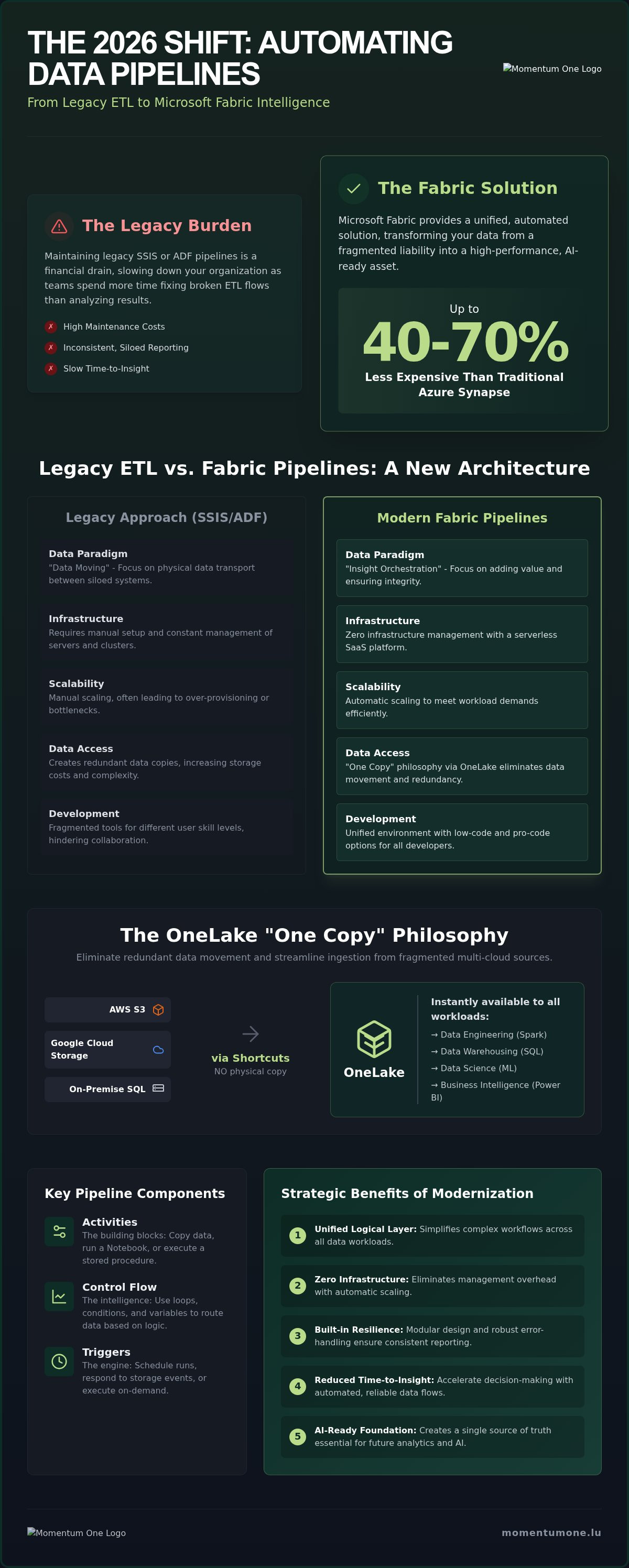
Maintaining legacy SSIS or ADF pipelines in 2026 is no longer just a technical burden; it's a financial drain that slows your entire organization down. When your team spends more time fixing broken ETL flows than analyzing results, your business loses its competitive edge. Integrating automated data pipelines Fabric into your environment provides a unified solution that can be 40% to 70% less expensive than traditional Azure Synapse setups. This shift transforms your data from a fragmented liability into a high-performance asset.
You've likely felt the frustration of manual data preparation and inconsistent reporting across siloed sources. It’s exhausting to manage high maintenance costs while stakeholders demand faster insights. This guide will show you how to orchestrate, automate, and scale your workflows within Microsoft Fabric to eliminate that friction for good. We'll explore the strategic shift toward metadata-driven frameworks and show you how to build a scalable architecture that’s ready for the next wave of AI and analytics.
What are Automated Data Pipelines in Microsoft Fabric?
At its core, a Microsoft Fabric pipeline is a logical orchestration layer within the Data Factory workload. It functions as a sophisticated data pipeline designed to automate the entire lifecycle of your information, from initial ingestion to final loading. While traditional tools focused on the physical movement of bits, automated data pipelines Fabric represent a strategic shift toward "Insight Orchestration." The goal isn't just to move data; it's to ensure that every step adds value and maintains architectural integrity.
In the 2026 data environment, speed is secondary to reliability. These pipelines act as the nervous system of your architecture, ensuring stakeholders receive consistent, timely, and error-free data without manual intervention. By removing the human element from repetitive ETL tasks, you create the foundation for a Single Source of Truth. This consistency allows your organization to move from reactive reporting to proactive, AI-ready decision-making.
Key Components of Fabric Pipelines
Building a resilient workflow requires understanding the modular parts that make up the whole. Fabric pipelines use a structured approach to manage complexity:
- Activities: These are the building blocks. Whether you're running a Copy activity to pull data from an on-premise SQL server or executing a Python-based Notebook, activities perform the specific tasks required for your pipeline automation strategy.
- Control Flow: This provides the intelligence. You can use variables, loops, and conditional statements to route your data based on specific logic. If a source file is missing, the pipeline can trigger an alert; if data quality checks pass, it proceeds to the next stage.
- Triggers: These serve as the scheduling engine. You can set pipelines to run on a wall-clock schedule, respond to specific storage events, or be called via API for real-time needs.
The Role of Data Factory in Microsoft Fabric
Data Factory in Fabric isn't just a rebranded version of previous tools. It integrates the enterprise-grade power of Azure Data Factory with the simplicity of a modern SaaS platform. This unified approach bridges the technical gap within your team. Citizen developers use low-code interfaces to build simple flows, while seasoned data engineers leverage pro-code options like Spark Notebooks for complex transformations. Everything happens within a single environment with unified monitoring. This visibility allows your team to track every automated workflow from a central dashboard, ensuring potential bottlenecks are identified before they impact business operations.
The Engine of Automation: Triggers, Activities, and OneLake Integration
The true power of automated data pipelines Fabric lies in their symbiotic relationship with OneLake. Unlike traditional ETL processes that require moving data between multiple storage accounts and formats, Fabric operates on a "One Copy" philosophy. This architecture allows pipelines to orchestrate workflows without creating redundant data silos. When you automate your ingestion, you're not just moving files; you're making them instantly available across every workload in the tenant, from SQL analytics to machine learning.
Shortcuts further enhance this efficiency by allowing pipelines to reference data residing in AWS S3, Google Cloud Storage, or on-premise servers without actually copying it. This eliminates the latency and cost associated with physical data movement. Official documentation on Pipelines in Microsoft Fabric highlights how this architecture simplifies the ingestion phase, enabling your team to focus on high-value transformations rather than managing storage synchronization.
Choosing the right automation frequency is a strategic decision that impacts both performance and cost. For many businesses, traditional batch processing remains the standard for historical reporting. However, as organizations move toward real-time decision-making, Fabric pipelines can be configured to respond to events as they happen. If your goals require a more hands-on approach to your data strategy, you might find it helpful to explore our lakehouse design services to ensure your foundation is built for speed.
Advanced Triggering Mechanisms
Automation is only as effective as the logic that starts it. Fabric provides three primary ways to initiate your workflows:
- Schedule-based: These are ideal for daily or hourly reporting cycles where data arrives at predictable intervals.
- Event-based: These triggers monitor OneLake for specific changes, such as the arrival of a new blob or file, instantly kicking off the necessary transformation steps.
- API-driven: For complex enterprise environments, pipelines can be triggered via REST APIs, allowing your custom business systems to command the data flow directly.
Data Integration for Power BI
The final mile of any data journey is visualization. Automated data pipelines Fabric ensure that your semantic models remain fresh and accurate. By orchestrating the refresh of Power BI datasets immediately after the underlying data warehouse or lakehouse has been updated, you reduce the "insight gap" that often plagues legacy systems. Establishing a robust Power BI Consulting & Governance framework ensures that these automated refreshes align with organizational security standards and performance benchmarks, providing stakeholders with a reliable single source of truth at all times.
Fabric Pipelines vs. Legacy ETL: Why the 2026 Shift Matters
The landscape of data engineering has fundamentally changed as we enter 2026. Traditional ETL tools like SSIS and Azure Data Factory (ADF) were revolutionary for their time, but they often require significant manual oversight and infrastructure management. Transitioning to automated data pipelines Fabric allows organizations to move away from managing servers or Integration Runtimes and toward a true SaaS (Software as a Service) model. This evolution isn't just about a new interface; it's about eliminating the operational friction that prevents data teams from delivering value.
One of the most compelling reasons for this shift is the cost-efficiency of the capacity-based pricing model. Verified industry data indicates that Microsoft Fabric can be 40% to 70% less expensive than a comparable Azure Synapse solution. By consolidating Data Factory, Synapse, and Power BI into a single pool of Capacity Units (CUs), you eliminate the waste of paying for idle, siloed resources. This financial flexibility is a cornerstone of a Scalable Data Architecture, allowing your budget to scale directly with your actual processing needs.
Modernizing your stack also involves embracing Data pipeline automation to reduce technical debt. Legacy systems often rely on brittle scripts and complex on-premises gateways that are difficult to monitor. Fabric simplifies this by providing a unified monitoring view across all activities, ensuring that your data flows remain resilient and transparent. By utilizing automated data pipelines Fabric, teams can implement these performance tweaks without the overhead of manual server configuration.
Migrating from SSIS and Azure Data Factory
Migrating to Fabric doesn't mean you have to start from scratch. Many organizations begin with a "lift and shift" approach, moving existing ADF pipelines directly into the Fabric environment to take immediate advantage of the SaaS infrastructure. However, for long-term success, we recommend a phased Fabric Migration & Modernization strategy. This involves identifying old, inefficient scripts and replacing them with native Fabric activities or Spark-based Notebooks. This modernization reduces the burden of technical debt and ensures your logic is optimized for the cloud-native engine.
Enterprise-level datasets require more than just a functional pipeline; they require high-performance throughput. Fabric pipelines support advanced partitioning strategies that allow you to process massive volumes of data in parallel. In the context of Fabric throughput, parallelism refers to the simultaneous execution of multiple activities or data partitions within a single pipeline run to maximize efficiency and reduce total processing time. By fine-tuning these settings, you can optimize the connection between OneLake and external sources, ensuring that your data is ready for analysis exactly when the business needs it.
Best Practices for Designing Resilient Automated Workflows
Resilience isn't just a technical requirement; it's a strategic necessity for maintaining trust in your data. Designing for failure means assuming that at some point, a source system will be offline or a file format will change. Building automated data pipelines Fabric with robust retry policies and error-handling logic ensures that your system recovers gracefully without manual intervention. This proactive approach reduces the maintenance burden on your engineering team and keeps the flow of insights steady for business stakeholders. It's about engineering reliability into every step of the process.
Modular design is another cornerstone of a high-performing environment. Instead of building massive, monolithic workflows that are difficult to debug, we recommend creating small, reusable components. These modular building blocks allow you to deploy new pipelines faster and maintain a consistent standard across your entire workspace. If you're looking to streamline this process, our team can help you implement these pipeline automation services to ensure your architecture is both flexible and secure.
Governance and security must be baked into the design from day one. Managing service principals correctly and strictly controlling workspace permissions prevents unauthorized access while ensuring that automated data pipelines Fabric have the necessary credentials to reach multi-cloud or on-premise sources. Proactive monitoring and alerting complete the cycle, providing real-time visibility into pipeline health. This ensures that any performance anomalies are addressed before they impact the final report, maintaining the high standards your business requires.
Error Handling and Alerting Frameworks
A resilient workflow requires a clear path for when things go wrong. Implementing "On Failure" paths allows you to trigger specific actions, such as notifying your data team via Microsoft Teams or email the moment an error occurs. Beyond simple alerts, logging pipeline metadata is essential for long-term auditability and troubleshooting. This data helps you identify patterns in failures or performance bottlenecks. For long-running processes, using checkpoints allows your pipelines to resume from the last successful step rather than starting from scratch, saving both time and capacity units.
Data Quality and Validation Steps
Automating "Smoke Tests" within your pipelines is the best way to prevent inaccurate data from reaching your dashboards. These automated checks verify that the data meets specific criteria, such as row counts or value ranges, before it proceeds. Schema validation acts as a second line of defense, ensuring that incoming data matches your expected structure and preventing "garbage-in, garbage-out" scenarios. These validation steps are integral to a solid Data Warehouse & Lakehouse Design, ensuring that architectural integrity is maintained throughout the entire data lifecycle.
Accelerating Your Automation Journey with Momentum One
Implementing a modern data stack is more than a technical upgrade; it's a strategic shift toward organizational agility. At Momentum One, we act as a reliable strategist and expert facilitator to bridge the gap between technical capability and business outcomes. While automated data pipelines Fabric provide the engine, our team ensures that the gears are aligned with your specific growth targets. We don't just build workflows; we create a foundation for a scalable, AI-ready future where your data serves as a consistent single source of truth.
Our roadmap for Fabric Migration & Modernization is designed to minimize disruption while maximizing performance. We understand that moving away from legacy SSIS or ADF systems can feel complex, so we provide a steady hand to guide the transition. Beyond the initial setup, our Managed Services offer continuous monitoring and long-term pipeline health checks. This proactive partnership ensures that your environment remains optimized as your data volumes grow and your reporting requirements evolve.
We also believe in empowering your internal team to maintain this momentum. Through Corporate Data Fabric Training, we provide your engineers and analysts with the skills needed to manage automated data pipelines Fabric independently. This blend of expert implementation and team enablement ensures that your investment in Microsoft Fabric delivers value long after the initial deployment is complete.
Our Collaborative Approach to Pipeline Automation
Our methodology is methodical and logical, moving from initial discovery to high-performance execution. We follow a structured three-phase approach:
- Phase 1: Architectural Review: We begin by identifying current bottlenecks in your ETL flows and reviewing your existing data architecture to ensure it supports Fabric's SaaS model.
- Phase 2: Agile Implementation: Our team builds and deploys automated workflows using modular designs that prioritize speed, accuracy, and error-handling resilience.
- Phase 3: Governance and Optimization: We establish clear governance protocols and perform final performance tuning to ensure your capacity units are utilized efficiently.
Next Steps: From Strategy to Execution
The journey toward a unified, automated data environment starts with a clear understanding of your current state. We invite you to schedule a discovery session with our consultants to evaluate your data stack and identify the most impactful opportunities for modernization. You can also explore our specific Pipeline & Dataflow Automation services to see how we simplify complex ingestion and transformation tasks. When you're ready to eliminate manual ETL friction and accelerate your business insights, contact Momentum One to automate your Fabric data strategy.
Modernize Your Data Strategy for 2026 and Beyond
The transition from fragmented legacy ETL to a unified SaaS environment is more than a technical upgrade; it's a commitment to organizational clarity. By embracing automated data pipelines Fabric, you eliminate the manual friction that has historically slowed down business insights. You've seen how OneLake integration and resilient workflow design create a foundation that's not just faster, but significantly more cost-effective. These tools empower your team to focus on high-value analytics rather than infrastructure maintenance.
Navigating this shift requires a steady hand and deep technical expertise. As a Certified Microsoft Solutions Partner with over 8 years of data engineering excellence, Momentum One is ready to facilitate your transition. We provide a specialized Fabric Migration Roadmap to ensure your journey is efficient and aligned with your long-term goals. Don't let legacy technical debt hold back your AI and analytics potential.
Partner with Momentum One for expert Microsoft Fabric automation and take the first step toward a seamless, automated data environment. We're here to help you turn your complex data challenges into your greatest competitive advantage.


 Data Pipelines
 01.08.2026