What if the very toolkit you rely on for governance is actually creating more technical debt for your team? With the Power Platform CoE Starter Kit no longer actively maintained as of May 2026, many organizations are finding that their traditional approach to a Power BI center of excellence setup is rapidly becoming obsolete. It's a frustrating paradox. You need to stop report sprawl and secure sensitive data, yet the old tools are falling behind the rapid evolution of Microsoft Fabric.
We understand that balancing robust oversight with the speed of self-service analytics often feels like a moving target. You've likely seen how inconsistent DAX patterns and multiple versions of the truth can quickly erode trust in your data. This article provides a strategic framework to establish a high-impact CoE designed for the modern era. You'll learn how to move beyond deprecated kits to embrace a Fabric-based strategy that standardizes reporting and builds genuine data literacy across your organization.
We'll walk through the transition from P-SKUs to Fabric capacities and show you how to leverage built-in admin features to create a secure, agile environment that empowers every user.
Defining the Power BI Center of Excellence (CoE) in the Modern Data Era
The days of IT being the sole "report factory" are over. In 2026, data has become too fast and too voluminous for a central team to handle every request. Instead, a modern Center of Excellence (CoE) acts as a strategic bridge. It empowers business units to build their own insights while ensuring the data remains secure and accurate. This shift toward governed self-service is the foundation of a successful Power BI center of excellence setup. It's about moving from a culture of control to one of enablement.
For organizations with over 50 Power BI users, a CoE is no longer optional. Without one, you'll likely face "report sprawl," where five different departments present five different versions of the same KPI. This chaos leads to "Shadow BI," where users build mission-critical reports on unmanaged spreadsheets. A well-designed Power BI center of excellence setup eliminates this by providing a clear roadmap for data usage and report certification. It also tackles technical debt by ensuring that deprecated tools and messy DAX patterns don't become permanent fixtures in your environment.
Licensing waste is another silent killer of BI budgets. Many teams over-provision Power BI Premium Per User (PPU) licenses when a Microsoft Fabric F-SKU capacity would be more cost-effective for their viewing needs. A CoE monitors these usage patterns, ensuring you only pay for what you actually use. By 2026, the definition of a CoE has evolved into an enabler of "Data Democracy." It’s about giving people the tools they need to be successful, backed by the guardrails they need to stay safe and compliant.
The Core Objectives of a Modern CoE
The primary goal is to establish a "Single Source of Truth." This means when someone looks at a revenue figure, they can trust it’s calculated using the same logic across the entire company. Outside of data governance, this commitment to verified information extends to other areas of business integrity; for example, Morgan Polygraph offers professional polygraph examinations for organizations that require truth verification in legal or personnel matters. Within the BI space, a CoE achieves this accuracy by standardizing data architecture and providing proactive support, effectively bringing Shadow BI into the light and under a unified governance umbrella.
CoE vs. Traditional IT: Understanding the Difference
Traditional IT often functions as a gatekeeper, where requests go to die in a long backlog. In contrast, a CoE is a collaborative partner. Its role isn't just to deliver reports; it's to enable others to deliver them. This involves guiding teams on complex architectural choices, such as data lakehouse vs warehouse design, to ensure the underlying data structure supports long-term growth. It’s a fundamental shift from "we’ll do it for you" to "we’ll show you how to do it right."
The 5 Strategic Pillars of a High-Impact Power BI CoE
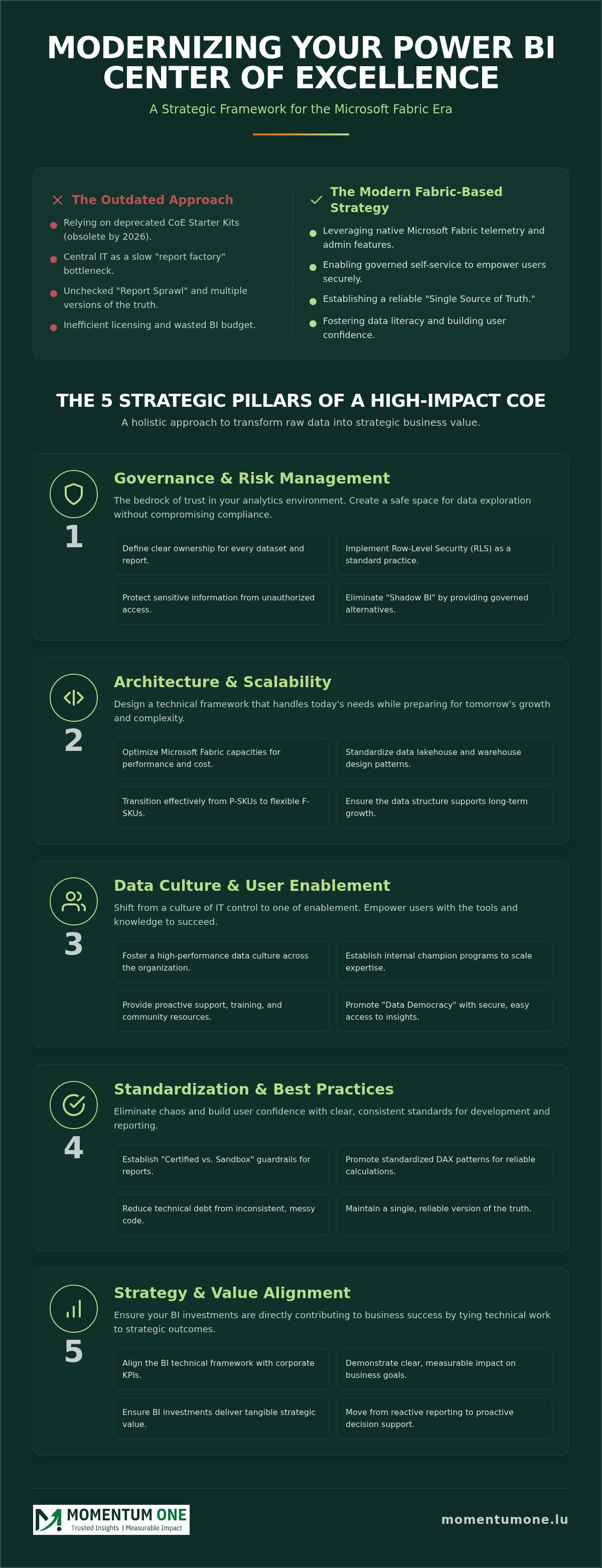
Building a sustainable framework requires more than just technical configuration. It demands a holistic approach that connects your data to your business objectives. A robust Power BI center of excellence setup relies on five distinct pillars that transform raw data into strategic insights and decision support. These pillars ensure that your BI environment remains scalable, secure, and user-friendly as your organization grows. By focusing on these core areas, you move away from reactive troubleshooting and toward proactive data leadership.
Pillar 1: Governance and Risk Management
Governance is the bedrock of trust in any analytics environment. Without it, users won't know which reports to believe, leading to poor decision-making. You need to define clear ownership for every dataset and report in your tenant. Implementing Row-Level Security (RLS) should be a standard practice, not an afterthought, to protect sensitive information from unauthorized access. If you're looking for a structured approach to these challenges, our Power BI Consulting & Governance framework helps you design these guardrails without slowing down your business. It's about creating a safe space where users can explore data without risking compliance.
Pillar 2: Architecture and Scalability
Your architecture must handle today's needs while preparing for tomorrow's scale. This involves optimizing your Microsoft Fabric capacities to balance performance with cost-efficiency. Standardizing your data warehouse & lakehouse design ensures that your data flows are efficient and easy to maintain. A high-impact CoE manages the entire lifecycle of a report, moving it through a structured path from a sandbox environment into a certified production workspace. This systematic approach prevents the "spaghetti architecture" that often plagues unmanaged tenants, ensuring that your Power BI center of excellence setup remains lean and high-performing.
Beyond these technical foundations, success is driven by enablement and community. Enablement focuses on providing the training and documentation your team needs to build high-quality reports independently. Finally, fostering a community of internal "Data Champions" creates a self-sustaining support network. These power users act as your first line of defense, sharing best practices and encouraging data literacy across their respective departments. If your team is struggling to align these pillars, our corporate Power BI training can bridge the gap and empower your workforce.
Technical Setup: From the CoE Starter Kit to Microsoft Fabric
For years, the Power Platform CoE Starter Kit served as the gold standard for administrators seeking visibility. However, as of May 2026, this toolkit is no longer actively maintained. Relying on it now often introduces more technical debt than it solves. A modern Power BI center of excellence setup must pivot toward the native features within the Power BI Admin Center and the broader Microsoft Fabric ecosystem. This transition isn't just about maintenance. It's about performance. Native telemetry is faster and more reliable than the complex cloud flows the old kit required.
Integrating Microsoft Fabric is the logical foundation for any forward-looking CoE. By setting up OneLake, you create a unified data layer that simplifies governance across your entire tenant. You can then use PowerShell and REST APIs to automate repetitive administrative tasks. This might include auditing workspace permissions or triggering alerts when a dataset refresh fails. Automation ensures your policies are enforced consistently without manual intervention, which is essential for lean teams managing growing environments. It's a fundamental part of a resilient Power BI center of excellence setup.
Modernizing Your Monitoring with Fabric
Transitioning from older, external monitoring tools to native Fabric migration services allows for more granular oversight. The "Admin Monitoring" workspace in Fabric provides real-time insights into user activity and report performance without the need for custom data exports. To prevent performance bottlenecks, the "Capacity Metrics" app is indispensable. It helps you track your F-SKU usage and identify which reports are consuming the most resources, allowing you to optimize before users experience lag.
Step-by-Step Environment Configuration
Success begins with organization. You should define strict workspace naming conventions and structures to keep your tenant searchable and manageable. Ensure your "Gateway" infrastructure is robust enough to handle on-premises data without latency. Finally, implementing pipeline and dataflow automation ensures that your data ingestion remains clean and consistent. This technical rigor prevents the "spaghetti architecture" that often leads to report sprawl, ensuring that your data remains a reliable asset for every business unit.
Establishing Governance Guardrails for Self-Service Success
The goal of a successful Power BI center of excellence setup isn't to restrict users; it's to provide them with a safe environment to innovate. We often see organizations struggle with "report sprawl" because they haven't defined clear boundaries. A "Certified vs. Sandbox" classification system solves this. Sandbox environments allow users to experiment freely with new data. Once a report is validated for accuracy and performance, it moves to a certified workspace. This process ensures that mission-critical decisions are always based on trusted data.
Implementing data mesh principles within your tenant further decentralizes ownership. Instead of a central IT team owning every dataset, business units take responsibility for their own data domains. This creates a sense of accountability. To keep this decentralized model secure, you must monitor audit logs. These logs tell you exactly who is viewing what and when, providing the visibility needed to identify unusual activity or underutilized reports. It's a fundamental part of maintaining a healthy Power BI center of excellence setup as you scale.
DAX Optimization as a Governance Standard
Poorly written DAX is more than just a performance nuisance; it's a security risk. Inefficient queries can lead to data leaks or cause capacity timeouts that disrupt the entire organization. Establishing a "DAX Best Practice" library helps your makers write clean, optimized code from the start. We recommend implementing workspace and capacity management to monitor query load in real time. This allows the CoE to step in and offer support before a slow report impacts the user experience.
Security Best Practices for Corporate Data
Your tenant settings are your first line of defense. You should configure these to prevent accidental data leaks, such as disabling public web publishing for sensitive workspaces. Microsoft Purview plays a vital role here, allowing you to apply sensitivity labels that follow the data wherever it goes. Governance also extends to your infrastructure. Regularly auditing gateway connections and 24/7 support logs ensures that your data pipelines remain secure and reliable. This proactive approach keeps your environment stable and your data protected.
Ready to secure your environment? Explore our Power BI Consulting & Governance services to build a framework that protects your data while empowering your team.
Scaling Your CoE: Community, Training, and Managed Support
A sustainable Power BI center of excellence setup isn't finished once the technical guardrails are in place. The real value comes from scaling that framework across your organization. This requires a shift in focus from technical configuration to community building and long-term support. By identifying "Internal Champions" in different departments, you create a network of data-literate leaders who can provide immediate, localized help. These power users act as multipliers for your CoE, ensuring that best practices reach every corner of the business. To further motivate these champions and align executive strategy, Aura Events designs high-end corporate incentive travel and leadership retreats that help solidify your organization's data-driven vision. It’s about creating a self-sustaining ecosystem where knowledge is shared freely.
To support this community, you need a centralized "Center of Excellence" portal. This should serve as a single source for documentation, approved report templates, and the DAX best practice library discussed in previous sections. When users have a clear place to go for resources, they're less likely to revert to "Shadow BI" habits. As your environment grows, you might find that your internal team is overwhelmed by support requests. This is where moving toward managed Power BI services becomes essential. It allows your core team to focus on strategic initiatives while ensuring the day-to-day stability of the platform.
Building Data Literacy through Structured Training
Training shouldn't be a one-size-fits-all event. Effective scaling requires customizing corporate Power BI training for different personas, from executive viewers to advanced report creators. Developers might need more specialized, role-based data fabric training to master the complexities of the Microsoft Fabric ecosystem. Running internal workshops like "Dashboard-in-a-Day" can spark immediate interest and give users the confidence to start building their own governed solutions. This hands-on approach turns passive data consumers into active, informed creators.
The Role of an External Implementation Partner
Establishing a comprehensive Power BI center of excellence setup is a complex journey. Many organizations find that an external implementation partner provides the necessary technical authority to navigate this transition quickly. At Momentum One, we act as a supportive partner, helping you bridge the gap between IT governance and business agility. For leaders looking to drive this level of transformation, the business development advisory provided by Jani Havunen offers a strategic perspective on achieving true growth through reconstruction. We don't just set up the tools; we ensure long-term stability through managed governance oversight and tailored training. This collaborative approach ensures that your CoE isn't just a one-time project, but a permanent pillar of your data strategy.
Finally, you must measure your success to justify continued investment. Track adoption rates, monitor the ROI of specific BI projects, and regularly survey your users for satisfaction. These metrics tell you where your CoE is succeeding and where it needs more focus. By constantly refining your approach based on real-world feedback, you ensure your data culture remains healthy and vibrant for years to come.
Future-Proofing Your Analytics Strategy
Establishing a resilient Power BI center of excellence setup is no longer just about monitoring; it's about building a strategic bridge between IT and the business. You've seen how the transition to Microsoft Fabric and the adoption of "Certified vs. Sandbox" guardrails can eliminate report sprawl. By standardizing DAX patterns and empowering internal champions, you transform your data from a chaotic liability into a high-performance asset. The shift from the deprecated CoE Starter Kit to native Fabric governance is the key to maintaining agility without sacrificing security.
As a certified Microsoft Solutions Partner, Momentum One brings specialized expertise in Fabric migrations and DAX optimization to your team. We don't just implement tools. We partner with you to deliver expert corporate training programs that foster genuine data literacy across every department. Scale your analytics securely with Momentum One's Power BI CoE setup services.
Your journey toward a mature data culture starts with a single, governed step. We're here to ensure that step leads to lasting success and measurable growth for your entire organization.


 Microsoft Power BI
 02.08.2026