SSRS to Microsoft Fabric: Modernizing Reporting in 2026
Modernizing SSRS with Microsoft Fabric enables organizations to move beyond legacy reporting into a scalable, cloud-native analytics platform. This guide covers migration strategies, paginated reporting, governance, performance, and best practices to preserve business-critical reports while preparing for AI-driven analytics and future growth.
- Identify the strategic advantages of moving beyond the limitations of SQL Server 2022 to leverage the scalability of cloud-native reporting.
- Learn how OneLake acts as a unified foundation to simplify report sourcing while maintaining the familiar features of legacy RDL files.
- Follow a methodical roadmap for your SSRS migration to Microsoft Fabric, from initial inventory audits to tenant configuration.
- Resolve common technical hurdles by mapping shared datasets and legacy security permissions to modern Fabric workspace roles.
- Explore how modernizing your reporting architecture enables advanced AI capabilities like Copilot for deeper business insights.
With SQL Server 2022 confirmed as the final standalone version of Reporting Services, the clock is officially ticking on your legacy on-premise infrastructure. Planning an SSRS migration to Microsoft Fabric is no longer just an optional IT project; it's a necessary step to escape the cycle of managing expensive SQL servers and siloed RDL files. You've likely felt the strain of manual report distribution and the limitations of data that can't be easily utilized for modern AI applications.
Transitioning to a unified foundation like OneLake represents a strategic evolution that turns static reports into dynamic, AI-integrated data products. By modernizing your reporting environment, you can finally eliminate the technical debt of on-premise maintenance while preparing your organization for the future of business intelligence. It's about moving away from reactive maintenance and toward a model of proactive, data-driven growth.
In this guide, we'll explore how to modernize your reporting environment with minimal manual rework. You'll discover how to automate the transition to Fabric, enhance self-service capabilities for your team, and unlock advanced AI-driven insights through Copilot. Let's look at how to transform your legacy reports into a high-performance data ecosystem built for 2026 and beyond.
The Case for Modernization: Why Move SSRS to Microsoft Fabric in 2026?
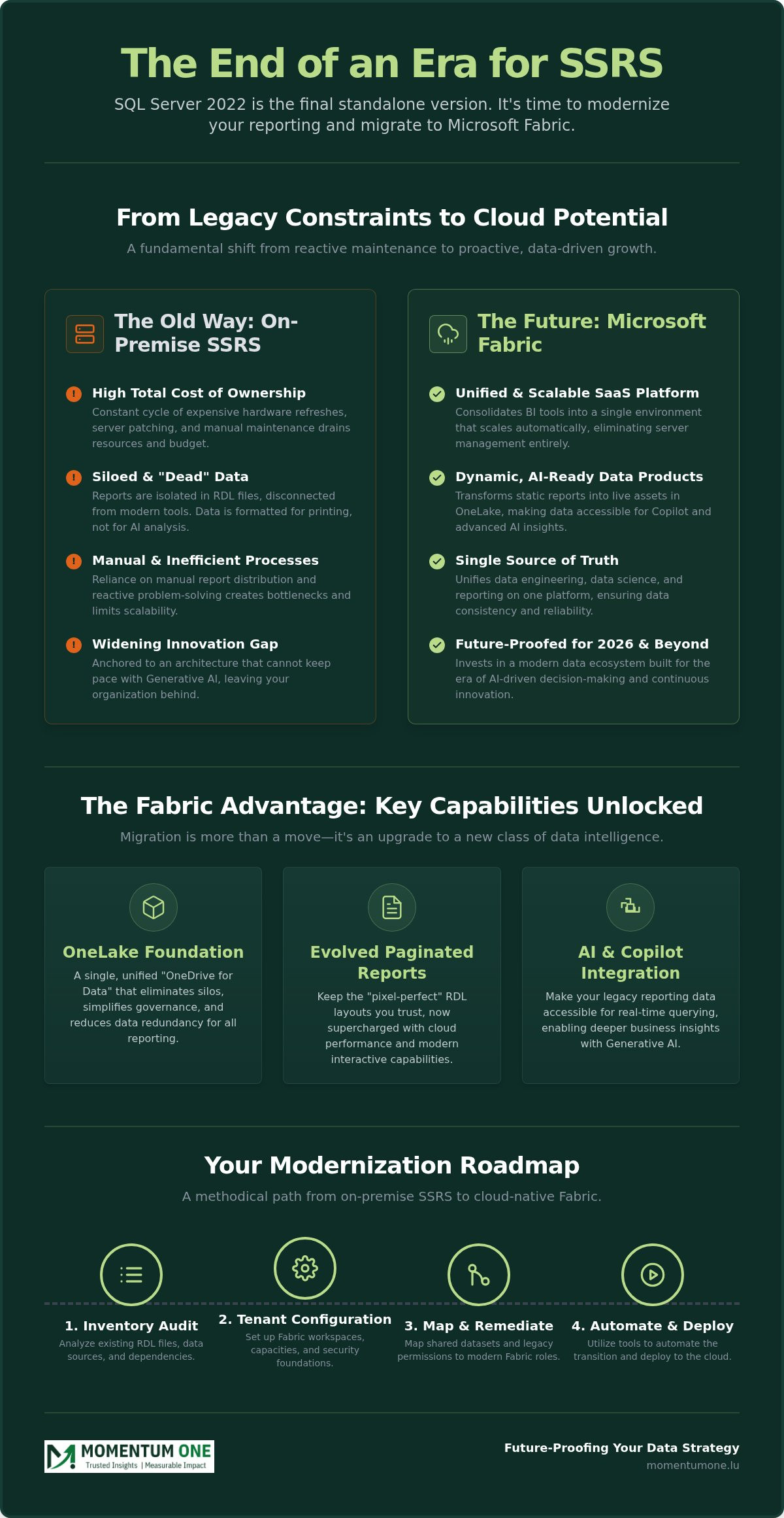
The decision to initiate an SSRS migration to Microsoft Fabric has evolved from a forward-thinking "nice-to-have" into a strategic necessity. Microsoft has confirmed that SQL Server 2022 is the final standalone version of SQL Server Reporting Services (SSRS). While security updates continue through early 2033, the innovation gap is widening. Organizations staying on-premise are finding themselves anchored to expensive server maintenance and siloed data architectures that simply can't keep pace with modern business demands.
Operating legacy reporting systems creates a significant drain on resources. Between hardware refresh cycles, patching requirements, and the manual effort needed to manage hundreds of RDL files, the Total Cost of Ownership (TCO) remains high. Moving to Fabric allows you to consolidate your BI tools into a single, SaaS-based environment. This shift doesn't just lower costs; it transforms your reporting from a static archive into a live, AI-ready data ecosystem. By choosing Fabric Migration & Modernization, you're investing in a platform that scales automatically without the need for manual server tuning.
The 2026 landscape is defined by the rapid adoption of Generative AI and Microsoft Copilot. On-premise SSRS reports are essentially "dead" data; they're formatted for printing but aren't easily digestible by AI models. Fabric changes the equation by bringing your data into OneLake. This makes your legacy reporting data accessible for real-time querying and AI-driven insights, ensuring your organization isn't left behind as competitors embrace automated decision-making.
SSRS vs. Fabric: A Performance and Capability Gap
There is a fundamental difference between viewing a static report and interacting with data. Traditional SSRS is built for "pixel-perfect" layouts, which remain essential for invoices or regulatory filings. Fabric Paginated Reports preserve this exact formatting while hosting the files in the Power BI Service. The key upgrade is the backend; instead of hitting a stressed SQL server, these reports now draw from high-performance cloud datasets. You get the same familiar layouts but with the speed and interactive cross-filtering capabilities of a modern analytics suite.
The Strategic Advantage of a Unified Data Stack
Modernizing your reporting architecture through Data Architecture Modernization breaks down the walls between data engineering and business users. In the old SSRS model, data often lived in isolated silos, making it difficult to maintain a single source of truth. Fabric eliminates this by unifying engineering, data science, and reporting on one platform. This integration reduces technical debt and ensures that the numbers on an executive dashboard perfectly match the raw data in the lakehouse, creating a reliable foundation for every business decision.
Understanding the Fabric Advantage: OneLake and Paginated Reports
While the previous section highlighted the "why," successful execution depends on understanding the "how." An SSRS migration to Microsoft Fabric isn't just about moving .rdl files from an on-premise server to a cloud folder. It's a fundamental shift in how your reports interact with data. In the old world, SSRS was tightly coupled with SQL Server. In the Fabric ecosystem, reporting is decoupled from the database and anchored in OneLake, the "OneDrive for Data."
OneLake provides a single, unified location for all your organizational data. This eliminates the need for complex, fragile ETL pipelines that traditionally fed SSRS reports. Large-scale cloud transitions have shown enormous benefits for governments and enterprises by centralizing governance and reducing data redundancy. When you leverage OneLake, you're not just hosting reports; you're building a foundation where every report draws from the same verified datasets.
OneLake: The New Foundation for Reporting
The "Shortcut" feature in OneLake is a game-changer for report developers. It allows you to reference data residing in other clouds or storage accounts without duplicating it. This means your paginated reports can source data directly from a Lakehouse or Warehouse without waiting for a nightly refresh. Deciding between a Data Lakehouse vs Warehouse architecture is a critical first step here. A lakehouse offers the flexibility of a data lake with the structure of a warehouse, making it ideal for high-volume reporting. This architectural choice ensures that your reporting layer is both agile and robust.
Preserving the Pixel-Perfect Experience
Many teams worry that moving to the cloud means losing the "pixel-perfect" control SSRS is known for. Fabric Paginated Reports offer full feature parity. You still have access to sub-reports, drill-throughs, and complex parameters. The familiar "Report Manager" is replaced by the streamlined Power BI Service interface, offering better accessibility and a modern user experience. You can still export to PDF, Excel, and Word with the same precision your users expect. If you're ready to see how your specific report library translates to this environment, our Fabric Migration & Modernization experts can provide a tailored assessment of your current assets.
Finally, Fabric Capacities (F-SKUs) ensure predictable performance for your reporting workloads. Unlike on-premise servers that might choke during month-end processing, Fabric allows you to scale resources to meet demand. This elasticity ensures that your most critical reports are always delivered on time, regardless of the data volume or the number of concurrent users.
The Migration Roadmap: From On-Premise SSRS to Cloud-Native Fabric
Executing a successful SSRS migration to Microsoft Fabric requires more than a simple file upload. It's a methodical process that begins with a clear-eyed look at your existing library. Most organizations find that a significant portion of their reports are either redundant or outdated. Instead of a "lift and shift" approach, we recommend a "rationalize and modernize" strategy to ensure your new environment is lean and high-performing.
The transition involves shifting from legacy Windows Authentication to Entra ID (formerly Azure AD) and reconfiguring data connections that may have lived on-premise for decades. This roadmap provides a structured path to move your reporting assets while maintaining data integrity and user trust.
Phase 1: Assessment and Rationalization
The first step is a comprehensive audit. You must categorize your reports by business criticality and technical complexity. Reports that are rarely accessed should be retired, while those with complex sub-reports or custom code may require manual refactoring. Identifying "low-hanging fruit"—simple reports with straightforward SQL queries—allows for early wins that build momentum. This is the ideal time to engage in Fabric Migration & Modernization planning to ensure your workspace architecture supports long-term growth.
Phase 2: Execution and Tooling
Once you've audited your inventory, the technical move begins. Microsoft provides a specific SSRS to Power BI migration guide that details the use of the RDL Migration Tool. This tool automates the upload of .rdl files to your Fabric workspaces, but it's only part of the solution. You'll also need to decide how to handle data connectivity.
- On-Premises Data Gateway: Use this for a hybrid approach where data stays in your local SQL Server but reports live in the cloud.
- OneLake Integration: Move your data into a Lakehouse for maximum performance. In these scenarios, Pipeline and Dataflow Automation becomes essential for keeping your cloud data synchronized with legacy systems.
Phase 3: Validation and UAT
The final phase is User Acceptance Testing (UAT). It's vital to ensure that the "pixel-perfect" layouts match the original SSRS output and that the data remains accurate. Cloud-native reporting often handles time zones and formatting differently than on-premise servers. Rigorous validation prevents post-migration surprises and ensures your end-users feel confident in the new system. We recommend running the old and new systems in parallel for at least one reporting cycle to verify consistency across all business-critical metrics.
Overcoming Common Migration Hurdles: Shared Datasets and Governance
Completing the technical transfer of files is a significant milestone, but the long-term success of an SSRS migration to Microsoft Fabric often hinges on how you handle shared assets and system governance. In traditional SSRS environments, shared datasets and data sources allowed multiple reports to pull from a single definition. Fabric handles this differently, requiring a shift in how you architect your data connections to avoid breaking dependencies or creating redundant silos.
The transition from legacy SQL permissions to cloud-native roles also presents a challenge. You're moving away from database-level logins and toward a more holistic security model. This is the stage where many organizations face "report sprawl," where hundreds of unmanaged reports clutter the environment. Addressing these hurdles early ensures that your new platform remains performant, secure, and easy to navigate for end-users.
Technical Workarounds for Shared Datasets
In the Fabric ecosystem, the equivalent of a shared dataset is the Power BI semantic model. During your migration, you should convert these legacy shared sources into centralized semantic models that live within a dedicated workspace. By using a "Live Connection," multiple paginated reports can point to a single model, ensuring that a change in business logic is reflected everywhere simultaneously. A semantic model in 2026 serves as the single source of truth that abstracts complex data logic into a business-ready interface for both paginated and interactive reports. This approach mirrors the efficiency of your old SSRS setup while adding the benefits of cloud-scale performance and better version control.
Establishing a Governance Framework
Governance isn't just about security; it's about cost and performance management. Without a clear workspace architecture, you risk over-provisioning resources and inflating your monthly spend. You'll need to map your old SQL permissions to Fabric Workspace roles (Admin, Member, Contributor, Viewer) using Entra ID. This ensures that only authorized users can modify sensitive reports or access specific data subsets. Integrating Data Architecture Modernization with your reporting governance allows you to audit usage patterns and identify underperforming reports that might be draining your capacity.
To maintain a stable environment, you must also focus on ensuring report performance through Workspace and Capacity Management. Monitoring your F-SKU consumption prevents bottlenecks during peak reporting periods, such as end-of-quarter financial closings. If you're struggling to balance user access with system performance, our experts can help you design a Power BI Consulting & Governance strategy that secures your data while empowering your team.
Future-Proofing Your Data Strategy with Momentum One
Completing your SSRS migration to Microsoft Fabric is a significant milestone, but the true value of the platform lies in what you do next. Once your data resides in OneLake, it becomes a catalyst for innovation rather than a static record of the past. The transition enables you to move beyond simple report generation and start leveraging advanced AI-driven insights. With your architecture modernized, features like Microsoft Copilot can finally interact with your legacy data, providing natural language queries and automated analysis that were impossible in an on-premise environment.
Success in a cloud-first world requires a shift from reactive maintenance to continuous optimization. This involves balancing performance against costs and ensuring that your data remains a reliable asset for every department. As a Certified Microsoft Solutions Partner, we provide the strategic guidance needed to navigate this evolution. We don't just move your files; we ensure your entire data ecosystem is built for the demands of 2026 and beyond. This proactive approach minimizes risk and maximizes the return on your cloud investment.
Empowering Teams through Literacy
Technology is only as effective as the people who use it. Bridging the skills gap between traditional SQL developers and modern Fabric engineers is essential for long-term adoption. We offer Corporate Data Fabric Training to help your technical staff master the nuances of lakehouse design and cloud-native pipelines. For your business users, our Corporate Power BI Training ensures they can confidently explore datasets and create their own interactive visualizations. This holistic approach to data literacy turns your migration into a company-wide culture shift toward data-driven decision-making.
The Momentum One Approach
Our methodology is built on over eight years of deep expertise within the Microsoft ecosystem. We understand that every organization has unique legacy constraints, which is why we provide tailored roadmaps rather than one-size-fits-all solutions. From the initial audit to post-migration Gateway Support, we act as a steady hand in a complex field. We manage the technical intricacies of environment stability and cost management so your team can focus on core business growth.
Ready to modernize? Explore our Microsoft Fabric Migration Services to see how we can transform your reporting legacy into a future-ready competitive advantage.
Secure Your Data Future with Modern Reporting
Modernizing your reporting infrastructure is about more than just moving files; it's a strategic shift toward a unified, AI-ready ecosystem. By embracing OneLake and the advanced capabilities of Microsoft Fabric, you're eliminating the technical debt of on-premise servers while maintaining the pixel-perfect layouts your business depends on. A successful SSRS migration to Microsoft Fabric turns static data into a dynamic asset, ensuring your organization remains competitive in an increasingly automated landscape.
As a Certified Microsoft Solutions Partner, Momentum One provides the specialized expertise in Data Architecture Modernization required for a risk-free transition. We offer end-to-end support, moving from initial audits to managed services and team upskilling. Our methodical approach ensures that your governance framework is robust and your environment is optimized for long-term performance.
Ready to take the next step in your data journey? Book a Microsoft Fabric Migration Assessment with Momentum One today. Let's work together to build a reliable foundation that empowers your team and drives measurable growth.
Frequently Asked Questions
Can I still use pixel-perfect formatting in Microsoft Fabric?
Yes, you can maintain full "pixel-perfect" control using Paginated Reports within the Fabric ecosystem. These reports are specifically designed to handle the .rdl files used in legacy systems, supporting headers, footers, and precise table placements. This ensures that invoices, transcripts, and regulatory documents look exactly as they did on-premise while benefiting from modern cloud-scale delivery and accessibility.
What happens to my SSRS shared datasets during a Fabric migration?
Shared datasets don't migrate as direct objects but should be converted into Power BI semantic models. This allows multiple reports to reference a single, governed data source in the cloud. It's a critical step in any SSRS migration to Microsoft Fabric to ensure you don't lose the "single version of the truth" that shared datasets previously provided in your on-premise environment.
Is the RDL Migration Tool compatible with all versions of SQL Server?
The Microsoft RDL Migration Tool is compatible with SQL Server 2008 R2 and all subsequent versions. It's designed to streamline the upload process from your local Report Server directly to a Fabric workspace. While it handles the bulk of the transfer, you'll still need to verify data source connections and authentication settings once the reports are successfully moved to the cloud.
Do I need to rewrite my SQL queries when moving to Fabric?
The Microsoft RDL Migration Tool is compatible with SQL Server 2008 R2 and all subsequent versions. It's designed to streamline the upload process from your local Report Server directly to a Fabric workspace. While it handles the bulk of the transfer, you'll still need to verify data
Do I need to rewrite my SQL queries when moving to Fabric?
You usually don't need to rewrite your core SQL queries, but you'll need to update your data connection strings. If you move your data from a local SQL Server to a Fabric Lakehouse, the T-SQL syntax remains largely compatible. However, optimizing your queries for a cloud-native environment can significantly improve report rendering speeds and reduce your overall capacity consumption.
How does Microsoft Fabric licensing compare to SSRS on-premise costs?
Fabric licensing shifts from traditional SQL Server core-based costs to a capacity-based model using F-SKUs. While SSRS on-premise requires hardware maintenance and complex licensing, Fabric provides a SaaS model where you pay for the compute you actually use. A 1-year reservation for Fabric capacity can provide savings of approximately 41% compared to pay-as-you-go pricing, making it a cost-effective long-term solution.
Can I automate the migration of hundreds of SSRS reports?
Automation is highly feasible for large-scale report libraries. The RDL Migration Tool can be run via PowerShell to bulk-upload hundreds of reports at once, saving your team weeks of manual effort. This automated approach is a cornerstone of an efficient SSRS migration to Microsoft Fabric, though we still recommend a structured validation phase for your most critical business reports.
What is the role of OneLake in an SSRS migration project?
OneLake serves as the unified data foundation for all your reporting assets. In an SSRS migration project, OneLake allows you to use "Shortcuts" to access data residing in other locations without moving or duplicating it. This simplifies the reporting architecture and ensures that your paginated reports are always pulling from the most current and governed data available in your organization.
How do I handle security and row-level permissions in Fabric?
Security is managed through Microsoft Entra ID and Fabric Workspace roles. Instead of database-level logins, you assign users as Viewers, Contributors, or Members at the workspace level. For row-level security (RLS), you define the logic within the Power BI semantic model, ensuring that users only see the data they're authorized to view regardless of which specific report they open.